How CapCut AI Avatar Helps Creators Save Time


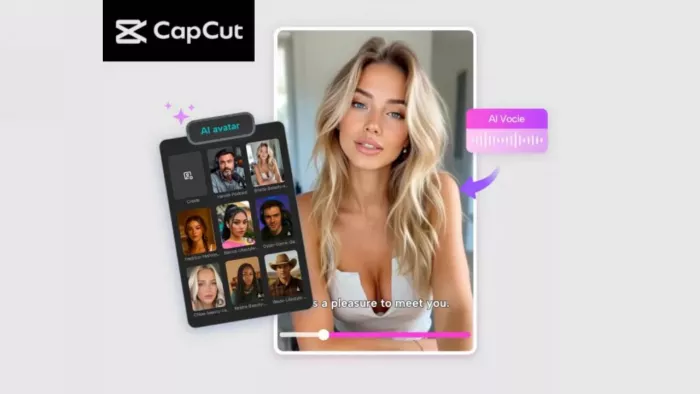
Content creation is more fast-paced than ever. Whether you’re a student making presentations, a beginner YouTuber, a busy freelancer, or a brand trying to stay consistent online, producing videos every day can feel overwhelming. Filming, retakes, voiceovers, lighting, editing—each step demands time most creators don’t have.
With CapCut’s AI Avatar, instead of spending hours recording videos, creators can now generate an on-camera presenter in minutes. You pick an avatar, write the script, choose an AI voice, and CapCut does the rest. The result? Professional, polished videos without cameras, actors, or complicated editing. CapCut’s AI Avatar tool doesn’t just help creators save time—it removes the pressure of being on camera, eliminates the need for studio setups, and speeds up video production for anyone who works online.
Why CapCut AI Avatar Helps Creators Save Time
Here are the biggest reasons creators love using AI avatars:
1. No Need for Filming or Retakes
Filming is usually the longest part of creating content. You have to fix lighting, correct mistakes, re-record lines, and check your energy level on camera. An AI avatar eliminates all that. You simply write your script, pick a voice, and the avatar delivers it perfectly every time—no retakes needed.
2. Saves Hours of Editing
Instead of cutting clips, syncing audio, cleaning noise, or adjusting color, CapCut generates an avatar video that’s already clean and consistent. You may apply minor edits, but the heavy work is done for you.
3. Helps Creators Stay Consistent
Posting regularly is the secret to growth on platforms like YouTube, TikTok, and Instagram. With AI avatars, creators can generate educational videos, tutorials, explainer content, and product guides in minutes—keeping their content flowing, even on busy days.
4. Perfect for Camera-Shy or Busy Creators
Some creators don’t like recording themselves. Others may simply not have time to film every day. AI avatars step in as your digital presenter—they never need makeup, breaks, or studio setups.
5. Supports Multilingual Content with Ease
Need to make videos in English, Urdu, Spanish, or French? CapCut offers 150+ realistic AI voices, making it easy to reach global audiences without hiring voice artists or translators.
How to Use CapCut AI Avatar to Save Time
Let's explore the steps to use CapCut AI Avatar. You can use these steps for school projects, YouTube videos, business content, explainers, or social media posts.
Step 1: Access the AI Avatar
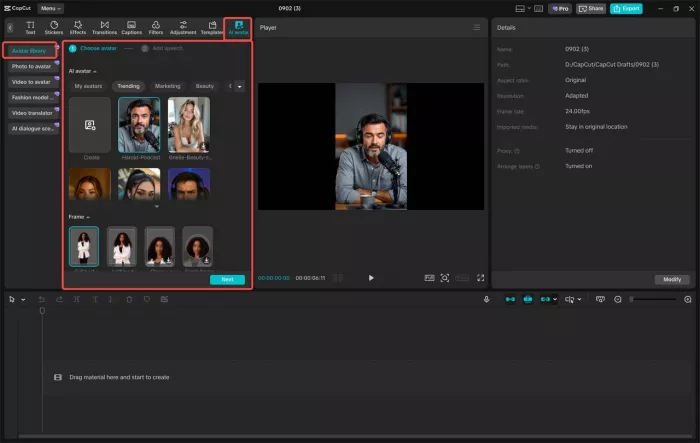
Open CapCut, then navigate to “AI Avatar” > “Avatar Library. " Inside the library, you’ll find 1,000+ AI characters—from professional hosts to casual presenters, animated characters, teachers, influencers, and more. Pick any avatar that fits your project style.
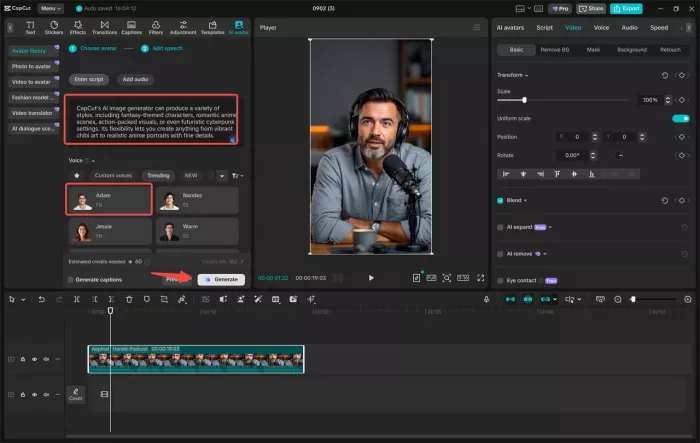
Once you select your avatar, click “Add Speech.” CapCut Text to Speech AI gives you access to 150+ AI voices, including male, female, and character voices in different accents and languages. Choose the tone that matches your video—calm, energetic, formal, friendly, or funny. After choosing your voice, write or paste your script. Then click “Generate” to bring your avatar to life. CapCut will instantly create a talking presenter who delivers your words with natural expressions and lip-sync. This step replaces hours of filming, retakes, and recording voiceovers—making it perfect for creators who value speed.
Step 2: Edit Your Avatar Video
Once your AI avatar is generated, it’s time to polish your video. CapCut makes this incredibly easy, even for beginners. Start by adding a visual boost with “Filters” to enhance colors, brightness, or the video's overall mood. Next, replace or adjust the background to set the tone of your video. Whether you want a classroom, studio, office, gaming room, or digital backdrop, you can change settings instantly without needing a real location.
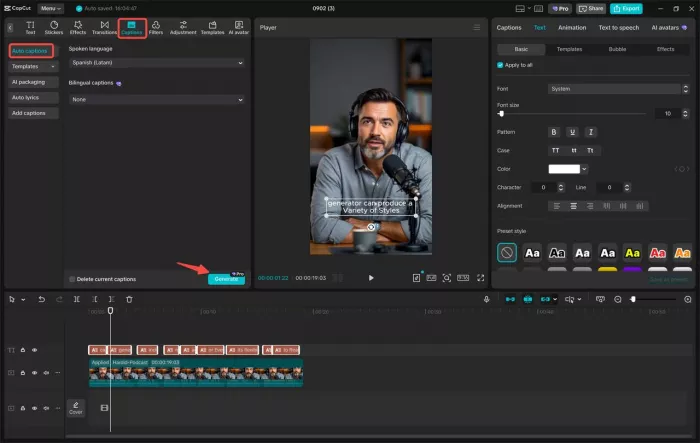
Then head to “Captions” > “Auto captions” to generate subtitles automatically. This not only improves accessibility but also saves creators the time of typing each line manually. Subtitles are essential for TikTok, YouTube Shorts, and Instagram because most viewers watch videos without sound. You can fine-tune the font, color, size, and animation of your captions to match your brand identity or style preference.
Step 3: Export Your Avatar
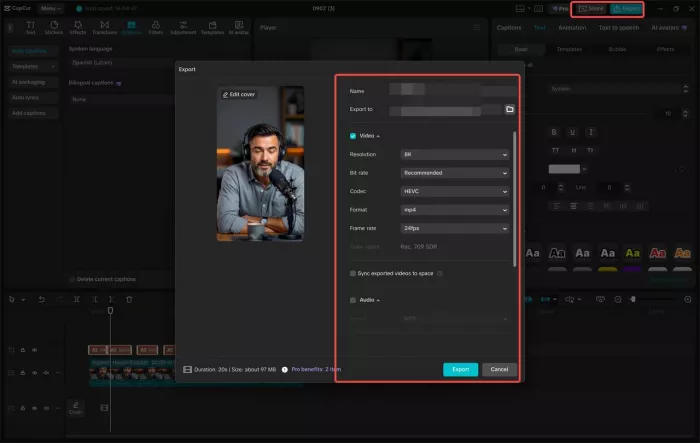
Once you’re happy with the final look, click Export to download your avatar video to your device. You can also publish it directly to platforms like YouTube, TikTok, or Facebook, saving even more time. This quick export process lets creators produce and upload videos back-to-back, making it ideal for:
- Daily content posting
- Educational series
- Business explainers
- Product demos
- Social media announcements
- Online courses
Your AI avatar becomes your personal digital presenter—ready to deliver content whenever you need it.
Conclusion
CapCut’s AI Avatar feature is more than just a fun tool—it’s a practical time-saver for modern creators. It streamlines the entire video production pipeline, eliminating the need for filming, reducing editing time, and helping creators stay consistent without burnout. Whether you're a beginner, a student, a business owner, or a full-time creator, AI avatars allow you to create polished, engaging videos in minutes—without any camera pressure. With just a script, a voice, and a few clicks, you can generate content that looks professional and speaks directly to your audience. If you’ve been wanting a faster way to create videos, CapCut’s AI Avatar tool is one of the most efficient and creator-friendly options available today.


Comments