Cutout.Pro Review: I Tested Its AI Editing Tools to See Where It Actually Works




Cutout.Pro is not just a background remover anymore. It now looks more like a full AI visual editing platform with tools for background removal, image enhancement, object cleanup, passport photos, cartoon selfies, video background removal, and API workflows. I tested it with the kind of images people actually use: product shots, portraits, low-quality photos, and a short video clip. The result was useful, fast, and sometimes surprisingly clean, but not perfect enough to replace a professional editor.
Quick Verdict
| Category | Review Take |
| Best for | Product photos, background removal, profile images, bulk editing, simple cleanup |
| Not ideal for | Complex retouching, high-end design control, sensitive personal images, difficult hair edges |
| Output quality | Strong on clean subjects, mixed on busy backgrounds and fine details |
| Ease of use | Very simple, especially for non-designers |
| Editing control | Good for quick fixes, limited for advanced manual correction |
| Pricing | Credit-based, affordable for regular image use, less clear for occasional users |
Cutout.Pro is worth trying if you want fast results without learning Photoshop. It is less convincing if you need total control, advanced retouching, or strong public trust signals around privacy and support.
Cutout.Pro Overview
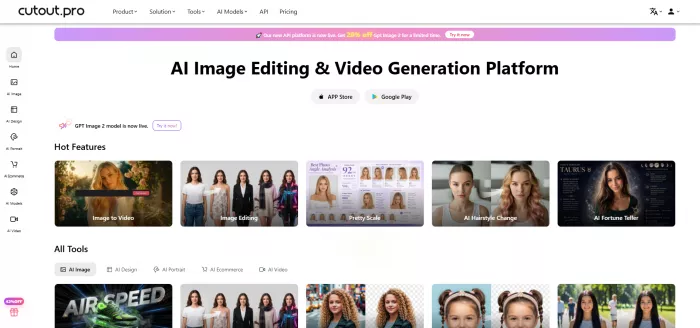
Cutout.Pro is an AI-powered image and video editing platform built around automatic subject detection. Its main feature is background removal, but the product menu now includes image editing, face cutout, object removal, photo enhancement, photo colorizing, passport photo creation, background diffusion, e-commerce product posters, AI video tools, and developer APIs. The official site lists separate sections for AI image, design, e-commerce, portrait, and video tools, which shows how much broader the platform has become beyond simple PNG cutouts.
The main promise is speed. Instead of drawing masks by hand, you upload an image, let the AI detect the subject, make small edits if needed, and download the result. That makes it attractive for e-commerce sellers, social media creators, bloggers, agencies, developers, and small businesses that need clean visuals without a full design workflow.
How Cutout.Pro Works
The workflow is simple. I uploaded an image, waited for the AI to process it, checked the cutout result, used the edit option where the mask needed cleanup, and then moved to download. For background removal, Cutout.Pro supports common subject categories such as people, vegetation, animals, sky, objects, vehicles, graphics, icons, and symbols. The upload page also supports drag-and-drop, pasting an image, or adding a URL.
The process feels built for people who want the result quickly rather than people who want to control every pixel. You do not get a deep editing studio with layers, blending modes, adjustment masks, and professional retouching panels. Instead, you get a fast automatic result, then a small amount of manual correction.
For a basic user, that is a good thing. For a designer, it feels more like a shortcut than a full workspace.
Features I Tested
Cutout.Pro has a long feature list, but not every tool matters equally. The strongest tools are still the ones connected to background removal, cleanup, and image improvement.
| Feature | What It Does | My Practical Take |
| Image background remover | Removes the background from photos automatically | The best and most reliable part of the platform |
| Face cutout | Separates faces, hair, people, and pets | Useful, but hair edges need checking |
| Object removal | Removes unwanted objects, marks, scratches, and distractions | Good for small cleanup, weaker on large objects |
| Photo enhancer | Sharpens, denoises, enlarges, and improves image clarity | Helpful for soft images, but can look artificial if pushed too far |
| Passport photo maker | Creates ID-style photos with formal sizing | Useful, but output must be checked carefully before official use |
| Video background remover | Removes video background without a green screen | Convenient for simple clips, less polished on movement |
| API access | Lets developers integrate image and video processing | Strong value for bulk or SaaS workflows |
Cutout.Pro also promotes bulk processing, desktop apps, a Shopify plugin, and API integration for large workflows. Its background remover page says the desktop app can process more than 10,000 images in a single batch, while API integration is positioned for websites, apps, SaaS tools, e-commerce, advertising, print-on-demand, and image retouching workflows.
My Test Setup
To make the review practical, I did not judge Cutout.Pro from demo images alone. I used five normal editing tasks:
| Test | What I Uploaded | What I Wanted to Check |
| Product cutout | A product photo with a slightly uneven background | Whether it can create a clean e-commerce image |
| Portrait cutout | A human portrait with hair and clothing edges | Whether it can handle fine outlines |
| Object cleanup | A photo with a small distracting object | Whether retouching looks natural |
| Image enhancement | A low-resolution, slightly blurry image | Whether it improves clarity without over-processing |
| Video cutout | A short talking-head clip | Whether background removal stays stable in motion |
This is the right way to test Cutout.Pro because its value depends on real image conditions. A clean demo image will almost always look good. A mixed background, poor lighting, hair detail, shadow, or reflective product gives a more honest result.
Test One: Product Background Removal
I started with a product image because this is where Cutout.Pro makes the most sense. The upload was quick, and the background removal result appeared almost immediately. On a product photo with a clearly separated subject, the output looked ready for a website listing or social media post. The product outline stayed mostly clean, and the transparent background made it easy to place the item on white, grey, or a branded color background.
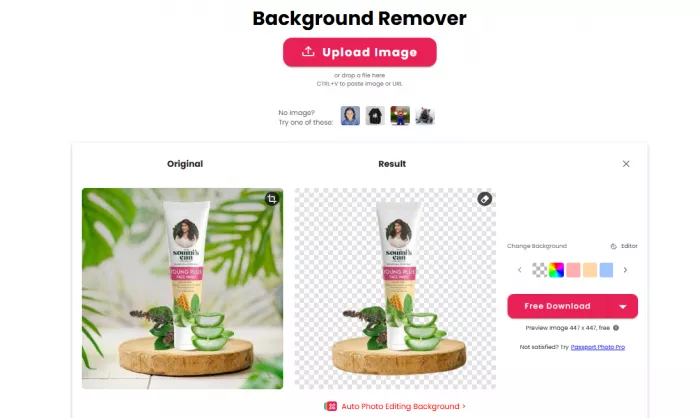
The best part was the speed. For a seller who needs to clean dozens of images, this saves a lot of time compared with manual editing. Cutout.Pro also specifically promotes background removal for e-commerce product photos and bulk image workflows, so this use case matches the platform’s own positioning.
The weaker part appeared around soft shadows and edges where the product color was close to the background color. The cutout was still usable, but not always perfect. If the image is for a marketplace listing, it works well. If the image is for a premium ad campaign, I would still inspect the edges manually before publishing.
Test Two: Portrait and Hair Edges
The portrait result was good, but this is where I noticed the difference between “fast” and “perfect.” Cutout.Pro detected the face and body correctly, and the subject was separated from the background without much effort. Clothing edges looked cleaner than hair edges. Around loose hair strands, the result became softer and slightly uneven in a few places.
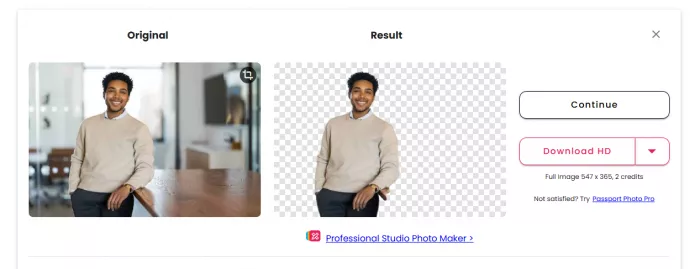
That is normal for AI cutout tools. Hair, fur, transparent fabric, and motion blur are harder than solid objects. Cutout.Pro says its face cutout supports face and hair segmentation for humans and pets with fine details, but in practice the result still depends heavily on lighting, contrast, and image sharpness.
For profile images, thumbnails, LinkedIn-style visuals, and basic social media graphics, the portrait cutout is useful. For beauty, fashion, or professional headshot editing, I would use it as a first pass, not the final step.
Test Three: Object Removal and Cleanup
Next, I tried the retouch tool on a photo with a small distracting object in the background. This worked best when the object was small and the surrounding area had a simple texture. A small mark on a wall, a minor scratch, or a tiny distraction could be removed quickly enough for casual use.
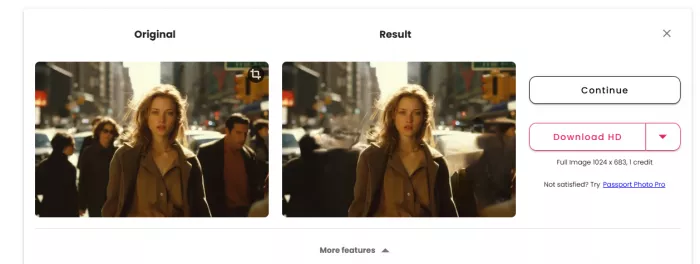
The result was weaker when the object was larger or placed over a detailed background. The repaired area sometimes looked smudged, and the AI filled the space in a way that was acceptable from a distance but obvious when zoomed in. That makes the retouch tool useful for small fixes, not serious restoration work.
This is an important distinction. Cutout.Pro can remove unwanted objects, scratches, skin blemishes, and imperfections, but it does not give the same control as Photoshop’s clone stamp, healing brush, manual masking, or layer-based cleanup.
Test Four: Image Enhancer and Upscaler
The enhancer was useful on a slightly soft image. It made the photo sharper, clearer, and more suitable for web use. Cutout.Pro describes its enhancer as a one-click tool for improving resolution, sharpness, denoising, portrait detail, night images, and old photo repair. It also says its super enlargement can upscale by 200 percent, and the platform promotes enhancement use cases for photographers, e-commerce shops, real estate, app graphics, and social sharing.
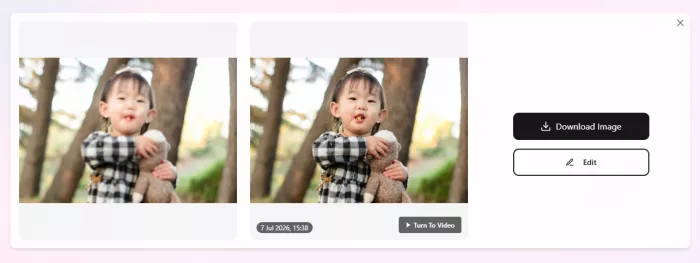
My experience was balanced. If the original image had enough detail, the enhancer improved it. If the original image was very blurry, noisy, or badly compressed, the AI could not fully rescue it. In some areas, it made the image look sharper but also slightly artificial. Faces can look over-smoothed if the original file is weak.
For blogs, product previews, and social posts, the enhancer is useful. For print-quality restoration or professional photography, it should be checked carefully.
Test Five: Video Background Removal
Cutout.Pro’s video background remover is one of its more interesting tools because it does not require a green screen. The tool is built around automatic background removal, which means users do not need to pick pixels, select colors, draw masks, or move paths manually.
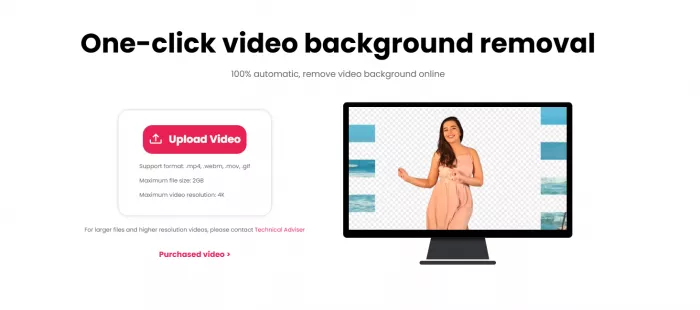
I tested it with a simple talking-head clip. The result worked best when the subject stayed still, the lighting was even, and the background was not too busy. The AI detected the person and removed most of the background, which is useful for presentations, short ads, creator videos, and simple social clips.
The weakness was edge stability. Around hair, shoulders, and fast movement, the cutout could look slightly soft. This is not unusual for automated video background removal, but it means the tool is better for practical creator work than polished studio production.
Output Quality: Strong but Image-Dependent
Cutout.Pro’s quality depends on the input. With clean subjects, good contrast, and sharp images, it performs well. With blurred edges, similar subject-background colors, transparent objects, flames, waterfalls, text, signatures, or out-of-focus subjects, the platform itself says results may not work well. It also recommends using the edit button to manually remove unwanted parts after automatic removal.
Here is the honest quality breakdown:
| Area Tested | Output Quality |
| Clean product photos | Very usable for web stores and ads |
| Portraits | Good overall, but hair needs review |
| Busy backgrounds | Mixed, especially around similar colors |
| Object removal | Good for small distractions, weaker for larger edits |
| Image enhancement | Helpful for mild blur and low resolution |
| Video background removal | Useful for simple clips, less polished with motion |
Cutout.Pro is at its best when the task is clear: remove a clean background, improve a product image, make a quick PNG, or prepare visuals in bulk. It is less impressive when the image needs judgment, subtle retouching, or professional finishing.
Control and Editing: Simple, Not Deep
The editing control is enough for basic users. After the AI result, you can make corrections if the cutout is imperfect. That matters because even good automatic tools make mistakes around edges. Cutout.Pro’s own FAQ points users to the edit button when cutout results have unwanted parts.
Still, this is not a professional editing suite. You do not get the same control over masks, layers, shadows, color grading, or manual reconstruction that you get in Photoshop. Cutout.Pro is designed for speed, not detailed creative control.
That makes it good for:
● Sellers who need consistent product images quickly. The tool can remove backgrounds and help prepare product photos without building a full editing setup.
● Creators who need usable visuals for posts and thumbnails. It is faster than opening a large design app for every small edit.
● Teams with repeated image tasks. Bulk tools, desktop support, Shopify integration, and API access make more sense when image volume is high.
It is not as strong for designers who need full control over every detail.
Pricing: Credits Need Attention
Cutout.Pro uses a credit-based pricing system. For images, the free account includes free previews and 5 free credits. Background removal and image retouch cost 1 credit per image, while cartoon selfie, passport photo, enhancer, and colorizer cost 2 credits per image. Subscription pricing starts at 80 credits for $5 per month, then moves through 170 credits for $9.90, 300 credits for $16.90, 550 credits for $29, 1000 credits for $49, and 1450 credits for $69. Pay-as-you-go credits start at 30 credits for $4.99 and scale up to larger bundles. Cutout.Pro also lists a 14-day money-back guarantee, restricted to 50 downloads.
| Plan Type | Starting Price | Best For |
| Free account | Free with 5 credits | Testing quality before paying |
| Monthly subscription | $5 for 80 credits | Regular image editing |
| Pay as you go | $4.99 for 30 credits | Occasional users who do not want a subscription |
| Large credit packs | Up to $1399 for 30,000 credits | Bulk users, agencies, high-volume workflows |
| Video credits | From $9 for 1 minute | Video background removal and video AI tools |
Video pricing is separate. Video credits are used for AI video generation, video background removal, video enhancement, and photo animation. The official video pricing page lists pay-as-you-go packages starting at 1 minute for $9, with higher packages reducing the per-second cost. It also lists a maximum file size of 2GB.
The pricing is reasonable if you use the tool regularly. It becomes less straightforward if you only need one or two images, because the credit model requires you to understand what each tool costs before downloading.
API and Developer Use
Cutout.Pro is stronger than many simple background removers because it has API support. The API documentation lists image processing APIs for background remover, face cutout, photo enhancer, photo colorizer, image retouch, cartoon selfie, passport photo, photo animation, photo color correction, AI art generation, and background diffusion. It also lists video APIs for image-to-video generation and video background removal.
The API pricing is also credit-based. A successful background remover API call costs 1 credit, image retouch costs 1 credit, cartoon selfie costs 2 credits, photo enhancer costs 2 credits, and photo colorizer costs 2 credits. The API supports PNG, JPG, JPEG, BMP, and WEBP, with a current maximum upload resolution of 4096 x 4096 pixels and file size below 15MB.
This makes Cutout.Pro more useful for developers, marketplaces, SaaS tools, and print-on-demand platforms than for users who only need one image every few months.
Privacy and Security Check
This section matters more for Cutout.Pro than it does for many casual editing tools. The platform’s privacy policy says uploaded images and videos are transferred with SSL/TLS encryption and used only to perform the requested processing. It says uploaded and processed files are deleted automatically. For face data, it says selected photos may be processed through Amazon Web Services and cached for 24 to 48 hours after the last edit so users can access or modify them.
That policy sounds clear, but public security history should still be mentioned. Cybernews reported in February 2023 that Cutout.Pro leaked 9GB of data from an exposed system, including user visuals and customer data. In March 2024, Cybernews also reported that details of millions of Cutout.Pro users were exposed on a leak forum, with attackers claiming data connected to more than 20 million users.
Have I Been Pwned also lists a February 2024 Cutout.Pro breach involving 20 million records, including email addresses, IP addresses, names, and password hashes.
For normal product photos, the risk may not bother every user. For passport photos, face images, client portraits, sensitive brand assets, or private documents, I would be more cautious.
Advantages
● It is very fast for background removal. Clean product photos and simple portraits can be processed quickly, which makes it useful for sellers, bloggers, and creators who do not want to edit manually.
● The tool is easy for beginners. The upload, preview, edit, and download flow is simple enough for users with no design background.
● It supports more than images. Video background removal, image enhancement, passport photos, colorizing, photo animation, and API access make it broader than a basic cutout tool.
● Bulk and API workflows add business value. Cutout.Pro is more useful for high-volume image work than single-use editing because the desktop app, Shopify plugin, and API support repeatable tasks.
● The credit pricing can be affordable for regular users. At higher monthly tiers, the per-credit cost drops, which can help teams processing many images.
Limitations
● Fine details still need checking. Hair, fur, shadows, transparent objects, and similar background colors can create imperfect edges.
● Manual editing control is limited. It is not a Photoshop replacement, especially for retouching, compositing, color grading, or advanced mask correction.
● The credit system can confuse new users. Different tools consume different credits, and video pricing is separate from image pricing.
● Public trust signals are mixed. Trustpilot feedback is heavily negative, while Capterra has only one visible review, so the user review picture is uneven.
● Security history is a real concern. Past data leak and breach reports make it harder to recommend for sensitive personal or client images.
Best Use Cases
Cutout.Pro makes the most sense for people who need fast, repeatable visual edits. It is especially useful for:
| User Type | Why It Fits |
| E-commerce sellers | Fast product background removal and cleaner listing images |
| Social media creators | Quick profile photos, thumbnails, and campaign visuals |
| Bloggers and marketers | Simple image cleanup without hiring a designer |
| Print-on-demand sellers | Bulk product image preparation |
| Small agencies | Quick first-pass edits for client assets |
| Developers | API access for automated background removal and image enhancement |
It is less ideal for professional retouchers, privacy-sensitive users, and designers who need detailed control over masks, shadows, layers, and final finishing.
Best Alternatives to Cutout.Pro
| Alternative | Better For | Why Choose It |
| Remove.bg | Simple background removal | More focused if you only need background removal |
| Photoroom | Product images and online sellers | Stronger e-commerce image workflow and listing-style tools |
| Canva | Social graphics and templates | Better when you need design layouts after removing a background |
| Adobe Photoshop | Professional editing | Better masking, retouching, layers, and full creative control |
| Fotor | Casual photo editing | Good for quick edits, templates, and general enhancement |
| Adobe Express | Fast marketing visuals | Easier for branded posts, flyers, and social assets |
| Pixlr | Browser-based manual editing | More control than Cutout.Pro without full Photoshop complexity |
Remove.bg is the cleanest alternative if background removal is your only priority. Photoroom is stronger for sellers who want product images, listing templates, and commerce-focused workflows. Canva is better if you need to turn the cutout into a complete design. Photoshop is still the better choice when quality control matters more than speed. Remove.bg and Photoroom both publish current pricing and workflow details on their official pricing pages, while Adobe lists Photoshop plans directly on its official pricing page.
Personal Rating Table
| Category | Rating | My Take |
| Background removal | 4.3/5 | Strong on clean product photos and portraits, but fine hair, shadows, and low-contrast edges still need review. |
| Output quality | 3.9/5 | Results are usable for web and social content, but complex images can look soft or slightly artificial. |
| Ease of use | 4.5/5 | The upload, preview, edit, and download flow is simple enough for beginners. |
| Editing control | 3.3/5 | Good for quick corrections, but not deep enough for professional masking, retouching, or compositing. |
| Video tools | 3.5/5 | Useful for simple talking-head clips, but movement and hair edges can reduce polish. |
| Pricing clarity | 3.6/5 | The credit system is flexible, but beginners may need time to understand tool-based credit usage. |
| Privacy and trust | 3.0/5 | The policy explains file handling, but past breach reports and mixed public reviews make caution necessary. |
| Overall score | 4.0/5 | A practical AI editing tool for fast cutouts and simple cleanup, but not a full replacement for professional editing software. |
Final Verdict
Cutout.Pro is a useful AI editing tool when speed matters. Its background remover is the strongest feature, and it performs well on clean product images, simple portraits, and basic visual cleanup tasks. The enhancer, retouch, video background remover, and API tools add value, especially for users who process images regularly.
The weakness is not the core idea. The weakness is consistency and trust. Output quality still depends heavily on the image, manual editing control is limited, and the public review picture is uneven. The reported data leaks and breach history also make it harder to recommend for sensitive personal photos, ID images, or confidential client assets.
For e-commerce sellers, creators, bloggers, and small teams, Cutout.Pro is worth testing with the free credits before paying. For professional designers, Photoshop users, or anyone handling sensitive images, it works better as a quick first-pass tool than a final editing solution.
Comments

Satyam Singh
Sep 29, 2026Tried the video background remover for a talking-head clip. When I sat still it was fine but the moment I moved, the edges got soft and wobbly around my shoulders. Cool for a quick social clip, not something I'd put in front of a client. Impressed and let down at the same time.
Login To Reply ↪

Rustom Samurai
Oct 3, 2026The background remover is genuinely fast. I run a small store and had 40 product shots to clean, dropped them in and had transparent PNGs in minutes. What used to take me a whole evening in Photoshop is done before my coffee's cold. For $5 a month I'm not complaining.
Login To Reply ↪