HubSpot vs Mailchimp: Which Marketing Platform Actually Fits Your Business?



Choosing between HubSpot and Mailchimp is not just a tool decision. It is a stack decision. The wrong choice can lock you into the wrong workflows, inflate your costs as you scale, or force painful migrations later.
On the surface, both platforms offer email marketing, automation, analytics, and integrations. But under the hood, they are built for very different growth paths. Mailchimp started as an email marketing tool that expanded outward. HubSpot started as a CRM platform that expanded into marketing, sales, and service.
That difference shapes everything from pricing to usability to long-term value. This comparison focuses on real-world fit, not feature checklists.
The Core Positioning Difference Most Buyers Miss
The simplest way to understand the divide is this:
1. Mailchimp is primarily a marketing tool with light CRM features.
2. HubSpot is a CRM platform with deep marketing capabilities layered on top.
This matters more than most buyers realize.
Mailchimp is optimized for sending campaigns quickly, managing audiences, and running straightforward automations. HubSpot is designed to manage the entire customer lifecycle across marketing, sales, and support.

In practice:
1. If your business revolves around email marketing campaigns, Mailchimp often feels faster and simpler.
2. If your business needs full-funnel visibility and pipeline tracking, HubSpot quickly becomes more compelling.
Email Marketing: Where Mailchimp Still Feels Native
Email marketing is still the entry point for many buyers, and this is where Mailchimp’s heritage shows.
Mailchimp’s campaign builder remains one of the most intuitive in the market. Creating newsletters, promotional blasts, or basic drip campaigns is fast and visually clean. For small teams or solo operators, the learning curve is minimal.
HubSpot’s email tools are powerful but feel more embedded inside a larger system. The builder is capable, but the workflow assumes you are managing contacts, deals, and automation within the broader CRM.
Where Mailchimp pulls ahead
1. faster campaign setup
2. simpler template workflow
3. easier for beginners
4. strong creative email builder
Where HubSpot wins
1. deeper personalization using CRM data
2. stronger lifecycle email automation
3. better alignment with sales pipeline
4. more advanced behavioral triggers
Real-world example
A Shopify store sending weekly promos will usually feel more comfortable in Mailchimp. A B2B SaaS company nurturing leads across a multi-stage funnel will usually outgrow Mailchimp and prefer HubSpot.

Edge: Mailchimp for pure email marketing simplicity. HubSpot for lifecycle-driven email.
CRM Capabilities: This Is Where the Gap Opens
This is the most decisive difference between the two platforms.
HubSpot offers a fully developed CRM that includes:
1. deal pipelines
2. contact timelines
3. sales automation
4. task management
5. lead scoring
6. lifecycle stages
Mailchimp technically has audience management and some CRM-like views, but it is not a true sales CRM. It is primarily a marketing database with tagging and segmentation.
For businesses that need to track deals, sales conversations, or customer journeys across multiple touchpoints, Mailchimp quickly starts to feel limited.
HubSpot clearly dominates in:
1. pipeline management
2. contact activity timelines
3. sales team workflows
4. multi-stage lead nurturing
5. unified customer view
If your business has even moderate sales complexity, HubSpot’s CRM is often the turning point.
Edge: HubSpot by a wide margin.
Automation and Workflows: Power vs Practical Simplicity
Both platforms offer marketing automation, but they serve very different levels of sophistication.
Mailchimp’s automation builder is designed for straightforward use cases:
1. welcome sequences
2. abandoned cart emails
3. simple behavioral triggers
4. basic customer journeys
It works well for ecommerce and small business scenarios. However, as workflows become more complex, limitations appear quickly.
HubSpot’s workflow engine is significantly more advanced. It supports:
1. multi-branch logic
2. deep CRM triggers
3. cross-channel automation
4. lead scoring actions
5. sales handoffs
6. complex nurturing paths
The tradeoff is complexity. HubSpot workflows can feel overwhelming for beginners.
Where HubSpot clearly wins
1. complex B2B funnels
2. multi-touch nurturing
3. lifecycle automation
4. sales-marketing alignment
5. enterprise workflows
Important reality check
Many small businesses never fully use HubSpot’s automation power. For them, the platform can feel like overkill.
Edge: HubSpot for advanced automation, Mailchimp for simplicity.
Contact Management and Segmentation
This is an area where the philosophical difference becomes very visible.
Mailchimp’s segmentation is list and tag driven. It is flexible for marketing use cases but can become messy as databases grow. Contact records are primarily email-centric rather than relationship-centric.
HubSpot uses a unified contact model tied to lifecycle stages, behavioral history, and deal activity. Segmentation is dynamic and deeply integrated with automation.
In practice:
1. Mailchimp segmentation works well for campaign targeting.
2. HubSpot segmentation works better for full-funnel orchestration.
Pain point many users hit
Mailchimp audiences can become fragmented if not carefully managed. HubSpot avoids some of this by maintaining a single contact record structure.
Edge: HubSpot for long-term database health. Mailchimp for quick marketing segmentation.
Analytics and Reporting
Both tools provide campaign analytics, but their depth and orientation differ.
Mailchimp’s reporting is campaign-focused. It shows:
● open rates
● click rates
● ecommerce revenue attribution
● engagement metrics
For many small businesses, this is sufficient.
HubSpot’s analytics are broader and more funnel-oriented. It can connect marketing activity to:
● deal creation
● pipeline movement
● revenue attribution
● lifecycle progression
This is extremely valuable for B2B and high-ticket businesses but may be unnecessary for simple email marketing operations.
Pricing Reality in 2026
Pricing is where many businesses feel the real pressure, especially as contact lists grow.
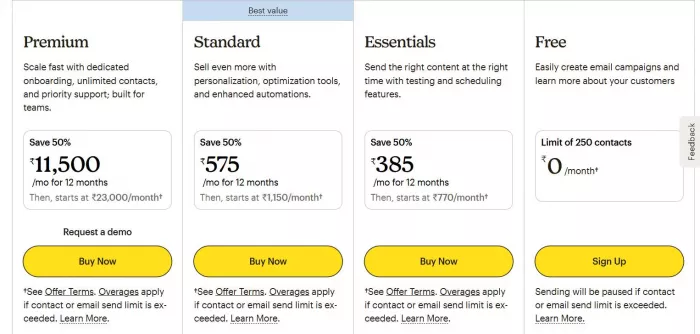
Mailchimp Pricing
Mailchimp offers four main pricing tiers that scale based on features and contact count.
1. Free Plan: Good for beginners. You can manage up to 500 contacts and send limited emails, but features are basic and Mailchimp branding remains on emails.
2. Essentials: Starts around $13 per month. This unlocks basic automation, A/B testing, and email support. However, costs increase as your contact list grows.
3. Standard: Starts around $20 per month. This is the most commonly used tier, adding the customer journey builder, behavioral targeting, and more advanced automation capabilities.
4. Premium: Starts around $350 per month. Built for large teams needing advanced segmentation, multivariate testing, and phone support.
Important scaling reality
Mailchimp pricing rises steeply with contact count. Many users underestimate how fast costs grow past 10k to 50k subscribers.
HubSpot Pricing
HubSpot’s Marketing Hub pricing starts free but becomes significantly more expensive as you unlock advanced features.
1. Free CRM: A solid entry point with basic email tools, contact management, and very limited automation. Good for testing the ecosystem but not enough for serious marketing automation.
2. Starter: Starts around $20 per month per seat. Removes HubSpot branding and adds basic automation and reporting. Suitable for small teams but still fairly limited.
3. Professional: Starts around $890 per month. This is the real power tier, unlocking advanced workflows, lead scoring, and custom reporting. However, the price jump is substantial and often surprises growing businesses.
4. Enterprise: Starts around $3,600 per month. Designed for large organizations needing advanced permissions, predictive analytics, and deep customization.
Critical reality
HubSpot becomes expensive very quickly once you need Professional-tier automation. Many teams underestimate this jump.

When HubSpot Is the Better Choice
HubSpot usually makes more sense when your business is moving beyond simple email marketing.
Strong fit scenarios
1. B2B companies
2. SaaS businesses
3. companies with sales teams
4. multi-stage funnels
5. agencies managing pipelines
6. teams needing full-funnel visibility
When Mailchimp Is the Better Choice
Mailchimp still makes excellent sense for many businesses.
Strong fit scenarios
1. ecommerce stores
2. creators and newsletters
3. solopreneurs
4. early-stage startups
5. businesses focused mainly on email campaigns
6. teams wanting quick deployment
Quick Comparison Summary
| Area | Winner |
| Email marketing simplicity | Mailchimp |
| CRM depth | HubSpot |
| Advanced automation | HubSpot |
| Beginner friendliness | Mailchimp |
| Full-funnel analytics | HubSpot |
| Ecommerce email workflows | Mailchimp |
| Long-term scalability | HubSpot |
| Quick campaign deployment | Mailchimp |
Final Practical Recommendation
If your business lives primarily in email campaigns and you value speed, simplicity, and fast execution, Mailchimp remains a strong and sensible choice. It gets you moving quickly and handles most small-to-mid marketing needs without heavy setup.
However, if your organization is building a serious growth engine with sales pipelines, lifecycle automation, and multi-touch attribution, HubSpot is operating in a different league. Yes, it is more complex and often more expensive, but for the right teams, the ecosystem advantage is real.
The honest bottom line
1. Choose Mailchimp for focused email marketing and ease of use.
2. Choose HubSpot when you need a true growth platform tied to CRM.
The best tool is not the one with the most features.
It is the one that matches how your business actually grows over the next 12 to 24 months


Comments