Inworld AI Review: My Hands-On Experience With Its Voice and Agent Tools



Inworld AI is best known for creating interactive AI characters, but the platform now focuses heavily on voice generation and real-time conversational agents.
I tested its main tools to see how easy it was to create a custom voice, generate speech and understand the process of turning that voice into a working AI agent. The voice tools were easy to explore, but the experience became more technical once I moved towards live conversations, memory and external actions.
Getting Started With Inworld
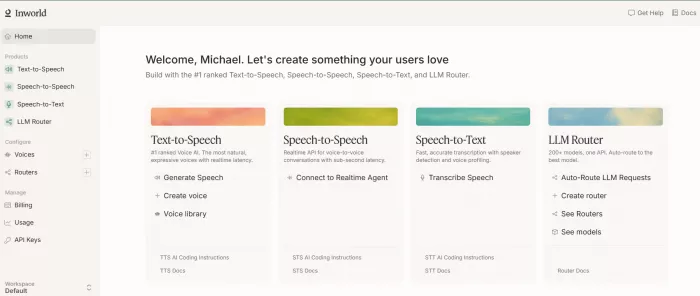
After creating an account, I reached the Inworld Portal, where the main tools are separated into areas such as text-to-speech, voice design, voice cloning, speech-to-text and developer APIs.
The dashboard did not feel difficult to use, but it was clear that Inworld is designed mainly for developers and product teams. Someone looking only for a voice generator can use the Playground without much trouble. However, building a complete AI character requires a better understanding of APIs, language models and application development.
I started with the text-to-speech Playground because it was the quickest way to produce an actual result.
Testing the Text-to-Speech Tool
For my first test, I used a hotel concierge script:
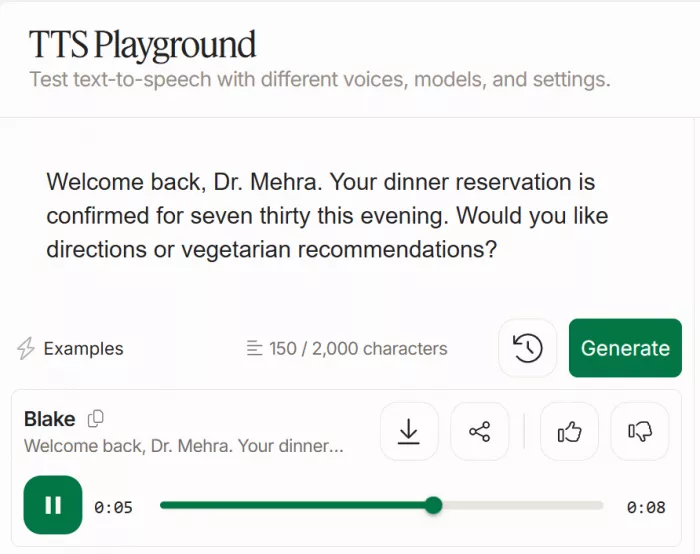
Welcome back, Dr. Andie. Your dinner reservation is confirmed for seven thirty this evening. Would you like directions or vegetarian recommendations?
I selected a voice, pasted the text and generated the audio.
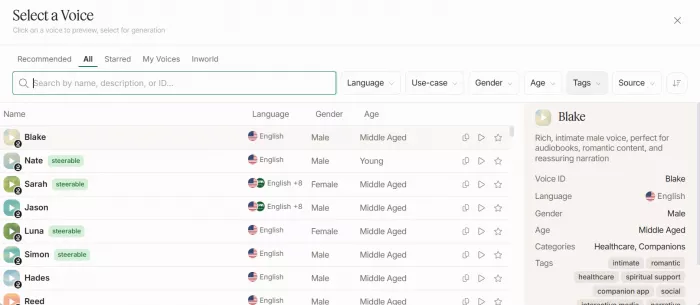
The process itself was simple. I did not need to set up an API or create a complete project before hearing the output. This makes the Playground useful for testing voices, preparing narration or comparing models.
Inworld currently provides different text-to-speech models for different needs. TTS-2 focuses on expression and voice control, while the 1.5 Max model is designed for stable output. The Mini model focuses more on speed and lower usage costs.
For this type of character, TTS-2 was the most suitable option because the voice needed to sound warm and conversational rather than simply reading the script.
The output sounded clearer when I changed numbers into spoken words and divided the script into shorter sentences. Writing “seven thirty this evening” worked better for spoken delivery than leaving the time as “7:30 p.m.”
This showed that the quality of the script still matters. Inworld can produce natural speech, but it cannot automatically fix every sentence that was originally written for reading rather than listening.
Adding Voice Instructions
One feature I found useful was the ability to place speaking instructions directly inside the script.
For example:
[Speak warmly] Welcome back, Dr. Mehra.
[Speak slowly and clearly] Your reservation is confirmed for seven thirty this evening.
These instructions can control elements such as speaking speed, tone, pitch and volume. TTS-2 also supports certain non-verbal sounds, including laughter, breathing, coughing and sighing.
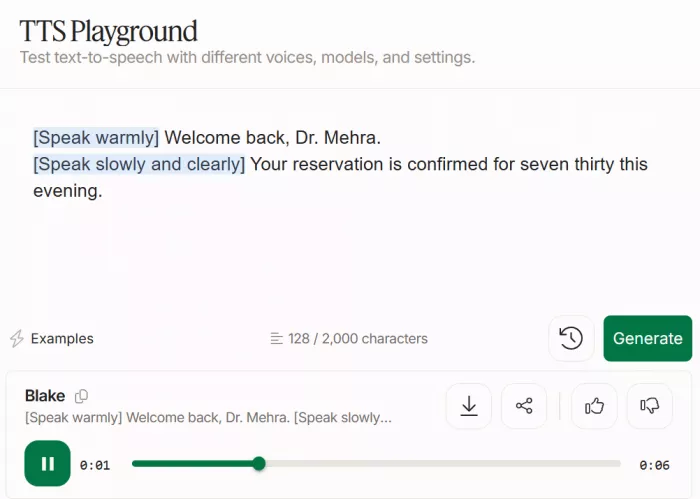
I did not need those sounds for a hotel concierge, but they could be helpful when creating game characters, AI companions or fictional dialogue.
The instructions worked best when I used them only in important places. Adding a new direction before every sentence made the script look cluttered and could cause unnecessary changes in delivery.
My preferred workflow was to write the script naturally first, generate it once and then add instructions only where the pacing or tone needed improvement.
Creating a Custom Voice
After testing the available voices, I tried the Voice Design feature.
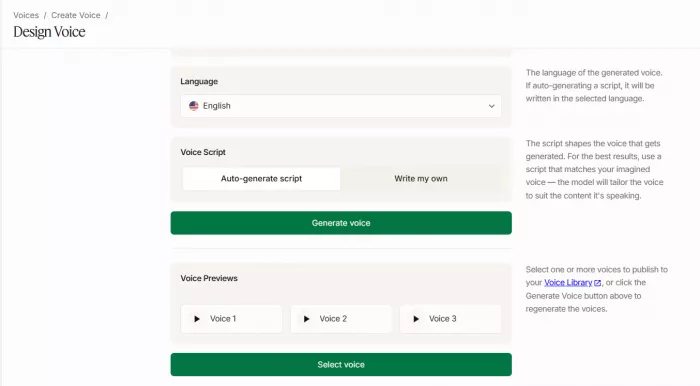
Instead of selecting a voice from the existing library, Voice Design lets the user describe the kind of voice they want. I entered a prompt similar to this:
A professional Arabic hotel concierge in her early thirties, with clear English, controlled pacing and a warm but restrained speaking style.
A detailed description produced a more focused direction than a vague prompt such as “professional female voice.”
It helps to mention:
● The approximate age of the speaker
● The accent or language style
● Whether the voice should sound calm, energetic or serious
● The preferred pacing and pitch
● The type of person or character the voice represents
Voice Design is useful for creating something more specific than a preset. However, it may still take several attempts to find a result that matches the voice you imagined.
Once a suitable voice is created, it can be saved to the voice library and reused in future generations or API projects.
Trying Voice Cloning
Inworld also provides instant voice cloning. The tool works from a short voice recording. Inworld recommends a clean sample of around 10 to 15 seconds, although shorter recordings may also work.
The recording should contain one person speaking clearly. Background music, other speakers, coughing or sudden changes in tone can affect the result.
Voice cloning is different from Voice Design. Voice Design creates a new voice from a written description. Voice cloning attempts to reproduce the sound and characteristics of a real recording.
A good way to test a cloned voice is to generate two types of scripts. The first should be similar to the original sample. The second should contain different words, names and numbers.
The second output is more useful because it shows whether the clone can handle new material rather than simply copying the style of the recording.
The cloning workflow is not difficult, but users should only clone voices they own or have clear permission to use.
Working Beyond English
My concierge script was in English, so I checked how far the voice tools stretch past it.
Inworld’s documentation says TTS-2 keeps one voice identity across more than 100 languages and can switch language mid-sentence. For a concierge, that means an English greeting can carry an Arabic street name or an Italian dish without the voice changing character. The faster Flash model covers fewer languages.
Worth separating in a Voice Design prompt:
● The accent of the speaker, which shapes the sound
● The language of the script, which the model handles on its own
The gap is on the input side. Live transcription in the Realtime API lists six languages. A voice can answer in dozens, but a live agent only understands a handful, so multilingual projects should check both directions.
Moving Into Speech-to-Text
The next stage was understanding how Inworld handles spoken input. Its speech-to-text system can transcribe recorded or live audio. It also supports custom vocabulary, which can help with product names, locations or unusual terms.
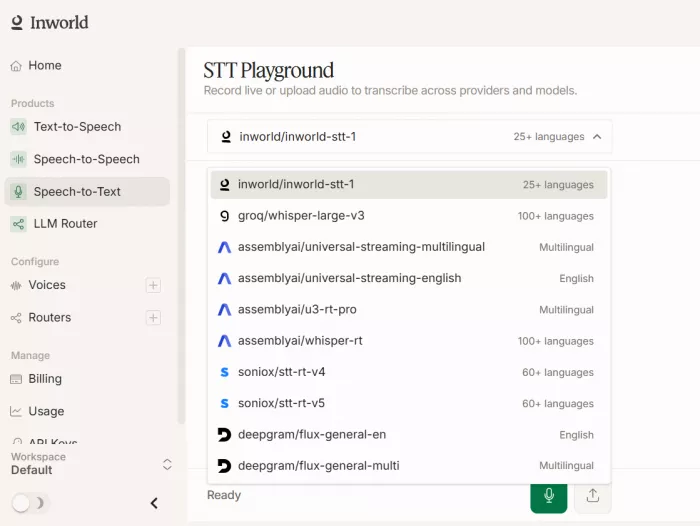
For a hotel concierge, this could include restaurant names, room types or local places that a general transcription model may not recognise correctly.
Speech recognition accuracy will depend on several factors:
● The quality of the microphone and recording
● The speaker’s accent and speed
● Background noise
● Unusual names or specialist vocabulary
● The language being spoken
Inworld also offers voice-profile information that can estimate details such as emotional tone, accent, pitch and speaking style. This information can help an agent adjust its response.
I would treat those signals as suggestions rather than confirmed facts. Emotion or age estimation should not be used for important decisions because the system may interpret a voice incorrectly.
Building a Live Conversation
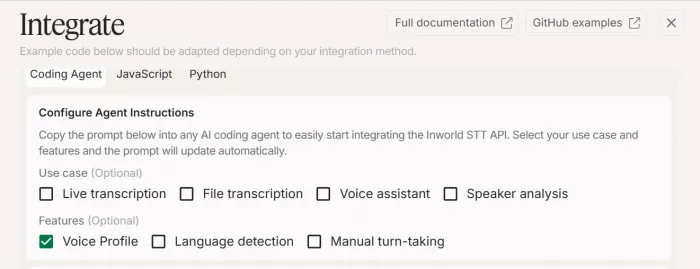
Text-to-speech creates audio, but it does not create a complete AI agent. For a live conversation, Inworld uses its Realtime API. This connects speech recognition, a language model and voice output inside one session.
A basic exchange could work like this:
Me : Is the hotel restaurant still open?
Agent: It closes at eleven. Would you like me to check availability?
Me: No, find a vegetarian restaurant nearby instead.
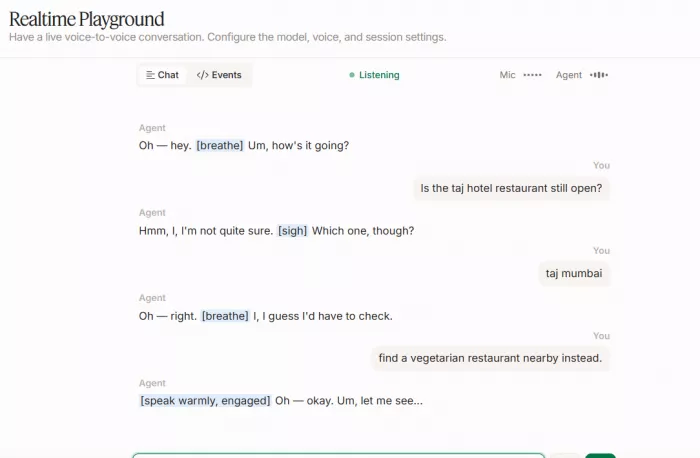
The important part is how the agent handles the change in request. It needs to stop its current response, understand the interruption and continue with the new question.
Inworld includes controls for interruptions, turn-taking and short filler responses. These can make the conversation feel more natural, but they need to be configured carefully.
An agent that says “I understand,” “one moment” or “let me check” too often can sound repetitive. A small amount of silence may sometimes feel more natural than constant filler speech.
This was also the point where the platform became more technical. The Playground made voice generation feel simple, but a working live agent requires code, API configuration and a connected language model.
Testing Memory
I also looked at how memory would work in a practical agent.
For example, I could tell the concierge that I preferred vegetarian food and then ask an unrelated question. When I later returned to restaurant recommendations, the agent should use the earlier preference.
Information can remain available during the current conversation through context. However, remembering that information after the user closes the session requires persistent memory.
Persistent memory is not completely automatic. The application needs to decide what should be saved, where it will be stored and when it should be added to a future conversation.
This is an important difference. Inworld provides tools that can support memory, but developers still need to build the rules around it.
Saving too much information can create privacy problems. Saving too little can make the agent feel forgetful.
Connecting External Actions
A useful concierge should be able to do more than speak. It should also be able to check information or complete tasks. Inworld supports function calling, allowing an agent to connect with external services. A restaurant-booking function could collect:
● The preferred reservation date and time
● The number of guests attending
● Any dietary preferences or restrictions
● The preferred restaurant location
● Final confirmation before completing the booking
If important details are missing, the agent should ask for them before sending the request.
If I said, “Book a vegetarian restaurant tomorrow,” the agent should first ask for the time and number of guests.
It should also wait for a successful response from the booking service before saying that a reservation has been confirmed.
Inworld handles the conversation and structured function request. It does not provide the external restaurant database or booking system. Those parts still need to be created and connected by the developer.
Fitting Inworld Into an Existing Stack
The Playground hides the question of how Inworld connects to everything else. The documentation shows three routes.
An OpenAI-compatible speech endpoint lets an app already using OpenAI’s text-to-speech point the same SDK at Inworld’s URL and swap in an Inworld model and voice ID. OpenAI’s own model and voice names are rejected, so the mapping is manual.
The Realtime API is described as wire-compatible with the OpenAI SDK, and settings like voice or tool list can be changed mid-session.
Inworld also appears as a supported service in voice-agent frameworks such as Pipecat and Vapi, and its Router can pick a language model by price or latency and stream text straight into TTS.
This changes who it suits. Teams with an existing pipeline can drop Inworld in. Teams starting from nothing still assemble the surrounding pieces.
Output Quality and Accuracy
The voice quality was the strongest part of the platform.
The available models give users a reasonable choice between expression, stability and lower latency. TTS-2 is particularly useful for character voices because it allows more control over the way a line is delivered.
However, accuracy needs to be judged in separate areas.
Pronunciation accuracy depends on the voice, script and language. Names, abbreviations and local terms should always be tested before publishing the audio.
Transcription accuracy depends on audio quality, background noise and the speaker’s accent. Custom vocabulary can help, but it does not guarantee perfect transcription.
Factual accuracy depends on the language model and data connected to the agent. A realistic voice can still speak incorrect information.
For an agent dealing with hotel policies, appointments, prices or bookings, important answers should come from a trusted database or external function rather than the general knowledge of the language model.
Getting the Audio Out
Hearing a good result in the Playground is one thing. Delivering it inside a product is another. Inworld lists MP3, WAV, Opus, FLAC and raw PCM as output formats, at 48 kHz mono for most and 24 kHz for PCM. Audio can come back in one piece or streamed over HTTP or WebSocket.
Three limits caught my attention:
● Each request takes up to 4,000 characters, so long narration must be split
● Speed control (0.5 to 1.5) applies to TTS-2 only
● Timestamps and custom pronunciation are API features, not Playground ones
On latency, Inworld reports a first audio chunk under 200 milliseconds. An independent Vapi benchmark measured a 288-millisecond median including network time. Both work for conversation, but the gap shows why real-world testing beats the headline figure.
Inworld AI Pricing
Inworld has a free On-Demand option that can be used for initial testing. It includes a limited amount of text-to-speech and speech-to-text usage, along with voice design, instant cloning and API access.
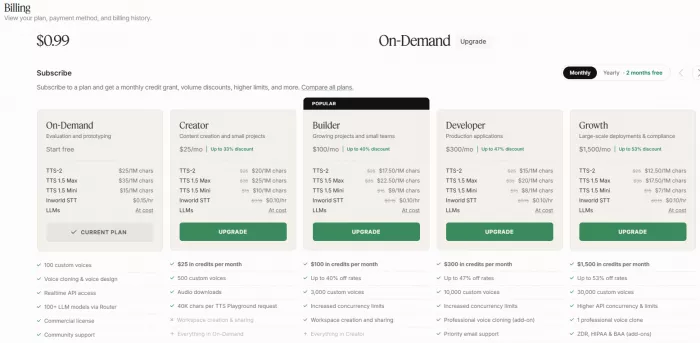
Paid plans provide monthly credits that can be used across the platform.
| Plan | Monthly price | Suitable for |
| On-Demand | Free to start | Testing and small prototypes |
| Creator | $25 | Content creators and individual projects |
| Builder | $100 | Small teams and growing applications |
| Developer | $300 | Production voice applications |
| Growth | $1,500 | Larger-scale deployments |
| Enterprise | Custom | High-volume and regulated projects |
The total cost of a live agent is more difficult to calculate than the cost of a voiceover.
A live conversation may include three separate charges:
1. Speech-to-text for the user’s audio
2. Language-model usage for creating the response
3. Text-to-speech for generating the spoken answer
The pricing is clearly separated by service, but users need to estimate all three parts before calculating the cost of a complete conversation.
Privacy and Voice Data
Privacy is especially important when using voice cloning or storing conversations.
Inworld explains that voice information may be treated as biometric data in some regions. Businesses should review how recordings are stored, how long they are retained and whether they are used for service improvement.
The platform offers privacy options such as Zero Data Retention for eligible workloads. Higher plans also provide additional compliance and deployment options.
These controls are useful, but the company building the final application still has responsibilities. Users should be informed when their voice is recorded, cloned or stored. They should also have a way to request deletion where required.
What Other Users Say
Inworld’s public reputation is still developing. The feedback available on major review platforms is generally positive about its voice quality, but there are too few reviews to judge the platform’s reliability or customer support with confidence.
On Product Hunt, Inworld holds a 5.0 rating from five reviews. Users frequently mention its natural speech, expressive interjections, multilingual voices and affordable pricing. One developer said the speech felt closer to a real conversation than a typical automated call. However, four of the five reviews are marked as founder reviews, so the rating should not be treated as fully independent customer feedback.
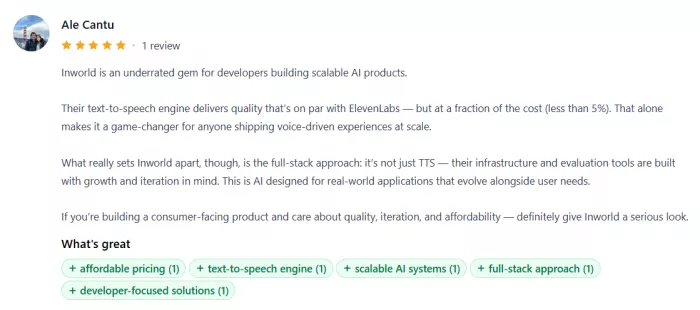
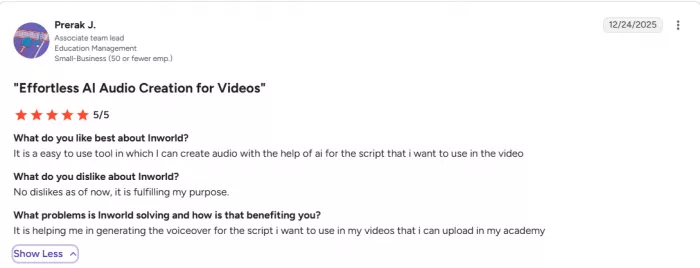
On G2, Inworld has a 5.0 rating, but it is based on only one validated and incentivised review. That user found the platform easy to use for creating voiceovers for educational videos and did not report any major problems. G2 itself states that there are not yet enough reviews to provide meaningful buying insight.
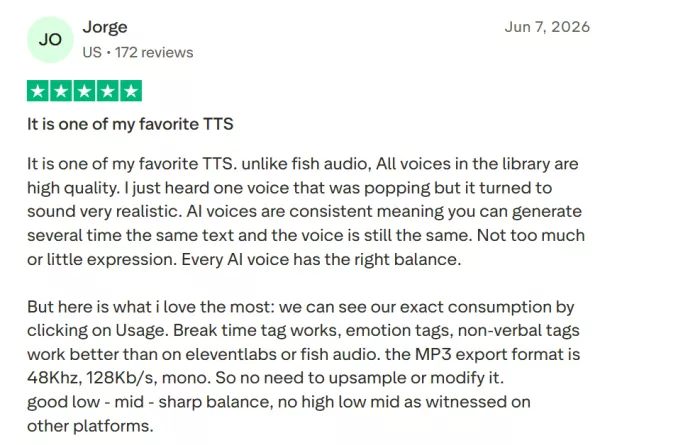
The feedback on Trustpilot is more mixed. Inworld has a 3.4 score from two reviews. The positive reviewer praised the quality and consistency of the voice library, saying repeated generations kept a similar delivery. They also liked the emotion controls, non-verbal cues, usage tracking and downloadable audio quality.
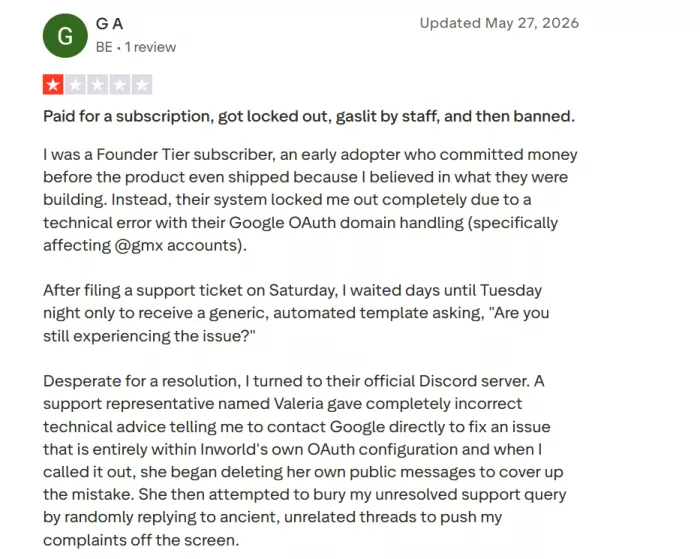
The negative review focused on an account-access problem and poor communication from support. The access issue was eventually resolved, but the user remained unhappy with how the case was handled.
Overall, users seem most impressed by Inworld’s natural voices, expression controls and value for developers. The main uncertainty is not the speech output itself, but the limited evidence around customer support, billing and long-term platform reliability.
Pros and Cons
| Pros | Cons |
| The TTS Playground is easy to use and produces a first result quickly. | The complete agent workflow is much more technical than the Playground suggests. |
| TTS-2 gives detailed control over tone, pacing and delivery. | Scripts still need editing before they sound natural when spoken. |
| Voice Design and cloning provide several ways to create a custom voice. | Voice Design may need multiple attempts before it matches a specific idea. |
| Different models let users balance quality, speed and cost. | Total agent pricing must be calculated across speech, LLM and transcription usage. |
| The Realtime API supports interruptions, turn-taking and live conversations. | Memory and external actions require additional development. |
| The free option is suitable for testing the main features. | Some advanced privacy and deployment controls are limited to higher plans. |
| Function calling allows agents to connect with real services. | Inworld does not provide the external systems needed to complete those actions. |
Verdict
Inworld made it easy to test voices, generate natural speech and create a more specific voice through design or cloning. TTS-2 was the most interesting part of the experience because it offered useful control over tone, pacing and delivery.
The platform became more demanding when I moved towards a complete agent. Memory, external actions and live data still require development work outside the basic Playground.
Inworld is a strong option for developers and product teams building voice agents, interactive characters or conversational applications. It is less suitable for someone expecting a complete no-code AI character builder.
Overall rating: 8.2/10
Comments

Creator_Nishant24
Oct 3, 2026The TTS-2 model is the real deal. I dropped 'Speak warmly' in front of one line and 'Speak slowly and clearly' on the next and the delivery actually changed, warm where I wanted warm and measured where I wanted measured. Making a game companion and I even got it to sigh and breathe between lines. Genuinely impressed.
Login To Reply ↪

Rosie Coleman
Oct 6, 2026Voice Design won me over. Instead of scrolling a preset list I just described what I wanted "woman, early thirties, clear English, warm but restrained" and it got surprisingly close. Took a few tries to nail it, sure but then I saved it to the library and reuse it everywhere. The Playground let me hear output in seconds without touching an API. For testing voices this is the fastest thing I've touched.
Login To Reply ↪