Milkshake vs Linktree: The Complete Guide to Choosing Your Link-in-Bio Tool



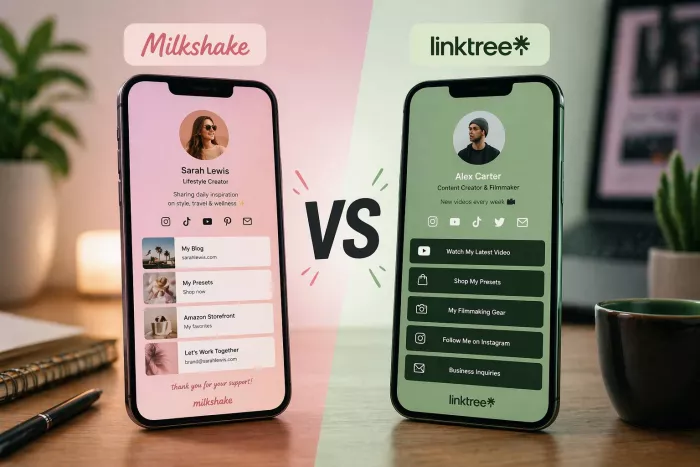
When your Instagram bio allows just one link but you have a dozen places you need people to go, that single URL becomes prime real estate. Both Milkshake and Linktree promise to solve this problem, but they do it in fundamentally different ways. This isn't just about features and pricing, it's about understanding which platform matches how you actually work and what your audience needs from you.
The Philosophy Gap: Cards vs. Lists
Linktree, launched in 2016, approaches the problem as a routing challenge: get people from your bio to the right destination as quickly as possible. You build a vertical list of buttons, visitors scroll top to bottom, and tap what they need. The interaction feels natural because it mirrors how people already browse most websites, scan, recognize, click.
Milkshake, launched in 2019, assumes your bio should function more like a mini website than a directory. Instead of a single scrolling list, you create swipeable “cards” that visitors move through horizontally, similar to Instagram Stories. One card can house your essential links, another introduces who you are, another highlights your YouTube channel or a specific offer. The experience is less “pick a link” and more “step into my world.”
Key implications:
● Linktree optimizes for speed and clarity: land, scan, act.
● Milkshake optimizes for narrative and immersion: land, explore, then act.
That philosophical split shapes everything else: design constraints, analytics, pricing logic, and how you scale.
Platform Access: Where You Build Matters
Here's where practical considerations enter the picture. Milkshake exists exclusively as a mobile app available on iOS and Android. There is no desktop version, no web editor, no way to work on your site from a laptop. For mobile-first creators who manage their entire online presence from their phone, this isn't a limitation, it's a feature. The app is designed specifically for touch interfaces, making it genuinely faster to create and update content while you're on the go.
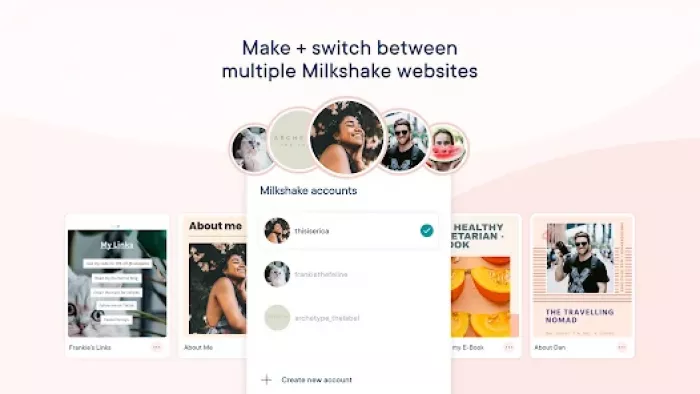
But if you regularly work from a computer, or if you're managing multiple brands and prefer a larger screen for organization, Milkshake's mobile-only approach becomes a genuine constraint. You cannot open your laptop at a coffee shop and restructure your entire bio page. You cannot quickly update links between meetings from your desktop. Everything happens through your phone.
Linktree takes the opposite approach with a web-based platform that you access through any browser. While they have a mobile app for convenience, the primary experience is desktop-optimized. This means you can work from wherever makes sense: your phone when you're out, your computer when you're at your desk, your tablet when you're traveling. For teams or creators who collaborate with managers or assistants, this accessibility becomes crucial since multiple people can access and edit the account from different devices.
Design Customization: Surface vs. Depth
Your link page is often the first off-platform surface someone sees after discovering you. Whether it feels aligned with your aesthetic or completely generic shapes how seriously people take you.
Milkshake’s design system is template-driven. You choose a “Look,” then adjust colors, fonts, images, and text inside a fixed layout, sometimes pairing it with a background remover to ensure visuals match the template cleanly. It deliberately limits your options:
● You can tweak background, button, and text colors; choose from a curated font library; add your logo and visuals.
● You cannot adjust spacing, element sizes, or layout structures; you’re operating inside a predefined grid.
For creators who find design overwhelming, those boundaries are a relief. You stay inside a system that makes it hard to produce something off-brand or amateurish. For brands with strict guidelines, exact hex values, specific typography pairings, very particular spacing those same boundaries become friction.
Linktree offers more granular control, but it’s layered behind pricing tiers.
● Free: basic themes, limited color tweaks.
● Paid: more sophisticated customization button styles, background images (including NFTs in some cases), animation options, and deeper element-level styling on higher tiers.
This allows you to get closer to a pixel-perfect match with your existing brand systems, but also makes it possible to design something visually chaotic if you ignore hierarchy and contrast.
The practical difference:
● If you want fast, safe polish with minimal design decisions, Milkshake’s templates get you there faster.
● If you need precise brand alignment (and have the eye or team to manage it), Linktree’s deeper controls are more accommodating once you’re on the right plan.
Content Types: What You Can Actually Share
This is where the platforms diverge significantly in their value propositions, and where your specific use case becomes the deciding factor.
Linktree has evolved into a comprehensive link management platform. You can add standard clickable links (obviously), but also embedded content that displays directly on your page without requiring clicks. YouTube videos, Twitch streams, TikTok posts, Twitter feeds, Spotify tracks, Pinterest boards, and Clubhouse events all embed natively. This means visitors see your content immediately when they land on your page rather than having to click through to another platform.
The monetization capabilities distinguish Linktree from simpler link-in-bio tools. You can sell digital products directly through your Linktree page, accept payments via integrated processors like Stripe and PayPal, set up a tip jar for donations, and even create commission structures for affiliate links. The platform tracks which links generate revenue, giving you direct line-of-sight on what content converts. However, this functionality comes with commerce fees ranging from 9% to 12% on lower-tier plans, dropping to 0% only on their Premium plan at $35 monthly.
Milkshake's content approach aligns with its card-based structure. Different card types serve different purposes: a Links card for your essential URLs, an About card for introduction text and images, a YouTube card that displays your channel, a Contact card for reaching you, and a Recommendations card for products or content you want to highlight. Each card is a self-contained unit with specific functionality.
What Milkshake notably lacks is native e-commerce. You cannot process payments directly through the platform. You can link to external payment pages or embed Buy buttons that redirect to payment processors, but there's no built-in shop functionality. For creators primarily focused on driving traffic to existing storefronts or platforms, this isn't a problem. For those wanting an all-in-one monetization solution, it's a deal-breaker.
The card system does create unique opportunities for content organization that Linktree's list format doesn't naturally support. You might create a card that's purely visual storytelling images and text describing your brand journey that users swipe through before reaching your links. This narrative structure can increase engagement by making your page feel more like content than a utility, but it also adds friction between discovery and action. Whether that friction is valuable storytelling or unnecessary obstacle depends entirely on your audience and goals.
Analytics: Understanding Your Traffic
Both tools show you that people are clicking; the question is how much context you get around those clicks.
Linktree’s analytics expand significantly as you move into paid tiers.
● Free: lifetime views and clicks enough to confirm usage.
● Paid: time-bounded data (28 days to 1 year), geo breakdowns, device splits, traffic sources, and per-link click-through rates.
● Integrations: Google Analytics, Facebook Pixel, and others so you can stitch bio behavior into your broader reporting.
That makes Linktree more suitable when:
● You’re running paid campaigns and need to track performance beyond “did they click?”
● You’re optimizing funnels and need to see which sources and link orders convert best.
Milkshake’s analytics are generous on the free tier but more self-contained.
● Free: ~30 days of views, clicks, traffic sources, and basic geo data.
● Paid: extended history, integrations like Google Analytics, and more insight into specific cards and forms.
The key difference is not whether both have analytics they do but how deeply they plug into the rest of your measurement stack. Linktree acts like another node in an existing analytics system; Milkshake behaves more like a standalone report on how your bio site is doing.
Email Collection and Lead Generation
Building an email list remains one of the most valuable assets for creators, since it's the one audience you fully own regardless of algorithm changes or platform policies. How these tools approach email collection reveals different priorities.
Linktree makes email collection available starting with the Starter plan at $8 monthly. You can add form blocks that capture email addresses, phone numbers, and custom fields. The system integrates directly with major email marketing platforms including Mailchimp, Klaviyo, and others, automatically adding new subscribers to your designated lists. This seamless integration means someone can go from discovering your Instagram profile to being on your email list in under a minute with no manual data entry required.
The Pro plan expands these capabilities with conditional forms, where you can ask different questions based on previous answers, and SMS collection for building text message marketing lists. For creators focused on converting social media followers into owned audience members, these features streamline what would otherwise require multiple tools and manual processes.
Milkshake's approach is more limited. Email collection requires the Pro plan (starting around $7 monthly, though pricing varies by region). You can create contact forms and integrate with mailing list providers, but the integration ecosystem is narrower than Linktree's. What you gain in Milkshake is the Contact card format, which can feel more natural within the swipeable card experience than a form embedded in a link list.
The strategic difference emerges when you're building sophisticated marketing funnels. If you're running Instagram ads to cold audiences and need to segment subscribers based on which lead magnet they downloaded, Linktree's form logic and broader integrations better support that complexity. If you're simply offering a newsletter signup to engaged followers, Milkshake's simpler approach suffices.
Pricing Strategy: What You Actually Pay
Price comparisons seem straightforward until you account for what features you need and how transaction fees compound over time.
Milkshake's Pricing Structure:
The free plan genuinely includes all core functionality: unlimited links, unlimited cards, full access to templates, and 30 days of analytics. Many creators never need to upgrade. The paid tiers are:
● Lite ($2.99/month): Removes Milkshake branding from your site
● Pro ($7-10/month depending on region): Adds contact forms, mailing list integration, SEO tools, Meta pixel tracking, and 365 days of analytics
● Pro+ ($10-15/month depending on region): Includes everything in Pro plus custom domain connection and Google Analytics integration
This pricing uses regional adjustment, meaning costs are lower in countries with lower average incomes and higher in wealthier markets. The base tier is remarkably affordable, and even the top tier remains budget-friendly for most creators.
Linktree's Pricing Structure (as of 2026):
Linktree raised prices across all paid plans in November 2025, making it substantially more expensive than previously:
● Free ($0): Unlimited links, basic themes, QR codes, simple lifetime analytics, digital product sales (with 12% transaction fee)
● Starter ($8/month): Adds email/phone collection, custom colors, link scheduling, social media scheduling, and reduces transaction fee to 9%
● Pro ($15/month): Removes Linktree branding, adds advanced analytics, Instagram automation, integrations (Mailchimp, Google Analytics, Zapier), and maintains 9% transaction fee
● Premium ($35/month): Eliminates transaction fees, adds priority support, data export, and full customization features
The transaction fee structure deserves special attention because it dramatically affects your true cost. If you're selling a $50 digital product on Linktree's free plan, you pay $6 (12%) to Linktree plus approximately $1.75 (2.9% + $0.30) to Stripe, netting $42.25. On the Premium plan with no transaction fee, you only pay Stripe's $1.75, netting $48.25. The $35 monthly Premium subscription pays for itself once you sell $389 worth of products monthly.
Cost Comparison Table:
| Feature | Milkshake Free | Milkshake Pro+ | Linktree Free | Linktree Premium |
| Monthly Cost | $0 | $10-15 | $0 | $35 |
| Transaction Fees | N/A (no native commerce) | N/A | 12% | 0% |
| Analytics Period | 30 days | 365 days | Lifetime (basic) | 365 days (advanced) |
| Custom Domain | No | Yes | No | Yes |
| Email Collection | No | Yes | No | Yes |
| Integration Ecosystem | Limited | Moderate | Limited | Extensive |
| Branding Removal | Lite ($2.99) | Included | No | Yes |
Mobile Experience: Where Users Actually Click
On mobile, the difference in philosophy becomes immediately visible.
Milkshake’s card interface feels native to social behavior. It mirrors the Story interaction pattern: full-screen visuals, swipe to move forward, tap for actions. For visually-driven brands, that means:
● Very strong first impression when someone taps your bio link.
● An experience that feels like content, not an admin panel.
The trade-off is performance: visual cards with imagery can be heavier to load than a minimal list, especially on slower networks.
Linktree’s mobile page is minimal and fast. A vertical list of links with optional embeds keeps load times short and interactions simple. For users who know exactly what they’re looking for “podcast,” “shop,” “newsletter” that directness is an advantage. There’s less visual drama but also less delay between landing and tapping the relevant button.
In practice:
● If your goal is immersion and brand feel, Milkshake’s mobile experience does more work per visit.
● If your goal is fast routing with minimal friction, Linktree’s mobile UX stays out of the way.
Use Case Scenarios: Who Should Choose What
Rather than declaring one platform superior, understanding which scenarios favor each tool provides more useful guidance.
Choose Milkshake if you:
You're a visual creator whose brand centers on aesthetics photographers, illustrators, fashion bloggers, lifestyle content creators. The card-based format lets you showcase your visual identity in ways a simple link list cannot.
You work exclusively from your phone and rarely touch a computer. Being mobile-only isn't a limitation when mobile is where you work anyway.
Your monetization happens on external platforms. You sell on Etsy, drive traffic to Patreon, link to Gumroad, or use other established storefronts. You need a beautiful bridge to those platforms, not native commerce.
You want to create an experience, not just a directory. The swipeable card format supports storytelling and brand narrative in ways that align with your content strategy.
You're budget-conscious and the free plan meets your needs. Even upgrading for a custom domain at $10-15 monthly is more affordable than Linktree's equivalent features.
Choose Linktree if you:
You need native e-commerce capabilities and sell enough volume that the Premium plan's 0% transaction fee provides better economics than paying per-transaction elsewhere.
You work across devices regularly and need desktop access for efficiency. Managing multiple brands or collaborating with team members from various locations requires platform flexibility.
Your strategy centers on data and optimization. The deeper analytics, integrations with Google Analytics and Facebook Pixel, and ability to track complete conversion funnels justify the higher cost.
You prioritize speed and simplicity. Adding links takes seconds, the interface is immediately intuitive, and you can publish changes without thinking about design.
You need sophisticated email collection with conditional logic, segmentation, and seamless CRM integration. You're building complex marketing funnels where lead capture is mission-critical.
The Hidden Limitations Nobody Discusses
Beyond feature comparisons, each platform has structural limitations that won't appear on pricing pages but might affect your long-term satisfaction.
Milkshake's Mobile-Only Trap:
The inability to access your account from desktop becomes increasingly frustrating as your online presence grows. Updating dozens of links across multiple cards while tapping on a phone screen takes longer and feels more tedious than it would on a computer with a keyboard and mouse. If you're managing multiple Milkshake sites for different brands or clients, the phone-only requirement becomes genuinely constraining.
There's also no collaboration functionality. You cannot give an assistant or team member access to update links without literally handing them your phone and login credentials. For solopreneurs, this rarely matters. For growing businesses, it's a scalability problem.
Linktree's Fragmented Feature Access:
The gap between free and paid plans is wider than the marketing suggests. Many features that seem fundamental to link-in-bio functionality email collection, removing branding, basic customization require paid plans. And many features that justify paid plans like advanced analytics and integrations only appear on the Pro tier or above.
This creates a version of the freemium treadmill where the free plan is functional enough to avoid switching but limited enough to constantly tempt you toward upgrading. Whether this motivates or frustrates depends on your personality and budget.
The transaction fee structure on lower tiers also creates perverse incentives. If you're on the free plan selling products, every sale both makes you money and costs you money in Linktree fees. You cannot simply evaluate success by revenue you must factor in the 12% overhead on every transaction. For creators selling low-margin digital products, this can make the platform economically unviable unless you upgrade to Premium.
Integration Ecosystems: The Tools You Already Use
Your link-in-bio tool doesn't exist in isolation; it needs to work seamlessly with your existing tech stack.
Link-in-bio tools work best when they connect smoothly with the rest of your stack. Linktree supports a wider range of native integrations, including email marketing tools, analytics platforms, e-commerce systems, social channels, and automation tools like Zapier. That makes it easier to sync lead capture, click data, and product activity without manual work.
Milkshake covers the basics, such as Google Analytics, Facebook Pixel, and some email marketing connections, which is enough for many solo creators. But for more advanced workflows, especially automation, Linktree has a clear advantage. Its Zapier support lets users trigger actions from link clicks or form submissions, while Milkshake often requires more manual handling.
Support and Resources: When Something Goes Wrong
Both platforms offer help documentation and email support, but the quality and responsiveness differ.
Linktree benefits from its longer market presence and larger user base. Their help center is comprehensive with detailed articles covering virtually every feature and common issue. The community forums let you learn from other creators' experiences. Email support is available on all plans, with priority support on Premium.
The downside is that popularity creates support queue length. Unless you're on Premium with priority support, response times can stretch to several days. For urgent issues affecting your ability to generate revenue, this delay becomes costly.
Milkshake's smaller user base means faster support response times but less comprehensive community resources. The help center covers basics well, but edge cases or advanced configurations may require direct support contact. The team tends to respond within 24-48 hours based on user reports, which is reasonable for a smaller operation.
Making Your Decision: A Framework
Rather than recommending one platform universally, consider this decision framework:
Start with your revenue model. If you sell digital products at volume through your link-in-bio, calculate whether Linktree Premium's 0% transaction fee provides better economics than your current approach. If commerce isn't your primary monetization, this factor becomes irrelevant.
Assess your workflow. Where do you actually work? If you're genuinely mobile-first and rarely use computers, Milkshake's limitation becomes a feature. If you split time between devices or work with team members, desktop access becomes essential.
Define "enough." Look at both free plans. Does one provide everything you need? If Milkshake's free plan with 30 days of analytics, unlimited links, and full templates suffices, there's no reason to pay more elsewhere. If Linktree's free plan feels too limited but you can't justify $35 monthly for Premium, you're in an awkward middle ground.
Consider your aesthetic requirements. If your brand identity is flexible and you just want something clean and professional, either platform works. If you have specific brand guidelines that require precise color matching and detailed customization, check whether your chosen platform can actually achieve your vision.
Project forward. Which limitations will you outgrow first? Starting with a tool that works today but constrains you in six months creates unnecessary migration work. Starting with a tool that's overbuilt for current needs but provides room to grow might justify slightly higher costs now.
Quick Reference Comparison Table:
| Category | Milkshake | Linktree |
| Best For | Visual storytellers, mobile-first creators, budget-conscious individuals | Data-driven marketers, e-commerce sellers, team collaboration |
| Starting Price | Free (Paid from $2.99) | Free (Paid from $8) |
| Platform Access | Mobile app only (iOS/Android) | Web-based + mobile app |
| Design Philosophy | Swipeable cards, narrative-driven | Vertical list, utility-focused |
| Native Commerce | No (links to external) | Yes (with transaction fees on lower tiers) |
| Free Plan Analytics | 30 days | Lifetime basic metrics |
| Custom Domain | Pro+ plan ($10-15) | Not available on any plan |
| Email Collection | Pro plan | Starter plan ($8) |
| Integration Depth | Basic (GA, Pixel, email) | Extensive (dozens of platforms) |
| Transaction Fees | N/A | 12% (Free), 9% (Starter/Pro), 0% (Premium) |
| Learning Curve | Very low | Low |
| Mobile Experience | Exceptional | Good |
| Team Collaboration | Not available | Available on higher tiers |
| Ideal User | Solo creator, visual focus | Growing business, data focus |
The Alternative Worth Considering
Both platforms solve the link-in-bio problem, but neither may be optimal if your needs diverge from their core strengths. Before committing, consider whether specialized alternatives better match your use case:
If you need comprehensive booking and scheduling features, dedicated platforms like Calendly or Acuity Scheduling with integrated payment processing may serve you better than adding links to external booking tools.
If you're building a membership community or course business, platforms like Teachable or Podia include link-in-bio functionality as part of broader creator business infrastructure.
If your primary goal is growing an email list, dedicated landing page builders like ConvertKit or Leadpages provide more sophisticated opt-in forms and automation than either Linktree or Milkshake.
For established creators with technical resources, building a custom landing page on your own domain gives you complete control and ownership, though it requires more setup effort and ongoing maintenance.
Final Thoughts: There's No Wrong Choice, Only Wrong Fit
Both Milkshake and Linktree solve the same problem, but they suit different users. Milkshake is more mobile-first, design-led, and better suited to creators who want a visually styled link page managed mainly from their phone. Linktree is more feature-rich and better for creators who want deeper analytics, stronger integrations, and room to scale.
For most people, the bigger win is not choosing the “perfect” tool. It is having a clear, updated, and useful link page in the first place. The best option is usually the one you will actually keep updated, use consistently, and shape around what your audience responds to.
Choose based on how you work, what you need, and where you're headed. Both tools deliver on their core promise: your success depends more on how you use them than which one you choose.


Comments