How to Create a Simple Sales Page in Minutes Using Systeme.io




If you want to sell a product, service, or digital download online, you need one important thing: a sales page.
A sales page is simply a web page that explains your offer and encourages people to take action, usually to buy, sign up, or book a call.
The good news is that with Systeme.io, you do not need coding skills, design experience, or expensive tools. It is an all-in-one platform built especially for beginners who want to launch fast.
In this guide, you will learn the easiest way to build a simple sales page in Systeme.io step by step.
Why a Sales Page Matters
Think of a sales page as your online salesperson that works 24/7.
A well-built sales page helps you:
1. Explain what you are selling
2. Show why it is useful
3. Build trust with visitors
4. Turn visitors into customers
Without a clear sales page, visitors often get confused and leave without taking action.
Step-by-Step: Create a Simple Sales Page in Systeme.io
Follow these beginner-friendly steps inside Systeme.io.
Step 1: Be Clear About What You Are Selling
Before you even log in to Systeme.io, take a few minutes to define your offer clearly.
Ask yourself:
● What is your product or service?
● Who is it for?
● What problem does it solve?
Simple example:
“I help small businesses create logos quickly.”
When this is clear, building your sales page inside Systeme.io becomes much easier and faster.
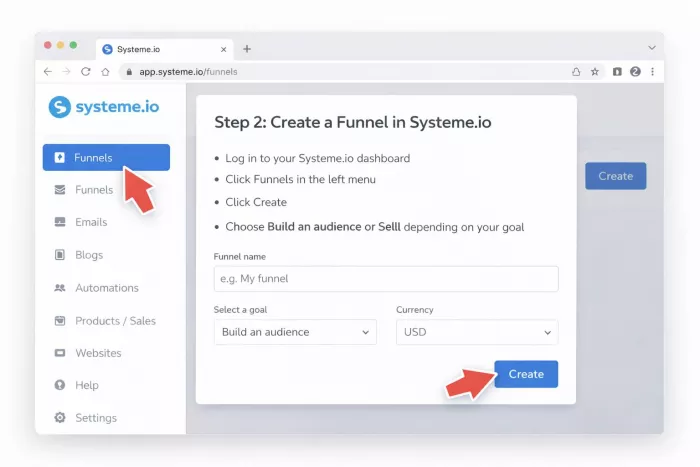
Step 2: Create a Funnel in Systeme.io
In Systeme.io, sales pages are usually created inside Funnels.
Here is what to do:
● Log in to your Systeme.io dashboard
● Click Funnels in the left menu
● Click Create
● Choose Build an audience or Sell depending on your goal
● Name your funnel and select your currency
This step creates the structure where your sales page will live.
Step 3: Choose a Simple Template
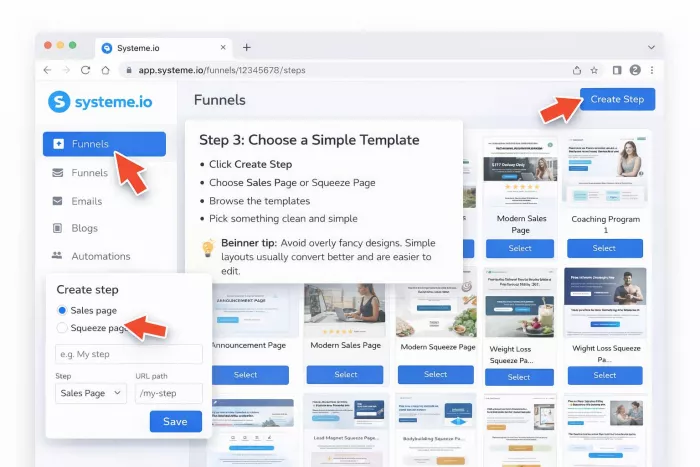
After creating the funnel, Systeme.io will show you ready-made page templates.
Inside the funnel:
● Click Create Step
● Choose Sales Page or Squeeze Page
● Browse the templates
● Pick something clean and simple
Beginner tip:
Avoid overly fancy designs. Simple layouts usually convert better and are easier to edit.
Step 4: Edit the Page with the Drag-and-Drop Builder
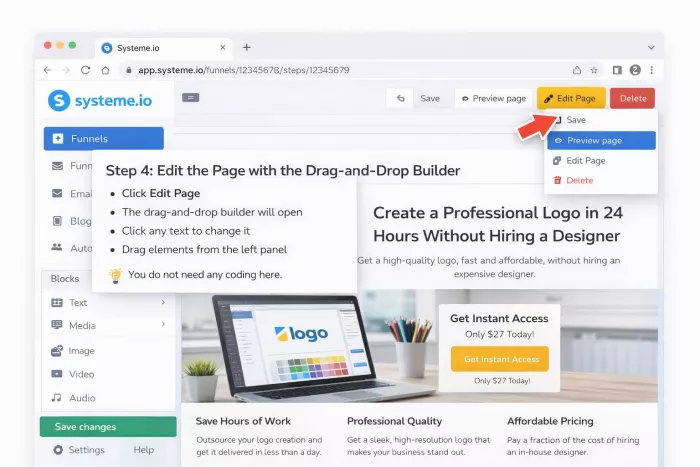
Systeme.io includes a visual editor, which means you can click and edit anything on the page.
To start editing:
● Click Edit Page
● The drag-and-drop builder will open
● Click any text to change it
● Drag elements from the left panel
You do not need any coding here.
Step 5: Write Your Headline First
Your headline is the first thing visitors see, so it must be clear and benefit-focused.
It should answer:
What will the buyer get?
Weak headline:
Welcome to my website
Better headline:
Create a Professional Logo in 24 Hours Without Hiring a Designer
Inside Systeme.io, simply click the headline text and replace it with your own.
Step 6: Add Benefits (Not Just Features)
Many beginners make the mistake of listing only features. Buyers care more about results.
Remember:
● Feature = what it is
● Benefit = why it matters
Example
Feature:
● 50-page ebook
Benefit:
● Learn how to get your first clients in 30 days
Inside Systeme.io, use bullet blocks to list clear benefits such as:
● Save time
● Avoid costly mistakes
● Get faster results
Step 7: Add a Clear Call-to-Action (CTA)
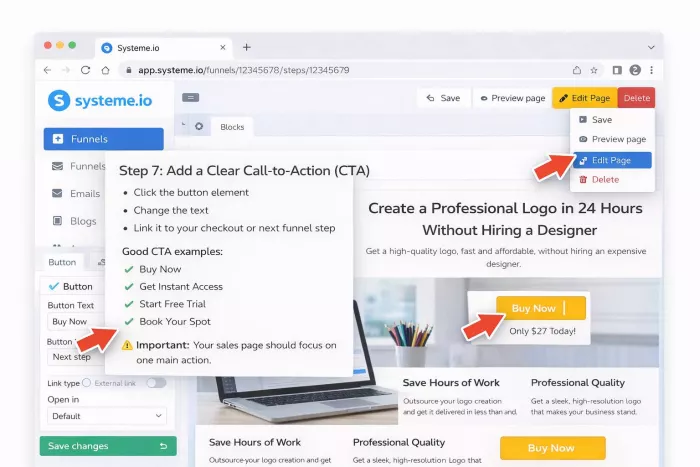
CTA means the button that tells visitors what to do next.
In Systeme.io:
● Click the button element
● Change the text
● Link it to your checkout or next funnel step
Good CTA examples:
● Buy Now
● Get Instant Access
● Start Free Trial
● Book Your Spot
Important:
Your sales page should focus on one main action.
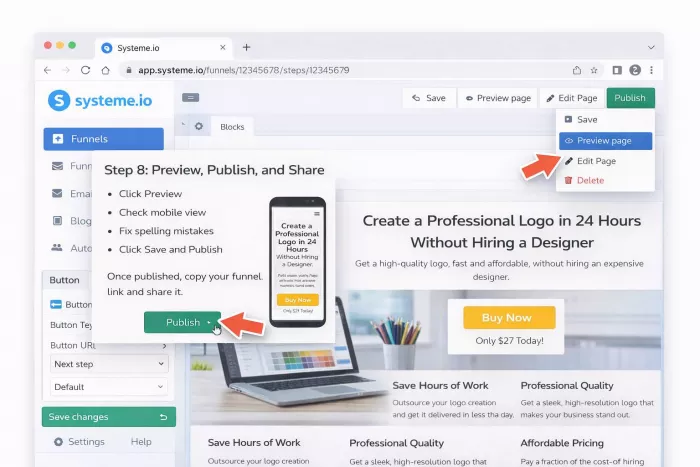
Step 8: Preview, Publish, and Share
Before going live, do a quick check.
Inside Systeme.io:
● Click Preview
● Check mobile view
● Fix spelling mistakes
● Click Save and Publish
Once published, copy your funnel link and share it.
Done. Your sales page is live.
Basic Elements Every Systeme.io Sales Page Needs
1. Headline
Your headline should:
● Grab attention
● Promise a clear result
● Be easy to understand
Avoid vague wording.
2. Short Introduction
Quickly explain:
● What the product is
● Who it is for
● Why it matters
Keep this section short and skimmable.
3. Benefits Section
Use bullet points to highlight outcomes, for example:
● Save hours of work
● Reduce stress
● Get better results faster
Benefits help visitors imagine success.
4. Social Proof (Optional but Powerful)
Systeme.io makes it easy to add trust elements like:
● Testimonials
● Reviews
● User counts
● Client logos
Even one short testimonial can increase trust.
5. Call-to-Action Button
Your CTA button should be:
● Easy to see
● Repeated 2 to 3 times on the page
● Action-focused
In Systeme.io, you can duplicate button blocks to repeat them quickly.
6. Simple FAQ (Optional)
FAQs help remove hesitation.
Common beginner FAQs:
● Is this beginner friendly?
● Do I get support?
● Is there a refund?
Simple Tips to Make Your Systeme.io Page Convert Better
Keep It Clean
Avoid:
● Too many colors
● Too many fonts
● Too much text
Clean pages build trust and load faster.
Focus on One Goal
Do not confuse visitors with multiple actions.
Bad example:
● Buy
● Subscribe
● Follow
● Download
Good example:
● One clear main CTA button
Write Like You Talk
Use simple, human language.
Instead of:
“Leverage this comprehensive solution…”
Say:
“Use this simple tool to…”
Simple words convert better.
Make the Button Easy to See
Your CTA button should:
● Stand out in color
● Be large enough
● Appear multiple times on the page
Always Check Mobile View
Many visitors will come from phones.
Before publishing in Systeme.io:
● Switch to mobile preview
● Check spacing
● Check button visibility
Final Thoughts
Creating a simple sales page with Systeme.io is much easier than most beginners expect.
You do not need:
● Coding skills
● Fancy design
● Expensive software
You only need:
● A clear offer
● Simple structure
● Strong benefits
● One clear call to action
Start simple. Publish fast. Improve later.
Your first sales page does not need to be perfect. It just needs to be live.


Comments