Sitemap Generator by SpellMistake: A Technical, Practical Deep Dive for SEO Teams


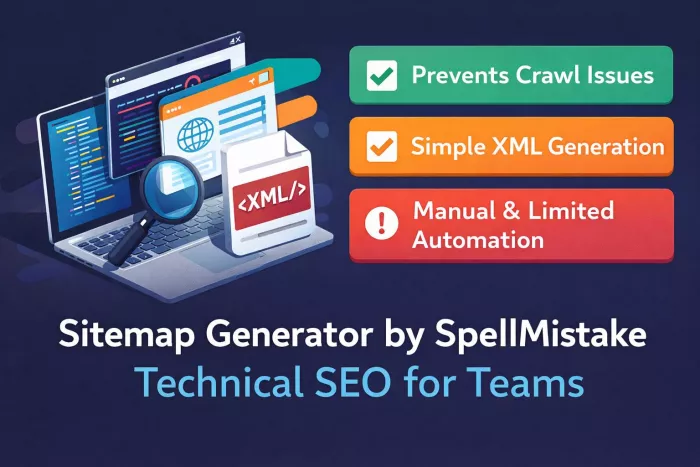
What Sitemap Generator by SpellMistake Actually Is
Sitemap Generator by SpellMistake is a lightweight web-based sitemap creation utility designed primarily for fast XML sitemap generation without requiring server-side installation or CMS plugins. It positions itself as a no-friction crawler that scans a domain, extracts indexable URLs, and exports structured sitemap files.
What separates it from many bulk sitemap tools is its minimal interface and single-purpose design. Instead of acting like a full SEO suite, it focuses narrowly on URL discovery and sitemap output. For small to mid-sized sites that just need a clean sitemap quickly, that simplicity is often the main appeal.
However, the same simplicity also defines its boundaries. This is not an enterprise crawler, and it does not attempt to replace full technical SEO platforms.
Core Functions and Technical Capabilities
At its core, Sitemap Generator by SpellMistake performs three primary technical tasks:
● Site crawling
● URL extraction and filtering
● Structured sitemap export
The crawler starts from a root URL and follows internal links recursively. During the crawl, it collects metadata needed for sitemap formatting such as last modification signals when detectable.
Key technical capabilities
1. Recursive internal link crawling
2. XML sitemap generation
3. Optional HTML sitemap output
4. Basic crawl depth handling
5. Duplicate URL filtering
6. Simple exclusion controls
The tool is clearly optimized for quick sitemap builds rather than deep site diagnostics. It does not behave like a full audit crawler such as Screaming Frog.
Supported Sitemap Formats
One area where users often evaluate sitemap tools is format flexibility. Based on current functionality, Sitemap Generator by SpellMistake primarily focuses on standard sitemap outputs.
| Sitemap Type | Support Status | Practical Notes |
| XML sitemap | Yes | Primary output |
| HTML sitemap | Limited/optional | Depends on configuration |
| Image sitemap | Not strongly specialized | May require manual work |
| Video sitemap | Not dedicated | Better handled elsewhere |
| News sitemap | Not native | Requires manual formatting |
Practical takeaway
● Strong for basic XML needs
● Limited for media-heavy SEO workflows
● Not ideal for Google News publishers
If your SEO strategy depends heavily on image or video indexing, you will likely need a more specialized generator.
Workflow Diagram Explained in Plain Text
Crawl Flow
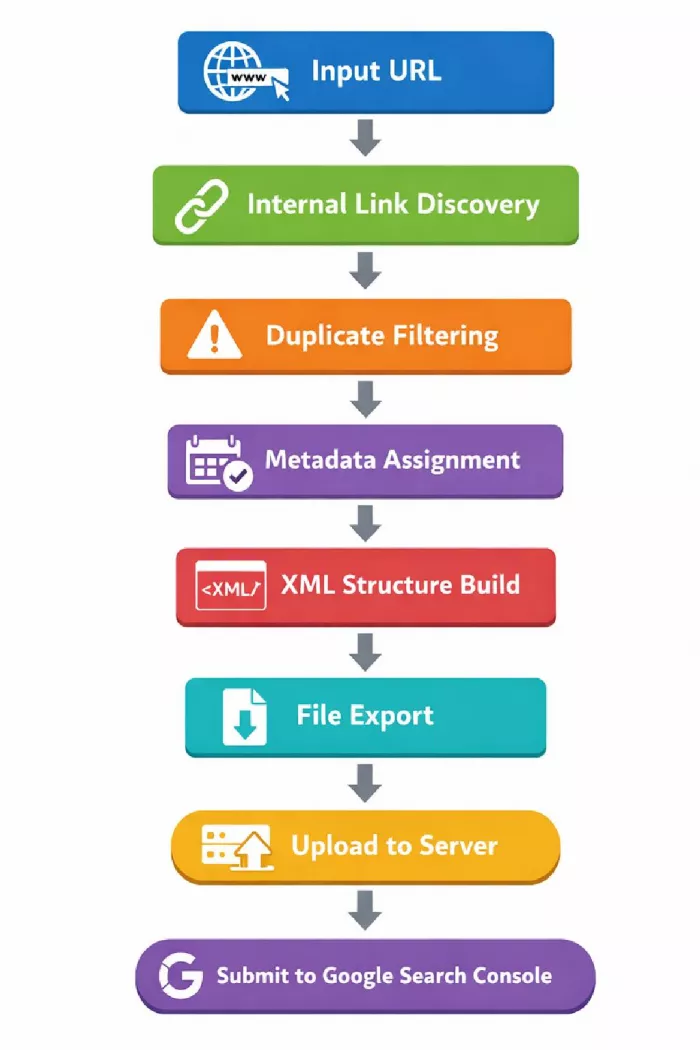
The key observation is that automation stops at file generation. Everything after export remains your responsibility.
What Technical SEO Errors It Helps Prevent
A properly generated sitemap does more than list URLs. Used correctly, this tool can reduce several common indexing risks.
Technical Error Prevention Matrix
| SEO Issue | How SpellMistake Helps | Coverage Strength |
| Orphan pages | Partial detection via crawl | Moderate |
| Crawl depth problems | Surfaces deep URLs | Basic |
| Duplicate URLs | Filters during crawl | Good |
| Missing sitemap coverage | Ensures baseline inclusion | Strong |
| Broken internal links | Not a full validator | Weak |
| Incorrect lastmod tags | Auto-assigned but not always accurate | Moderate |
| Priority misconfiguration | Uses default logic | Basic |
| Indexing gaps | Helps discovery but not guaranteed | Moderate |
Important reality
This tool improves sitemap hygiene, but it does not replace a technical audit crawler. Broken link validation and canonical conflict detection remain outside its main scope.
Where It Actually Helps
Small blogs
For content-driven blogs under a few thousand URLs, the generator provides fast coverage and clean XML output. It is especially useful when:
● The CMS lacks built-in sitemap support
● Plugins are not desirable
● You need a quick manual rebuild
eCommerce stores
It can help small to mid-sized stores ensure product URLs are discoverable. However, large catalog sites may run into crawl limits or performance slowdowns.
Best fit scenarios:
● Under 10k product URLs
● Relatively flat architecture
● Limited faceted navigation
SaaS marketing sites
Marketing sites with landing pages, documentation, and blog sections benefit from the tool’s simplicity. It is particularly useful for static or semi-static sites.
Portfolio and agency websites
For smaller brochure-style sites, this tool is often more than sufficient.
Automation Capabilities vs Manual Limitations
This is where many users misjudge lightweight sitemap tools.
What it automates well
1. Initial URL discovery
2. Basic duplicate cleanup
3. XML formatting
4. Quick sitemap rebuilds
What still requires manual handling
1. Scheduled auto-regeneration
2. Dynamic content monitoring
3. Advanced canonical logic
4. News sitemap compliance
5. Media sitemap structuring
6. Index splitting for very large sites
If your site changes daily at scale, manual regeneration quickly becomes a bottleneck.
Integration with Google Search Console and Other Tools
The tool itself does not directly push data into Google Search Console. The workflow remains manual.
Standard integration workflow
1. Generate sitemap
2. Upload to site root
3. Add sitemap URL in Google Search Console
4. Monitor indexing status
This is perfectly acceptable for many teams but lacks automation.
Missing native integrations
1. No automatic GSC submission
2. No API-based sync
3. No real-time monitoring
4. No indexing feedback loop
Teams running continuous SEO pipelines may find this limiting.
Benefits vs Limitations
Functional Reality Check
| Benefits | Limitations |
| Very easy to use | Limited automation |
| Fast for small sites | Not enterprise-ready |
| Clean XML output | Weak media sitemap support |
| No installation needed | Manual workflow required |
| Good duplicate filtering | Limited technical diagnostics |
| Lightweight interface | No deep crawl analytics |
The pattern is clear: strong simplicity, limited depth.
Feature Comparison with Alternative Sitemap Generators
To properly evaluate SpellMistake’s tool, it helps to compare it against more established options.
| Feature | SpellMistake | Screaming Frog | XML-Sitemaps.com |
| Ease of use | Very high | Moderate | High |
| Crawl depth control | Basic | Advanced | Basic |
| Media sitemap support | Limited | Strong | Moderate |
| Automation | Low | High | Low |
| Large site handling | Moderate | Excellent | Limited |
| Technical audit features | Minimal | Extensive | Minimal |
| GSC integration | Manual | Partial automation | Manual |
| Best for | Small to mid sites | Enterprise SEO | Quick sitemap builds |
Technical Gaps You Still Need to Handle Manually
Even when the sitemap is perfectly generated, several SEO responsibilities remain outside the tool’s scope.
Critical manual checks
1. Canonical tag validation
2. Robots.txt conflict review
3. JavaScript rendering issues
4. Parameter handling
5. Faceted navigation control
6. Index bloat management
7. Core Web Vitals performance
Relying solely on any sitemap generator for technical SEO is a strategic mistake.
FAQ: Real Questions Users Actually Ask
1. Is Sitemap Generator by SpellMistake free?
Most versions of the tool are free for basic usage. However, always verify current limits because free tools often impose crawl caps or usage restrictions.
2. Does it support large websites?
It can handle small to moderately sized sites effectively. For very large sites, performance and completeness may decline. Enterprise-scale crawling is not its primary strength.
3. Can it auto-update sitemaps?
No native continuous auto-update system is typically built in. You usually need to regenerate the sitemap manually when your site structure changes.
4. Is it safe to use?
Yes, from a typical usage standpoint it is safe. It only crawls publicly accessible URLs. Still, always review the generated sitemap before submission to ensure accuracy.
5. Does it detect broken links?
Not comprehensively. While it may encounter obvious issues during crawling, it is not a full broken-link auditing tool.
6. Can it generate image or video sitemaps?
Support for advanced media sitemap formats is limited. Sites heavily dependent on image or video SEO should consider more specialized tools.
7. Do I still need Google Search Console after using it?
Absolutely. The generator creates the sitemap, but Google Search Console is still required to submit, monitor, and diagnose indexing performance.
Bottom Line for Technical SEO Teams
Sitemap Generator by SpellMistake sits in a very specific niche. It is best understood as a fast, lightweight sitemap builder for small to mid-sized websites that need clean XML output without complexity.
It is not trying to be a full technical SEO platform, and expecting that level of depth will lead to disappointment. Used within its intended scope, it performs efficiently and predictably. Used beyond that scope, its limitations appear quickly.
For lean teams, static sites, and straightforward architectures, it can be a practical utility. For large-scale SEO operations, it should be viewed as a helper tool rather than the primary crawling engine.


Comments