Zoho CRM vs Pipedrive: Which CRM Holds Up When Sales Operations Get Complex



Zoho CRM and Pipedrive are often compared as if they solve the same problem, but they attract completely different types of users. One is built for teams that want speed and clarity in closing deals. The other is built for businesses that need systems, automation, and control across operations.
Most comparisons miss this distinction. They focus on features instead of how these tools behave when sales pipelines grow, teams expand, and workflows become more complex. The real difference is not about which tool has more features. It is about whether you need simplicity or depth.
Core Philosophy Difference
Zoho CRM is built as part of a larger ecosystem. It is designed to connect sales with marketing, support, finance, and operations. This makes it highly customizable, but also more complex to manage.
Pipedrive is built around one core idea. Sales teams should focus on deals and pipeline movement. Everything in the system is optimized for visibility and speed, not for building a full business system.
This is not a feature comparison. It is a difference in approach. Zoho tries to handle the entire business. Pipedrive focuses on helping sales teams close deals faster.
Pipedrive in Real Sales Workflows
Pipedrive works best when speed matters. In daily usage, the pipeline is always visible, deals are easy to move, and actions like adding notes or scheduling follow-ups take very little effort. Sales teams can operate without thinking about the system itself.
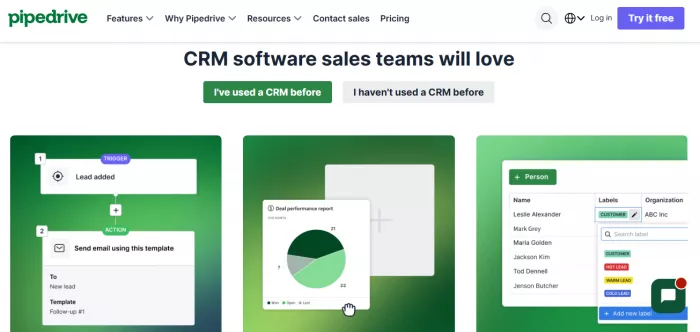
Adoption is quick because the structure is simple. Leads turn into deals, deals move across stages, and progress is always visible. This makes it especially effective for teams that need to stay focused on closing rather than managing tools.
However, this simplicity becomes a limitation as workflows grow. Once businesses need automation, advanced reporting, or multi-layered processes, Pipedrive starts to feel narrow. Teams often rely on integrations or manual workarounds to fill the gaps.
Best use cases
● Small to mid-sized sales teams focused on closing deals
● Teams that rely on visual pipelines and quick updates
● Businesses with straightforward sales processes
Key strengths
● Clear and visual pipeline management
● Fast onboarding and minimal training required
● Strong focus on deal tracking and follow-ups
Real limitations
● Limited automation compared to larger CRM systems
● Reporting lacks depth for advanced analysis
● Struggles with complex workflows and multi-team coordination
Zoho CRM in Real Business Operations
Zoho CRM behaves very differently in real environments. It is not just a pipeline tool. It is a system that can handle leads, workflows, automation, reporting, and integrations across multiple departments.
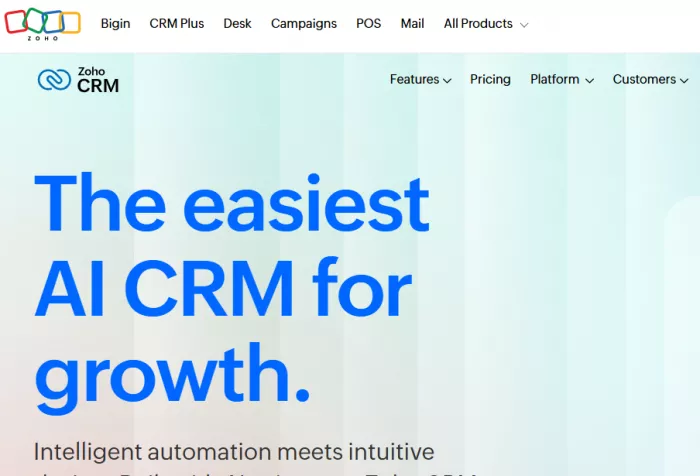
The initial experience can feel overwhelming. There are more settings, more customization options, and more decisions to make before the system works efficiently. This creates a learning curve that slows down early adoption.
Once configured properly, Zoho CRM becomes significantly more powerful. It can automate lead assignment, manage multiple pipelines, integrate with marketing tools, and provide detailed reporting across the business. This makes it suitable for organizations that need more than just a sales pipeline.
Best use cases
● Growing businesses with multiple sales processes
● Teams that need automation and workflow control
● Organizations using multiple tools within one ecosystem
Key strengths
● Strong automation capabilities across workflows
● Deep customization for different business models
● Integration with a wide ecosystem of tools
Real frustrations
● Interface can feel complex and cluttered
● Setup requires time and planning
● Learning curve slows down initial usage
Scenario-Based Comparison
For a small team managing leads manually, Pipedrive performs better. It allows teams to start quickly, track deals visually, and maintain momentum without needing setup or training. Zoho CRM, in this scenario, adds unnecessary complexity and slows down execution.
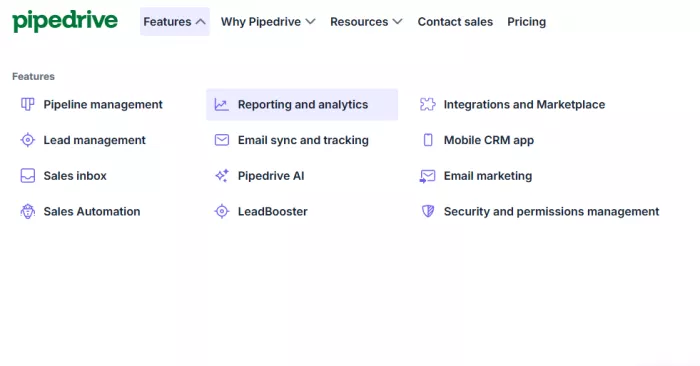
For a growing business that needs automation, Zoho CRM becomes more valuable. It can assign leads automatically, trigger workflows, and reduce manual work. Pipedrive can handle basic automation, but it starts requiring external tools as needs grow.
When handling multiple pipelines and workflows, Zoho CRM clearly performs better. It allows businesses to manage different sales processes within one system. Pipedrive can manage multiple pipelines, but it lacks the depth to handle complex variations efficiently.

As a business scales and requires integrations and reporting, Zoho CRM becomes a stronger option. It connects with a broader ecosystem and provides deeper insights. Pipedrive, while still usable, begins to feel limited and requires additional tools to maintain the same level of control.
Pricing and Value Analysis
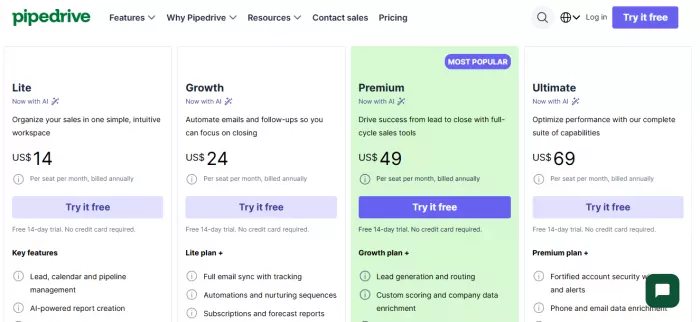
| Plan Level | Zoho CRM Pricing | Pipedrive Pricing |
| Entry-Level | Standard: $14 per user/month | Essential: $14.90 per user/month |
| Lower Mid-Tier | Professional: $23 per user/month | Advanced: $27.90 per user/month |
| Upper Mid-Tier | Enterprise: $40 per user/month | Professional: $49.90 per user/month |
| High Tier | Ultimate: $52 per user/month | Power: $64.90 per user/month |
| Top Tier | Not applicable (Ultimate is highest) | Enterprise: $99 per user/month |
In practice, Pipedrive becomes expensive faster as teams grow and require higher-tier features. Zoho CRM offers more functionality at lower tiers, but the real cost comes from setup time and complexity.
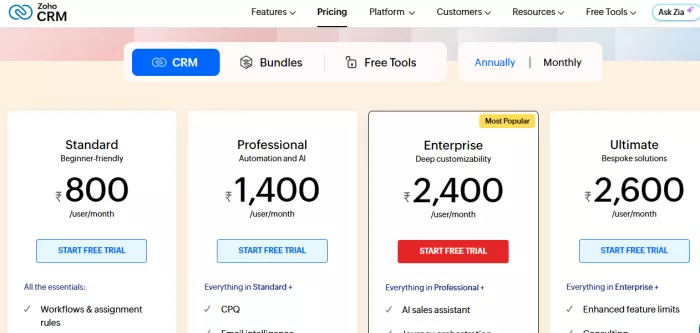
Pipedrive’s cost is straightforward but increases with feature needs. Zoho’s cost is lower per feature, but requires investment in configuration and management.
Ratings and User Feedback
Zoho CRM typically holds ratings between 4.1 and 4.3 out of 5, while Pipedrive ranges between 4.5 and 4.6 out of 5.
Pipedrive is consistently preferred for its simplicity, clean interface, and fast adoption. Sales teams can start using it without training, which improves consistency and usage rates.
Zoho CRM is chosen for its depth and flexibility. Businesses that need customization and integrations value its ability to adapt to complex workflows.
Common complaints
● Zoho CRM: complex interface, steep learning curve
● Pipedrive: limited customization and reporting depth
Key strengths
● Zoho CRM: strong automation and ecosystem integration
● Pipedrive: intuitive pipeline management and usability
Decision Framework
Choose Pipedrive if your priority is speed, simplicity, and closing deals without dealing with system complexity. It works best for teams that want a clear pipeline and minimal setup.
Choose Zoho CRM if your business requires automation, customization, and scalability across multiple processes. It is better suited for organizations that need a system, not just a pipeline.
Pipedrive is the better choice for execution-focused sales teams. Zoho CRM is the better choice for businesses building long-term operational infrastructure.


Comments