Akool AI Review: I Tested Whether It Can Replace a Small Video Production Workflow



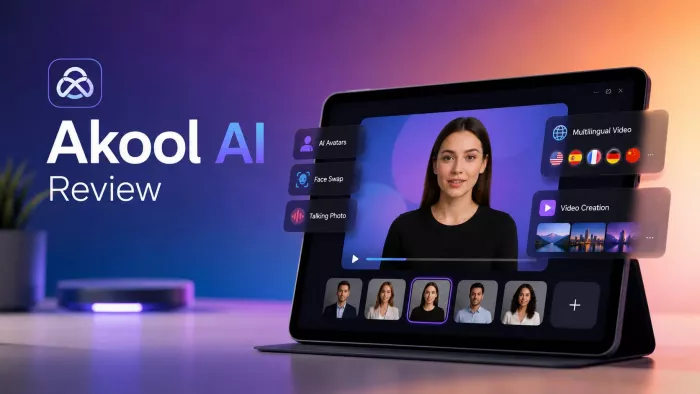
Akool AI is not trying to be just another face-swap website. It wants to sit inside a real content workflow, where a creator, marketer, educator, or agency can make avatar videos, translate clips, swap faces, animate photos, and produce campaign-style visuals without recording everything from scratch. I tested it from that angle: not whether it has many AI tools, but whether those tools actually feel useful in a production setting.
What Akool AI Is Really Trying to Do
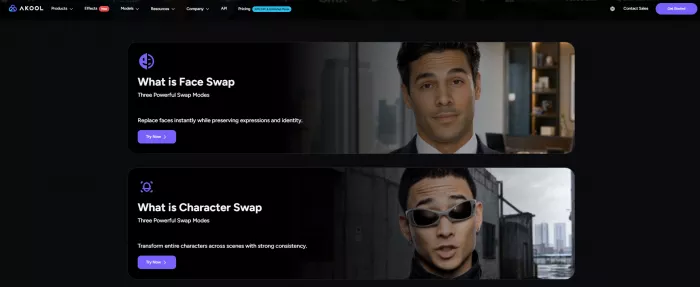
Akool AI is best understood as an AI video production suite. Its main tools include face swap, talking avatar, video translation, lip-sync, talking photo, image generation, background change, live camera features, and API access. That combination makes it broader than casual face-swap tools and more marketing-focused than basic avatar generators.
The platform is built around a specific promise: reduce the amount of manual video production work needed for spokesperson videos, localized clips, personalized ads, visual experiments, and branded AI content. Instead of hiring a presenter, recording multiple language versions, editing faces manually, or building every visual from scratch, Akool tries to place those tasks inside one browser-based workspace.
| Traditional Video Task | What Akool AI Tries to Replace |
| Recording a presenter | Talking avatars and talking photos |
| Reshooting a video in another language | Video translation and lip-sync |
| Manual face replacement | Face swap and head swap tools |
| Campaign personalization | AI face swap, avatars, and video campaign tools |
| Basic visual editing | Background change and image tools |
| Developer integration | API access for face swap, avatar, lip-sync, and moderation tools |
That makes Akool more serious than a novelty AI tool. But it also raises expectations. A platform like this cannot be judged only by how impressive one demo looks. It has to be judged by workflow, quality consistency, pricing, credits, safety, and whether the output can be used without too much correction.
First 20 Minutes With Akool AI
My first impression of Akool AI was that it feels more like a full video workspace than a single-purpose generator. The platform puts several tools in front of the user, including face swap, video translation, avatar video, talking photo, image generation, background tools, and live camera features. That range is useful, but it also means the first few minutes are not just about clicking “generate.” You have to decide what kind of output you are trying to create.
The interface feels more business-oriented than playful. A casual user who only wants one quick face swap may find it heavier than expected, but someone working on marketing content, product demos, localized videos, or AI spokesperson clips will understand why the platform has so many sections.
The good part is that the core workflows are not deeply technical. Face swap follows a clear upload-and-generate process. Avatar tools are built around selecting a presenter and adding a script. Video translation is structured around uploading a clip, choosing a language, and letting the system process speech and lip movement. The harder part is not learning where the buttons are. The harder part is understanding which tool is worth spending credits on.
That credit awareness appears quickly. Akool is not a tool where every experiment feels free or unlimited. Even if the platform has a free plan, serious use moves into paid plans and credit consumption. That changes how you test it. You do not want to generate ten versions casually without thinking about cost.
The Production Test: What I Tried
Instead of checking Akool as a list of features, I tested it through production-style questions. Can it create a usable AI presenter video? Can it translate a video without requiring a reshoot? Can the face swap look professional instead of gimmicky? Can a talking photo be useful beyond a short novelty clip?
| Test Scenario | What I Checked | What Mattered Most |
| AI presenter video | Avatar delivery, script handling, voice, expression | Whether it could replace a simple presenter recording |
| Video localization | Translation, lip-sync, timing, audio clarity | Whether it could reduce multilingual reshoots |
| Face swap | Blending, lighting, expression match, artifacts | Whether it looked usable beyond entertainment |
| Talking photo | Mouth movement, eye movement, short-form usefulness | Whether it worked as a practical content tool |
| Image and background tools | Ease of use and output usefulness | Whether these tools add real value or feel secondary |
This approach gave a clearer picture of Akool. It is strongest when the user has a specific production problem. It is weaker when used casually without a clear goal.
Test 1: Can Akool Create a Usable AI Presenter Video?
The avatar workflow is one of Akool’s most practical areas. I used it as if I were creating a short explainer or product message. The process is straightforward: choose an avatar, add a script, select voice settings, and generate the video.
The result fits best in business-style content. It works for product explainers, internal updates, training clips, SaaS walkthroughs, onboarding videos, and short marketing messages. This is not the same as hiring a strong human presenter, especially when the content needs emotion, humor, improvisation, or natural personality. But for structured delivery, Akool can reduce production effort.
The avatar output felt most convincing when the script was short and direct. Long paragraphs made the performance feel flatter. That is a common issue with AI presenters. They are better at clean delivery than emotional pacing. A short product explanation worked better than a dramatic brand story.
The important lesson is that Akool’s avatar tool should not be treated as a full human replacement. It is better as a presenter substitute for routine video formats where clarity matters more than deep personality.
Test 2: Can It Localize a Video Without Reshooting?
Video translation is one of Akool’s strongest business use cases. This feature makes the most sense for creators, educators, agencies, and brands that already have a talking-head video and want to adapt it into another language.
The practical value is clear. Normally, localization means rewriting the script, hiring another voice actor or presenter, recording again, editing again, and syncing the final version. Akool tries to reduce that chain by translating speech and adjusting lip movement to match the new audio.
The result depends heavily on the original video. Clean speech, minimal background noise, a visible speaker, and stable framing give the tool a better chance. If the original video has music over the voice, unclear pronunciation, multiple speakers, or fast cuts, the output becomes harder to trust.
This is the section where Akool feels less like a toy and more like a real business tool. It can save time on multilingual campaigns, training content, product demos, and creator videos. But I would not publish a translated video without reviewing the script, pronunciation, timing, and meaning. AI translation can help with production, but it should not remove final human review.
Test 3: Can Face Swap Look Professional, Not Gimmicky?
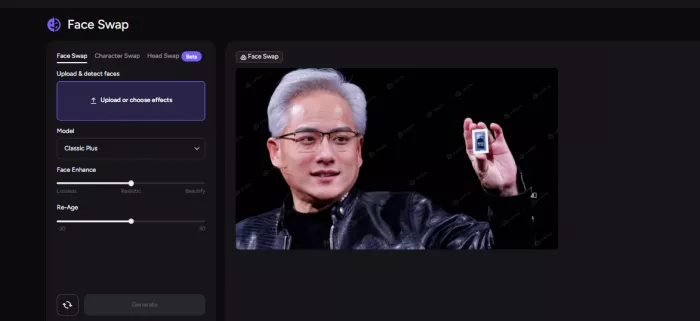
Akool’s face swap feature is one of the main reasons people discover the platform. It supports photo and video face swapping, and the workflow is simple enough: choose the swap type, upload the image or video, assign the face, and generate the result.
The best results came from clean input. A clear face, front-facing angle, steady lighting, and good resolution made the output look more natural. In that kind of material, Akool’s face swap can look polished enough for mockups, creative campaigns, internal concepts, and short-form visuals.
The weakness appears when the source material becomes difficult. Fast movement, strong shadows, side angles, low-resolution footage, and partial face obstruction can expose the limits of the AI. The result may still be usable, but it becomes easier to notice small artifacts or expression mismatch.
This is where users need realistic expectations. Akool can produce strong face swaps, but the quality does not come only from the AI model. It also comes from the input. Bad source footage creates bad pressure on the tool.
Test 4: Can Talking Photo Be More Than a Novelty?
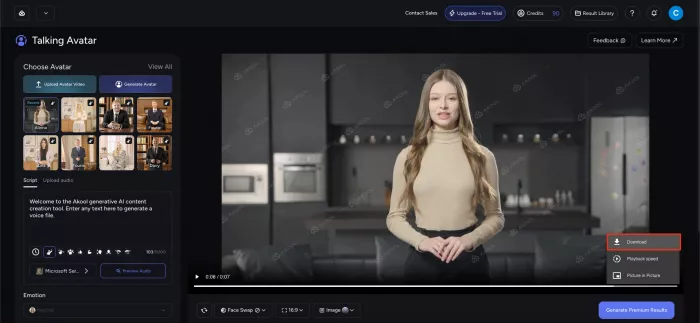
Talking Photo is useful, but only within the right limits. I see it as a short-form feature, not a long-form video solution.
The workflow is simple. Upload a still image, add speech or script, and let Akool animate the face. For short clips, profile-style messages, character explainers, or quick social posts, the feature can work well. It gives static images motion and can make simple visual content feel more alive.
The limitation is repetition. When a talking photo runs too long, the movement can start to feel mechanical. Mouth movement may stay acceptable, but the eyes, facial rhythm, and emotional expression can feel less natural than a real video. This is why the feature is better for short clips than extended presentations.
Talking Photo is a useful supporting tool inside Akool. It is not the strongest reason to buy the platform, but it adds value when you need quick animated content from a still image.
Test 5: Are the Image and Background Tools Actually Useful?
Akool also includes image generation and background change tools. These are helpful, but they feel more like supporting features than the platform’s core identity.
The background tool is useful when you need to adjust a visual without leaving the platform. The image generator can help create quick visual assets, concept images, or supporting graphics. But Akool’s strongest value is still video, face swap, avatars, and localization.
That matters because buyers should not choose Akool only for image generation. There are dedicated image tools with deeper control. Akool makes more sense when image tools are part of a larger video workflow.
The Output Quality Pattern I Noticed
Akool performs best when the input is already production-friendly. That is the biggest quality pattern across the platform.
A clear face improves face swap. Clean audio improves video translation. A front-facing speaker improves lip-sync. A short, structured script improves avatar delivery. A sharp photo improves talking photo output. The tool can help automate production, but it cannot fully rescue weak source material.
| Input Condition | What It Usually Improves |
| Clear face and good lighting | Better face swap realism |
| Stable video framing | Fewer visible motion issues |
| Clean speech audio | Better translation and voice timing |
| Front-facing speaker | More believable lip-sync |
| Short script | More natural avatar delivery |
| High-resolution image | Better talking photo and visual output |
This is why Akool is better for planned content than random low-quality clips. If the user prepares the input well, the output has a much better chance of looking polished.
Akool AI Pricing: What It Actually Costs
Akool is not priced like a simple unlimited monthly tool. It uses a mix of subscription plans and credit-based generation, so the real cost depends on the video length, feature type, resolution, number of retries, and output volume.
| Plan | Public Pricing Position | Main Limits or Benefits |
| Basic / Free | Free | 720p output, watermark included, 5-minute video limit, limited templates, Classic FaceSwap only, one concurrent generation |
| Pro | Around $30/month on monthly billing, lower annual or promo pricing may appear | Up to 4K, 30-minute videos, watermark removal, all video and image models, faster processing |
| Pro Max | Price varies by checkout and billing cycle | Up to 8K, 45-minute videos, API access, workspace collaboration, 8 concurrent generations |
| Business | Varies by package, often positioned for teams | Business license, 1 TB storage, longer session limits, more avatars, larger upload limits |
| Enterprise | Custom pricing | Custom limits, enterprise support, private or high-volume options |
The subscription price is only part of the cost. Akool also uses credits for different AI actions, especially when using API-style or high-volume workflows.
| Feature | Listed Credit Usage |
| Talking Avatar, 1080p | 5 credits per 10 seconds |
| Talking Avatar, 4K | 10 credits per 10 seconds |
| Video Translation | 1 credit per 5 seconds, listed as a limited-time offer |
| Talking Photo | 10 credits per 5 seconds |
| LipSync | 10 credits per 10 seconds |
| Face Swap Image | 4 credits per image |
| Face Swap Video | 10 credits per 10 seconds |
| Background Change | 4 credits per image |
| Image Generator | 8 credits per image |
That credit system is the main thing users should watch before subscribing. A short test video may feel inexpensive, but longer avatar videos, repeated face-swap attempts, 4K exports, and campaign-level testing can raise the real cost quickly. Akool makes the most sense when users estimate their monthly output volume first, not just the subscription fee.
The Credit Problem
Akool’s credit system is not automatically bad, but it requires attention. A credit system makes sense for AI video because different tasks consume different levels of processing. A five-second talking photo is not the same as a long face-swap video or a translated avatar clip.
The issue is predictability. If a user generates one clean output, the cost feels manageable. If they need five retries, multiple languages, longer durations, or higher-resolution versions, credits can disappear faster than expected.
This matters most for agencies, creators, and small businesses. A marketing team may test multiple avatars, versions, scripts, and languages before choosing one final video. That experimentation can become expensive if the credit budget is not planned.
The best way to use Akool is to test with short clips first, confirm the output style, and then spend credits on longer final videos. Treat credits like production budget, not like unlimited play money.
The Trust Problem: Akool’s Strongest Tools Need Responsible Use
Akool’s most impressive tools are also the ones that carry the most ethical risk. Face swap, avatars, lip-sync, and voice-style video generation can create realistic media. That makes consent and disclosure important.
The safest rule is simple: do not use someone’s face, voice, or likeness without permission. A technically clean face swap is not automatically acceptable. The person being represented still has privacy, identity, and reputation interests.
Akool can be useful for marketing campaigns, personalized ads, training videos, entertainment concepts, and localization. But users should avoid fake endorsements, impersonation, misleading celebrity content, political manipulation, deceptive advertising, and anything that makes viewers believe a real person said or did something they did not approve.
For business use, teams should build a basic review process: confirm consent, label AI content when needed, check commercial rights, review translated scripts, and keep records of approved assets.
Where Akool Feels Strongest
Akool feels strongest when the user has a clear production goal. It is not just for playing with AI effects. It works better when a team says, “We need a product explainer,” “We need this video in three languages,” or “We need a personalized campaign variation.”
The video translation workflow is one of the most practical areas because it solves a real production problem. Localization is expensive and slow when done manually. Akool can reduce that workload, especially for short business videos and educational material.
Face swap is also strong when the source material is clean. It can support campaign concepts, personalized videos, creative tests, and visual mockups. Talking avatars are useful for repeatable content like explainers, onboarding, tutorials, and internal communication.
The platform is also stronger than many casual tools because it includes API access and workspace-oriented features in higher plans. That makes it more useful for teams and businesses than for one-time hobby users.
Where Akool Feels Weakest
Akool is weakest when users expect instant perfection from difficult input. Low-resolution videos, bad lighting, unclear speech, fast movement, side angles, and crowded scenes can reduce output quality. The platform is powerful, but it still depends on the source material.
It can also feel too heavy for casual users. If someone only wants one quick avatar clip or one funny face swap, Akool may feel like more platform than they need. The broader toolset is valuable, but only if the user actually needs several video workflows.
Pricing is another area that needs caution. The subscription plan is only one part of the cost. Credits, video length, retries, and feature type shape the real monthly spend. Users who do not track credits may feel surprised by how quickly usage adds up.
The ethical responsibility is also heavier than with simple design tools. Akool’s face and video tools can create believable synthetic media, so misuse risk is real.
Real User Reviews: What People Like and Dislike About Akool AI
Public reviews of Akool AI are generally positive, but they are not one-dimensional. Across review platforms and app listings, users mostly praise the platform for its output quality, video-generation range, face swap tools, talking photo feature, and usefulness for marketing-style content. The criticism usually comes from a different place: pricing clarity, credit usage, generation consistency, limited editing control, and occasional workflow friction.
On Capterra, Akool is listed with positive feedback around content generation, text-to-image, creative design, custom voices, branding, and templates. The review pattern suggests that users see Akool as a serious creative tool rather than a basic AI gimmick. Some users specifically mention the interface, multilingual video tools, lip-syncing, and output quality as strengths. At the same time, value-for-money feedback is more cautious, which fits with the platform’s credit-based pricing model.
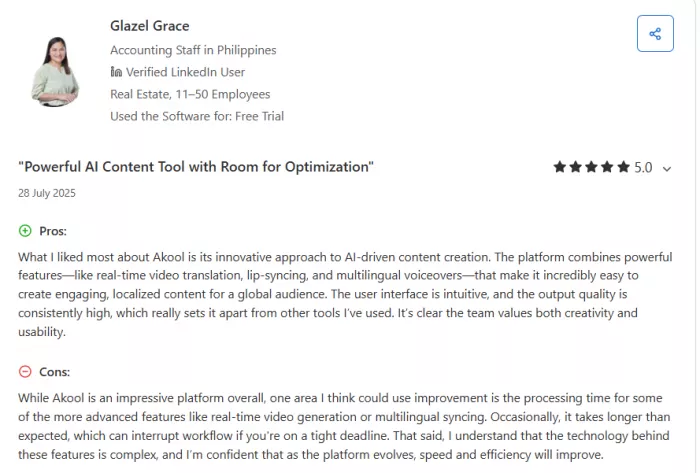
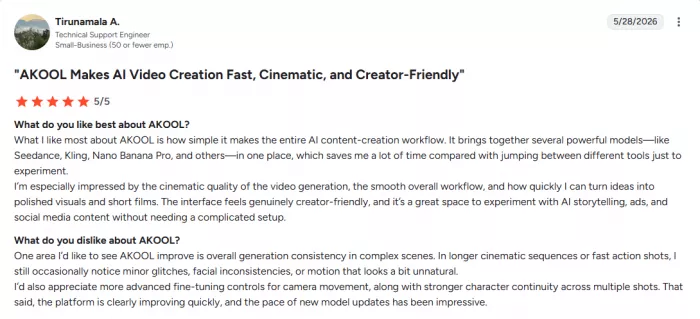
G2 feedback follows a similar pattern. Users like the cinematic quality and professional-looking outputs, especially when prompts and source material are strong. The main dislike mentioned in G2-style feedback is consistency. Some outputs may require multiple attempts, and generation speed can feel slower during heavier usage periods. This is important because Akool’s best results often come after testing, not always from the first generation.
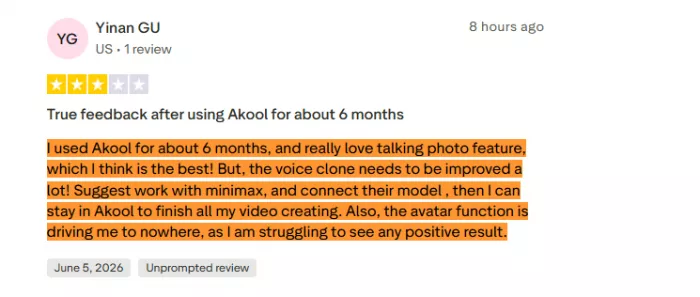
Trustpilot feedback is more mixed and useful for understanding real friction. Some users praise specific tools such as Talking Photo, but also mention that other areas, such as voice cloning or avatar generation, need improvement. That kind of feedback makes the platform look capable but uneven. Akool may impress in one workflow while still needing refinement in another.
The App Store listing also shows a similar split. Users like that Akool can create videos quickly and produce good-looking results, but some want more control over the final output. One visible review asks for better editing options, such as changing or removing objects and uploading personal videos for more customization. That points to a clear limitation: Akool can generate strong AI video results, but it is not a full manual video editor.
A fair summary of real user sentiment is this: Akool AI is liked for its creative power, realistic outputs, and broad feature set, but users want more predictable costs, more consistent generations, faster processing, and deeper editing control.
| What Users Like | What Users Dislike |
| Realistic face swap and video outputs | Credit-based pricing can feel hard to predict |
| Strong talking photo and avatar-style tools | Some generations need retries |
| Useful video translation and lip-sync features | Output quality depends heavily on source material |
| Good option for marketing and localized content | Limited manual editing compared with full video editors |
| Broad AI video suite in one platform | Some tools feel stronger than others |
| Professional-looking results with good inputs | Generation speed can vary during busy periods |
The biggest takeaway from user reviews is that Akool’s value depends on workflow fit. Users who need face swap, avatars, talking photos, video translation, and AI video personalization in one place are more likely to find value in it. Users who only need one simple feature may feel the platform is more expensive or more complex than necessary.
Best Akool AI Alternatives by Use Case
Akool is not always the best choice for every user. It depends on which part of the workflow matters most.
| Use Case | Alternative | Why It May Be Better |
| Business avatar videos | HeyGen | More focused on polished avatar and video translation workflows |
| Corporate training videos | Synthesia | Stronger fit for structured enterprise training content |
| Talking photo clips | D-ID | Simpler if photo animation is the main need |
| Dedicated video dubbing and translation | Rask AI | More focused on localization and dubbing |
| Casual face swaps | DeepSwap | More direct for users who only need face swapping |
| Budget avatar videos | Vidnoz AI | Easier for users who want lower-cost avatar generation |
| Creative AI video generation | Runway | Better for cinematic, generative video experiments |
| Education-focused avatar content | Colossyan | Stronger fit for training and learning videos |
The closest alternatives depend on the user’s goal. HeyGen and Synthesia compete more directly with Akool’s avatar and localization side. DeepSwap competes with its face-swap side. Rask AI competes with its translation side. Runway competes more with creative AI video generation than with business avatars.
Who Should Use Akool AI?
Akool AI is best for users who need more than one AI video tool in the same workspace. Marketers can use it for campaign variations and localized content. Agencies can test visual concepts without full reshoots. Educators can create training and explainer videos. Ecommerce teams can experiment with personalized product visuals. Creators can use it for short-form AI content, avatar clips, and multilingual videos.
It is also a good fit for teams that understand production planning. Akool gives better value when users prepare clean inputs, write short scripts, test small clips first, and use credits carefully.
Who Should Skip Akool AI?
Akool is not the best fit for users who only want one casual face swap, one free avatar video, or unlimited experimentation without watching credits. It is also not ideal for people who expect every AI output to be ready without review.
Users who need highly emotional human performance, complex cinematic scenes, or full manual editing control may still need traditional production tools or a dedicated video editor. Akool reduces parts of the production workload, but it does not replace creative judgment, editing taste, legal review, or consent.
Final Verdict
Akool AI is a serious AI video platform, not a simple gimmick tool. Its strongest value is in the combination of face swap, avatars, video translation, lip-sync, talking photos, image tools, and API access. When the input is clean and the goal is clear, it can reduce the need for reshoots, presenters, manual face editing, and repeated localization work.
The weak side is not lack of features. The weak side is control. Users need to manage credits, prepare good source material, review outputs carefully, and handle face or voice use responsibly. Akool can produce impressive results, but it still needs human judgment around quality, cost, consent, and final publishing.
Akool AI is worth considering for marketers, agencies, educators, ecommerce teams, and creators who need repeatable AI video production. It is less suitable for casual users who want one cheap face swap or unlimited free experiments. The platform works best when treated like a production assistant, not a magic replacement for the entire video process.


Comments