Frosting AI Review: What I Found After Testing It for Real Image Work



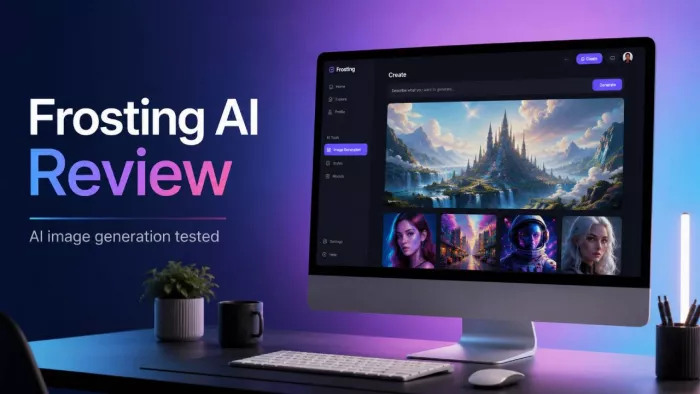
Frosting AI is the kind of tool that looks simple from the outside, but it becomes more interesting once you actually start testing it. It is not trying to be Canva, Photoshop, or a full design suite. It is mainly an AI image generator built for people who want to create characters, anime visuals, fantasy scenes, portraits, wallpapers, and quick creative concepts from prompts.
I tested it with that expectation. I wanted to know whether Frosting AI is only good for casual AI art or whether it can also be useful for content creators who need backgrounds, cover images, social visuals, and visual ideas without spending too much time on manual design.
My Short Take
Frosting AI is useful when you treat it as a fast creative generator, not as a final design tool. It can produce attractive images, especially when the prompt is detailed and the visual style matches what the tool is good at. Anime-style art, fantasy characters, stylized portraits, and mood-heavy backgrounds are where it feels most comfortable.
It becomes weaker when the image needs exact control. Text inside images is unreliable, hands and small details still need checking, and realistic scenes can look polished at first but imperfect when inspected closely. That does not make Frosting AI bad. It simply means the tool is better for idea generation, character visuals, and creative artwork than for professional brand assets.
| Area Tested | Practical Result |
| Ease of use | Easy to start with, even for beginners |
| Best output type | Anime, fantasy, character art, portraits, creative backgrounds |
| Weakest output type | Text-heavy graphics, logos, exact product images, strict layouts |
| Prompt control | Good when prompts are detailed and visual |
| Output consistency | Mixed, especially with faces, hands, and small objects |
| Pricing value | Worth testing on the free plan before paying |
| Trust and privacy | Fine for casual use, but sensitive uploads need caution |
| Best user | Someone creating AI art, characters, social visuals, or moodboards |
The Tool Makes Sense When You Use It Properly
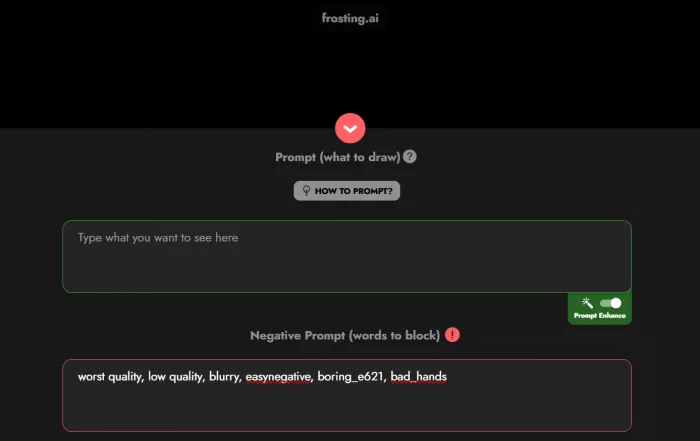
The mistake with Frosting AI would be judging it like a business design platform. It is not built for polished presentation decks, brand systems, typography-heavy posters, or controlled marketing layouts. It is closer to a browser-based Stable Diffusion-style image generator where the prompt does most of the work.
That makes the tool useful for a specific type of user. If you want to create a fantasy warrior, anime character, futuristic street scene, stylized portrait, furry-style artwork, or dramatic background, Frosting AI fits the job well. You can start quickly, test ideas, change your prompt, and generate multiple versions without dealing with a technical setup.
It is less convincing if you need precision. A logo needs clean structure and legal clarity. A product mockup needs correct shape, label placement, and proportions. A client ad needs readable text, exact composition, and brand-safe control. Frosting AI can help with the visual concept, but it should not be treated as the final production stage for that kind of work.
The best way to use it is as the first stage of visual creation. Generate the artwork or background inside Frosting AI, then use another tool like Canva, Photoshop, Photopea, or Figma to add text, crop the image, adjust colors, and prepare the final design.
How I Tested Frosting AI
I did not want to test Frosting AI with only one polished prompt. That would not show much. AI image tools often look impressive when the prompt is carefully written, but the real quality becomes clear when you try different image types.
I tested it across several practical scenarios. I used a simple character prompt to see what a beginner might get with very little detail. I tried anime and fantasy prompts because those seem close to the tool’s natural audience. I also tested realistic portrait-style prompts to check faces, skin, eyes, hands, and small details. For content use, I tested background-style prompts that could work for blog covers or social posts. I also tested prompts that included text because many creators want AI tools to make finished thumbnails or article images.
That testing gave a clear pattern. Frosting AI performs better when the prompt is visual and style-driven. It performs worse when the prompt requires exact typography, perfect anatomy, accurate object placement, or brand-like control.
The Workflow Is Simple, But Not Effortless
The workflow is one of Frosting AI’s strengths. It does not feel intimidating. You open the tool in the browser, go to the image generation area, write a prompt, choose the available settings, and generate. There is no local installation, no GPU setup, and no complicated workflow builder.
That simplicity makes it suitable for beginners. Someone who has never used ComfyUI, local Stable Diffusion, or advanced image models can still understand the basic process quickly. The prompt box remains the main workspace, and that keeps the tool approachable.
But simple does not mean effortless. Frosting AI still depends heavily on the quality of the prompt. A short prompt such as “fantasy girl in forest” may create an image, but the tool has to guess too much. It has to decide the clothing, camera angle, lighting, mood, background, color palette, and overall style.
A stronger prompt gives better direction. For example, “female fantasy character standing in a misty forest, silver armor, soft moonlight, glowing blue flowers, detailed costume, calm expression, cinematic lighting, high-detail digital art” gives the tool more to work with. The output is usually more focused because the idea is clearer.
That is the first real lesson of Frosting AI. It is easy to use, but better prompting leads to better images.
A Simple Prompt Structure That Worked for Me
Since prompt quality decides almost everything in Frosting AI, I settled on a rough structure that gave me more consistent results than typing a single loose line.
I built most prompts in five parts: subject, details, setting, lighting, and style. Instead of "fantasy girl in forest," I would write the subject (female fantasy character), the details (silver armor, calm expression, flowing cloak), the setting (misty forest with glowing flowers), the lighting (soft moonlight), and the style (cinematic, high-detail digital art). Stacking those pieces gave the tool far less to guess about, and the output matched my idea more often.
Negative prompts formed the second half of the habit. Adding things like extra fingers, blurry face, watermark, and distorted hands to the negative field cleaned up the common problem areas before they appeared. It did not fix everything, but it noticeably cut down on throwaway generations.
The lesson was simple. Frosting AI rewards structure. A prompt that reads like a short shot description beats a one-line idea almost every time.
Where the Images Looked Strong
Frosting AI gave the best results when the image had a strong visual mood. Anime-style characters, fantasy scenes, cyberpunk backgrounds, stylized portraits, and dramatic digital art were the most successful areas.
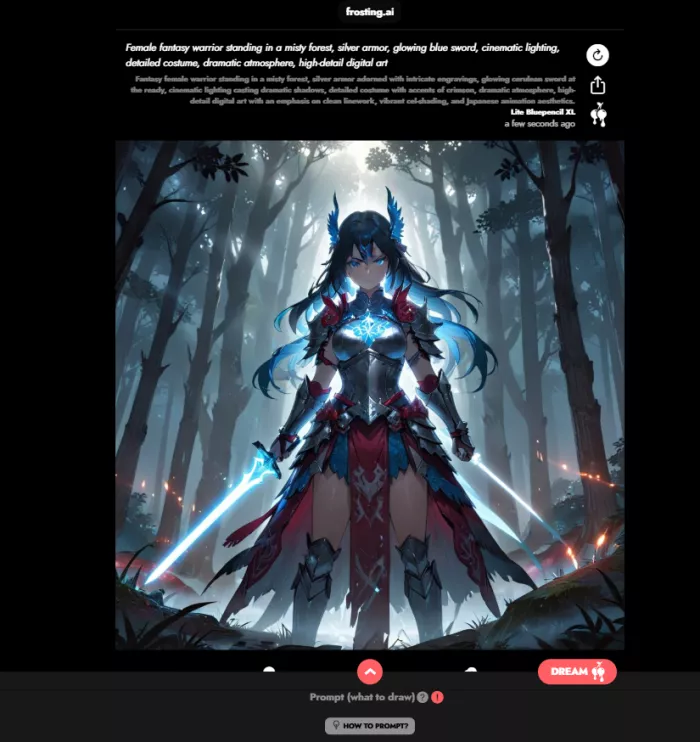
Character images were especially interesting. When the prompt included clothing, expression, lighting, and background detail, Frosting AI was able to create images that looked usable for inspiration, profile visuals, story characters, game concepts, or roleplay-style artwork. The results were not always perfect, but they often had enough style and atmosphere to be useful.
Fantasy prompts also worked well. Scenes with forests, armor, glowing effects, castles, magical lighting, futuristic cities, neon streets, and dramatic backgrounds gave the tool room to be creative. This is where Frosting AI feels more natural than corporate AI design tools. It seems more comfortable producing expressive artwork than clean business graphics.
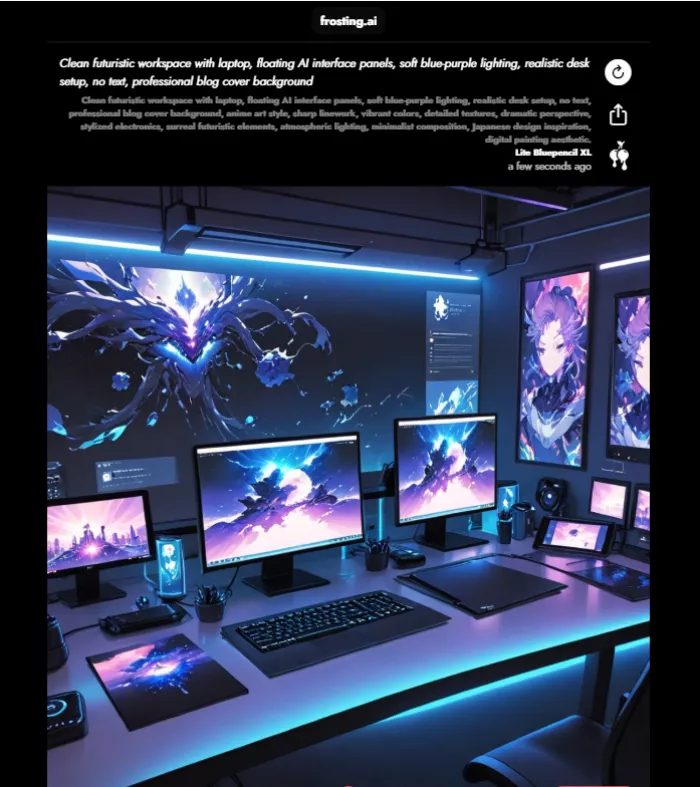
For blog covers and social media visuals, Frosting AI can also be useful, but only if you ask for the right thing. It is better to ask for a background image without text than to ask for a complete finished graphic. A prompt like “realistic futuristic workspace with laptop, floating AI interface panels, soft blue-purple lighting, clean desk setup, no text, professional blog cover background” is more practical than asking the tool to generate a complete article thumbnail with a readable headline.
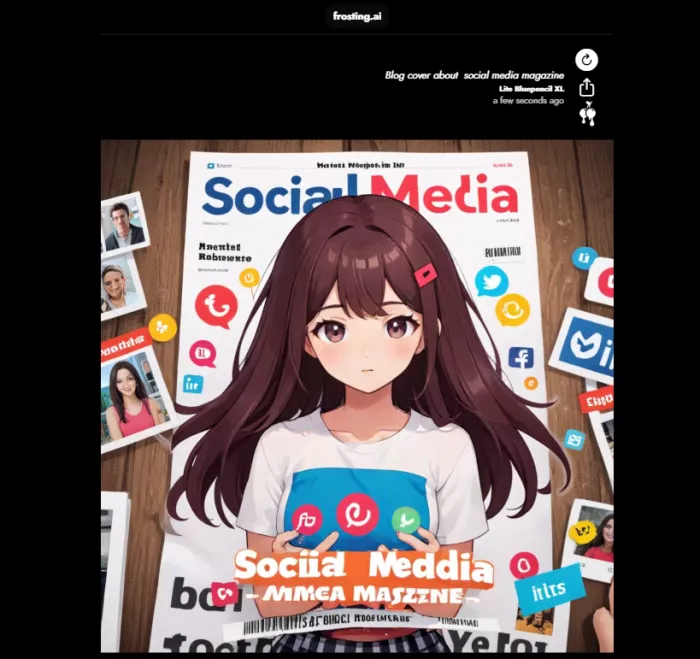
In short, Frosting AI is good at making the visual base. The final polish should happen elsewhere.
Where Frosting AI Struggled
The weak points are not surprising, but they are important. Frosting AI still has the common AI image problems that appear across many image generators.
Realistic portraits can look good at first glance, but small details need careful checking. Eyes may look slightly unnatural. Teeth can appear strange. Skin texture may be too smooth or inconsistent. Hands and fingers are still one of the most common problem areas, especially in full-body images or complex poses.
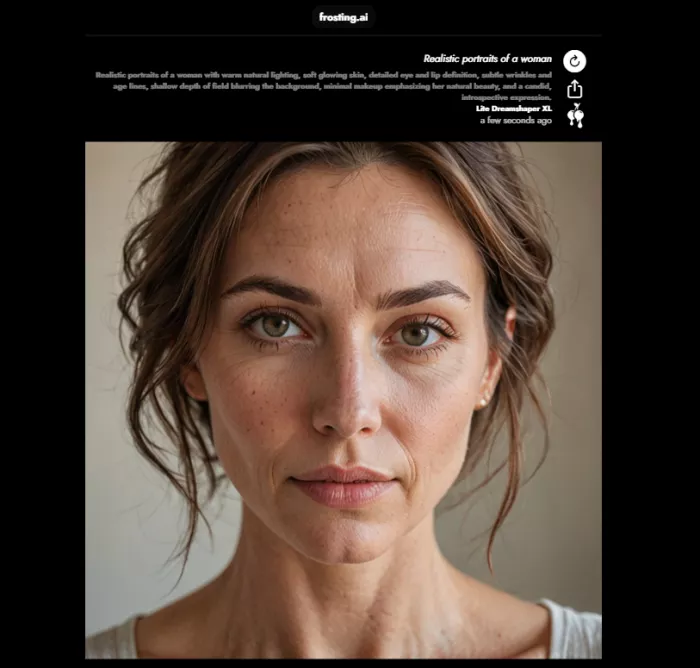
Small objects can also become messy. Jewelry, buttons, wires, background signs, accessories, and product details may not stay accurate. The tool is better at overall mood than exact structure.
The biggest weakness for content creators is text. Frosting AI is not reliable for readable typography inside images. If you ask it to create a poster, thumbnail, or blog cover with words included, the output may contain broken letters, random shapes, or fake text. This makes it unsuitable for final graphics where the headline needs to be clear.
That does not mean content creators should avoid it. It means they should use it differently. Generate the background or main visual in Frosting AI, then add text in a proper design tool. This creates a cleaner final result and avoids the broken typography problem.
Turning a Frosting AI Image Into a Finished Graphic
Because Frosting AI is a starting point rather than a finishing tool, the real value showed up in how I moved an image out of it. The handoff was quick once I had a routine.
First, I generated the visual with no text at all. Asking for a clean background or character without words avoided the broken typography problem entirely and gave me a usable base. Second, if the composition was strong but soft, I upscaled inside Frosting AI before exporting, since that was easier than regenerating and hoping for the same result.
From there, I moved the image into a design tool like Canva, Photopea, or Figma. That is where I added the headline, cropped to the exact size I needed, adjusted colors, and placed any branding. The final result looked far cleaner than anything I tried to finish inside Frosting AI, and it only added a few minutes.
Treated this way, the tool stopped feeling limited. It was doing the one job it is good at, and the design tool handled the rest.
The Features That Actually Matter
Not every feature in an AI image generator has the same impact on the final result. While Frosting AI offers several useful tools, a few stand out as genuinely valuable for everyday creators.
- Text-to-Image Generation: The core feature that matters most. A good AI image generator should accurately understand detailed prompts and turn them into high-quality visuals. If prompt interpretation is weak, additional features cannot fully compensate for poor results.
- Negative Prompts: These help eliminate common AI image issues such as extra fingers, distorted hands, blurry faces, duplicate limbs, unwanted text, watermarks, cluttered backgrounds, and other low-quality artifacts. While they cannot guarantee flawless results, they provide much greater control over image quality.
- Aspect Ratio Control: Different projects require different image dimensions. Square images work well for profile pictures and many social media posts, vertical formats are ideal for mobile content and wallpapers, and widescreen layouts are better suited for blog headers, website banners, and YouTube thumbnails. Having multiple aspect ratio options saves time during editing.
- Image Upscaling: When an image has a strong composition but lacks sharpness or resolution, the upscaling feature helps improve clarity without requiring you to regenerate the entire image.
- Batch Generation: AI image creation often involves experimentation. Generating multiple variations from a single prompt increases the chances of finding a version that closely matches your vision, reducing the need for repeated manual adjustments.
- Advanced Creative Tools: Some versions of Frosting AI also offer features such as reference image support, inpainting for selective edits, video generation capabilities, and other premium creative controls. Since these features may differ across subscription tiers, it's worth checking the latest pricing and feature list before upgrading.
Pricing and Value
Frosting AI is commonly listed with a free plan and paid plans starting around $25 per month, with higher tiers going up to around $120 per month. The exact credits and limits should be checked inside the live account because public sources do not always report the same allowance.
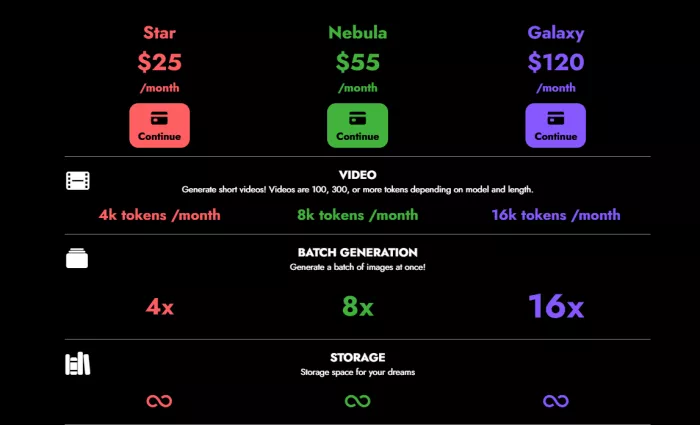
The free plan is important because image quality is personal. A tool may be powerful, but if you do not like its style, it will not be useful for your work. Frosting AI should be tested with your own prompts before paying.
| Plan Type | Practical Meaning |
| Free plan | Best for testing the output style before making a decision |
| Entry paid plan | Suitable for light regular use if the results match your needs |
| Mid-tier plans | Better for users who generate many variations or need more credits |
| Higher plans | More suitable for heavy users who need advanced features or larger limits |
The entry-level price can make sense for casual creators who like the output style. The higher plans require more thought. If you generate many images, test multiple prompt versions, upscale often, or use video features, credits can disappear faster than expected.
Before paying, users should check how many generations are included, whether credits refresh daily or monthly, whether unused credits expire, whether upscaling uses extra credits, whether video uses a separate token system, and whether commercial usage is clearly explained. This matters because AI image tools often feel affordable until you start generating several versions for every usable image.
What User Feedback Suggests
Frosting AI does not have the same review depth as larger tools like Midjourney, Leonardo AI, Canva, or Adobe Firefly. That makes it harder to judge long-term reliability from major review platforms.
The public feedback available from AI tool directories, Reddit discussion, and hands-on review sites is mixed but consistent. Users tend to like the tool because it is easy to try, fast enough for casual use, and good for creative images. At the same time, some users describe it as inconsistent, especially when the prompt is vague or the image requires precision.
That matches my own experience. Frosting AI is enjoyable when used for exploration. It becomes less impressive when treated like a controlled professional design system.
The smaller review footprint is not automatically a problem, but it does mean users should test more carefully before paying. With a tool like this, your own prompts matter more than generic star ratings. If it handles your preferred style well, it may be worth using. If it struggles with your image type, a bigger platform may be a better fit.
Trust, Privacy and Safety
Trust and privacy deserve attention in any Frosting AI review. The tool is often discussed in creative spaces that include anime art, fantasy visuals, furry-style images, and adult-style content. That does not make the platform unsafe by itself, but it does mean users should be careful with uploads and image rights.
For casual fictional artwork, the risk is lower. For private photos, client files, real people, or sensitive projects, users should slow down and read the terms. Do not upload identity documents, personal images, unreleased product designs, confidential client assets, or real people’s photos unless the platform clearly explains how data is stored, used, and deleted.
Users should also be careful with likeness and copyright issues. Creating a fictional fantasy character is different from creating an image that imitates a real person, celebrity, brand logo, or copyrighted character. Even if a tool can generate something, that does not automatically mean it is safe to publish or use commercially.
Frosting AI does not look like an obvious scam from the public information available, and its official community updates suggest that the product is active. Still, it does not have the same public trust layer as Adobe, Canva, or other large creative platforms. For personal creative use, that may be acceptable. For client work or commercial campaigns, I would be more cautious.
Reliability and Accuracy
With AI image tools, accuracy means how closely the output follows the prompt. Frosting AI is reliable with broad creative instructions. It understands requests like anime portrait, fantasy forest, cyberpunk city, cinematic lighting, realistic character, soft glow, or dramatic background.
It is less reliable with exact instructions. If you ask for a specific hand position, exact text, exact logo placement, exact number of objects, or precise product layout, the result may not follow the prompt perfectly. This is why Frosting AI works better for creative direction than strict production work.
That distinction is important. If you need five different visual ideas for a character, Frosting AI can help. If you need one exact product image for an advertisement, it is the wrong tool.
What I Liked and What Needs Work
| What Worked Well | What Needs Improvement |
| The tool is easy to start with and does not require technical setup. | Output quality can change a lot from one generation to another. |
| It works well for anime, fantasy, character visuals, and stylized backgrounds. | Realistic images still need close checking, especially hands and faces. |
| Detailed prompts can produce attractive and usable creative visuals. | Text inside images is not reliable enough for final graphics. |
| Aspect ratio and negative prompt controls make the workflow more practical. | Pricing, credits, and plan limits should be verified before payment. |
| The free plan gives users a way to test the tool before subscribing. | Public user reviews are limited compared with larger competitors. |
This is the most balanced way to look at Frosting AI. It is not a weak tool, but it is also not a fully polished design solution. It sits somewhere in the middle: useful, creative, easy to test, but still dependent on prompt quality and human review.
Best Use Cases
Frosting AI is a good fit for people who need fast visual ideas rather than perfect final assets. It works well for AI art experiments, anime characters, fantasy portraits, furry-style images, wallpapers, avatars, moodboards, social media backgrounds, and story or game character inspiration.
For bloggers and content creators, I would use it mainly for background visuals. It can help create a futuristic workspace, abstract AI scene, fantasy atmosphere, or stylized character image. After that, the image should be edited in a design tool where text, spacing, and branding can be controlled properly.
It is not the best choice for logos, brand identity, exact product mockups, client-sensitive visuals, text-heavy posters, or professional ad creatives. Those tasks need more control, clearer rights, and better consistency.
Is Frosting AI Worth Paying For?
After testing it, my honest answer is that it depends entirely on your style and how often you generate. The free plan exists for exactly this reason, so there is no good argument for paying before you have run your own prompts through it.
Paying starts to make sense when two things are true. You like the output style enough to use it regularly, and you generate often enough that free credits run out before you are done experimenting. For someone making anime art, character concepts, or background visuals every week, an entry plan can be reasonable value.
It is harder to justify if you need polished final graphics, readable text, or brand-safe consistency. In that case the money is better spent on a tool built for that job, since no amount of credits will fix the areas where Frosting AI is simply not designed to compete. Test first, match it to your actual work, and only then decide.
Alternatives Worth Comparing
| Alternative | Better For | Why It May Be a Better Choice |
| Midjourney | Polished artistic images | It usually produces more refined visuals and stronger aesthetics. |
| Leonardo AI | Creative control and concept assets | It gives creators more tools for game assets, image styles, and visual production. |
| Ideogram | Images with readable text | It is stronger when typography matters in posters, thumbnails, or social graphics. |
| Adobe Firefly | Business-friendly creative work | It fits users who want a more mainstream creative ecosystem and clearer commercial positioning. |
| Canva AI | Finished social designs | It is better for layouts, templates, text, and ready-to-publish graphics. |
| SeaArt AI | Community-style AI art | It offers another art-focused environment with many styles and model options. |
| Stable Diffusion or ComfyUI | Maximum control | It is better for advanced users who want local workflows, custom models, and deeper experimentation. |
Frosting AI’s main advantage is low friction. It is easy to try and simple to use. Its disadvantage is that other tools may offer stronger polish, clearer commercial use, better typography, or deeper control.
Final Verdict
After testing Frosting AI, I see it as a practical AI art generator for users who want quick creative images without technical setup. It is not perfect, but it does not need to be perfect for every user. Its value is in speed, simplicity, and stylized output.
I liked it most for anime-style images, fantasy visuals, character concepts, and background ideas. It felt useful when I wanted to explore a visual direction quickly. It felt weaker when I needed accuracy, readable text, precise layouts, or professional design control.
My recommendation is to try the free plan first and test it with the exact image style you need. Do not judge it from sample images alone. Write detailed prompts, generate several versions, and inspect the results closely. If the output style matches your work, Frosting AI can be a useful low-friction image tool. If you need cleaner text, stronger consistency, clearer commercial rights, or more polished final graphics, compare it with Midjourney, Leonardo AI, Ideogram, Adobe Firefly, or Canva before upgrading.


Robert Brown
Oct 6, 2026Really fun for anime and fantasy art but credits go fast once you start upscaling and making variations. Also it wasn't clear on commercial rights so i am careful about using anything for paid work, great for playing around though.
Login To Reply ↪