Wava AI Review (From Real Use): Features, Pricing, User Feedback & Safer Alternatives


When I first came across Wava AI, I was intrigued for one simple reason: it promised to turn plain text into viral-style videos without editing skills, cameras, or on-screen faces. As someone who experiments with AI tools regularly, I decided to test it myself to see whether it truly simplifies short-form video creation or if it’s just another flashy promise.
After using Wava AI for content experiments, here is my honest, in-depth breakdown of how it works, what it does well, where it struggles, and which alternatives may be a better fit depending on your goals.
What Is Wava AI?
Wava AI is an AI-powered video creation platform designed for people who want to make short, engaging social media videos quickly. The platform is clearly built for faceless content creators who want to publish on TikTok, Instagram Reels, or YouTube Shorts without appearing on camera or spending hours editing.
Instead of timelines, layers, and manual effects, Wava AI focuses on speed. You give it text, choose a style, and it generates a ready-to-post clip using stock visuals, transitions, captions, and AI voiceovers.
From my experience, Wava AI is not a traditional video editor, it is a content automation tool. Its strength is not creative control but fast output.
My First Experience With Wava AI
Signing up was quick, and the dashboard felt beginner-friendly. I entered a short motivational script, selected a visual theme, chose a voice style, and within minutes, the platform generated a complete vertical video with subtitles and background clips.
What surprised me was how “social-ready” the output looked. The pacing, text placement, and visuals clearly followed the viral short-form style you see on TikTok and Reels. For someone who wants volume and speed, Wava AI delivers that immediately.
However, after making several videos, I noticed that customization options were limited. You can tweak text, regenerate clips, and change voices but you cannot deeply control scene timing, transitions, or video structure like you would in a professional editor.
How Wava AI Works (Step by Step)
Wava AI is designed for speed and simplicity, so you don’t need any editing background to create short-form videos. The entire process is streamlined into a few guided steps.
Step 1: Create Your Account
Start by signing up on the Wava AI platform. Once you log in, you are taken to the main dashboard where all your projects and templates are stored.
Step 2: Enter Your Script or Text
You simply paste your content into the text box. This can be a story, motivational quote, product explanation, or social media caption. This text becomes the foundation of your video.
Step 3: Choose a Video Style
Next, you select the video format or template. These styles determine the pacing, layout, background visuals, subtitle design, and overall look of your video.
Step 4: Select Voice & Language
Pick an AI voice that matches your content tone. You can also choose your preferred language and accent, making it suitable for global audiences.
Step 5: Generate the Video
Click on the generate button. Wava AI automatically:
● Matches stock visuals to your text
● Adds subtitles and animations
● Applies transitions and music
● Syncs the AI voiceover
Within a few minutes, your video is ready for preview.
Step 6: Make Quick Edits
You can edit the text, regenerate scenes, adjust subtitle styles, or change the voice if needed. This step helps you personalize the final output.
Step 7: Export & Share
Once satisfied, download the video in vertical format and upload it directly to TikTok, Instagram Reels, YouTube Shorts, or Facebook.
Key Features and What They Mean in Real Use
1. Text-to-Video Generation
This is Wava AI’s core feature: you write your script, and the platform turns it into a complete video.
Real use: No video editing skills, cameras, or complex tools needed. You can produce social content simply by writing.
2. AI Voiceovers
Wava AI automatically adds a generated voice to narrate your video. You can choose different tones and accents.
Real use: Great for faceless videos, storytelling, and informational clips without needing your own voice recording.
3. Auto-Generated Subtitles
The platform creates and places subtitles on your video for you. They are synced with the narration and styled to fit the visuals.
Real use: This saves time and improves viewer retention, especially for platforms where people watch without sound.
4. Templates & Pre-Designed Styles
Wava AI provides ready-to-use formats with layout presets, visual themes, and pacing.
Real use: You instantly get a professional look even if you’ve never edited a video before, perfect for social platforms like TikTok and Reels.
5. Stock Visual Matching
The AI selects relevant stock clips or backgrounds that align with the script.
Real use: You don’t need to source media separately the platform pulls visuals that fit your message automatically.
6. Fast Video Generation
Wava AI builds your finished video in minutes, not hours.
Real use: Ideal for creators who need to publish daily or test multiple content ideas quickly.
7. Quick Editing & Regeneration
You can tweak the script, change the voice, switch visuals, or regenerate parts with a click.
Real use: Easy experimentation means you can try different versions of a video for better performance.
8. Social-Ready Formats
Outputs are optimized for vertical viewing (9:16), the best fit for TikTok, Instagram Reels, and YouTube Shorts.
Real use: No extra formatting needed your video fits the screen and genre viewers expect.
9. Multi-Language Support
The AI supports different languages and accents for voiceovers and subtitles.
Real use: You can target international audiences without extra translation or voice talent.
Pricing: What You Pay vs What You Get
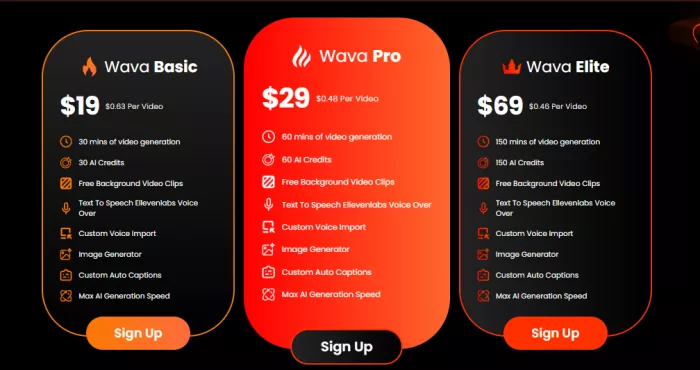
Wava AI offers subscription-based pricing, typically with monthly and yearly plans. The lower tiers are aimed at casual users, while higher plans offer longer videos, more exports, and additional voice styles.
From my perspective, the pricing is not unreasonable for what it offers, but users must read the billing terms carefully. Some users online report difficulties with cancellations and refunds, which is something you should be aware of before committing.
If you only need short videos occasionally, the cost may feel high. But if you are publishing daily, it can justify the price through time saved.
What Real Users Are Saying
Feedback from real users shows a wide range of experiences with Wava AI from genuine appreciation for its simplicity to strong frustrations around support and billing. Here’s what everyday creators actually report after using it.
Positive Experiences: Speed and Ease of Use
Many users praise Wava AI for dramatically reducing the time and effort needed to produce short-form videos. A recurring theme in reviews is that the platform removes the “editing barrier” transforming text into a complete social video in a matter of minutes, without needing design or technical skills. This is especially appreciated by creators who struggle with traditional tools or simply want to publish consistently without burnout.
Some community comments describe moments where Wava helped them finally complete and publish videos they had been procrastinating on, because the friction from manual editing was removed. This often translates into higher posting frequency and a feeling of regained momentum
Negative Experiences: Billing, Support, and Reliability
At the same time, many users express serious frustrations particularly around the billing and support experience.
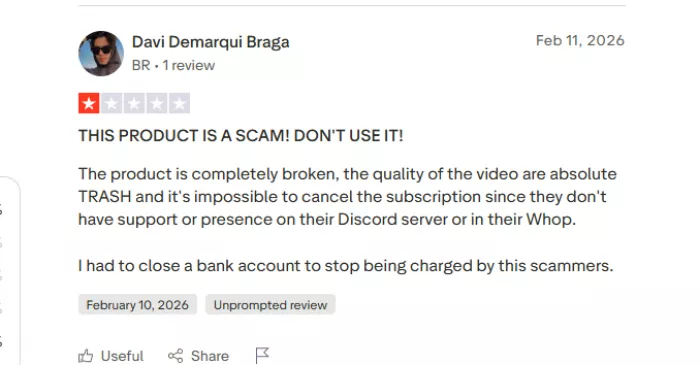
Subscription cancellation is one of the loudest complaints. Multiple reviewers say it was confusing or impossible to cancel their plan, with support emails either bouncing back or providing no clear guidance. Some users even claim they had to close bank accounts to stop charges. (Trustpilot)
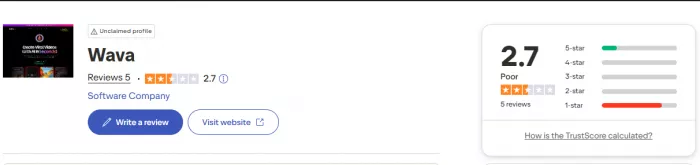
Technical issues also appear frequently in user feedback. A number of creators report videos failing to generate properly, errors during export, or glitches that interrupt the workflow. These kinds of problems are often cited as major obstacles when trying to produce content at scale.
Mixed Opinions: Output Quality and Creative Value
Some users offer middling feedback: they like how fast videos are made, but note that output can feel generic or repetitive over time especially if you rely on the same styles and templates. Because the AI automates so much, customization options feel limited, which can make multiple videos start to look similar.
This doesn’t mean the tool fails, it just highlights a common trade-off: speed over creative uniqueness. Many creators say that Wava AI is excellent for getting videos done, but less helpful for producing distinctive or brand-rich content.
Discussion in Communities (Reddit & Forums)
Outside formal reviews, the discussion is just as mixed.
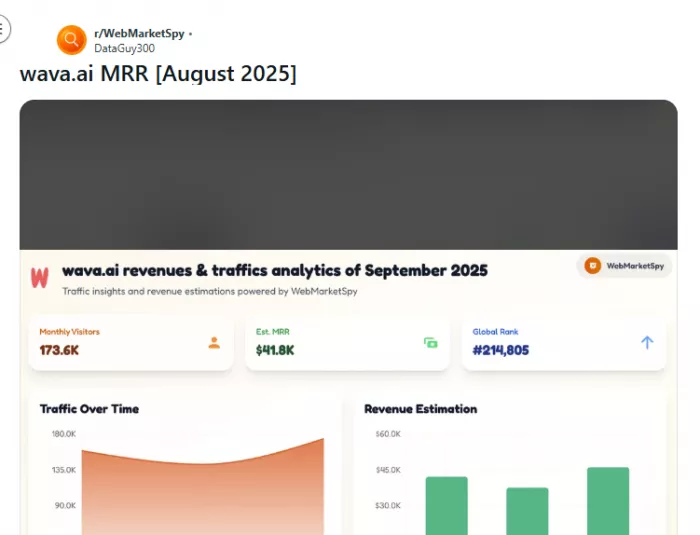
Some users on forums share success stories claiming fast processing, clean outputs, and positive viewer engagement. Others are skeptical, suggesting that positive posts might be influenced by promotional accounts, and warn readers to approach such tools with caution.
There are also reports of long-running support disputes and unresolved export issues, which echo the frustrations shared on review platforms.
Pros and Cons
| Pros, What Users Appreciate | Cons, What Users Commonly Criticize |
| Fast Content Creation Wava AI turns text into a complete video within minutes, saving creators hours of editing time. | Limited Customization Users often find there’s minimal control over specific scene timing, transitions, or visual layers compared to full editors. |
| Beginner-Friendly No technical editing skills required; intuitive interface helps even non-creators produce videos quickly. | Repetitive Output Style Because many templates follow similar formats, multiple videos can start to look alike over time. |
| AI Voiceovers Built-In Automatically adds narration, which is useful for faceless videos and storytelling. | Subscription/Billing Issues Several users report problems cancelling plans, unclear renewal policies, or difficulty getting refunds. |
| Auto-Generated Subtitles Saves time and improves accessibility, especially for viewers who watch without sound. | Customer Support Delays Many users note slow or unresponsive support when facing technical or billing problems. |
| Social-Ready Format Outputs are optimized for vertical platforms like TikTok, Reels, and Shorts. | Occasional Technical Errors Some users report export failures, scene glitches, or errors during processing. |
| Multiple Voice and Language Options Helps creators target different audience segments without external tools. | Quality Varies by Script The result depends heavily on the text input; weaker scripts can produce underwhelming videos. |
| Good for High-Volume Content Ideal for creators who want to publish repeatedly without a large time investment. | Not a Full Editor doesn't replace professional tools (like Premiere, Final Cut, Davinci Resolve) for serious branding or advanced editing. |
| Affordable for Some Users For frequent creators, subscription plans can feel cost-effective compared to outsourcing editing. | Generic Visual Matching Stock visuals the AI selects may not always align perfectly with the intended message or tone. |
Top Alternatives to Wava AI
| Tool | Best For | Why It’s Better |
| Pictory | YouTube Shorts & explainers | More editing control |
| InVideo | Marketing & ads | Large template library |
| Synthesia | AI avatar videos | Real AI presenters |
| Kapwing | Custom video edits | Full creative freedom |
These tools offer more flexibility and transparency, especially for long-term content creators.
Who Should Use Wava AI?
If you are a beginner, faceless content creator, or marketer who wants fast, automated videos for social media, Wava AI can be a helpful starting tool. If you are a professional editor, brand builder, or content strategist who values control and originality, you may be better served by more established platforms.
Final Verdict
Wava AI is not perfect but it does exactly what it claims: it helps you turn text into short, viral-style videos quickly. I found it useful for testing content ideas and creating volume, but I would not rely on it as my only long-term video solution.
If speed matters more than creative control, Wava AI is worth trying. But if you are serious about branding and growth, exploring stronger alternatives is a smarter move.
Wava AI - Frequently Asked Questions
Q1: Is Wava AI suitable for complete beginners?
Yes, it is designed for users with no editing experience. The interface is intuitive, and videos can be generated from simple text scripts.
Q2: Can I use my own visuals instead of the AI-selected stock footage?
Currently, Wava AI primarily relies on its AI-driven stock visuals. Direct upload of custom footage is limited, so it’s best suited for quick, automated videos.
Q3: How long does it take to generate a video?
Most short-form videos are generated in a few minutes. Exact time depends on video length and complexity of the text script.
Q4: Can I cancel my subscription anytime?
Technically, yes, but multiple users have reported challenges with the cancellation process. It’s advisable to read the billing terms carefully before subscribing.
Q5: Does Wava AI support multiple languages?
Yes, it offers different languages and voice accents for AI voiceovers, allowing you to target international audiences.
Q6: Are Wava AI videos suitable for monetization on platforms like YouTube or TikTok?
Yes, they can be monetized, but you should ensure the stock visuals and AI voices comply with the platform’s licensing rules and copyright policies.
Q7: Can Wava AI replace professional video editors?
No. While it’s great for speed and short-form content, it lacks advanced editing capabilities needed for cinematic or highly branded projects.
Q8: Is there a free trial available?
Wava AI occasionally offers a trial or demo, but availability may vary. Check the official website for the latest options.
Q9: How customizable are the AI voiceovers?
You can change voice tone, accent, and language, but fine-grained editing like pitch, speed, or emphasis is limited.
Q10: What platforms is Wava AI optimized for?
It’s primarily optimized for TikTok, Instagram Reels, and YouTube Shorts, producing vertical videos in 9:16 format.


Comments