How to Detect Fake Emails: Signs, Methods & Top Tools

Key Takeaways:
• The fastest way to detect fake emails is to ignore the sender’s display name and check the actual domain in the underlying email address.
• Hidden email headers contain the routing history and protocol results - Sender Policy Framework (SPF), DomainKeys Identified Mail (DKIM), and Domain-based Message Authentication, Reporting & Conformance (DMARC) - that tell you whether an email is real.
• Attackers frequently use temporary or disposable email addresses to bypass standard filters and stay anonymous.
• Manual checks help individuals react to scams, but enforcing a DMARC policy at p=reject stops domain spoofing automatically at the server level.
Not every suspicious email is obviously fake; that’s exactly the point. Cybercriminals have moved far beyond the era of poorly written, obvious scams. In 2026, attackers increasingly use AI to generate clean, error-free messages, so the old advice to look for bad spelling no longer works. Learning how to detect fake emails now depends on the sender’s domain and authentication results, not surface-level typos.
From sophisticated spoofed sender addresses to near-perfect brand impersonations, modern fake emails are engineered to bypass your instincts and technical defenses. Whether you are a small business owner protecting company data or an IT administrator securing an enterprise network, understanding how these messages work is critical.
Detecting email spoofing and impersonation takes a mix of sharp observation and the right investigative tools. This guide breaks down the core elements of a fraudulent email, outlines a manual inspection process, and reviews the top tools for verifying any sender instantly.
What Makes an Email ‘Fake’?
Put simply, an email is “fake” when someone deliberately alters its details to hide who they really are. Usually, they want to defraud you, trick you into handing over your passwords, or slip malware onto your device.
To do this, scammers tend to rely on a handful of classic tricks:
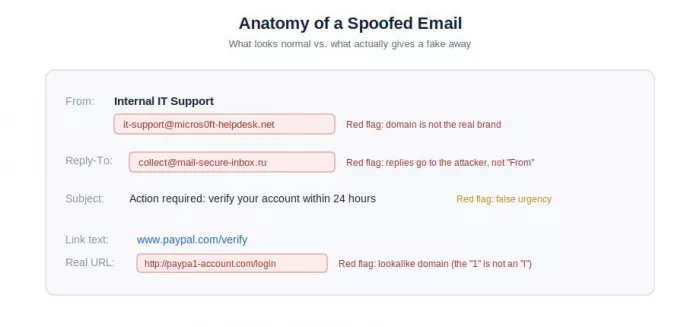
• Spoofed sender addresses: the name you see in your inbox looks legitimate - like “Internal IT Support” or “Billing Department” - but the actual sending domain is unrelated and unauthorized.
• Lookalike domains: attackers register domains that mimic real brands at a glance. If you skim too fast, it’s easy to miss something like paypa1.com (a number “1” instead of an “l”).
• Disposable or burner addresses: scammers use free, automated tools to generate short-lived email addresses. They use these throwaway accounts to bypass spam filters, launch a quick attack, and abandon the address before anyone can blacklist it.
• Manipulated email headers: here they forge the hidden metadata behind the scenes. The visible From address looks clean, but the Reply-To or Return-Path fields are set to send any response straight back to the attacker’s inbox.
5 Signs an Email Is Fake
Before opening any attachment or clicking a link, take a moment to check the message for these five red flags:
1. The Sender Domain Doesn’t Match
Don’t trust the friendly display name; look at the actual email address behind it. If a message claims to be an urgent security alert from a brand like Netflix or your bank, but the domain is a public address like @gmail.com or an unrelated site, it’s a fake.
2. Security Authentication Failures
Legitimate companies set up email authentication to protect their reputation. If a message fails its SPF, DKIM, or DMARC checks, that is a strong technical warning sign: the header has been altered, or the message came from an unauthorized server.
3. “Dear Customer” - or Suspiciously Specific Details
Mass phishing campaigns use generic greetings like “Dear user” or “Dear valued customer” because the sender is blasting thousands of addresses and doesn’t know who you are. Targeted spear-phishing does the opposite. It uses over-personalized details scraped from your social media or public records to make you lower your guard.
4. False Urgency and Scare Tactics
Fake emails rely on pressure. They demand you act immediately - threatening to lock your account, take legal action, or warning that you’ll lose money if you don’t comply. Others dangle a reward that’s too good to be true, or attach an unexpected invoice hoping you’ll panic and open it.
5. Links That Point Somewhere Else
On a computer, hover your cursor over any link (without clicking) to preview its real destination. On a phone, press and hold the link instead, since you can’t hover. If the visible text says “Verify Your Account Here” but the underlying link points to an unfamiliar domain that doesn’t match the company’s official site, you’re looking at an impersonation attempt.
What to do next: if a message trips any of these red flags, don’t reply, click links, or open attachments. Report it to your IT or security team, or forward it to the impersonated company’s abuse address (for example, abuse@ or phishing@ the real domain), then delete it.
How to Check Email Headers for Spoofing
The information you see on your screen can be faked in seconds, but the raw metadata inside the email header tells the real story. Checking the header lets you trace a message’s path and verify where it actually came from.
It looks like a wall of dense code, but you only need three steps to read it:
Step 1: Open the Raw Headers
First, pull up the raw text version of the message:
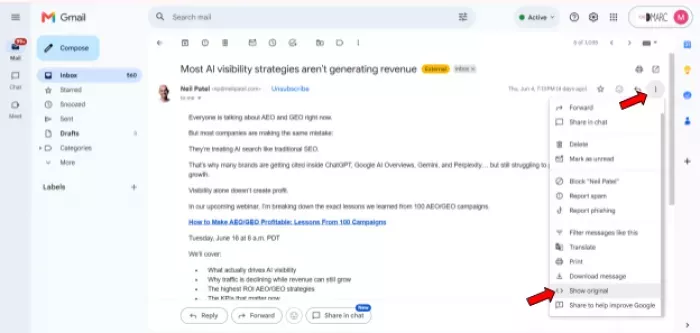
• Gmail: open the email, click the three vertical dots (More) next to the reply arrow, then click Show original.
• Outlook: open the message in its own window, go to File, click Properties, and find the Internet headers box at the bottom.
Step 2: Find the ‘Authentication-Results’ Line
With that block of text open, scroll down until you find the Authentication-Results section. Check the status markers for the main protocols:
• If you see spf=pass, dkim=pass, and dmarc=pass, the email verified successfully against the domain owner’s published rules.
• If you see fail, softfail, or none, the sender’s identity couldn’t be verified - often a sign of spoofing.
Step 3: Match Up the Key Fields
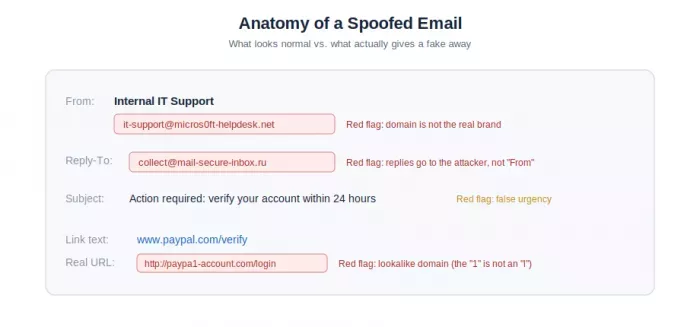
Next, compare the domains across these three header lines:
• From: the sender address you actually see in your inbox.
• Return-Path: where bounce notices go if a message fails.
• Reply-To: the inbox that receives your message if you hit reply.
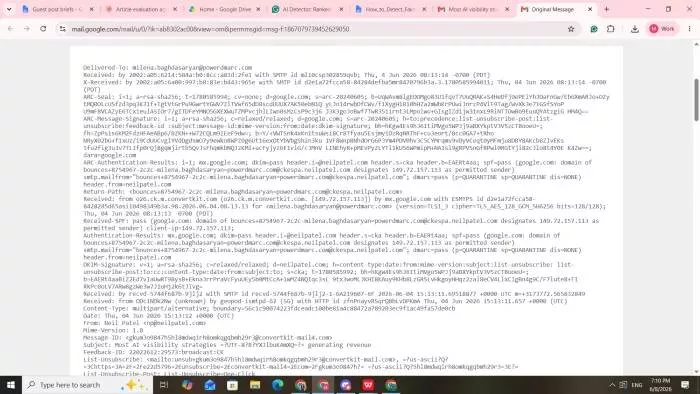
If these domains don’t match each other - or the official company website - the header has been manipulated. Reading all of this manually is slow and error-prone, which is why pasting it into an email header analyzer to parse it instantly is usually the better option.
How to Check If an Email Address Is Fake or Disposable
Attackers often use temporary or disposable addresses, from services like Guerrilla Mail, to run cheap, anonymous spam campaigns. Spotting these accounts helps you block fake sign-ups on your site and keep your inbox safer.
To check whether an address is legitimate, run the domain through a professional fake email address checker. These tools cross-reference the domain against real-time blocklists, check whether it has active Mail Exchanger (MX) records, and verify whether it belongs to a known temporary email provider.
Running a WHOIS domain lookup adds useful context about the sender. If the domain was registered only days ago, uses privacy proxies to hide the owner’s name, or has no working website or contact page, you are very likely looking at a malicious setup.
Top Tools to Detect Fake Emails
When manual inspection isn’t enough, specialized online tools can quickly analyze technical data points to verify a sender’s true identity.
PowerDMARC Fake Email Address Checker
The PowerDMARC Fake Email Address Checker - from PowerDMARC, an email authentication platform - is a validation tool that determines the legitimacy of any email sender or domain. Users enter the address or sending domain, and the system runs a series of back-end verifications.
It detects whether the target domain belongs to a temporary or disposable service, scores its risk against known abuse registries, and verifies whether it has active mail servers. This assessment helps organizations screen out malicious senders and stop fake registrations before they affect operations.
PowerDMARC Email Header Analyzer
For technical deep dives without reading raw code, the PowerDMARC Email Header Analyzer translates header data into a clear, structured report. Users copy the raw headers from their mail client and paste them into the analyzer.
With a single click, the tool parses the email’s routing history and isolates the Authentication-Results block. It delivers a visual breakdown of the SPF, DKIM, and DMARC pass/fail statuses. It also highlights mismatches between the From and Reply-To fields and flags routing irregularities, which makes it efficient for IT teams reviewing suspicious emails quickly.
WHOIS Domain Lookup
The WHOIS domain lookup tool extracts the publicly available registration metadata tied to a sender’s domain. By entering a domain, you can inspect its registration date, the registrar used, and the expiration timeline.
Because malicious domains used for impersonation are frequently abandoned within weeks, a very recent creation date is a strong indicator of fraud. The tool also shows whether the owner’s identity has been anonymized behind a privacy shield, which adds critical context during security investigations.
MXToolbox Email Header Analyzer
Another option is the MXToolbox Email Header Analyzer, which organizes raw headers into clear, easy-to-read tables. It calculates the transit time between server hops along the email’s path and checks the sending IP address against major blacklists. It’s a useful extra layer of visibility when you want to confirm whether a sender has a history of spamming or abuse.
Hunter.io Email Verifier
The Hunter.io Email Verifier focuses on deliverability and address validation. Instead of analyzing headers, it pings the target mail server using a Simple Mail Transfer Protocol (SMTP) verification process to confirm whether the specific inbox exists and can receive mail. It identifies catch-all setups, flags invalid or non-existent usernames, and confirms whether an address is a legitimate account or a fabricated alias.
Comparison of Top Email Detection Tools
| Tool | Primary focus | Best used for | Key technical benefit |
| PowerDMARC Fake Email Address Checker | Domain legitimacy and sender type | Spotting disposable, temporary, or high-risk addresses | Real-time verification against abuse and disposable-domain registries |
| PowerDMARC Email Header Analyzer | Email authentication and protocol status | One-click parsing of SPF, DKIM, and DMARC metadata | Converts raw text headers into clear visual reports |
| WHOIS Domain Lookup | Domain registration history and age | Identifying newly registered lookalike domains | Exposes creation date, owner data, and registration timeline |
| MXToolbox Email Header Analyzer | Mail server reputation and routing path | Tracking delivery hops and checking IP blacklists | Maps transit times and cross-references global blocklists |
| Hunter.io Email Verifier | Mailbox deliverability and server existence | Verifying whether a specific address actively exists | Uses direct SMTP pings to find catch-all setups and fake usernames |
How DMARC Stops Fake Emails at the Protocol Level
Checking headers and using validation tools helps individuals catch fake emails after the fact. True organizational security requires blocking fraudulent messages before they reach an employee or customer inbox.
This is achieved through email authentication protocols, specifically DMARC. (For background, see email authentication.) DMARC acts as a management layer over SPF and DKIM. It lets a domain owner publish an explicit policy in their public DNS records.
That policy tells receiving mail servers worldwide how to handle messages that claim to come from the domain but fail authentication.
It lets a domain owner publish an explicit policy in their public DNS records. That policy tells receiving mail servers worldwide how to handle messages that claim to come from the domain but fail authentication.
According to Microsoft’s guidance on protecting yourself from phishing and spoofing, correctly implementing these authentication standards is essential to validating message origins and preventing sender spoofing.
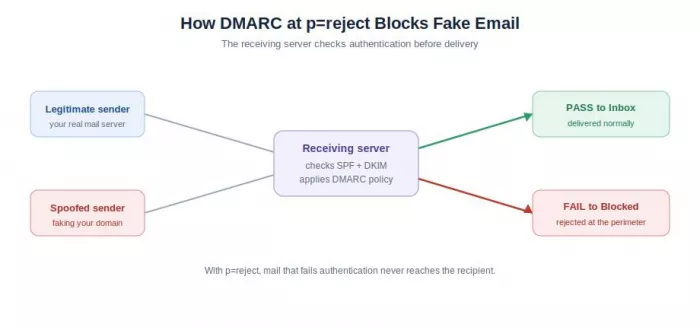
When a domain owner sets their DMARC policy to its strongest enforcement state - p=reject - receiving servers block unauthorized or spoofed emails claiming to be from that domain. Under this policy, fraudulent messages are dropped at the perimeter, protecting the organization’s brand.
Monitoring automated DMARC reports also gives administrators full visibility into global sending activity, so they can track who is attempting to fake their domain and fix legitimate delivery issues.
Summing Up
You can no longer detect fake emails by scanning for bad typos and calling it a day. The people running these scams have become very good at copying brand logos and names. To keep your inbox clean, pay attention to the actual domains behind the text and watch for dramatic “do this right now or else” scare tactics.
Whenever an email feels off, don’t guess. Run it through a header analyzer or a domain checker so you know exactly what you’re dealing with. And if you run a business domain, configure SPF, DKIM, and DMARC and enforce a reject policy. That stops scammers from using your name in the first place, which saves you and your customers real trouble down the road.
Frequently Asked Questions
How can I tell if an email is fake or spoofed?
Inspect the actual sender email address for lookalike domains, check the raw headers for SPF, DKIM, or DMARC authentication failures, watch for forced urgency or generic greetings, and verify that embedded links match the official corporate domain.
What is the best free tool to detect fake emails?
Strong free options include the PowerDMARC Fake Email Address Checker for validating domain legitimacy, alongside the PowerDMARC Email Header Analyzer, which parses complex header data into an easily understandable format.
Can a fake email pass spam filters?
Yes. Sophisticated fake emails can pass traditional spam filters when attackers use newly registered domains that haven’t been blacklisted yet, or when the targeted domain owner hasn’t enforced strict email authentication policies like DMARC.
What is email spoofing and how does it work?
Email spoofing is a deception technique where an attacker alters the header details of an email so the message appears to come from a trusted contact or brand. It works because the core email protocol, SMTP, natively lacks a built-in way to authenticate sender addresses without secondary protocols.
How do I stop fake emails from using my domain?
To stop others from spoofing your domain, correctly configure SPF and DKIM in your DNS, then deploy a DMARC policy enforced at p=reject to block unauthenticated messages automatically.


Comments