
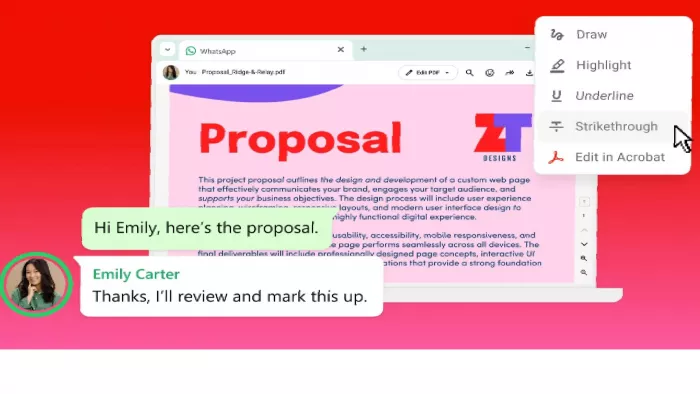
Opening a PDF on WhatsApp has always meant the same tedious loop: download the file, find the right app, make your edits, save a copy, then return to the chat to send it back. Adobe is now simplifying that process.
Acrobat's PDF tools are now integrated directly into WhatsApp Web and the WhatsApp app for Windows, allowing users to preview, open, review, annotate, and edit PDF documents without leaving the conversation. The feature is rolling out globally at a time when sharing documents through messaging apps has become a routine part of both work and everyday communication.
Why This Matters
With roughly three billion users worldwide, WhatsApp has become one of the most widely used platforms for sharing documents, making PDF viewing and collaboration a regular part of daily communication for many people.
This also reflects Adobe's broader strategy of bringing Acrobat beyond its standalone application. Over the past few years, the company has expanded Acrobat integrations across services including Chrome, Microsoft 365, ChatGPT, and Workday. WhatsApp is the latest addition, allowing users to work with PDFs directly inside an application they already use every day instead of switching between multiple programs.
What Actually Changes for Users
The biggest improvement is convenience. PDFs shared in WhatsApp can now open in a full-screen viewer directly within the desktop experience, with support for scrolling, zooming, and preserving the document's original formatting. Password-protected PDFs are also supported, allowing users to securely access protected files without changing how they're shared.
Security remains an important part of the experience. Documents continue to benefit from WhatsApp's end-to-end encryption, meaning files remain accessible only to participants in the conversation rather than being routed through a separate sharing service.
On editing, there's a real difference between the free experience and Adobe's premium tools:
- Free built-in features: Highlight text, add comments, mark up documents, and leave quick feedback without downloading the PDF.
- Edit in Acrobat (subscription required): Modify text, reorganize or extract pages, split documents, add signatures, and apply password protection.
- Acrobat AI Assistant (subscription required): Summarize documents, answer questions about their contents, and quickly surface important information.
For most users, the free tools remove much of the friction involved in reviewing PDFs. More advanced editing and AI-powered features remain part of Adobe's paid Acrobat experience.
Why Businesses Will Care
The integration is particularly relevant for small businesses and remote teams. Invoices, contracts, proposals, and customer documents are already exchanged through WhatsApp every day in many parts of the world. Being able to review and annotate those files without repeatedly downloading, editing, and re-uploading documents can help streamline everyday workflows.
Adobe isn't positioning this as a replacement for its full desktop application. The integration is designed for reviewing and lightweight editing, while more complex legal, financial, or design-related document work is still better suited to the complete Acrobat application.
Availability
Adobe says the feature is rolling out globally for WhatsApp Web and the WhatsApp application for Windows, although availability may vary as the rollout continues. At launch, the integration is focused on desktop experiences, and some Acrobat features, including advanced editing and AI-powered capabilities, continue to require an Acrobat subscription.
Commenting on the launch, Abhigyan Modi, Adobe's Senior Vice President of Creativity & Productivity, said Acrobat is designed to support document workflows wherever people work. Bringing PDF tools directly into WhatsApp reflects that vision by reducing the number of steps required to review and collaborate on documents.
For the millions of people who already exchange contracts, reports, invoices, and other PDFs through WhatsApp every day, the update removes one of the biggest points of friction in document collaboration.


Comments