I Tested Gizmo AI With Real Study Material: Here’s What Worked and What Didn’t



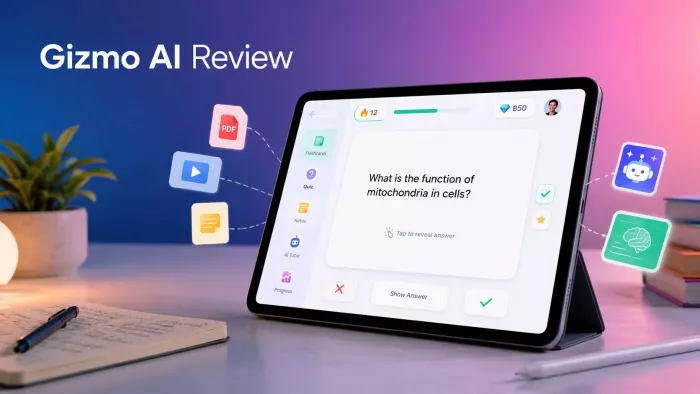
My revision used to live in twelve different places at once: lecture PDFs I never reopened, half finished notes, screenshots buried in my camera roll, a YouTube playlist of explainers, and a guilt inducing stack of printouts. Gizmo AI promises to swallow all of that mess and hand back flashcards and quizzes I would genuinely use. So I gave it the most chaotic corner of my study life and watched what came out the other side. This is what happened, where it earned its place, and where it let me down.
What Gizmo AI actually is
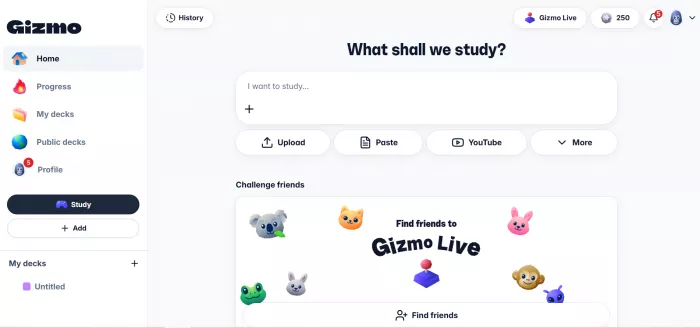
Gizmo AI is an AI study tool that turns your learning material into interactive flashcards and quizzes, then schedules them with spaced repetition and active recall so the content sticks for longer than a cram session. It runs on the web, on iOS and on Android, wraps a game style motivation system around the studying, and bundles an AI tutor that explains concepts when you get stuck. That is the entire pitch in one breath. The interesting question is how each of those claims survives contact with real, imperfect material, which is exactly what I set out to test.
How I tested it
I used Gizmo AI across several weeks, on both a phone and the web app, the way a real student or self learner would rather than as a five minute demo. I imported dense PDF chapters, two recorded lectures, a YouTube explainer, an old set pulled in from another flashcard app, and a photo of my handwritten notes. I then sat the quizzes daily, followed the spaced repetition schedule instead of cramming, and pushed the AI tutor on topics I already understood so I could judge its accuracy before trusting it on topics I did not. I lived inside the free tier first, then tried premium.
Throughout, I watched three things in particular:
● how much time it actually saved me,
● how accurate the generated material was,
● and whether I kept coming back without forcing myself.
I have also studied with the main alternatives for years, so the comparisons later come from real use rather than feature lists.
Turning messy material into cards
This is the headline feature and, for me, the strongest part of the product. I dropped in a long PDF chapter, pasted a bare revision list, imported a YouTube video, recorded a lecture straight into the app, and scanned a page of handwritten notes. In most cases I had a usable set of flashcards and quiz questions in well under a minute. The breadth of what it will accept is genuinely useful:
• PDFs, lecture slides and pasted notes
• YouTube videos and recorded or imported audio, transcribed into cards
• Photos of handwritten notes, read through on screen text recognition
• Existing decks imported from other flashcard tools
The accuracy is good, not flawless. In my use, roughly 85 to 90 percent of the generated cards were usable as written. On clean, structured text such as definitions and lists, the output was excellent. On dense or diagram heavy PDFs, it occasionally misread what mattered, flattened a piece of nuance, or wrote a question that was technically correct but slightly beside the point.
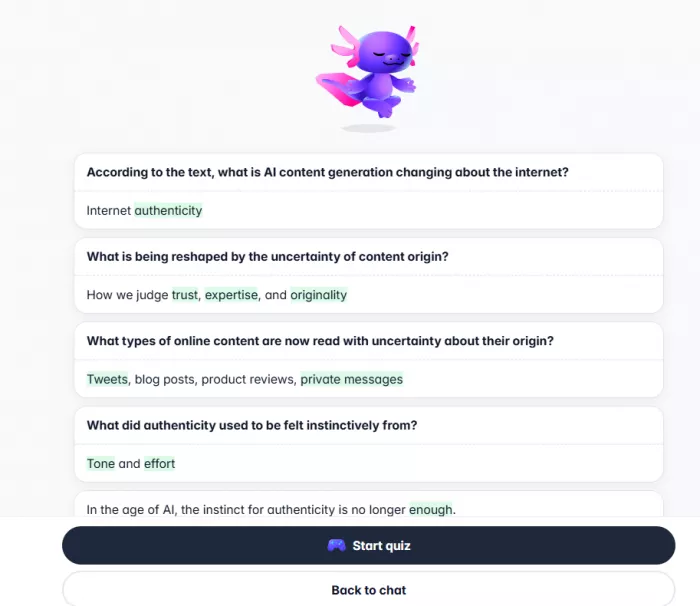
The lecture transcription impressed me, though it inherited the odd mishearing from the audio. The honest takeaway is that Gizmo AI removes the grunt work of building a deck, but you still owe that deck a quick review pass before you rely on it for an exam. If you are in medicine, law, or any field where a wrong card is expensive, treat that review pass as mandatory rather than optional. One more friction point worth flagging: very large PDFs sometimes took a while to process, and on a couple of occasions an import stalled on the loading screen.
The flashcards and quiz types
Once a set existed, I ran it through every question mode Gizmo AI offers. You get multiple choice, fill in the blank, true or false, and written answer questions, and the system mixes them so a session never feels like flipping the same card twice. The questions are context aware: they test whether you understood an idea rather than whether you can repeat a sentence word for word. The quiet hero here is the explanation that appears when you get something wrong.
Instead of simply marking you down, Gizmo AI tells you why the correct answer is correct, which kept me from repeating the same mistake. Where it is weaker is depth. The questions are strong for recall but rarely reach the harder synthesis level that a sharp human tutor would set, and the range of study formats is narrower than the most established libraries in this space.
Spaced repetition and active recall
I followed the daily schedule rather than bingeing, which is the entire point of a tool like this. The loop works, and the per card retention tracking is quietly motivating: you can see roughly how long a given fact is likely to stay with you, which nudges you to keep going. I remembered noticeably more with less rereading than my old habit of staring at PDFs.
My honest reservation is that the scheduling is not as rigorous as the gold standard tools built purely around spaced repetition. It leans toward keeping recent cards in heavy rotation and can be slow to resurface material you have already answered correctly, which is the opposite of what long horizon retention needs. For a single exam a few weeks out, this is a non issue. For building durable knowledge across an entire year, the spacing algorithm is the weakest link in the chain.
The AI tutor
I tested the tutor deliberately: first on topics I knew cold, so I could catch errors, then on topics I was shaky on. On familiar ground it was accurate and well paced, breaking a concept into bite sized steps and checking in along the way, and it handled homework style questions sensibly.
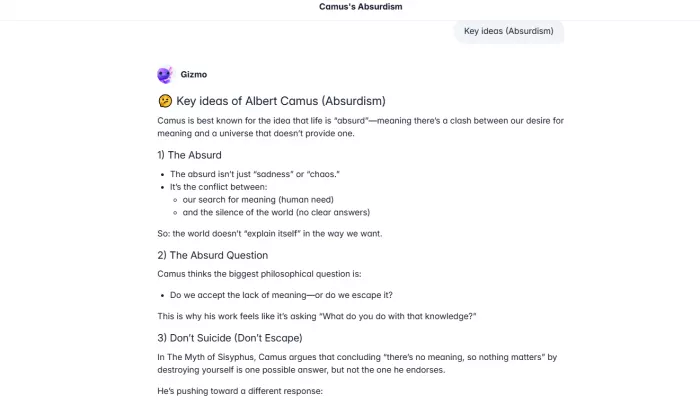
On a few edge cases it was confidently shallow, correct in outline but thin on the harder detail that actually trips students up. As a study companion for unblocking yourself late at night, it is a real asset. As a replacement for an expert who knows your syllabus, it is not there, and it does not pretend to be.
Gamification, streaks and the hearts system
I studied solo, then ran a group session with the multiplayer quiz mode. The XP, streaks and leaderboards pulled me back day after day almost without conscious decision, and the multiplayer mode turns class revision into something closer to a game show, where everyone answers the same questions and competes in real time. This is the feature that solves the real problem, which was never making the cards but actually showing up to study them.
Now the catch, and it is a significant one. The free tier runs on lives, sometimes shown as hearts, that drain as you study and refill on a timer, with a short lockout once they run out. It is the single most criticised aspect of Gizmo AI in user feedback, and after living with it I agree with the complaints. The lockout has an uncanny habit of arriving precisely when you are drilling the hard material you most need to repeat, which is exactly the wrong moment to be told to wait or upgrade. It does not just limit features, it interrupts momentum.
Progress tracking and organisation
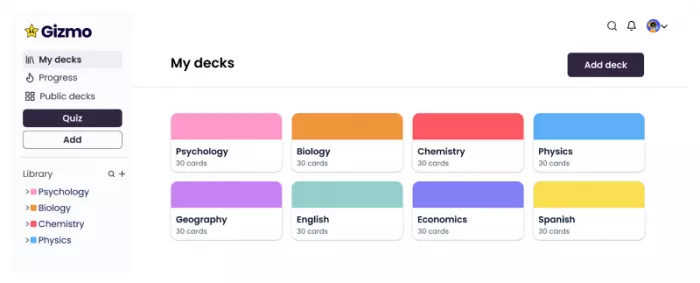
Gizmo AI keeps a clear view of your performance and points you toward weak areas, and it organises everything into files and decks so a growing library stays navigable. None of this is flashy, but it is solid, and it matters once you have fed in a semester of material rather than a single chapter.
Pricing and Whether Gizmo AI Is Worth It
Gizmo AI has a usable free tier, but it is better for testing the app than for long study sessions. The main limitation is the lives or hearts system, which can stop a session once you run out. That makes the free plan fine for light revision, but frustrating if you are preparing seriously for exams.
The paid Unlimited plan removes the lives lockout, lifts daily quiz limits, unlocks the full AI tutor, and allows unlimited imports. Pricing can vary by region and may change over time, so the in-app price should always be checked before subscribing.
| Plan | Approx. Price | What You Get | Best For |
| Free tier | Free | Limited study access with lives or hearts, basic flashcard and quiz use | Trying Gizmo AI or studying occasionally |
| Unlimited weekly | Around $14/week | Removes lockouts, unlocks full tutor, daily quizzes, and unlimited imports | One intense exam week or short-term use |
| Unlimited annual | Works out to around $3/week | Same Unlimited features at a much lower weekly cost | Students who plan to use Gizmo AI regularly |
| Student discount | Roughly 50% off where available | Discounted access to Unlimited features | Students who qualify and use the app often |
The weekly plan is the one to watch. A single week can make sense if you only need Gizmo AI for a short exam sprint, but leaving the weekly subscription running can become expensive quickly. The annual plan offers much better value if you use the app almost every day, especially during a full semester or exam season.
My value verdict is simple: Gizmo AI is worth paying for if it becomes part of your daily study routine. If you use it regularly to turn PDFs, videos, notes, and lectures into study cards, the Unlimited plan saves enough time to justify the cost. But if you only study occasionally, the free tier may feel restrictive and the weekly plan may feel too expensive. Choose the billing period carefully, check the cancellation terms, and avoid subscribing weekly unless you only need it for a short, focused study period.
Performance, reliability and offline use
On normal days, Gizmo AI is smooth. Cards load quickly, quizzes run without stutter, and moving between decks is painless. The friction shows up at the edges: very large imports can lag or freeze, the occasional import gets stuck, and now and then a card did not save and I had to add it again. Offline support is limited, so the app really expects a connection, which is worth knowing if you study on patchy transport or in exam halls that block signal.
What real users are saying
Set against my own experience, the wider reception is strong and, importantly, strong at scale. The app store ratings are not a handful of reviews but tens of thousands:
| Platform | Average rating | Approx. ratings |
| Apple App Store | About 4.7 to 4.8 out of 5 | More than 10,000 |
| Google Play | About 4.7 out of 5 | Roughly 98,000 |
Beyond the raw scores, what struck me is how closely other users describe the same things I noticed. The praise lines up almost exactly with mine, and so do the criticisms.
What User Consistently Praise
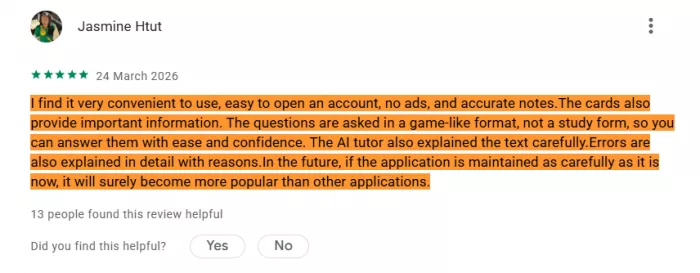
Users consistently praise the tool for how much time it saves when turning PDFs, videos, and notes into study cards. Instead of manually breaking down large study material, users can import content and get usable cards much faster. Many also appreciate the game-style learning system because it adds a sense of progress and makes studying feel more like a routine than a task.
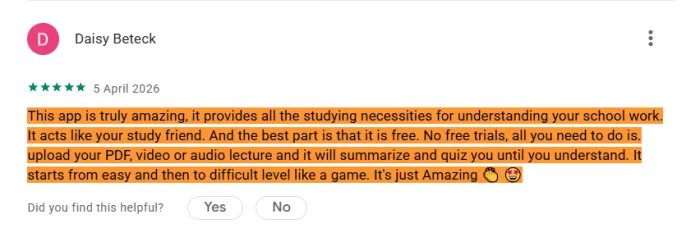
The AI tutor is another strong point, especially because it explains concepts instead of only giving direct answers. Users also like that the free tier feels more generous than several paid rivals, and the mobile experience is often described as fast, polished, and easy to use.
What User Consistently Criticize
The main criticism is that the free tier can still feel restrictive because lives or hearts can run out and interrupt study sessions. Some users also feel the paid plan is expensive for light use, especially when weekly billing creates surprise charges.
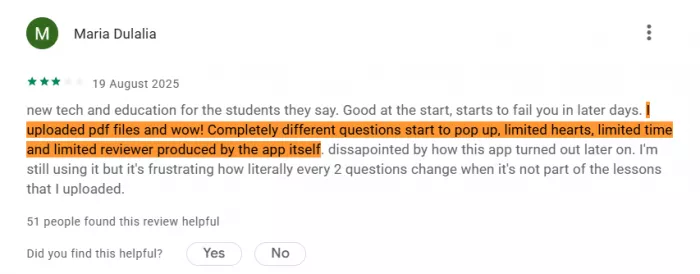
Accuracy is another concern, as a few cards can be oddly phrased or not fully correct, meaning users still need to review the output before trusting it. Large imports can sometimes create lag, stalls, or sync issues, and the spaced repetition system may feel slow when it delays bringing mastered cards back into review.
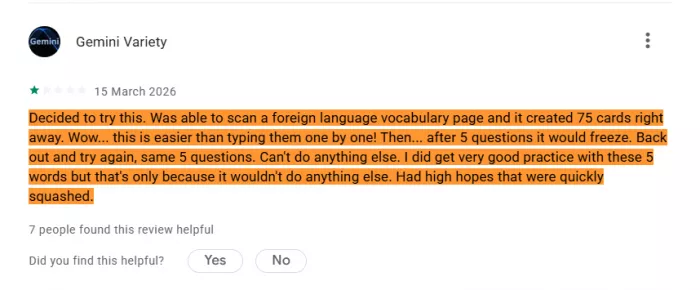
That alignment matters. When independent voices and my own testing converge on the same strengths and the same irritations, the picture is more trustworthy than any single review, including this one.
My scorecard
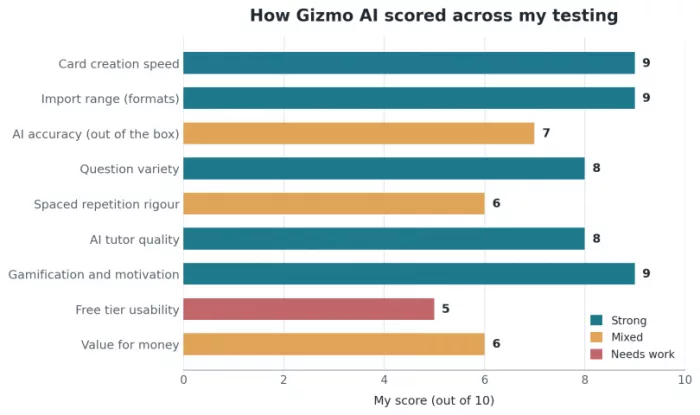
Pulling the testing together, here is how I rate Gizmo AI across the areas that decide whether a study tool is worth your time. The strong bars are where it leads its category. The weaker bars are where the free tier design, the spacing algorithm and the pricing hold it back.
Alternatives worth knowing
Gizmo AI is not the only way to study with AI, and the right tool depends on what you are optimising for. These are the alternatives I would actually point people toward, each with a clear reason to choose it over Gizmo AI.
Anki
Free and open source, and still the benchmark for spaced repetition control and long term retention. The trade off is that it is largely manual and has a steep setup, so it rewards effort up front. This is the serious choice when the algorithm matters more than convenience.
Quizlet
The established name, with an enormous library of ready made decks and a wide set of study modes. It is easier to pick up than Anki, though its premade decks will not always match your exact syllabus, and its AI generation is a newer addition rather than the core.
Knowt
The strongest free alternative for AI study. It generates cards from your material, offers generous free study modes, and imports decks from elsewhere in a click, which makes it the natural pick for budget conscious students who still want automation.
RemNote
Keeps your notes and flashcards together in one connected knowledge base, with its own AI tutor, so every card traces back to the idea it came from. That structure is the best fit for complex, interconnected subjects where isolated facts do not stick.
Brainscape
Built around confidence based review, where you rate how well you know each card and the app adjusts frequency accordingly, paired with expert certified deck libraries. A strong option for structured, exam focused study.
A quick side by side:
| Tool | Spaced repetition | Free tier | Best suited to |
| Gizmo AI | Decent | Yes, limited by lives | Fast card creation and motivation, mobile first study |
| Anki | Excellent | Yes, fully free | Power users who want full control and long term retention |
| Quizlet | Good | Yes, with limits | A vast ready made deck library and varied study modes |
| Knowt | Good | Yes, generous | Budget learners wanting AI cards and Quizlet imports free |
| RemNote | Strong | Yes, with limits | Linked notes and cards for complex, interconnected subjects |
| Brainscape | Strong | Yes, with limits | Confidence based review and expert certified deck libraries |
Who Gizmo AI is for, and who should look elsewhere
Reach for Gizmo AI if you struggle to start or maintain revision, you have a heavy load of PDFs and lectures to get through, you respond well to gamified motivation, and you study mostly on your phone. It is very good at the two hardest parts of self study: making the material, and getting you to actually sit down with it.
Look elsewhere if you want precise control over your review schedule, in which case Anki wins, or a permanent linked knowledge base, in which case RemNote fits better, or a genuinely free option, where Knowt is hard to beat. If you only study occasionally, the price and the free tier limits will frustrate you. And if you work in a precision critical field, remember that an unreviewed AI card can quietly teach you something wrong, so the review pass is not negotiable.
The verdict
Gizmo AI is a very good front end for getting study material made and for getting yourself to show up, and that combination is genuinely valuable, which the high ratings across tens of thousands of users reflect. It is held back by an aggressive free tier, a spacing algorithm that is merely average for long term retention, and pricing that punishes casual use. For the right user, a motivated student in the thick of exams who will use it most days, it sits comfortably around four out of five. For a power user who wants algorithmic control, or a light user who dips in occasionally, that score drops. Go in clear about which of those you are, pick your billing period deliberately, and give every generated deck a quick review before you trust it, and Gizmo AI will earn its place in your study routine.
Quick answers to common questions
Is Gizmo AI free?
There is a free tier, and it is usable, but the lives lockout limits long sessions and the full feature set needs a paid subscription.
Is Gizmo AI accurate?
Mostly. In my use, around 85 to 90 percent of generated cards were usable as written, but you should review a deck before any high stakes exam.
Is Gizmo AI better than Quizlet or Anki?
It is better at turning your own material into cards quickly. Anki still wins on long term spaced repetition, and Quizlet on the sheer size of its ready made library.
Can you cancel a Gizmo AI subscription easily?
Cancellation has drawn complaints, and the weekly versus yearly billing causes confusion, so choose your plan carefully and check the terms before subscribing.


Comments