Is Parrot AI Any Good? What I Found After Testing It.



I kept seeing Parrot AI clips on my feed for weeks. A cartoon monkey ranting on a fake podcast. A Donald Trump soundalike wishing a stranger happy birthday. A Joe Rogan voice reading out someone's grocery list. The app promises you can make any celebrity say anything, and the marketing makes it look effortless.
So I created an account, tested everything my free balance would let me touch, and paid close attention to the exact moment the free ride ended.
This review is what I found. I went in with one goal, to work out whether Parrot AI deserves your time and money before you spend either. Every screenshot here comes from my own session, and every claim about pricing or quality is something I saw firsthand or checked against public sources.
The answer to the title question turned out to be less simple than a plain yes or no. Let me walk you through it in the order it happened, starting with the first thing that loaded.
The Promise on the Homepage
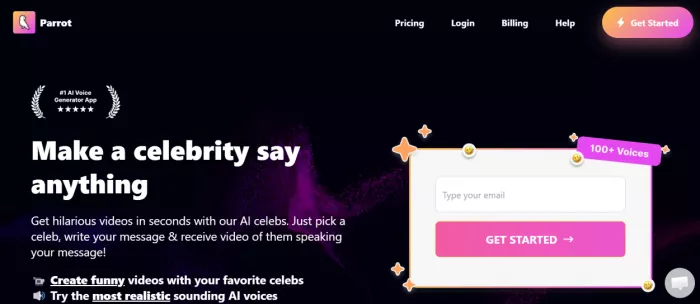
The homepage opens with one bold line: “Make a celebrity say anything.” Around it sit a badge claiming the number one AI Voice Generator App, a promise of 100+ voices, and a counter boasting 42 million generations already created.
It is a confident pitch. Pick a celebrity, type your message, receive a video of them speaking it back to you. The two hooks it leans on are funny videos with your favourite celebrities and the most realistic AI voices around.
Landing pages always sound good, so I treated every one of these lines as a claim to test rather than a fact to trust. The 42 million figure and the number one badge are exactly the kind of numbers no visitor can check, and I filed them under confidence, not proof.
The only way to verify any of it was to get inside, so I created an account.
Signing Up and the Five-Credit Bait
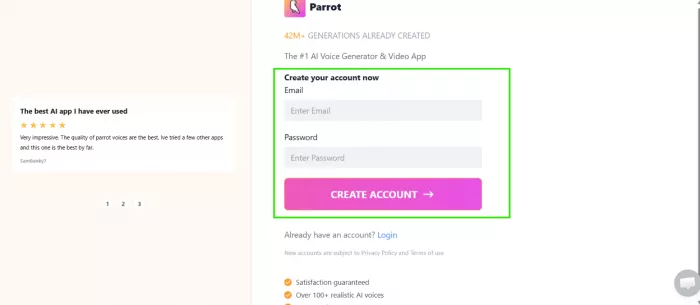
Registration took seconds. Email and password, then done. A testimonial sat beside the signup box calling it the best AI app the reviewer had ever used, the sort of line every landing page writes about itself.
Then came the first interesting moment.
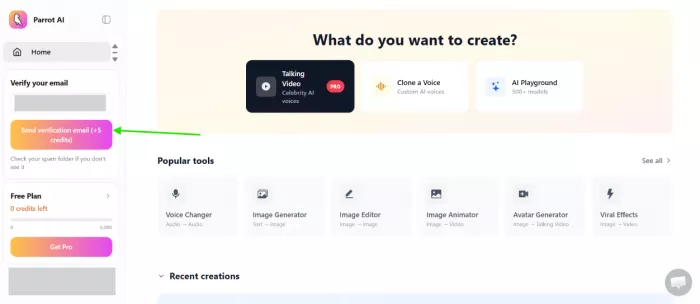
My dashboard loaded with a banner telling me to verify my email to claim 5 free credits. My balance read zero out of 5,000, and a bright Get Pro button waited beside it.
Five credits. Hold that number in your head, because it quietly becomes the whole story of the free experience. I verified my email, collected my five, and went looking for something to spend them on.
Inside the Dashboard: A Wall of PRO Badges
The dashboard greeted me with a friendly question: “What do you want to create?” Three large options sat at the top. Talking Video with celebrity AI voices carried a PRO tag. Clone a Voice sat beside it, and an AI Playground advertised 500+ models.
Below that ran a row of popular tools. I counted a Voice Changer, an Image Generator, an Image Editor, an Image Animator, an Avatar Generator, and a set of Viral Effects. On paper, that is a generous spread for one app.
The catch showed up fast. The headline feature, the celebrity talking video the entire homepage is built around, wears a PRO badge before you click a single thing. My five free credits clearly were not meant for the main event.
I decided to test that star attraction anyway, since it is what most people come here for.
The Headline Feature: Making a Celebrity Talk
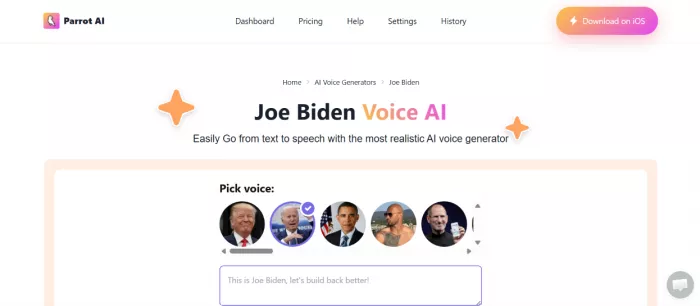
This is the reason Parrot AI exists, so it earned the first real test. I opened the celebrity voice generator and landed on a page titled Joe Biden Voice AI, promising text to speech from the most realistic AI voice generator.
A row of faces waited under “Pick voice.” Trump, Biden, Obama, and a scroll of others behind them. A sample line came pre-filled: “This is Joe Biden, let's build back better!” All I needed to do was type and generate.
Except I couldn't. Every path to actually producing the voice pushed me toward payment. The homepage sells this as the free, fun thing you can do in seconds. In practice, generating a celebrity voice on the web app is gated behind a plan.
Here is the blunt version, and it matters for anyone arriving with the expectation I had. If you came to Parrot AI to make a celebrity say something for free, you will leave disappointed. The celebrity voice feature, the one plastered across every advert, is paid.
That left me holding five credits and a decision. With the marquee feature locked, I moved to the tools that looked like they might still run on a free balance.
The One Thing That Worked: The Image Generator
The Image Generator turned out to be the highlight of my entire session.
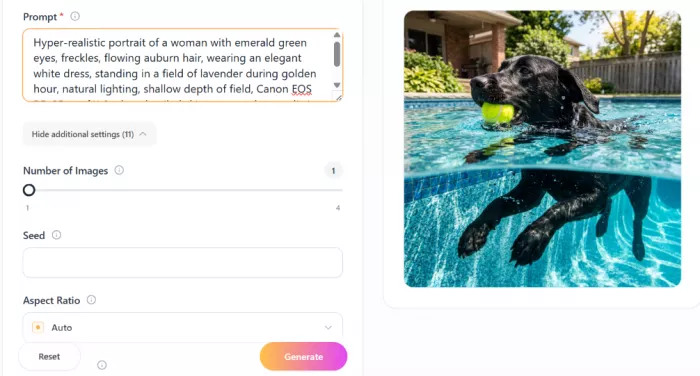
I fed it a demanding prompt, the kind written to expose a weak model: “Hyper-realistic portrait of a woman with emerald green eyes, freckles, flowing auburn hair, wearing an elegant white dress, standing in a field of lavender during golden hour, natural lighting, shallow depth of field, Canon EOS R5, 85mm f/1.2, ultra-detailed skin texture, photorealistic, 8K, masterpiece.”
The settings panel was reasonable. I could choose the number of images, set a seed, and pick an aspect ratio. I left everything on defaults and hit generate.

The result impressed me. Out came a photographic portrait: a red-haired woman in a white dress standing in a lavender field at golden hour, freckles intact, the background blurred the way an 85mm lens genuinely renders it. Dropped into a stranger's feed, I would not have flagged it as AI at a glance.
Then the bill arrived. That one image cost 5 credits, the exact number I had earned for verifying my email. A single generation, and my free balance hit zero.
So the free tier, in real terms, is one image. That is the ceiling. Everything past it lives behind the paywall I keep running into, which is where I went next, not by choice but because the app left me no other door.
Zero Credits: Hitting the Paywall Everywhere
With an empty balance, the app changed character.
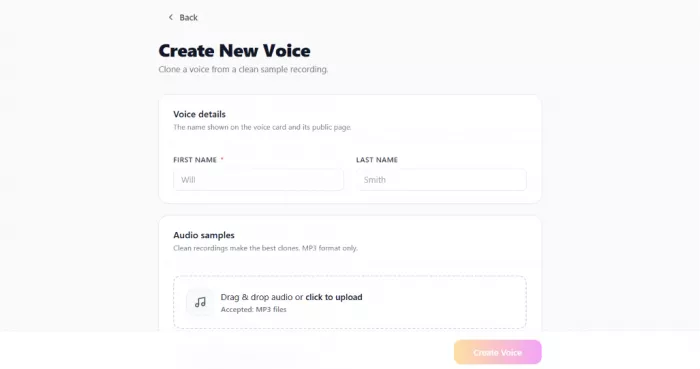
I opened Create New Voice, hoping to test the voice cloning. The form asked for a name and a clean MP3 sample, then promised to clone the voice. The instant I tried to proceed, the pricing page appeared and asked me to upgrade.
This became the rhythm of the rest of my session. Click a feature, get bounced to pricing. It happened often enough that exploring stopped feeling like using a product and started feeling like a guided tour of a paywall.
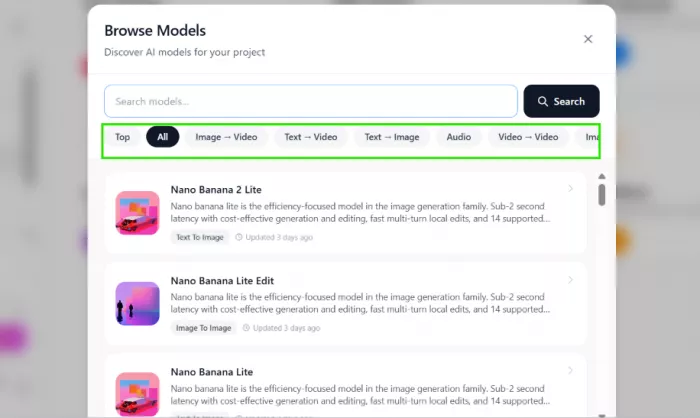
I did get to browse the model library, which was the more encouraging part. A Browse Models window let me search and filter across image to video, text to video, text to image, audio, and video to video. The catalogue listed current models such as Nano Banana 2 Lite, updated only days before my visit. Parrot AI is clearly wiring itself to capable engines underneath.
That raised the obvious question. If the underlying models are strong, and the one image I made looked this good, is the paid plan worth buying? To answer honestly, I went to read the pricing page properly.
The Pricing, and the Catch Nobody Mentions
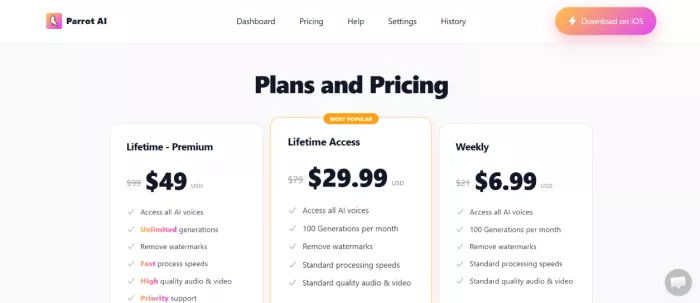
Parrot AI runs three plans. I pulled the figures below straight from the company's official pricing page, and they are accurate as of 4 July 2026. Each plan is shown with a struck-through “original” price beside a lower one, the classic urgency tactic.
| Plan | Price shown | What you get |
|---|---|---|
| Weekly | $6.99 (from $21) | All AI voices, 100 generations per month, watermark removal, standard speed and quality |
| Lifetime Access (Most Popular) | $29.99 (from $79) | All AI voices, 100 generations per month, watermark removal, standard speed and quality |
| Lifetime Premium | $49 (from $99) | All AI voices, unlimited generations, watermark removal, fast processing, high quality audio and video, priority support |
Source: Parrot AI official pricing page (tryparrotai.com/pricing), accurate as of 4 July 2026.
One line from that same official page deserves your attention before you buy. Parrot AI states plainly that it does not offer refunds, on the grounds that the GPU processing behind each voice and video is already paid for once you generate. Payment runs through Stripe, and the company does not accept PayPal or cryptocurrency.
At first glance the Lifetime Access deal looks tempting. Pay thirty dollars once, keep it forever. Two details deserve a hard look before you reach for your card.
First, the word lifetime is doing heavy lifting. A one-time payment only holds value while the product keeps working and keeps being maintained, and as the next section shows, plenty of buyers report the opposite.
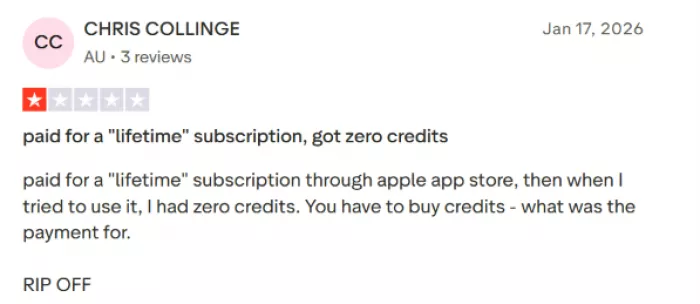
Second, and this is the detail buried deepest, several paying users say the plans still run on credits or tokens layered on top of the subscription. One reviewer described paying for a lifetime plan and then finding zero credits waiting, forced to buy more before generating anything. Pair that with a no-refund policy and the sticker price starts to look like a door charge rather than the full bill.
I could not stress-test the paid tier without spending, so I did the next best thing and went to see what people who did pay have to say.
What Other Users Are Saying
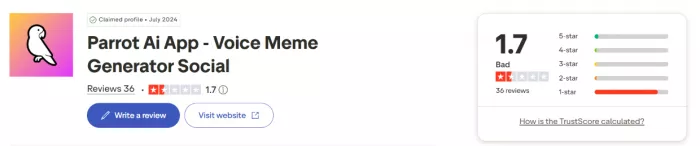
Parrot AI's Trustpilot profile tells a stark story. Across the reviews I read, the score sat at 1.7 out of 5. The breakdown was sharper still: 5 percent gave five stars, a thin sliver landed in the middle bands, and a full 86 percent left a single star.
Numbers like that are hard to spin, so let me show both sides fairly.
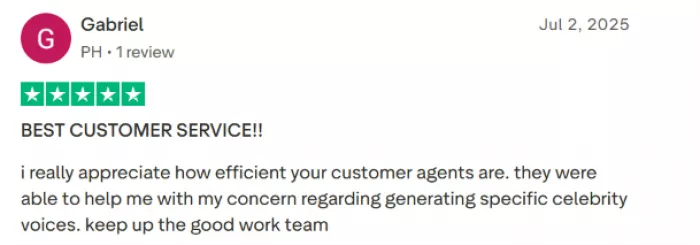
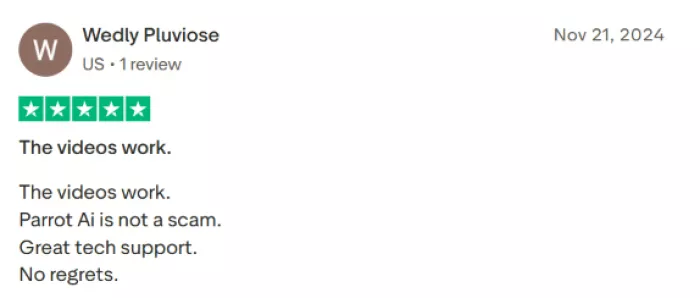
Some users are genuinely happy. One praised the customer service and said the agents helped with a question about generating specific celebrity voices. Another kept it short and satisfied, reporting that the videos work, the app is not a scam, and there were no regrets. The image quality I saw myself backs up the idea that, when it runs, the output can be good.
The complaints, though, gather around money and reliability, and they repeat with uncomfortable consistency.
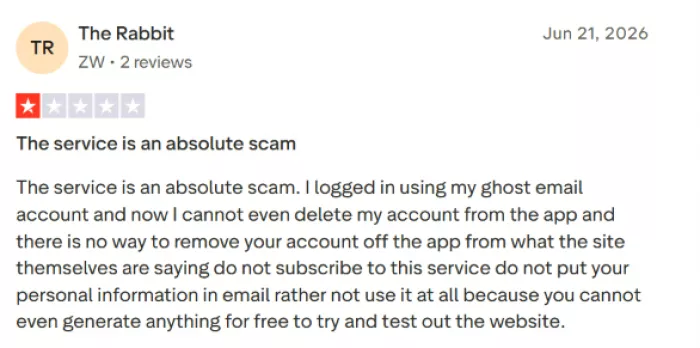
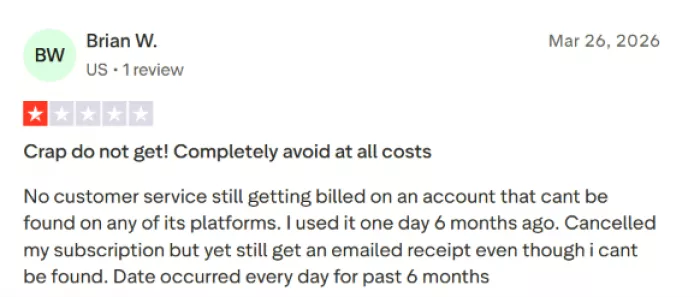
Several buyers describe billing problems. One reported paying for a lifetime subscription through the App Store, then opening the app to find zero credits, and flatly called it a rip-off. Another said they kept getting charged on an account that support could not even locate, with the charge recurring for months after cancellation.
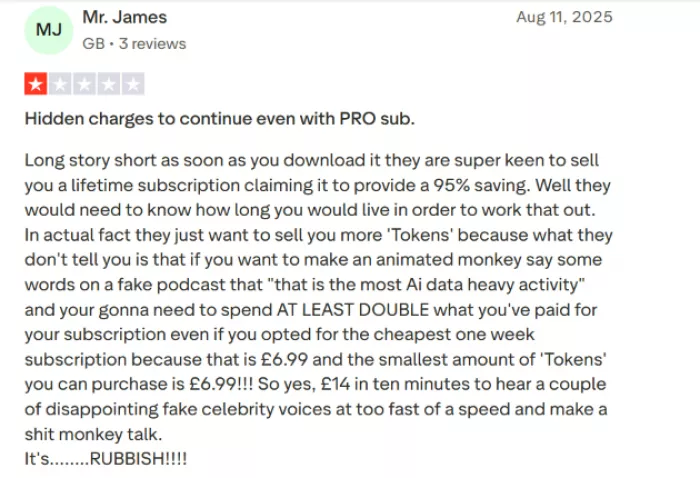
A UK reviewer laid out the token math that stung most. After buying the cheapest weekly plan, they found that animating a character to speak burned tokens fast, and the smallest top-up cost nearly as much as the plan itself, landing them near fourteen pounds in ten minutes for a couple of clips they were not happy with.
Another recurring thread is people saying they could not delete their account or remove their data, and warning others against handing over personal details in the first place.
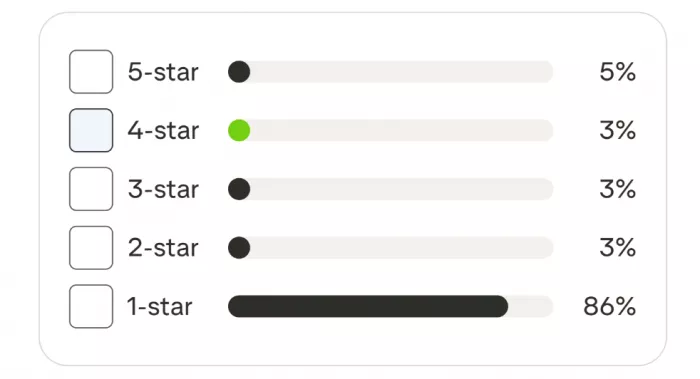
Put together, the pattern points away from the tool's ability to make a clip and toward what happens to your money and your data once you are inside.
How Parrot AI Compares to Real Alternatives
Before you decide Parrot AI is your only route to celebrity voices, it helps to see the field. I lined it up against three better-known names.
| Tool | Free tier | Celebrity voices | Roughly what it costs | Best for |
|---|---|---|---|---|
| Parrot AI | 5 credits (about one image) | 100+, celebrity-branded | $6.99/week or $29.99 lifetime, plus possible token top-ups | Quick meme clips, if it works for you |
| FakeYou | Yes, genuinely usable | 3,500+ community voices | Free tier; paid plans for priority and longer clips | The widest character library on a budget |
| ElevenLabs | Yes, 10,000 credits a month | No celebrity brands, but top-tier custom and cloned voices | Free, then $5 Starter, $22 Creator | Professional voice quality and cloning |
| Speechify | Limited free | Licensed voices such as Snoop Dogg | Paid subscription | Reading documents aloud in polished voices |
Competitor pricing checked against each provider's official site, accurate as of 4 July 2026.
A few honest takeaways from that comparison.
FakeYou is the closest match to what Parrot AI advertises, and its free tier actually lets you generate celebrity and character voices without paying first. The trade-offs are queue times during busy hours and quality that swings from model to model, since the library is community-made.
ElevenLabs is the quality benchmark. Its voices sit close enough to human that people struggle to tell the difference, and its free plan hands you roughly ten minutes of speech a month. It avoids celebrity impressions for legal reasons, so it fits creators who want an excellent voice rather than one specific famous person.
Speechify leans toward reading text aloud in a handful of licensed celebrity voices, a different job from producing a fake video clip.
The short version: for free celebrity voices, FakeYou beats Parrot AI on access. For raw quality, ElevenLabs wins. Parrot AI's real pitch is convenience and a polished mobile app, and it starts charging for that convenience earlier than any competitor here.
The Good and the Bad
After a full hands-on session, here is my honest tally.
What Parrot AI gets right:
- The image generator produced a convincing, high-detail photo from a single prompt.
- The interface is clean and easy to move around.
- The underlying model library is current, with recent engines like Nano Banana 2 Lite.
- When features do run, the output quality can be good.
Where it falls short:
- The celebrity voice feature, its entire selling point, is paywalled on the web app.
- Five free credits stretch to roughly one generation, so you cannot meaningfully test it for free.
- Most tools redirect straight to a pricing page.
- A 1.7 Trustpilot score, with 86 percent one-star reviews, signals deep dissatisfaction.
- An explicit no-refund policy sits next to repeated reports of billing issues and “lifetime” plans that still demand paid tokens.
- Several users say they could not delete their accounts or data.
The imbalance in that tally is the whole point. The technology can perform, as my lavender-field portrait proved. The practices wrapped around it are what drag the experience down.
Final Verdict: Is Parrot AI Any Good?
So, is Parrot AI any good? After testing it myself, my answer is a qualified no for most people.
The tool itself is capable. I watched it produce a great image, and the model library underneath is legitimate. Had Parrot AI paired that capability with honest pricing and clean billing, this would be an easy recommendation.
It did not. The feature that draws people in is locked behind payment, the free allowance amounts to a single image, and the reviews from people who actually paid describe billing headaches serious enough to trigger chargebacks and formal complaints. A 1.7 rating built on 86 percent one-star reviews is no accident.
If you want a quick celebrity meme without spending, start with FakeYou. If you care about voice quality and plan to create regularly, ElevenLabs is the stronger long-term home. If you still want to try Parrot AI after all of this, use a payment method you can dispute with ease, treat the lifetime label with suspicion, and confirm your plan actually includes usable credits before you celebrate.
I came in asking whether Parrot AI is any good. It can make a good image. Trusting it with your card is a separate question, and on that one, the evidence I gathered points to caution.


Comments