PixVerse AI Review: What Users Like, What They Complain About and Whether It Is Worth Paying For



PixVerse AI looks exciting because it can turn a prompt or image into a short AI video within minutes. That is the good part. The harder question is whether the results are consistent enough, the credits last long enough, and the paid plans feel fair after users start regenerating clips. Based on public user feedback, PixVerse is a capable AI video tool with real creative value, but it is also one of those products where the final experience depends heavily on how patient you are with failed outputs and how carefully you manage credits.
Quick Review Summary
| Review Area | Rating | Expert View |
| Ease of use | 8.8/10 | Simple enough for beginners and mobile-first creators |
| Video quality | 7.8/10 | Strong for short clips, effects, and image animation, but not always consistent |
| Prompt accuracy | 6.2/10 | Works well with simple prompts, weaker with complex instructions |
| Pricing value | 6/10 | Useful if managed carefully, frustrating if many retries are needed |
| Credit fairness | 5.5/10 | The biggest user complaint is paying credits for poor or failed generations |
| Mobile experience | 8/10 | Large adoption and strong Play Store footprint |
| Trust and support | 6/10 | Mixed sentiment, especially around payments, refunds, and subscriptions |
| Overall score | 7.3/10 | Good creative tool, but not a risk-free purchase |
PixVerse is best reviewed as a short-form AI video generator, not a full video production suite. It works well for creators who need quick visuals for TikTok, Instagram Reels, YouTube Shorts, product teasers, and AI effects. It becomes weaker when users expect exact storyboarding, long videos, reliable character consistency, or perfect prompt obedience.
Review Footprint: What Public Ratings Say
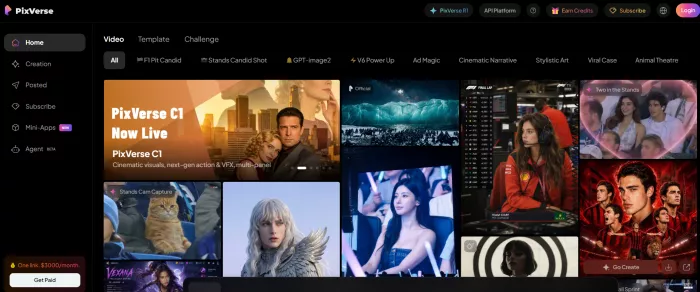
PixVerse has a stronger review presence on app stores and consumer review sites than on traditional software review platforms. Its public image is split: Google Play shows large-scale adoption, while Trustpilot shows sharper frustration around payments, credits, and support.
| Platform | Current Review Signal | What It Means |
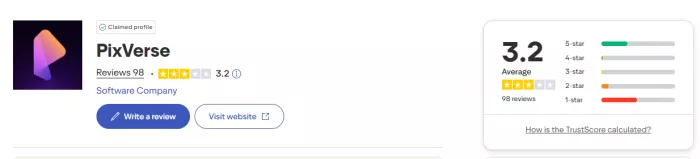
| Google Play | 4.3 stars, 43.7 lakh reviews, 5 crore plus downloads | Very large mobile user base and strong mainstream adoption |
| Trustpilot | 3.2/5 from 98 reviews | Mixed trust signal, with many complaints around billing and credits |
| No fixed rating | Useful for creator-level feedback, especially around quality and cost |
The Google Play listing shows PixVerse as a widely used AI video app, with 4.3 stars, 43.7 lakh reviews, and 5 crore plus downloads in the India-facing listing. That scale matters because it shows PixVerse is not just a niche web tool with temporary hype. It has reached a broad mobile audience.
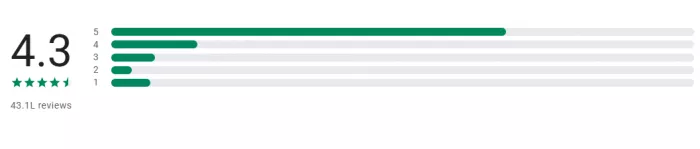
Trustpilot gives a more cautious picture. PixVerse currently shows 3.2 out of 5 from 98 reviews, which is a weaker trust score than its mobile rating suggests. The negative reviews focus heavily on subscriptions, credits, refunds, cancellation issues, customer support, and results not matching prompts.
What Users Like About PixVerse AI
The positive side of PixVerse is easy to understand. The tool lowers the barrier to video creation. A user can upload a still image, describe a scene, apply an effect, or test a short visual idea without knowing video editing. That makes it attractive for creators who need speed more than precision.
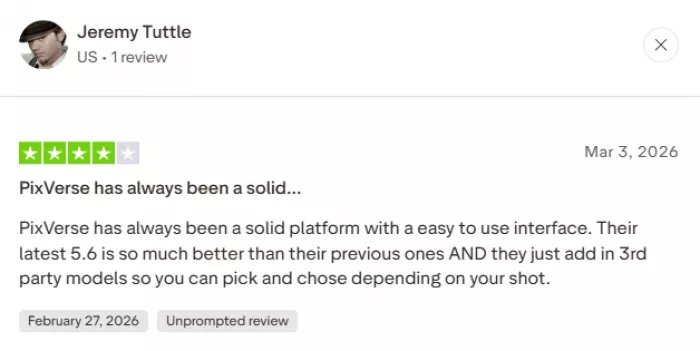
Users often praise PixVerse for three reasons: it is easy to start, the outputs can look impressive, and the templates make it simple to create trend-style videos. For casual creators, this matters more than having deep production controls. A video that is “good enough to post” is often more valuable than a complex tool that takes hours to learn.
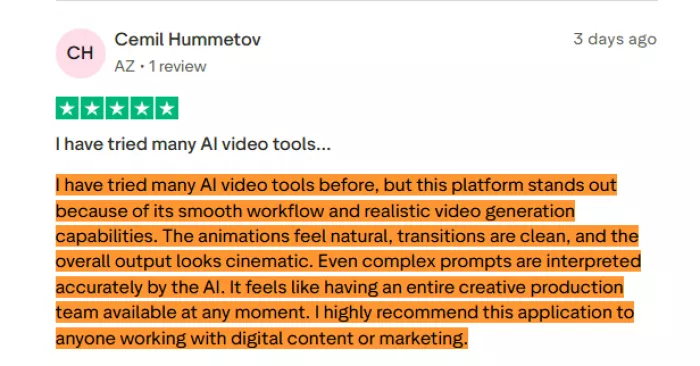
The strongest positive patterns are:
● Easy image-to-video generation
● Fast short video creation
● Fun AI effects and viral templates
● Strong mobile accessibility
● Useful results for social media posts
● Good visual quality when prompts are simple
● Helpful for creators who do not know traditional editing
This is where PixVerse earns its place. It helps users create motion from static ideas. A product photo can become a short promotional clip. A portrait can become an animated character shot. A fantasy image can turn into a cinematic scene. That makes it genuinely useful for creators who publish visual content regularly.
What Users Complain About Most
The complaints are not random. They follow a clear pattern. Users are not mainly saying PixVerse cannot create videos. They are saying the cost of reaching a usable result can feel too high.
A visible Google Play review captures the main frustration: users may like the app, but they dislike having to keep buying credits, especially when there is no proper preview-and-accept system and remakes still consume credits even when the output does not work. The same review also mentions that voice prompts are not always accurate, causing more remakes.
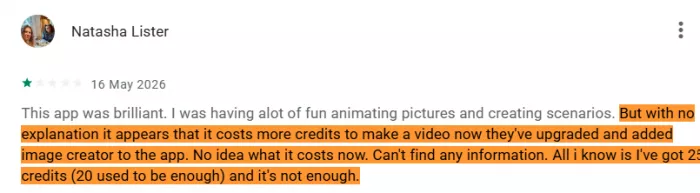
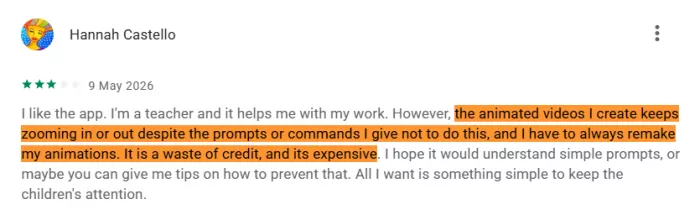
That one complaint explains the core weakness of PixVerse better than any feature table. AI video generation is not always predictable. If the first output is wrong, users regenerate. If the second output changes the face, object, motion, or scene, users regenerate again. Each attempt can cost credits. The frustration is not only “the tool failed.” The frustration is “the tool failed and I still paid for the attempt.”
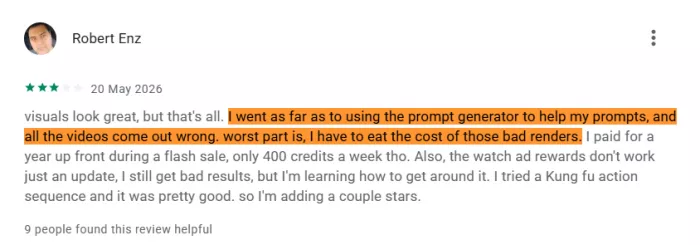
Trustpilot reviews show similar concerns, with users reporting problems around subscription handling, payment issues, missing credits, refunds, cancellations, and support response.
| Complaint Area | Why It Matters |
| Credit burn | Users may spend several attempts to get one usable clip |
| Failed generations | Poor outputs can still consume credits |
| Prompt mismatch | The final video may ignore part of the instruction |
| Remake cost | Fixing a bad result can cost more credits |
| Subscription concerns | Some users complain about billing and cancellation handling |
| Refund issues | Dissatisfied users may not always feel supported |
| Support quality | Trustpilot feedback suggests customer service is a weak point for some users |
PixVerse is not unusual here. Many AI video tools have the same problem. But because PixVerse is popular with casual mobile users, the credit system feels especially visible. Casual users expect the app to behave like a simple creative tool. The economics are closer to a usage-metered AI platform.
The Review Pattern in One Chart
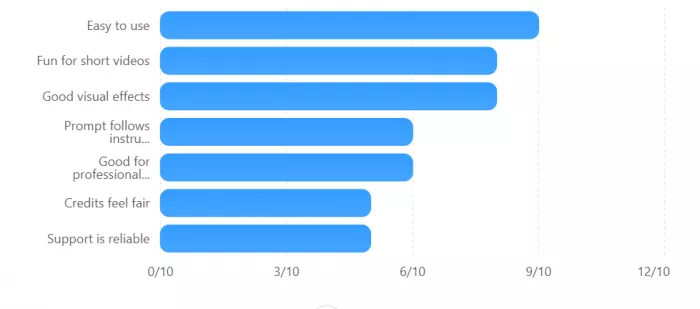
This is the clearest way to understand PixVerse. Users like the creative output. They are less confident about the payment experience and the control they get over results.
Video Quality Review
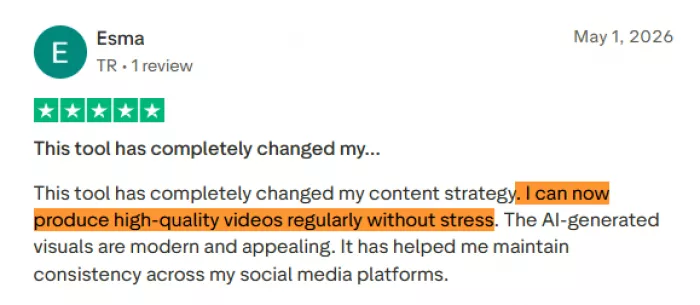
PixVerse can generate good-looking short clips, especially when the prompt is simple and visual. The best results usually come from scenes with one subject, clear lighting, limited movement, and a straightforward camera direction. Product shots, character portraits, cinematic fantasy scenes, transformations, and social media effects are the safest use cases.
Where PixVerse performs well:
| Output Type | Performance |
| Product motion clips | Strong |
| AI portrait animation | Strong |
| Fantasy or cinematic scenes | Good |
| Social media effects | Strong |
| Simple camera movement | Good |
| Talking character clips | Mixed |
| Multi-character scenes | Mixed to weak |
| Long story sequences | Weak |
PixVerse struggles when users ask for too much at once. A prompt with several characters, exact camera motion, detailed object handling, readable text, brand-specific elements, and emotional facial continuity is more likely to break. This is not a PixVerse-only problem. It is a current AI video limitation. But users should know it before paying.
The best outputs come when users treat PixVerse like a visual sketch machine. It is excellent for generating a compelling short clip that can be polished elsewhere. It is less reliable as a one-click final video generator.
Pricing Review: The Plan Price Is Not the Full Cost
PixVerse pricing is credit-based. That means the monthly plan price is only the entry cost. The real cost depends on how many generations, remakes, upscales, audio additions, and exports a user needs.
| Plan | Reported Monthly Price | Best For | Review Take |
| Free | $0 | Testing basic generation | Useful for trial, too limited for serious use |
| Standard | Around $10/month | Light creators | Good entry point, but credits can run out fast |
| Pro | Around $30/month | Regular creators | Better for active users who need more volume |
| Premium | Around $60/month | Heavy creators and small teams | Useful only if video generation is part of regular workflow |
| API / Enterprise | Custom or separate pricing | Developers and businesses | Better for scaled workflows, not casual creators |
The main pricing problem is not the headline plan price. A $10 or $30 plan can be reasonable if the first few generations work. The problem appears when users need repeated remakes. If a single usable clip takes five attempts, the effective cost of that clip becomes much higher than expected.
This is why user reviews often sound emotionally split. People like the tool, but they do not always like the economics. PixVerse feels more valuable when it produces a good result quickly. It feels expensive when the user spends credits fixing the model’s mistakes.
Feature Review: Useful, But Not Equally Reliable
PixVerse has a strong feature set for short-form AI video. But in a review, the better question is not “how many features does it have?” The better question is “which features are actually useful?”
| Feature | Review Judgment |
| Text-to-video | Useful, but depends heavily on prompt simplicity |
| Image-to-video | One of the strongest features, especially for creators |
| Effects and templates | Very useful for casual and social content |
| Motion control | Helpful, but not always exact |
| Multi-image reference | Useful for style and subject guidance, but not perfect |
| Video extension | Good idea, mixed consistency |
| Selection editing | Practical when only part of the clip needs correction |
| Speech or talking character tools | Useful for short scenes, but accuracy varies |
| HD / 1080p output | Important for quality, but increases credit pressure |
The most reliable everyday feature is image-to-video. It gives the model a stronger visual base than text alone. Text-to-video is more flexible, but also more unpredictable. Templates and effects are useful because they reduce the creative burden. Instead of building a complex prompt, users can start from a format that already works.
Who Will Like PixVerse AI?
PixVerse works best for users who understand that AI video is still experimental. If the user accepts retries as part of the process, PixVerse can be valuable. If the user expects exact results immediately, frustration is likely.
PixVerse is a good fit for:
● Creators making TikTok, Reels, and Shorts
● Ecommerce sellers animating product photos
● Marketers testing ad hooks
● YouTubers needing short visual cutaways
● Meme pages and trend-focused accounts
● Designers creating moodboards or concept visuals
● Small teams without video production resources
It is not a good fit for:
● Users who need frame-perfect control
● Long-form video editors
● Brands with strict visual guidelines
● People who dislike credits
● Users who expect every generation to work
● Anyone needing predictable cost per finished video
PixVerse AI vs Alternatives
| Alternative | Best For | Compared With PixVerse |
| Runway | More serious AI video production | Better for advanced editing and control |
| Pika | Creative short AI videos | Similar creator appeal, often strong for playful effects |
| Kling AI | Realistic motion and cinematic clips | Better for users prioritizing realism |
| Luma Dream Machine | Cinematic movement and visual storytelling | Stronger for atmospheric scenes and camera motion |
| InVideo AI | Complete marketing videos | Better for script-to-video and structured business videos |
PixVerse is easier to use than many advanced tools, but less controlled than professional platforms. It is more of a fast creative generator than a full video workflow system.
Final Verdict: Is PixVerse AI Worth It?
PixVerse AI is worth trying if your goal is short, visual, fast-moving content. It is especially useful for creators who need social clips, animated images, product visuals, effects, and quick concept videos. The app is popular for a reason: it makes AI video generation accessible to people who do not know traditional editing.
But PixVerse is not a tool you should buy blindly. The credit system changes the value equation. If you get a good video in one or two attempts, PixVerse feels impressive. If you need repeated remakes, the same tool can feel expensive and frustrating. Public reviews make that pattern clear: users like the creative potential, but many complain about credits, subscriptions, refunds, and support.
The fairest review is this: PixVerse AI is a strong short-form AI video generator with a weak cost-control experience. It is not bad, and it is not perfect. It is useful when treated as a fast visual testing tool, not as a guaranteed one-click video studio.
For casual users, the free plan is enough to test whether the workflow feels right. For regular creators, the paid plans can make sense if they are producing content often and can manage credits carefully. For professional teams, PixVerse is better as a concept and asset generator than a final production tool.
PixVerse’s value is real, but it comes with a condition: the user must be comfortable experimenting, retrying, and paying attention to credit usage.


Comments