SeaArt AI Review: Is This AI Art Platform Worth Your Time and Credits?




SeaArt AI does not feel like a basic prompt-to-image tool. It feels more like a full creative playground where users can generate images, try different models, remix community work, edit visuals, create short videos, and experiment with characters. That makes it more interesting than many simple AI art tools, but also more complicated.
The real question is not whether SeaArt AI has enough features. It clearly does. The better question is whether all those features actually help users create better visuals, or whether the platform becomes too crowded once credits, models, workflows, and settings enter the picture.
SeaArt AI Quick Snapshot
| Area | Review Summary |
| Tool type | AI image, video, editing, model, and community platform |
| Best for | Anime art, fantasy visuals, character design, stylized portraits, and creative experiments |
| Main strength | Huge model variety and strong creative range |
| Main weakness | Busy interface, learning curve, and credit-based usage |
| Ease of use | Easy to start, harder to master |
| Output quality | Strong with the right model and prompt |
| Pricing style | Free stamina plus paid credit-based plans |
| Best user | Creators who enjoy experimenting with styles and models |
| Not ideal for | Users who want a very simple AI image tool |
| Overall verdict | Flexible and powerful, but not frictionless |
The First Impression: SeaArt Does Not Open Like a Blank Canvas
Some AI image tools keep the experience clean. You enter a prompt, choose a size, generate an image, and move on. SeaArt AI feels different from the first few minutes. The platform immediately presents images, models, styles, community posts, creation tools, and editing options.
That is not necessarily a bad thing. For a creator, this can feel exciting because there is always something to explore. You can look at what others are making, copy ideas, test a model, remix an image, or move from image generation into video or editing. SeaArt does not want to be a small tool. It wants to be an AI creation environment.
The problem is that this same environment can feel busy. A beginner who only wants one clean image may wonder where to start, which model to choose, whether credits are being used, and why there are so many ways to generate or remix an output. SeaArt is approachable at the surface, but the deeper experience is not as simple as it first appears.
Who Is SeaArt AI Actually Built For?
SeaArt AI is not built for just one type of user. That is both its strength and its problem. A casual user can create images with prompts, but the platform becomes more valuable for people who enjoy experimenting with models, styles, image references, and community workflows.
| User Type | How SeaArt AI Feels |
| Casual user | Interesting, but may feel crowded |
| Anime creator | Strong fit because of style and model variety |
| Prompt experimenter | Very useful for testing different looks |
| Character designer | Good for visual exploration and variations |
| Advanced AI creator | More valuable because of workflows and model control |
| Business user | Useful only after checking privacy, rights, and consistency |
| Beginner designer | Less clean than Canva, Firefly, or simpler design tools |
SeaArt works best for users who like creative trial and error. If you enjoy testing prompts, changing models, comparing outputs, and learning from community examples, the platform starts to make sense. If you want a very clean image generator with predictable pricing and minimal settings, SeaArt may feel heavier than expected.
Starting With a Simple Prompt
The easiest way to understand SeaArt is to start with a normal prompt. A user can enter something like: “cinematic fantasy warrior standing in a neon-lit city, dramatic lighting, detailed armor, realistic style.”
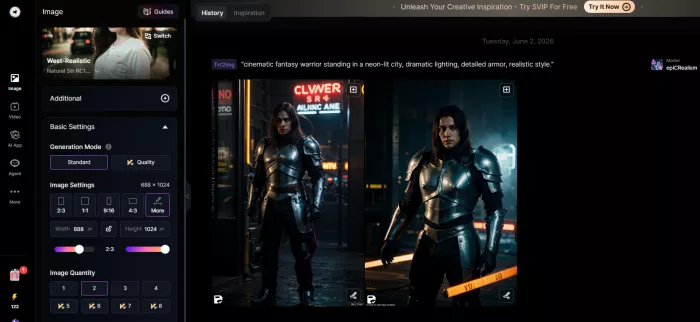
SeaArt can generate a strong first result from a prompt like this, especially if the selected model matches the visual style. The lighting can look dramatic, character details can be sharp, and the overall image may feel more polished than what basic image generators produce. For fantasy, anime, and stylized character visuals, SeaArt quickly shows why many creators like it.
But the first result is not always the best result. Sometimes the image looks too generic. Sometimes the face looks slightly artificial. Sometimes the armor, hands, background, or lighting need another generation. This is where SeaArt’s model-based system matters. The same prompt can look very different depending on the model, style, and settings.
That means SeaArt is not a one-prompt miracle machine. It is better understood as a tool that rewards experimentation. The more you learn how models behave, the better the results become.
The Platform Opens Up After the First Generation
The first generated image is only the start of SeaArt’s workflow. Once an image appears, the platform pushes users toward the wider ecosystem. You can create variations, upscale the image, edit parts of it, use image-to-image, explore similar community outputs, or try a different model.
This is where SeaArt becomes more interesting than a basic generator. It is not only asking, “What prompt do you want to type?” It also asks, “What style do you want? What model do you want? Do you want to remix this? Do you want to use a reference image? Do you want to turn this into a video? Do you want to explore what other creators made?”
For experienced users, this is useful. It gives more creative paths. For beginners, it can create friction. The platform gives you many options before you fully understand which ones matter. That makes SeaArt feel powerful, but also slightly overloaded.
Model Variety Is SeaArt’s Biggest Strength
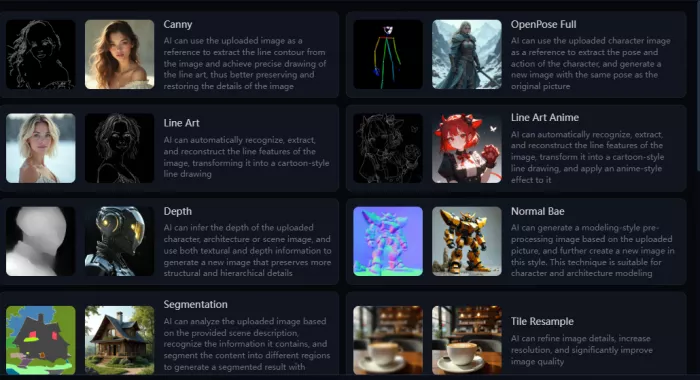
SeaArt’s biggest advantage is not just that it can generate images. Many tools can do that. Its bigger strength is model variety. Users can explore different models for anime, fantasy, realistic portraits, illustrations, game-style characters, and other visual styles.
This gives SeaArt more range than a fixed one-model image generator. If one model gives weak results, another model may completely change the output. That flexibility is useful for creators who want a specific visual identity rather than a generic AI-art look.
| Model Use Case | How SeaArt Performs |
| Anime characters | One of its strongest areas |
| Fantasy art | Strong with the right model and prompt |
| Realistic portraits | Good, but sometimes too polished |
| Game-style assets | Useful for concepts and character ideas |
| Social media visuals | Good for creative posts and stylized images |
| Product-style visuals | Possible, but less predictable |
| Brand-safe commercial work | Needs careful review and rights checking |
This model variety also creates a learning curve. A new user may not know which model to select or why one output looks better than another. SeaArt becomes more useful when users stop treating it like one AI tool and start treating it like a collection of creative engines.
Image Quality: Impressive, But Not Automatic
SeaArt AI can produce impressive images, especially in anime, fantasy, stylized portraits, and character design. These are the areas where the platform feels most confident. With the right model and prompt, outputs can look detailed, polished, and visually appealing.
The quality becomes less predictable when users expect exact control. Product-style visuals, realistic business images, and clean commercial assets may require more prompting, more model testing, and more editing. SeaArt can produce strong realistic images, but realism is more model-dependent than automatic.
| Test Area | What Works Well | What Feels Weak |
| Anime art | Sharp, expressive, and detailed | Can look repetitive if prompts are weak |
| Fantasy visuals | Strong lighting and atmosphere | Needs model and prompt control |
| Realistic portraits | Polished and clean | Faces may look too smooth or artificial |
| Image-to-image | Useful for restyling and visual direction | Not always precise |
| Upscaling | Helps improve final polish | Cannot fix a weak base image |
| AI video | Fun for short experiments | Not as strong as dedicated video tools |
| Character design | Good for variations and style testing | Consistency may need extra work |
SeaArt’s quality is not poor. The issue is predictability. When the prompt, model, and settings align, the results can be very strong. When they do not, the output can look generic, over-stylized, or slightly messy. It is a good tool for experimentation, not a guaranteed first-shot result machine.
UX: Creative Playground or Too Much at Once?
SeaArt’s interface is not bad, but it is dense. There are many things happening at the same time: prompts, models, styles, community images, remix options, editing tools, credits, stamina, workflows, and video tools. The platform feels active, but not always clean.
For creative users, this density can be useful. The community feed gives ideas. The model library gives variety. Remixing helps users learn from existing images. The editing tools allow users to keep working after the first generation.
For new users, the same layout can feel overwhelming. It is easy to generate an image, but harder to understand how to get consistently better results. That difference matters. SeaArt is beginner-accessible, but not beginner-simple.
| UX Element | User Experience |
| Basic generation | Easy to start |
| Model selection | Powerful but crowded |
| Community feed | Useful for inspiration |
| Remixing | Helpful for learning prompt and model behavior |
| Credit tracking | Requires attention |
| Advanced workflows | Better for experienced users |
| Mobile app | Convenient, but can feel dense |
| Overall UX | Creative and feature-rich, but not minimal |
The best way to describe SeaArt’s UX is this: it gives users a lot, but it also asks users to learn a lot.
Pricing: Credits, Stamina, and the Cost of Experimenting
SeaArt’s pricing is based around free stamina and paid credits. This is important because the real cost of using SeaArt depends on how much you generate and what type of tools you use.
Free stamina allows users to test the platform without immediately paying. That is useful because SeaArt is a tool you should try before buying. Paid credits are used for more generation capacity and advanced usage. Standard image generation usually costs less than video generation or complex workflows.
| Pricing Element | What It Means for Users |
| Free stamina | Daily-use allowance for testing and light creation |
| Credits | Paid or plan-based tokens used for generation |
| Standard images | Usually cheaper than videos or advanced workflows |
| Video generation | More credit-sensitive |
| Advanced workflows | Can cost more depending on the tool or model |
| Paid plans | Better for frequent creators |
| Main risk | Trial and error can consume credits quickly |
SeaArt’s paid plans start at around $9.99 per month for a Standard-style plan and $29.99 per month for a Pro-style plan, although users should always confirm the latest pricing inside SeaArt before paying as pricing might be different as per time and the region.
The important point is not only the monthly price. SeaArt encourages experimentation, and experimentation consumes credits. If you generate multiple versions, test different models, upscale outputs, or try video, your usage can rise quickly. Pricing can feel fair when you understand the system, but confusing if you start clicking through tools without watching credit usage.
What Real Users Say About SeaArt AI
Real user feedback around SeaArt AI is mixed, but the pattern is clear. People who enjoy creative freedom often praise it. People who expect simple pricing, easy cancellation, perfect moderation, or a clean beginner-only interface are more likely to complain.
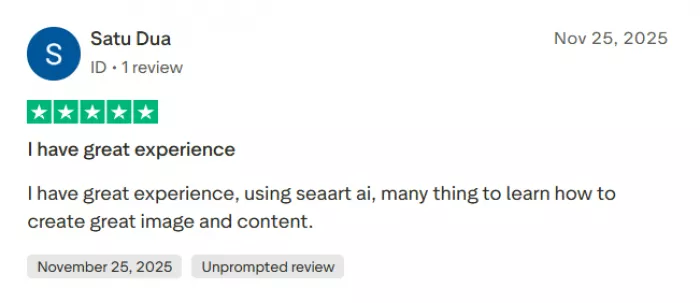
Positive reviews usually mention image quality, model variety, daily credits, creative tools, and community inspiration. Users like that SeaArt can make anime art, fantasy visuals, characters, memes, and detailed stylized images without requiring professional art skills.

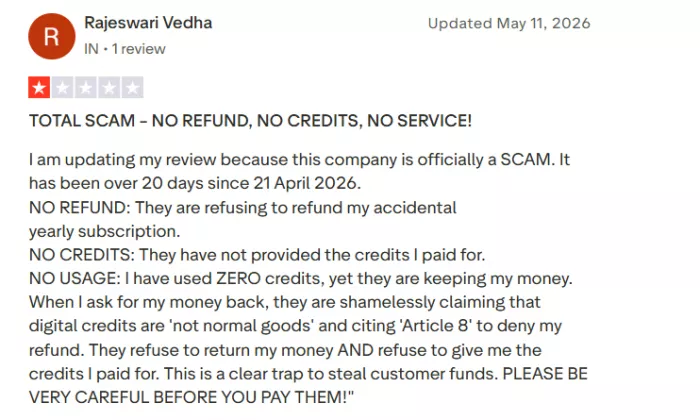
Negative reviews often focus on billing, subscriptions, refund frustration, app bugs, moderation, and credit confusion. Some users say the platform became stricter with moderation.
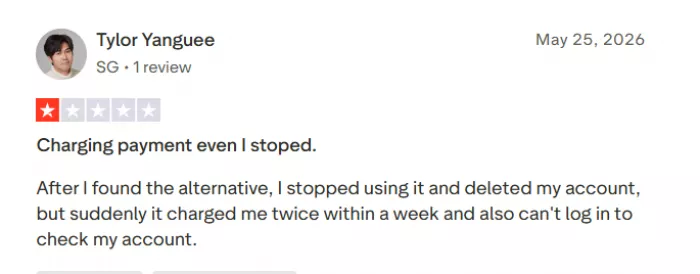
Others complain about unclear trial-to-paid conversion or difficulty getting refunds. There are also complaints around crashes, payment prompts, and inconsistent output quality.
| What Users Like | What Users Complain About |
| Strong creative output | Billing and subscription confusion |
| Anime and character quality | Refund complaints |
| Large model variety | App bugs and crashes |
| Free daily credits | Strict or inconsistent moderation |
| Community inspiration | Credit usage can feel unclear |
| Browser and mobile access | Output quality varies by model |
The praise and complaints are connected. SeaArt is powerful because it has many options. It can also frustrate users because many options mean more settings, more costs to track, and more room for confusion.
Privacy and Trust: What Users Should Check
SeaArt looks like a legitimate platform. It has an official website, mobile apps, public policy pages, pricing, community features, and visible user reviews. The concern is not whether it exists as a real tool. The concern is how users handle uploads, generated images, prompts, public visibility, and model training features.
SeaArt is not a private offline editor. It is a connected AI creation platform with community features. That means users should check whether their generations are private or public, whether uploaded images are saved, how content can be shared or remixed, and what rights apply to commercial use.
| Privacy Question | Why It Matters |
| Are my generations public? | Community platforms may show or remix content |
| Are uploads saved? | Reference images may remain in account history |
| Can I train models? | Training datasets may include sensitive material |
| Can I use outputs commercially? | Rights depend on content, model, and platform terms |
| Should I upload faces? | Face images need extra caution |
| Should I upload client work? | Not without checking privacy and usage terms |
Users should avoid uploading private portraits, children’s photos, client images, confidential brand assets, ID-style images, or copyrighted reference sets without checking the current terms and visibility settings. SeaArt is best used first with non-sensitive creative experiments.
Where SeaArt AI Works Best
SeaArt AI works best as a creative testing platform, especially when users want style variety instead of one fixed output. Its strongest areas are anime art, fantasy visuals, character design, stylized portraits, and social media-friendly images.
It is especially useful for creators who like experimenting with prompts, models, and community examples. The platform gives enough room to test different looks, remix ideas, and build visual direction before moving into a final design workflow.
SeaArt is also helpful for concept art. Users can quickly generate character drafts, mood references, fantasy scenes, and visual ideas. It may not always produce a final polished asset on the first try, but it gives creators many directions to explore.
Where SeaArt AI Feels Weak
SeaArt AI feels weaker when users want a simple, predictable, low-friction tool. The interface can feel busy because there are many models, settings, community posts, credits, stamina rules, and advanced workflows in one place.
Its pricing also needs attention. Free stamina is useful, but credits can be used quickly when testing models, upscaling images, creating videos, or running advanced workflows. That makes the tool less straightforward than a simple monthly image generator.
The platform is also less ideal for professional consistency, serious commercial use, and high-end AI video. Output quality depends heavily on the model and prompt, while public reviews mention some complaints around billing, refunds, app reliability, and moderation. SeaArt is powerful, but it works best for patient creators, not users who want a clean tool that behaves the same way every time.
Best SeaArt AI Alternatives
SeaArt is useful, but it is not the best choice for every user. The right alternative depends on the job.
| Alternative | Better For |
| Midjourney | Polished artistic image generation |
| Leonardo AI | Game assets, concept art, and creative workflows |
| Adobe Firefly | Safer commercial design use inside Adobe tools |
| Canva AI | Simple social media visuals and templates |
| Ideogram | Text-heavy graphics and poster-style images |
| Runway | AI video generation |
| Playground AI | Simple image generation and editing |
| Tensor.Art | Model-based Stable Diffusion-style generation |
If you want polished art with less setup, Midjourney may feel cleaner. If you want commercial design safety, Adobe Firefly is easier to justify. If you want simple social media content, Canva is more practical. If you want model variety and experimentation, SeaArt remains a strong option.
Final Verdict: Is SeaArt AI Worth Using?
SeaArt AI is worth trying if you want a flexible AI art platform with strong model variety, community inspiration, anime generation, character creation, and creative experimentation. Its biggest strength is range. It gives users many ways to create, remix, edit, and explore visual styles.
The tradeoff is friction. SeaArt is not the cleanest tool in the category. The interface can feel crowded, pricing depends on credits and stamina, quality varies by model, and real user reviews show complaints around billing, refunds, moderation, and app reliability. None of that makes SeaArt useless, but it does mean users should approach it carefully.
The best way to use SeaArt is to start with the free allowance, test different models, watch credit usage, avoid sensitive uploads, and only pay once you understand how often you will actually use it.
SeaArt AI is not for users who want the simplest possible image generator. It is for curious creators who enjoy experimenting. If that is your style, SeaArt can be powerful. If you want a clean, predictable, low-friction tool, it may feel like too much.


Comments