Sitemap Generator UploadArticle.com Review: Is the XML File Ready to Submit?




I look at a sitemap generator by the file it gives back, not by how quickly it produces one. A fast XML file is not useful if it includes broken URLs, misses important pages, mixes domain versions, or points search engines toward pages that should stay out of search. That is the right way to look at Sitemap Generator UploadArticle.com.
This tool is simple, and that is part of its appeal. But a sitemap is not just a technical file. It is a signal you give to search engines about which pages matter on your website. That makes the final output more important than the button that creates it.
The Real Test Is the XML File
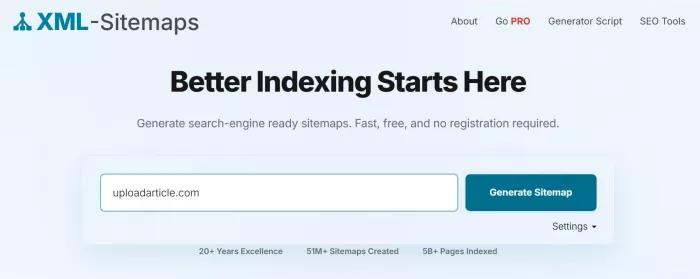
A sitemap generator has one obvious job: create a sitemap.xml file. But the real review starts after that file is generated.
The file should contain clean, public, indexable URLs. It should reflect the preferred version of the website. It should avoid clutter such as redirects, login pages, internal search URLs, duplicate filters, and weak archive pages. If the sitemap gets those basics right, it can be useful. If it does not, the user still has work to do before submitting it.
That is why Sitemap Generator UploadArticle.com should be reviewed as a practical sitemap utility, not as a complete SEO tool. It helps create the file. It does not replace the judgment needed to decide whether that file is worth submitting.
For a small website, this may be enough. For a large site, ecommerce store, news platform, or technical SEO project, the sitemap needs more control than a basic generator may provide.
What Sitemap Generator UploadArticle.com Does
Sitemap Generator UploadArticle.com is a browser-based XML sitemap generator. Its purpose is to take a website URL, scan the public pages it can find, and turn those URLs into a sitemap file that search engines can read.
That makes it useful for users who do not want to write XML manually, install software, or configure a plugin. It is especially relevant for static websites, small business sites, portfolios, and simple blogs that do not already have a sitemap system in place.
The tool should not be confused with a full SEO platform. It does not audit content quality, check keyword rankings, analyze backlinks, review index coverage, or diagnose every technical issue on a website. Its job is much narrower.
It helps with sitemap creation, not complete SEO management.
| Area | What the tool helps with | What it does not replace |
| Sitemap creation | Creates a basic XML sitemap from a website URL | A full technical SEO crawl |
| Setup | Avoids coding, plugins, and manual XML formatting | CMS-level sitemap automation |
| Search discovery | Prepares a file that search engines can use | Indexing or ranking guarantees |
| Small-site SEO | Helps with first-time sitemap submission | Ongoing SEO monitoring |
This is a fair way to place the tool. It is useful when the requirement is simple. It becomes limited when the website needs automation, reporting, or advanced crawl control.
The URLs That Belong in the Sitemap
A strong sitemap is selective. It should not list every URL a crawler can find. It should list the pages that deserve to be discovered by search engines.
For a small business website, that usually means the homepage, service pages, important location pages, contact page, about page, and useful blog posts. For a blog, it means the main posts and valuable category pages. For a portfolio site, it may include project pages, case studies, service pages, and a contact page.
The sitemap should also use the correct domain version. If the website runs on HTTPS, the sitemap should use HTTPS URLs. If the preferred site version is non-www, the sitemap should not mix in www URLs. These details may look small, but they help keep search signals clean.
A good sitemap should include pages that are:
● public and accessible,
● important enough to be discovered,
● canonical rather than duplicate,
● using the correct HTTPS and domain version,
● intended to appear in search results.
This is where Sitemap Generator UploadArticle.com can be helpful for simple websites. If the site structure is clean and the important pages are linked properly, the tool can create a useful sitemap file without much effort.
Still, the user should open the file before submitting it. A generator can collect URLs, but it cannot always understand which pages have business value.
The URLs That Should Not Be There
More URLs do not make a sitemap better. A sitemap filled with weak or unnecessary pages can reduce clarity.
Search engines do not need admin pages, login pages, internal search pages, cart pages, checkout pages, private pages, duplicate filters, or old redirected URLs listed in the sitemap. Those pages may exist on the site, but they do not belong in a search discovery file.
The same applies to broken pages. If a URL returns a 404 error, it should not be in the sitemap. If a page redirects to another page, the sitemap should list the final destination instead. If a page is marked noindex, it should usually stay out because it is not meant to appear in search results.
| Keep in the sitemap | Keep out of the sitemap |
| Homepage and main public pages | Login, admin, cart, and checkout pages |
| Important blog posts and resources | Broken, redirected, or outdated URLs |
| Canonical HTTPS URLs | Mixed HTTP, HTTPS, www, and non-www versions |
| Pages intended for search visibility | Noindex pages, filters, and internal search pages |
This is the most important quality check. Sitemap Generator UploadArticle.com can create the XML structure, but the sitemap still needs a human review. If the file contains the wrong pages, the user should clean it before uploading or submitting it.
The Workflow: Simple, But Not Finished at Download
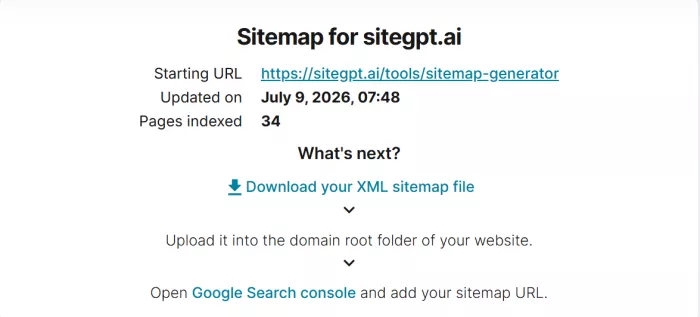
The workflow is simple. Enter the website URL, generate the sitemap, download the XML file, upload it to the site, and submit the sitemap URL to search engines.
The problem is that many users stop at the download stage.
A sitemap file saved on a computer does nothing for search engines. It needs to be uploaded to the website, usually at a URL like:
https://yourwebsite.com/sitemap.xml
After that, the sitemap should be submitted in Google Search Console. It can also be submitted in Bing Webmaster Tools. Adding the sitemap path to robots.txt can also make it easier for crawlers to find.
A proper sitemap workflow looks like this:
1. Enter the correct website version before generating the sitemap.
2. Review the generated XML file before uploading it.
3. Remove or avoid broken, redirected, duplicate, private, and noindex URLs.
4. Upload the sitemap to the correct website path.
5. Submit the sitemap in Google Search Console or Bing Webmaster Tools.
6. Check the sitemap status after submission.
7. Regenerate the sitemap after major site changes.
The review step matters the most. Sitemap Generator UploadArticle.com can help create the file, but it does not remove the need to check whether the file is clean.
Where It Saves Time
Sitemap Generator UploadArticle.com saves time by removing the first technical barrier. A user does not need to understand XML formatting, install a WordPress plugin, or download a desktop crawler just to create a basic sitemap.
That makes it practical for small websites. A local business site with a few service pages, a simple portfolio, or a static website does not always need a heavy SEO setup. If the pages are public and the navigation is clear, a lightweight generator can create a sitemap quickly.
It is also helpful for non-WordPress websites. Many WordPress users already have sitemap features through plugins like Yoast SEO or Rank Math. But custom sites, static HTML projects, and older websites may not have sitemap generation built in.
The tool works best when the job is clear: create a simple XML sitemap for a small website and use it for first-time search engine submission.
Where It Starts to Show Limits
The limits appear when the website becomes more complex.
A basic sitemap generator usually follows public links. If a page is not linked properly, it may not be discovered. If links are loaded heavily through JavaScript, the crawler may miss them. If pages are blocked by robots.txt, hidden behind forms, or kept behind login, they are unlikely to appear in the sitemap.
Manual updating is another limitation. If the tool gives a downloadable XML file, that file can become outdated when new pages are added, old pages are deleted, or URLs are changed. For a static site, this is manageable. For a blog that publishes often, a news site, or an ecommerce store, it becomes a problem.
The tool may also lack the deeper diagnostics that technical SEO work needs. A full crawler can show redirects, status codes, canonical tags, broken links, crawl depth, duplicate titles, and other important signals. A simple sitemap generator usually focuses on creating the file, not explaining every issue behind the crawl.
The main limits are clear:
● It may miss orphan pages or JavaScript-rendered links.
● It may not show detailed crawl errors or skipped URLs.
● It may not update the sitemap automatically.
● It may not be suitable for very large websites.
● It is not a replacement for technical SEO software.
These limits do not make the tool useless. They define where it fits.
Privacy, Trust and Public Feedback
For public websites, the privacy risk is low. A sitemap generator usually only needs a live website URL. It should not require CMS login details, hosting access, database credentials, or a Google account.
Still, users should be careful with private URLs. A public sitemap tool should not be used for staging websites, internal company pages, unpublished client projects, password-protected sections, or pages that are not ready to be discovered.
The safest approach is simple: use it only for websites that are already public.
Public feedback for Sitemap Generator UploadArticle.com appears limited compared with established SEO tools. There are review-style articles and SEO explainers about it, but not a large base of verified user reviews from major software review platforms. That does not automatically make the tool unreliable, but it does mean users should treat it as a lightweight utility rather than a mature SEO system.
The general public view is consistent: it is simple, browser-based, and useful for quick sitemap creation, but it is not built for advanced SEO work.
Who Should Use It
Sitemap Generator UploadArticle.com is best for users with simple sitemap needs. It is not the right fit for every website.
| User or website type | Fit | Why |
| New blogger | Good | Helpful for first-time sitemap submission |
| Local business website | Good | Most pages are public, simple, and stable |
| Portfolio website | Good | The structure is usually small and easy to crawl |
| Static HTML website | Good | Useful when there is no built-in sitemap feature |
| WordPress website | Mixed | Yoast SEO or Rank Math usually handles sitemaps better |
| Ecommerce store | Weak | Product, filter, and pagination URLs need stronger control |
| News website | Weak | Frequent publishing needs automatic sitemap updates |
| SEO agency | Limited | Professional work needs crawl logs and deeper diagnostics |
The best fit is a small public website with stable pages. The weakest fit is a site where URLs change often or where sitemap accuracy affects a larger SEO workflow.
Better Alternatives
Sitemap Generator UploadArticle.com belongs in the quick sitemap generator category. The right alternative depends on the website and the level of control needed.
| Need | Better option | Why |
| Quick online sitemap generation | XML-Sitemaps.com | More established for simple sitemap creation |
| WordPress sitemap automation | Yoast SEO or Rank Math | Updates sitemaps automatically inside WordPress |
| Technical SEO crawling | Screaming Frog | Shows redirects, status codes, canonicals, and crawl depth |
| Visual sitemap planning | Octopus.do | Helps map website structure visually |
| Large dynamic website | CMS-generated sitemap | Keeps the sitemap updated when content changes |
If the website is small and the goal is only to create a sitemap file, Sitemap Generator UploadArticle.com can be enough. If the website needs automation, detailed crawl data, or frequent updates, one of the alternatives will be safer.
Final Verdict
My view is that Sitemap Generator UploadArticle.com is useful when the job is small, clear, and low-risk. If you need a quick XML sitemap for a simple public website, it can help you create the file without plugins, coding, or paid software.
But I would not submit the file blindly. The sitemap should be opened, checked, uploaded correctly, submitted to search engines, and monitored afterward. The tool can create the file, but the quality check still belongs to the user.
For a small blog, portfolio, static website, or local business site, Sitemap Generator UploadArticle.com can do the job. For WordPress, Yoast SEO or Rank Math is usually the better long-term option. For technical SEO, Screaming Frog is stronger. For large or fast-changing websites, a dynamic sitemap system is the safer choice.
The tool’s strength is speed. Its limit is control. Use it as a quick sitemap utility, not as a complete SEO solution.


Comments