Link in Bio Meaning: What It Is and How to Use It on Social Media

Ranjit Sharma
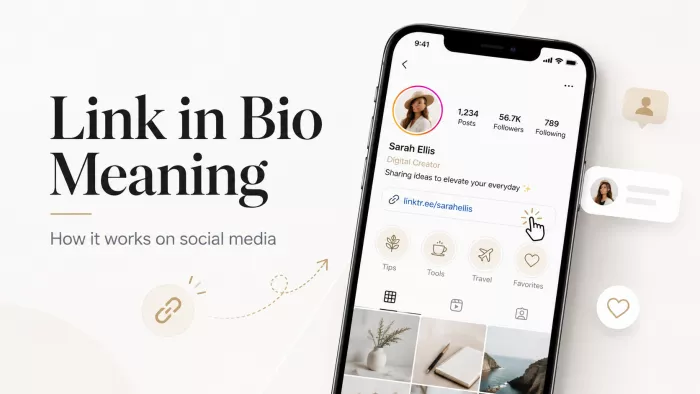
You have seen the phrase a hundred times without stopping to think about it.
A Reel ends. A designer holds up an ivory lehenga. The caption says "shop this, link in bio." For about two seconds you actually consider it. You tap through to the profile, scan for something clickable, find a shortened URL you do not recognise, hesitate, and go back to the feed.
That whole sequence took four seconds. Most social media traffic is won or lost inside those four seconds, and almost nobody designs for them.
This guide stays with that moment. What the phrase means, why it survived long after Instagram removed the limitation that created it, what each platform permits right now, how to use it inside captions and videos so people actually tap, and what the profiles of working creators look like once you open them.
If you want the full anatomy of a bio link page (the blocks, the layout, the setup process and the design decisions behind it), our definitive guide to link in bio covers that ground in detail. This piece stays on the phrase itself and the habits around it.
Link in Bio Meaning, in One Line
Link in bio means the single clickable URL placed in the bio section of a social media profile. When someone writes or says the phrase, they are handing you an instruction: leave this post, and open my profile to find the link sitting under my name.
That is the entire meaning. Everything complicated about it comes from a different question, which is why anybody needs to say it at all.
Instagram does not make links clickable inside post captions. Neither does TikTok. Paste a URL into a caption and it sits there as grey text that nobody can tap and almost nobody will retype into a browser. The profile is the only surface where a link becomes live.
So the caption points at the profile. The profile holds the link. The phrase is the bridge between the two.
It is a workaround that outlived the problem it was invented to solve, which is where the story gets interesting.
Where the Phrase Came From, and Why It Refused to Die
Instagram launched without clickable caption links, and the reasoning was commercial rather than technical. Outbound links pull people out of the app. Fewer exits means longer sessions, cleaner feeds, less spam, and more time spent inside the platform's own shopping surfaces.
Creators built a workaround within months. "Link in bio" became shorthand, then a hashtag, then a habit that spread to TikTok, YouTube Shorts, Threads and Pinterest, none of which invented it.
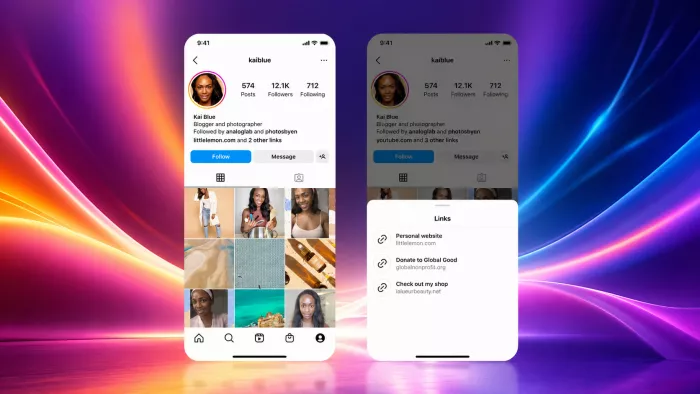
Then in 2023 Instagram softened. Support for up to five links in the bio arrived, available to every account type, and Mark Zuckerberg described it as one of the most requested features the platform had ever received.
The phrase should have died there.
It did not, for a reason that matters more than it sounds: only one of those five links is displayed on the profile. The other four sit behind an extra tap. Your audience sees one thing while you are trying to point at five.
Meanwhile the workaround grew into an industry. Linktree alone reports more than 70 million users and roughly 1.7 billion profile views every month. A phrase invented to route around a restriction now supports an entire category of software.
The Variants, and What Each One Signals
You will see the instruction written a dozen ways. They mean the same thing, and the differences quietly tell you something about the account.
- "Link in bio" is the standard. Neutral, and understood on every platform.
- "Link in bio" with a chain emoji saves characters in a caption that Instagram will truncate anyway.
- "Check my bio" or "it is in my bio" shows up more on TikTok, where creators talk to camera instead of writing long captions.
- Deliberately misspelled versions come from a widespread belief that Instagram suppresses reach on posts containing the word "link". Instagram has never confirmed this. Creators keep doing it anyway, which is a useful reminder that social media convention runs on folklore as much as on documentation.
- The #linkinbio hashtag is a leftover from the mid-2010s. It still gets used and it no longer does much.
One distinction is worth carrying into the rest of this article. When a creator says the phrase and their bio holds a page, they are pointing at a destination that will still work in six months. When they say it and their bio holds a raw product URL, they are pointing at something that breaks the moment they promote anything else. Almost every piece of advice below follows from that difference.
How to Find Someone's Link in Bio
A good share of the people searching for the meaning of this phrase are not creators at all. They are viewers who followed an instruction and could not find the thing they were sent to find. Here is where to look.
| Platform | Where the link sits | What it looks like |
|---|---|---|
| Under the bio text, above the Highlights row | A coloured link, sometimes with a small chain icon. If the account has more than one, tapping it opens a list | |
| TikTok | Under the follower counts, above the video grid | A short URL with a globe or link icon beside it |
| YouTube | In the channel banner and on the About tab | Small icons for each linked site |
| X | Under the display name, beside the join date | A blue clickable domain |
| Inside the contact info panel | Listed under Websites | |
| Directly under the profile name | Shows the domain only | |
| Threads | Under the bio text | The same placement as Instagram |
Two things trip viewers up here.
A URL typed into the bio text on TikTok is not clickable, and it looks nearly identical to a real one. And plenty of creators rotate their link weekly, so a caption from ten days ago can point at something that no longer exists. Both problems are avoidable, and the mistakes section further down covers how.
What Each Platform Actually Permits in 2026
The rules differ more than most people expect, and getting them wrong costs weeks.
| Platform | Clickable links allowed | What you need |
|---|---|---|
| Up to 5 | Nothing. Open to personal, creator and business accounts | |
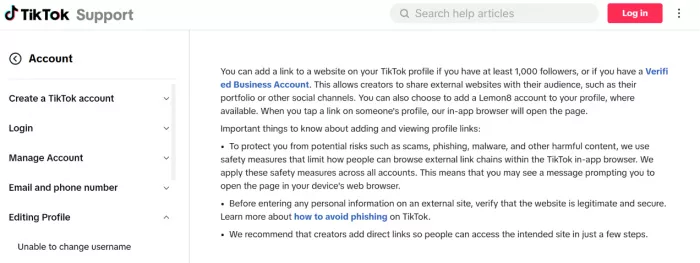
| TikTok | 1 | Help Centre guidance points to 1,000+ followers or a registered Business Account. Availability varies by region |
| YouTube | Multiple | Basic channel eligibility |
| X | 1 | Nothing |
| 1 website field | Nothing | |
| 1 | Nothing. Claiming your domain adds attribution on Pins | |
| Threads | 1 | Nothing |
TikTok is the one people get wrong
TikTok's own support material states that an account can add a website if it has 1,000 or more followers or holds a registered Business Account, and that availability can change by region and account status. The website field also appears only inside the mobile app, so anyone trying to add it from a desktop browser will fail even when their account qualifies.
Verify this against TikTok's Help Centre on the day you read it. Third-party guides disagree with each other on this point, and several of the top-ranking ones are working from rules that changed years ago.
Instagram's five links are useful but narrow
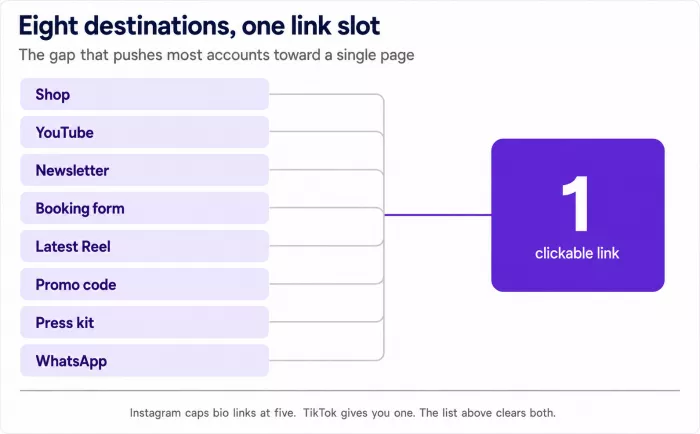
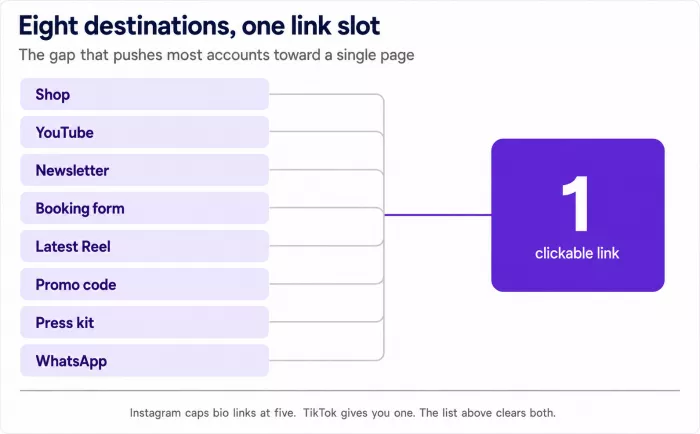
You get a hard ceiling of five, no click data for individual links, and nothing clickable inside posts or Reels. A working creator usually has eight or more places worth sending people. That gap is the pressure that pushes most accounts toward a dedicated page, which the final sections return to.
What Happens in the Four Seconds After the Tap
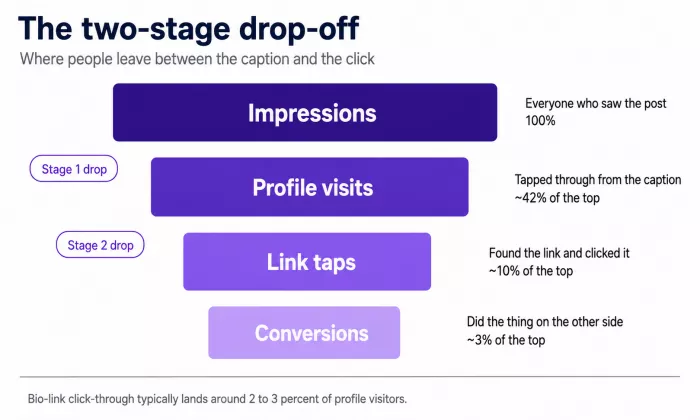
The journey has two stages, and most creators only ever look at one of them.
Stage one is the profile visit. Somebody read your caption, believed there was something worth seeing, and tapped through. Stage two is the link tap. They found the link, decided it was worth leaving the app for, and clicked.
The gap between those two stages is brutal. Independent creator analyses put bio link click-through rates in a band of roughly two to three percent. One comparison of affiliate campaigns measured bio links at two to three percent against twelve to eighteen percent for automated DM delivery, and attributed the difference to step count: six steps from post to purchase through a bio link, two steps through a DM.
Read that as a design brief rather than a verdict. Every extra step between the caption and the destination costs clicks. Page speed alone moves the number, with benchmarks cited by growth agencies suggesting faster pages generate close to a third more clicks than slow ones.
We come back to measuring all of this a few sections below. First, the part you can act on today.
How to Use Link in Bio on Social Media
Everything above was context. This section is the practice.
1. Say it in the caption, with a reason attached
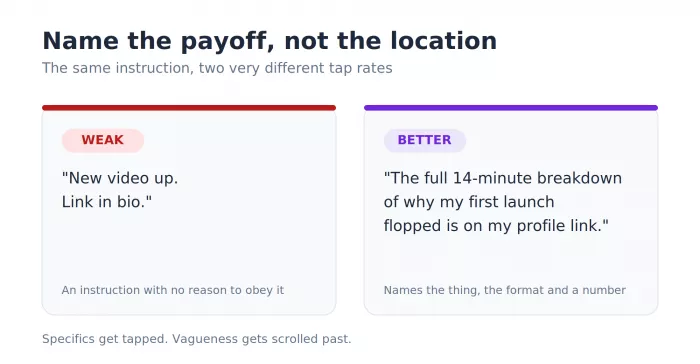
"Link in bio" on its own is an instruction with no incentive behind it. Add the payoff and the tap rate moves.
Weak: New video up. Link in bio.
Better: The full 14-minute breakdown of why my first launch flopped is on my profile link.
Name the thing. Name the format. Give a length or a number if you have one. People tap specifics and scroll past vagueness.
2. Say it out loud in Reels and Shorts
Most people watch short video with the caption collapsed. A caption CTA reaches a fraction of your viewers. Saying "the link is on my profile" in the last two seconds of the video reaches all of them, and putting the same words on screen at that moment doubles the signal.
3. Pin a comment that describes the link
Comments are not clickable on Instagram or TikTok, so this is not about the click. It is about removing doubt. A pinned comment reading "link is on my profile, look for Free Notion Template" tells a visitor exactly what to search for when they arrive, which prevents the scan-and-bounce behaviour described at the top of this article.
4. Use the Stories link sticker for anything time-sensitive
Stories are the one Instagram surface where a link is tappable inside the content itself. Launches and restocks belong here rather than in a permanent bio link. Save the Story to a Highlight afterwards and the link keeps working long past the 24-hour window.
5. Write a bio line that earns the tap
The line sitting directly above your link does more work than the link does. It has to answer who you are and what happens if somebody taps.
- Content creator | DM for collabs
- I test skincare for oily Indian skin. Free routine builder below.
The second one gives a stranger a reason. The first one gives them a job title.
6. Put your most wanted link first, and mean it
Link order is a ranking decision, not a filing decision. Whatever sits at the top absorbs the majority of taps. If newsletter signups are your priority this month, the newsletter goes first and everything else moves down, including the link you are emotionally attached to.
Knowing Whether It Is Working
You need two numbers and one habit.
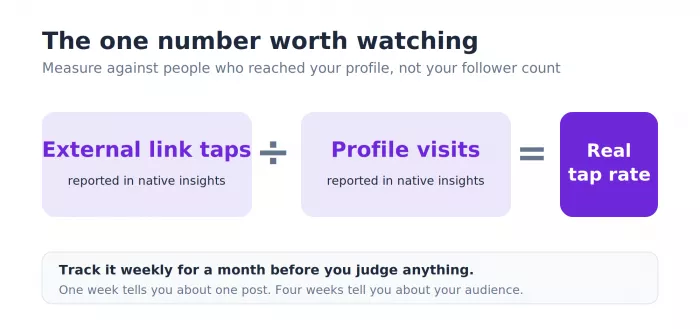
The first number is profile visits, which Instagram and TikTok both report inside their native insights. The second is external link taps, reported in the same place. Divide the second by the first and you have your real tap rate, measured against people who reached your profile rather than against your follower count.
Track it weekly for a month before you judge anything. One week tells you about one post. Four weeks tell you about your audience.
The habit is tagging. Add a UTM parameter to the destination URL, something as plain as ?utm_source=instagram_bio, so the traffic lands in Google Analytics correctly instead of disappearing into direct and referral noise. Without it you will spend a year unable to prove that social media sends you anything at all.
Our breakdown of CTR and clicks on your link in bio goes considerably further into what those numbers mean once you have them, including why click counts arrive both inflated and undercounted.
What the First Link Should Be, and Why
Theory is cheap. The useful question is not what a good bio page looks like in general, but what belongs at the top of yours, because the first link absorbs most of the taps and everything below it competes for scraps.
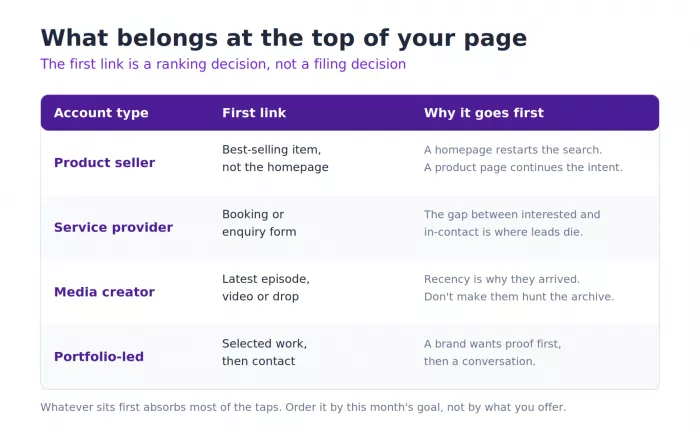
The answer depends on the job the page is doing. A page built to sell has a different top link from one built to book calls, and both differ from one built to grow an audience. Here is how the four common types break down.
| Account type | What goes first | Why it goes first |
|---|---|---|
| Product seller | Best-selling item, not the homepage | A homepage asks the visitor to start searching again. A product page continues the exact intent the caption created |
| Service provider | Booking or enquiry form | The gap between "interested" and "in contact" is where most leads quietly die. Close it in one tap |
| Media creator | Latest episode, video or drop | Recency is usually the reason someone arrived. Sending them to an archive makes them hunt for what they already came to see |
| Portfolio-led | A piece of selected work, then contact | A brand checking you out wants proof before a conversation. Lead with the work, put the enquiry second |
Two patterns cut across all four.
The homepage is almost never the right first link. It restarts the visitor's search instead of carrying their intent forward, and every extra decision costs clicks, an effect the earlier section on the four-second journey already covered. A product seller who links a storefront homepage forces a second search the moment someone lands. A product seller who links the item from the video does not.
Order is a ranking decision, not a filing decision. Whatever sits first wins. If this month's priority is newsletter signups, the newsletter goes to the top and the shop moves down, even if the shop is where the money is. The page reflects what you want more of right now, not everything you happen to offer.
A useful test: look at your last three posts, then look at your first link. If a stranger followed the caption from any of those posts, would the top of your page match what the post promised? When it does not, you are pointing people at a page that answers a question they did not ask.
Five Ways People Waste the Phrase
These are usage mistakes rather than design mistakes, and every one of them is fixable this afternoon.
- Saying it when the link does not match. The caption promises a recipe and the link opens a homepage. Trust drops immediately, and the next caption gets ignored.
- Rotating the link without touching old captions. A post from last month still says the phrase while the link now points somewhere unrelated. Either keep a permanent page with clearly named sections or accept that older posts stop converting the day you swap.
- Typing the URL into a TikTok bio instead of the website field. It looks identical and does nothing. As covered in the platform rules above, the clickable field appears only in the mobile app for eligible accounts.
- Burying the CTA at the end of a long caption. Instagram truncates after roughly two lines. An instruction sitting below the fold reaches almost nobody.
- Sending everyone to the same destination regardless of the post. A cooking video and a sponsorship announcement need different landing points. A page with named sections handles this. A single hard link cannot.
When One Link Stops Being Enough
Somewhere between your third and fourth destination, the arithmetic breaks.
Count what you would send people to this week. A shop. A YouTube channel. A newsletter. A booking form. Your latest Reel. A discount code. A press kit. A WhatsApp number. That list clears Instagram's five-link ceiling before you have finished thinking about it, and it will not fit into TikTok's single slot at all.
The choice at that point is between rewriting your bio every few days and building one page that holds everything at once. TIEUP.IO handles the second option, with unlimited links, product blocks, portfolio sections and affiliate codes sitting on a single profile. If you would rather weigh the options side by side first, our comparison of link-in-bio tools for creators walks through how the main platforms differ on pricing and features.
Building the page takes about twenty minutes. The habits covered earlier in this article take longer, and they are the part that decides whether the page earns anything.
Before You Close This Tab
Do one thing today, and do it the awkward way.
Open your own profile the way a stranger would. Not from your settings screen, where everything looks fine because you built it. Open a private browser window and search your handle. Look at what a person who has never met you sees.
Read the bio line first. Does it tell that stranger what happens if they tap, or does it tell them your job title? Then tap your own link and count the seconds until the page finishes loading. Then look at whatever sits first on that page and ask whether it matches what you want more of this month, right now, in July.
Most people find something wrong inside a minute. A dead link, or a top button that made sense during a launch six months ago and has been quietly collecting taps ever since.
Fix the one that costs you the most. Leave the rest for next week.


Comments