Slidesgo in Practice: Useful Templates, Questionable Edges




If you have ever searched for presentation templates, there is a good chance you have already used Slidesgo without thinking much about it. It shows up consistently in search results, offers visually polished slides, and promises to save time for anyone who does not want to design from scratch. On the surface, it looks like a straightforward productivity tool.
But once you spend more time with it and look at real user feedback, the picture becomes less simple. Slidesgo sits in an interesting position. It is widely used, visually strong, and easy to access, yet it also carries recurring complaints around billing, limitations, and how its AI features actually perform in real situations.
What Slidesgo Actually Is and How It Evolved
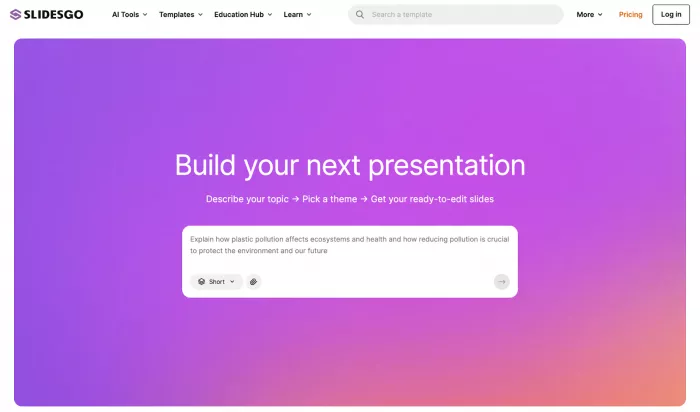
Slidesgo started as a template library for PowerPoint and Google Slides, launched under the Freepik Company. Over time, it expanded into something closer to a presentation workflow tool, adding AI features and a browser-based editor connected to the broader Freepik ecosystem.
Today, the platform operates across three main layers. It offers a large collection of ready-made templates, a set of AI tools that generate presentation drafts, and an online editor that allows quick adjustments before exporting files.
This evolution matters because Slidesgo is no longer just competing with template websites. It now overlaps with AI presentation tools that attempt to automate both design and structure.
How It Works When You Actually Use It
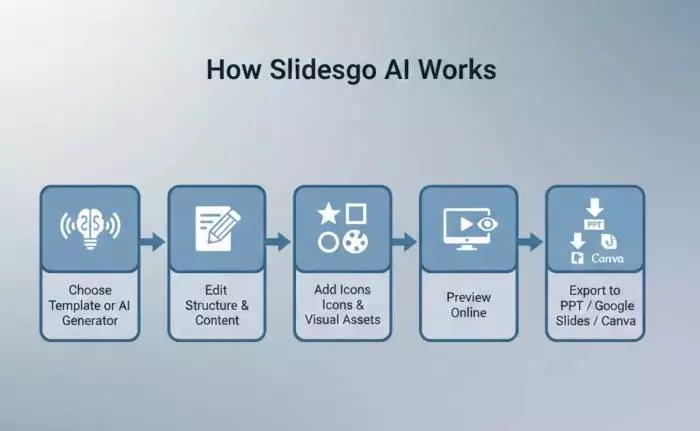
The workflow is built around speed rather than flexibility. Most users begin by either selecting a template or generating one through AI. From there, they edit content inside the browser or export the file to PowerPoint or Google Slides for further refinement.
The system integrates with Freepik and Flaticon, which means users can pull in icons, illustrations, and visuals without leaving the platform.
In practice, this makes it easy to move from idea to draft presentation quickly. What it does not do particularly well is replace the need for editing. The generated slides often feel like a starting point rather than a finished product.
Templates and Design Quality
One area where Slidesgo is consistently strong is design. Templates are structured with clear layouts, coordinated color schemes, and usable slide hierarchies. This is especially useful for users who lack design experience.
The platform covers a wide range of use cases including education, business, marketing, and research presentations.
However, popularity creates a side effect. Because many people rely on the same templates, it is not uncommon to see similar designs repeated across different presentations, especially in classrooms or internal business settings.
AI Features and Their Real Limits
Slidesgo has introduced several AI tools, including a text-to-presentation generator and document-to-slide converter. These features are designed to reduce manual work by creating a structured outline automatically.
In real use, the AI performs well at organizing content and building a logical slide flow. Where it falls short is depth. The generated text often feels generic and requires editing, particularly for technical or academic topics.
This creates a pattern. The AI is useful for speed and structure, but not for accuracy or originality. Most users still need to rewrite or refine content before presenting.
Pricing and What You Actually Get
Slidesgo follows a typical freemium structure, but the differences between tiers become noticeable with regular use.
| Plan | Cost | Downloads | AI Access | Attribution |
| Free | $0 | Limited monthly | Limited | Required |
| Premium | Around $3 to $6 per month | High or unlimited use | Full access | Not required |
The free plan is functional but restrictive. Attribution is mandatory, and download limits can become frustrating during heavy usage periods.
The paid plan removes these constraints and allows commercial use. Pricing is relatively low compared to other design tools, which explains its popularity among students and freelancers.
User Feedback and Reputation Across Platforms
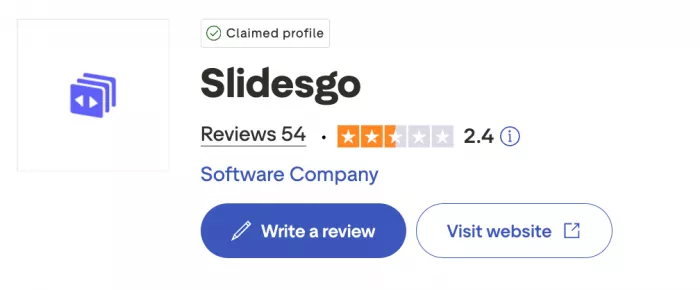
User sentiment around Slidesgo is divided depending on where you look.
On platforms focused on usability, such as G2, ratings tend to be high, often above 4 out of 5. Users highlight ease of use, time savings, and design quality.
On Trustpilot, the tone shifts. Ratings drop closer to the mid range, with recurring complaints about billing issues, subscription cancellation, and lack of support response.
This split is important. It suggests that the core product works well, but the surrounding experience, especially account management, creates frustration for some users.
Common Issues That Keep Coming Up
Several concerns appear repeatedly across reviews.
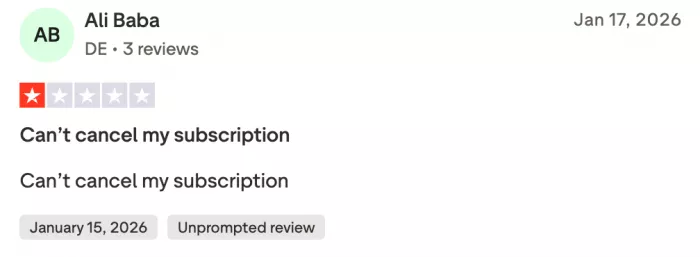

One major issue involves subscription management. Some users report difficulty canceling plans or continued charges after attempting to cancel. These complaints show up often enough to stand out rather than being isolated cases.
Customer support is another weak point. Users mention delayed or missing responses when trying to resolve billing problems.
There are also occasional technical complaints, such as file inconsistencies or broken templates, though these appear less frequently than billing concerns.
Where Slidesgo Works Well and Where It Does Not
Slidesgo works best in situations where speed matters more than originality. Teachers preparing lesson slides, students working on assignments, and teams creating internal presentations benefit the most.
It is less suitable for scenarios where uniqueness or precision is critical, such as investor presentations or high-level client work. The templates can feel overused, and the AI content lacks the depth needed for more serious use cases.
A More Grounded View of Trust and Reliability
Despite the complaints, Slidesgo is not an unknown or unstable platform. It operates under a recognized parent company, has a large user base, and is widely used in educational and professional environments.
There are no widespread reports of security risks or malicious behavior. The concerns are more practical than structural, focusing on usability and account handling rather than safety.
Final Take
Slidesgo sits somewhere between convenience and compromise. It does a very good job of removing the effort required to build presentations from scratch. Templates are polished, workflows are fast, and the barrier to entry is low.
At the same time, the platform is not without friction. AI features are limited in depth, free usage comes with restrictions, and recurring complaints about billing and support are hard to ignore.
Used casually, it works well. Used heavily or commercially, it requires more attention to detail, especially around subscriptions and content quality.
It is not a complete solution for presentation design, but it is a practical tool for getting started quickly, as long as you understand where its limits begin.


Comments