2short.ai Review: A Smart AI Clipper for Long Videos, But Not a Full Editing System



2short.ai is built for one clear job: turning long videos into short clips for YouTube Shorts, TikTok, and Instagram Reels. It is not a complete video editor, and it is not a prompt-to-video tool. The value is more specific than that. It helps creators find usable short-form moments inside videos they have already made.
That makes the tool useful, but only for the right type of creator. If you already publish podcasts, interviews, commentary videos, tutorials, product reviews, or educational content, 2short.ai can remove a painful part of the workflow. If your content is cinematic, music-heavy, visual-first, or ad-focused, the tool starts to feel much less essential.
What 2short.ai Really Solves
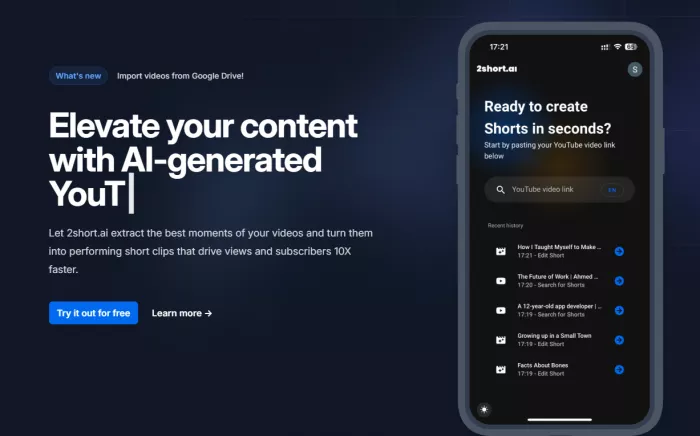
Most creators do not struggle because they cannot export a vertical video. They struggle because finding the right 30 to 60 seconds inside a long recording takes time. A 40-minute podcast may have three strong moments, but finding them manually means scanning, replaying, trimming, and checking context again and again.
This is the exact place where 2short.ai fits. It acts like a clip scout. You give it a long video, and it returns possible short-form clips. From there, you decide which clips are actually worth polishing and publishing.
That difference matters. 2short.ai is not trying to finish the entire creative process. It is trying to shorten the part where you search through long content and look for moments that can stand alone.
The Tool Works Best When the Source Video Is Already Strong
2short.ai depends heavily on the quality and structure of the original video. If the long video has clear speech, clean audio, proper captions, and complete ideas, the AI has a better chance of finding usable clips. If the video is rambling, badly recorded, or too dependent on visual context, the output will naturally feel weaker.
This is why the tool works better for spoken content than for purely visual content. Podcasts, interviews, tutorials, product reviews, coaching videos, and commentary clips usually contain direct statements that can be turned into Shorts. A cinematic travel montage or music-heavy video may look better on screen, but it gives the AI less language-based structure to understand.
A good 2short.ai source video usually has these qualities:
● The speaker explains ideas in complete sections, so clips can work without too much missing context.
● The audio is clear enough for captions and AI analysis to understand the content properly.
● The video already contains hooks, opinions, lessons, reactions, or useful moments worth extracting.
● The content is long enough that manual clip discovery would take real time.
● The topic has short-form potential, such as advice, debate, education, review, storytelling, or commentary.
This is also where expectations need to stay realistic. 2short.ai can find a strong moment faster, but it cannot create a strong moment that was never present in the original recording.
Workflow and User Experience
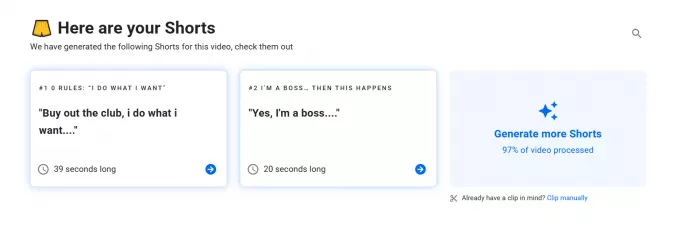
The workflow is simple. You add a YouTube link, and paid plans also support imports from Google Drive and public URLs. The tool analyzes the video, generates clip options, adds subtitles, helps with framing, and lets you export short-form versions for social platforms.
The interface is built around speed rather than deep editing. That is the right choice for this category. A creator using 2short.ai probably does not want a complex timeline or a professional editing dashboard. They want to move from long video to usable clips without learning another heavy software tool.
Where the tool feels most useful is the review stage. Instead of starting with an empty timeline, you start with AI-selected clips. That makes the process feel less like editing from scratch and more like choosing from a shortlist.
The limitation appears after that shortlist is created. Some clips may look clean but still need judgement. A clip can have subtitles, good crop, and a proper format, yet still fail because the hook is weak or the context is missing. This is why 2short.ai should be treated as a strong starting point, not a final publishing decision.
Output Quality: The Real Test Is Context
The output quality depends on more than whether the exported clip looks clean. A good short clip needs to make sense to someone who has not seen the original video. It needs a clear opening, a complete idea, readable captions, and a natural ending.
This is where AI clipping tools often struggle. They may identify an interesting sentence but miss the setup. They may pick a useful answer but cut before the point fully lands. They may create a vertical clip that is technically correct but not strong enough to stop someone scrolling.
Before publishing a 2short.ai clip, the most important checks are:
● The opening line should feel strong enough to work as a hook on Shorts, Reels, or TikTok.
● The clip should make sense without requiring the viewer to watch the full original video.
● The ending should feel complete instead of cutting away before the main point finishes.
● The subtitles should be accurate enough that names, terms, and key phrases are not misleading.
● The speaker should stay properly framed after the video is converted into vertical format.
When 2short.ai gets these areas mostly right, it saves real editing time. When it misses them, the clip still needs manual cleanup in another editor.
Features That Matter Most
2short.ai has a focused feature set, and the useful features are the ones that directly affect the repurposing workflow. AI highlight detection is the core feature because it decides whether the tool is actually saving you time. If the suggested clips are weak, the rest of the platform cannot fully compensate.
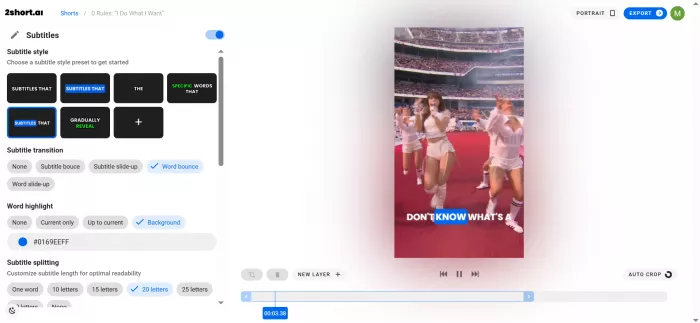
Facial tracking is useful because most long YouTube videos are horizontal, while short-form platforms prefer vertical framing. Keeping the active speaker centered prevents clips from looking lazily cropped. Animated subtitles also matter because short-form videos are often watched without sound, and clear captions can make spoken clips easier to follow.
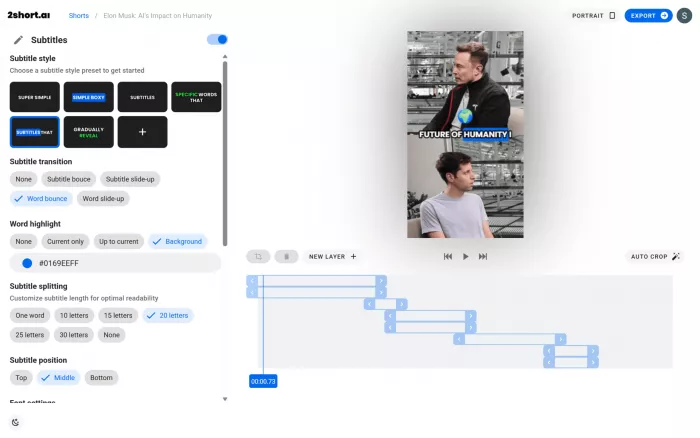
The tool also supports multiple aspect ratios, brand presets, advanced cropping, and 1080p watermark-free exports. These are not luxury features. They help repurposed clips look more publishable and less like rough leftovers from a long video.
Pricing and Value
2short.ai pricing should be judged by analysis time, not just by the monthly fee. The official pricing page says all plans get full access to features, while the main difference between plans is how many hours of AI video analysis you get each month.
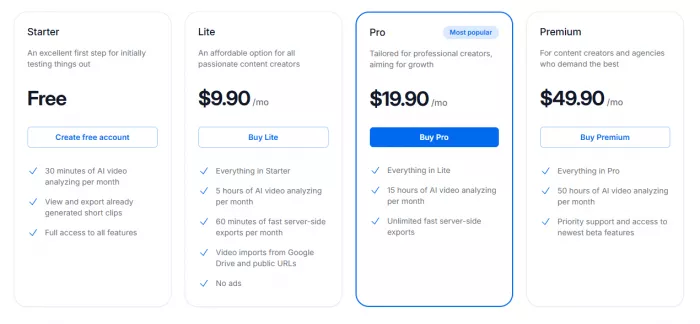
Lite includes 5 hours of AI video analysis per month, 60 minutes of fast server-side exports, Google Drive and public URL imports, and no ads. Pro increases the limit to 15 hours of AI analysis and includes unlimited fast server-side exports. Premium increases the limit to 50 hours and adds priority support plus access to beta features.
The free plan is useful for testing, but there is one small inconsistency on the official site. One pricing area lists 30 minutes of AI video analysis per month, while another section mentions 15 minutes. That does not change the overall value, but users should check the current limit inside the app before depending on the free plan.
The best way to judge value is simple: count how many hours of long video you need to process each month. If you publish occasionally, Lite may be enough. If you publish long videos every week and want multiple short clips from each one, Pro is the more practical plan. Premium only makes sense when video volume is high enough to justify the larger analysis limit.
Real User Reviews
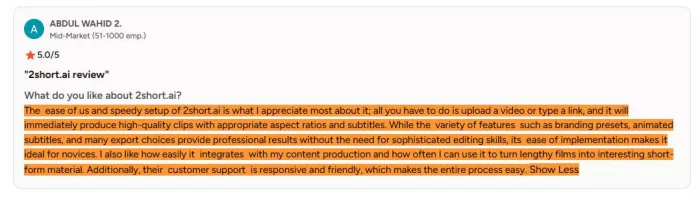
Public feedback is positive, but still thin. G2 shows a 4.5 out of 5 rating from 5 reviews. Users highlight easy setup, fast clip creation, branding presets, subtitles, aspect ratio support, and customer support. Those comments match what the tool is designed to do: make long-video repurposing faster and easier.
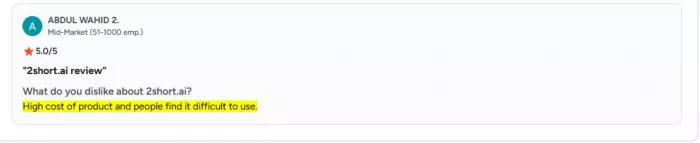
The criticism is also useful. Some users mention cost and difficulty navigating features. That tells you where the product may feel less smooth for certain users, especially people expecting a fuller editor or more refined control.
Capterra lists 2short.ai but does not currently provide a strong review base. So the safest reading is balanced: early user feedback is encouraging, but the public review sample is too small to treat 2short.ai as a widely proven market leader.
Privacy, Security and Transparency
2short.ai has a public privacy policy, which is important because users may sign in with Google and process video links through the platform. The policy says the service may collect IP address, email address, first and last name, profile picture, and language preference. It also says Google sign-in may involve account data such as name, email, profile picture, and language preference.
The policy says personal information is stored on secure servers in the European Union and that personal information is not sold or shared except where needed to provide the service. It also mentions GDPR rights such as access, correction, deletion, restriction, objection, and portability.
The weaker point is that the privacy policy was last updated on 17 February 2023 and still mentions OpenAI GPT-3. That makes the documentation feel dated for a current AI product. It does not automatically make the tool unsafe, but it does mean the privacy page could be clearer about current AI processing, retention, subprocessors, and deletion practices.
For individual creators repurposing their own public YouTube videos, this may not be a major concern. For agencies, brands, or teams handling unpublished client content, the privacy and retention details deserve closer checking before using the tool in a professional workflow.
The Copyright Point Many Users Miss
2short.ai helps with repurposing, but it does not solve content ownership. If you are clipping your own YouTube videos, podcasts, webinars, or tutorials, the workflow is straightforward. You own the source content, and the tool is helping you reuse it.
The situation changes when users clip third-party videos, copyrighted footage, music-heavy content, interview clips without permission, or viral videos they do not own. The tool may generate a short clip, but that does not remove copyright or platform risk.
This matters most for monetized creators, agencies, and brand accounts. AI clipping is a workflow shortcut. It is not a rights clearance system.
Strengths and Limitations
2short.ai works best when it is used for a focused repurposing workflow, not as a complete editing system. Its strengths are clear when the source video is already strong, spoken, and structured.
Strengths
● It reduces the time spent manually searching through long videos for short-form moments.
● It works well for podcasts, interviews, tutorials, product reviews, commentary videos, and educational content.
● It helps turn long spoken videos into Shorts, Reels, and TikTok-ready clip candidates faster.
● It adds useful short-form basics such as subtitles, framing support, aspect ratio options, and export-ready formatting.
● It is especially useful for creators with a back catalog of long videos that can be repurposed into fresh social clips.
Limitations
● It depends heavily on clear speech and captions, so visual-first or music-heavy videos are not the best fit.
● It can select clips that look clean but still need better context, stronger hooks, or tighter endings.
● It does not replace a full editor for pacing, B-roll, sound design, transitions, or brand-level polish.
● It still needs human review before publishing because AI-selected clips are not always complete enough to stand alone.
● Public user feedback is positive but limited, and the privacy documentation could be more current and detailed.
In practical terms, 2short.ai is useful when your main problem is finding clips inside long videos. It becomes less useful when your main problem is finishing those clips with polish, story, and creative control.
Best Alternatives to 2short.ai
The right alternative depends on what you need beyond AI clip discovery.
| Alternative | Choose it when |
| OpusClip | You want a broader AI clipping workflow with more creator automation. |
| Vizard AI | You want AI clipping combined with a stronger browser editing workflow. |
| Klap | You want another simple long-video-to-short-video tool. |
| CapCut | You want manual short-form editing, templates, effects, music, and more control. |
| Descript | You edit podcasts, interviews, screen recordings, or transcript-heavy content. |
| Submagic | Captions, hooks, and subtitle styling matter more than clip discovery. |
| VEED.io | You want a general online video editor with AI tools included. |
| Munch | You want marketing-focused repurposing and social content support. |
2short.ai still has a place because it is focused. It does not try to become a full editor, social scheduler, AI video generator, and brand suite at the same time. That narrow focus is useful for some creators and limiting for others.
My Personal Rating
| Category | Rating | Why it gets this score |
| Ease of use | 8.5/10 | The workflow is simple enough for creators who want to move from a long video to short clip suggestions without learning a full editor. |
| Clip discovery | 8/10 | It does a good job of reducing manual searching, especially for spoken videos like podcasts, tutorials, interviews, and commentary content. |
| Output quality | 7/10 | The clips can be useful, but they still need human review for hook strength, context, captions, framing, and clean endings. |
| Editing control | 6.5/10 | It offers helpful basics like subtitles, crop, aspect ratios, and branding, but it is not built for deep timeline editing or polished production work. |
| Pricing value | 7.5/10 | The paid plans are reasonable if you process long videos regularly, but value depends heavily on how many hours of video you analyze each month. |
| Privacy and transparency | 6.5/10 | The privacy policy covers the basics, but it feels dated and could be clearer about retention, AI processing, subprocessors, and deletion practices. |
| Best-use fit | 8/10 | It fits its niche well as an AI clip scout for long spoken videos, but it becomes less useful outside that workflow. |
| Overall rating | 7.5/10 | 2short.ai is a useful repurposing tool for creators who need faster clip discovery, but it is not a complete video editing system. |
2short.ai earns a strong rating when judged as a clip discovery tool. It loses points when judged as a full editor, because the final publishing decision still depends on human judgement and, in many cases, another editing tool.
Final Verdict
2short.ai is worth using if your long videos already contain strong spoken moments and your main problem is finding them quickly. It is a practical tool for YouTubers, podcasters, educators, reviewers, coaches, and commentary creators who want more short-form output from existing content.
Its best role is early in the editing workflow. It helps discover candidate clips, reframe them, add subtitles, and prepare them for short-form platforms. That can save meaningful time, especially if you publish long videos regularly or have a large back catalog.
But 2short.ai should not be treated as a complete editing replacement. It does not guarantee a strong hook, perfect context, clean pacing, or a publish-ready final cut every time. The user still has to decide whether the clip is worth posting.
The cleanest verdict is this: 2short.ai shortens the search, not the whole creative process. If clip discovery is the part that slows you down, it is worth testing. If you need deep creative control, original video generation, or polished brand-level editing, you will probably outgrow it quickly.


Comments