
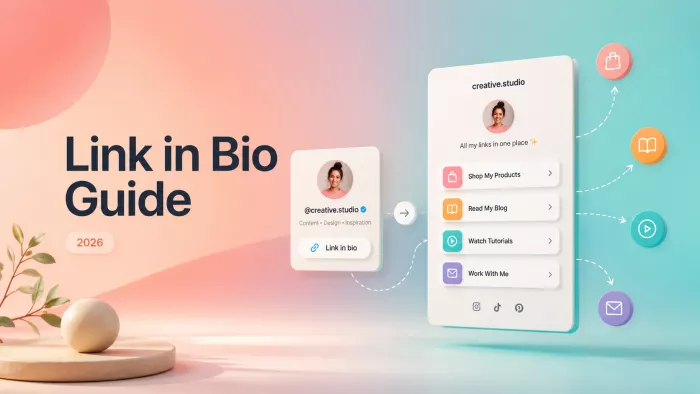
The short answer: A "link in bio" is the single clickable URL allowed on a social media profile. Because most platforms give creators just one link slot, that slot usually points to a dedicated landing page built with a tool like Linktree or Beacons which fans out into every other destination: shop, newsletter, latest video, other socials, and more. It's the one clickable bridge between a creator's content and everywhere else an audience might go.
Anyone who spends time on TikTok or Instagram has read the phrase a hundred times: "link in bio." Creators drop it into videos, captions, and comments as a kind of verbal shortcut. It's all on my profile. But the mechanics behind those three words, and how much they've shifted, are worth understanding for any creator who wants a profile that does more than sit there. This guide breaks the whole thing down: what a link in bio is, why it exists, how it works, the tools, and how creators in 2026 turn attention into something they own.
What a link in bio actually is
At its simplest, a link in bio is the clickable web address displayed on a social profile usually just under the username and bio text. One tap, and the app hands off to wherever the creator pointed.
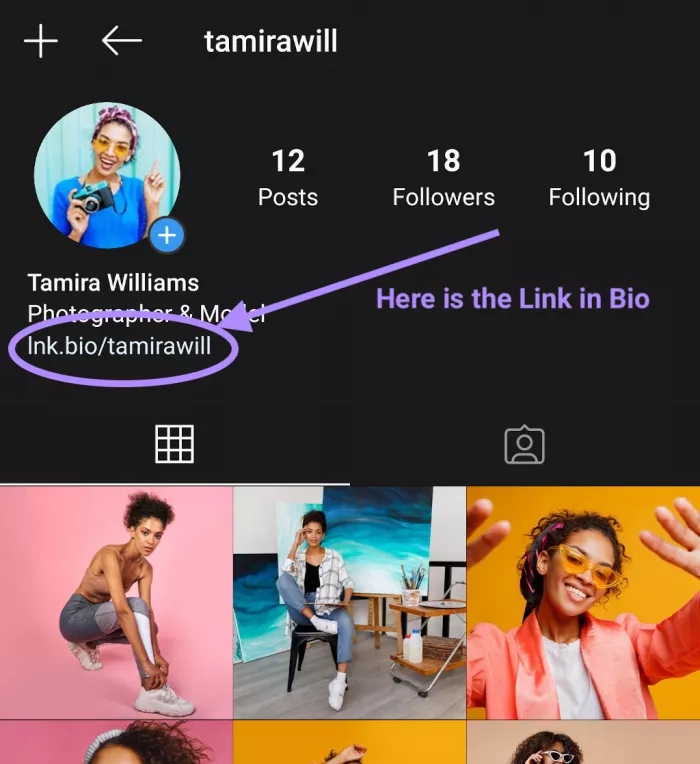
The catch is that "wherever" can only be one place at a time on most platforms. There's a single link field. But a creator almost never has just one destination in mind: a YouTube channel, a merch store, an email list, a Discord, the latest single, and last week's affiliate code, all competing for that one slot.
That tension is the entire reason the term exists as its own concept. A "link in bio" isn't just a link; in practice it's become shorthand for the strategy of using that single slot well most often by pointing it at a purpose-built page that holds every link behind neat, tappable buttons. When a creator says "the link in my bio," the reference is usually that page, not a lone URL.
Why it exists: the one-link problem
Social platforms deliberately limit outbound links. The goal is to keep users scrolling inside the app rather than clicking away to someone else's website, so clickable links are rationed. Here's roughly how the major platforms handle it in 2026:
| Platform | Clickable link in profile? | Notes |
| Yes up to ~5 links | Multiple bio links now supported; link stickers also work in Stories | |
| TikTok | One website link | Personal accounts generally need 1,000+ followers; Business/Creator accounts get it immediately |
| YouTube | Multiple links | Links on channel page and in video descriptions |
| X (Twitter) | One website link | The website field is clickable; links in the bio text usually aren't |
| Facebook / Threads / LinkedIn | Limited | Varies by profile type; generally one primary link |
The pattern is clear: even where more than one link is allowed (Instagram, YouTube), the space is tight, unformatted, and easy to outgrow. And on the platform where discovery runs hottest TikTok the cap is a single URL, available only after clearing a follower threshold or switching account types. That scarcity created an entire product category built around solving it.
How a link in bio works under the hood
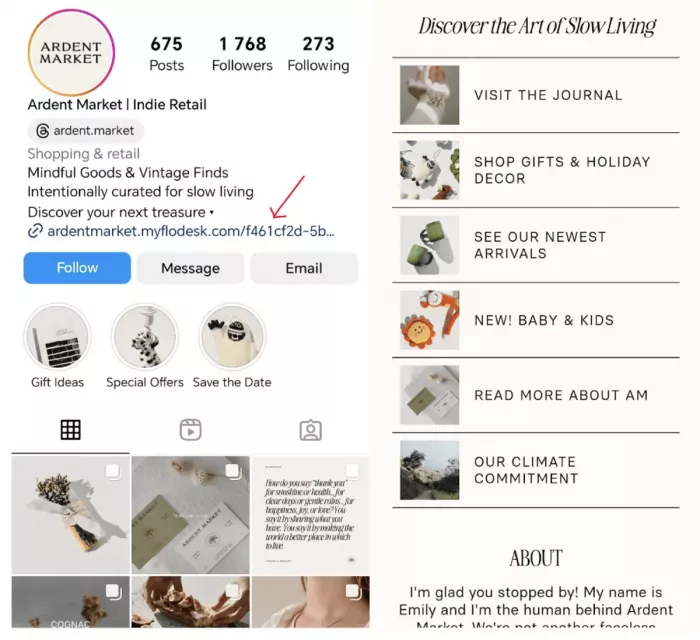
The mechanics are simpler than they look. A link-in-bio tool provides one short, shareable URL, which goes into the profile's link field. A tap on it opens not some random webpage but a lightweight landing page the creator controls a vertical stack of buttons, each pointing to a different destination.
So the flow runs like this: a video sparks interest → the viewer taps through to the profile → the viewer taps the one bio link → the hub page loads → the visitor picks a destination. A single allowed link becomes a menu.
Two things happen quietly in the background that matter more than most people realize. First, because every tap flows through one page, the analytics come out clean which buttons get clicked, from which platform, and when.
Second, destinations can change without the bio changing at all. Swapping the top button from "new video" to "holiday sale" leaves every old caption that said "link in bio" still working. Nothing breaks. That flexibility is a big part of why creators standardize on a hub instead of pasting raw links.
The evolution: from a list of links to a creator's home base
Not long ago, a link in bio was exactly what it sounds like a plain list of blue underlined URLs, unstyled and joyless. That version is basically dead.
In 2026, the better tools behave less like a link list and more like a mini landing page, storefront, and email funnel rolled into one. A single page can list socials, sell a digital product overnight, take tips, capture email addresses, embed the latest video, and route buyers to checkout without ever leaving the page. Some creators now run a genuine slice of a business off that one URL.
Underneath all of it sits a strategic shift worth internalizing: the bio link is the one piece of real estate a creator actually owns in a rented ecosystem. Reach on TikTok or Instagram is borrowed from the algorithm giveth and taketh away, and accounts get throttled or banned overnight. But an email address captured through a bio page, or a customer who bought from it, stays put regardless of what any platform does next. For creators, that's the whole point. The link in bio is where borrowed attention converts into an owned audience.
The main types of link-in-bio setups
Not every creator needs the same thing. Broadly, setups fall into five buckets, from bare-bones to full commerce engine.
| Type | What it is | Best for |
| Raw single link | Bio points straight at one URL, no tool | A single destination and zero setup |
| DIY mini-site | A small custom page built by hand (e.g. Carrd) | Creators who want full design control and a "real website" feel |
| Dedicated hub | A purpose-built button page (Linktree, Beacons, etc.) | Most creators fast, clean, made for exactly this |
| Creator-commerce page | A hub that also sells products and takes payment | Selling courses, presets, ebooks, bookings, memberships |
| Smart / dynamic links | Short links that track clicks or route by device/campaign | Data-driven creators and anyone running paid or affiliate campaigns |
Most creators start in the middle of a dedicated hub and drift toward commerce once selling begins. There's no prize for over-building early; a clean three-button page often converts better than a cluttered one.
Who uses it and how
The tool is the same; the job it does changes completely depending on the creator. A few of the most common patterns:
● Content creators and influencers use it to funnel a fragmented audience into one place routing TikTok viewers to YouTube, surfacing brand-deal links, and keeping every platform a single tap away. The bio page becomes an unofficial homepage.
● In Music Marketing , Musicians lean on "smart links" that detect a listener's preferred service and open Spotify, Apple Music, or a pre-save page directly. One link, and every fan lands on the platform already in use.
● Affiliate creators stack multiple product links behind clean buttons with proper disclosure, so an "everything I mentioned is in my bio" video actually delivers on the promise without a mess of raw URLs.
● Coaches and digital-product sellers turn the page into a storefront course, ebook, one-on-one booking calendar and take payment on the spot rather than sending buyers on a multi-click journey to a separate checkout.
● Newsletter and community builders put email capture or a Discord invite front and center, because the entire goal is moving fans off the platform and into something owned.
The through-line: the best creators don't treat the bio link as an afterthought. Each one matches it to the single most important action a new follower should take.
Platform-by-platform: rules and setup
The concept is universal, but the rules differ. Here's the current state and setup on the platforms creators care about most.
Instagram : Profiles can hold multiple links (up to around five) directly in the bio, and link stickers work in Stories. The path: Edit Profile → Links → Add external link. Even with multiple links available, many creators still route to a single hub page for a cleaner look and unified tracking.
TikTok : One clickable website link is allowed, and eligibility is the sticking point. Personal accounts generally need to cross 1,000 followers, while Business and Creator accounts unlock the field immediately. It's added inside the mobile app (it doesn't appear on desktop): Edit Profile → Website → paste the URL → Save. Instagram and YouTube icons can be linked separately without meeting any threshold. Availability varies slightly by market and account status, so a missing Website field usually calls for updating the app and re-checking the account type first.
YouTube : More generous several links can sit in the channel banner area, plus a link in every video description. Handy, though it lives on the channel page rather than under a "bio," so it works differently from the tap-and-go bio link on TikTok or Instagram.
X (Twitter) : One clickable website link in the profile's dedicated field. URLs typed into the bio text itself generally aren't clickable, so the website slot is the one shot a natural fit for a hub page.
A practical note that trips people up: a URL typed as plain text in a bio is not the same as a clickable link. On TikTok especially, an account that doesn't meet the requirements can display the address, but visitors have to copy and paste it manually and most won't bother.
What makes a good link in bio
Having a link is easy. Having one that actually gets tapped and converts is a different skill. The creators who pull real traffic tend to do these things:
● Lead with one priority link, not ten. Every extra button dilutes the odds that anyone taps the one that matters. When a follower can realistically do only one thing, that thing belongs at the top and the rest gets buried or cut.
● Match the destination to the content that earned the click. A viewer tapping through right after a specific video arrives with intent. A generic homepage wastes that intent; the exact thing the video was about converts it.
● Treat load speed as a conversion feature. Bio-link traffic is almost entirely mobile and often on shaky connections. A page that takes three seconds to load loses people a sub-one-second page would have kept. Fast, light pages win.
● Use tracking, because in-app browsers hide the truth. Many apps open a link inside their own slow browser that strips cookies, so attribution vanishes unless it's planned for. Short links with built-in analytics and UTM parameters reveal which videos actually drove the clicks.
● Capture an email or an owned follow somewhere on the page. Traffic that leaves and never returns is a wasted asset. A lead magnet or newsletter signup turns a one-time visitor into a contact reachable without an algorithm's permission.
● Refresh it on a schedule. Rotate the top link around launches, seasons, and current content. A bio page set up once and forgotten quietly points thousands of people at something stale.
Choosing a tool: the 2026 landscape
The market has split into a few clear lanes simple hubs, creator-commerce suites, and conversion-focused link infrastructure. For most creators, the right pick comes down to one question: mainly sharing links, or selling from them? A few of the notable options and where they fit:
| Tool | Lane | Best for |
| Linktree | Simple hub | Fast setup and the most recognizable name; free tier is heavily branded |
| Beacons | Creator-commerce | Selling products, tips, and media kits alongside links; watch platform fees |
| Carrd | DIY mini-site | A custom, "real website" one-pager with design control |
| Stan Store | Commerce-first | Selling digital products and bookings straight from the page |
| Later's Linkin.bio | Instagram-native | Creators who schedule content and want shoppable, post-linked pages |
| Bento / minimalist tools | Clean & fast | Prioritizing speed and a premium, uncluttered look |
Don't over-index on features. The honest test is whether a tool loads fast, looks like a real brand rather than a generic dump, surfaces real click data, and for sellers takes payment without gouging on fees. Free plans are perfect for starting; the ceiling only really bites once the goal becomes removing branding, unlocking deeper analytics, or selling.
Setting one up in about five minutes
Once a tool is picked, the actual setup is fast. The steps are nearly identical across platforms:
● Create the hub and claim a clean URL. Sign up, then pick a username that becomes the page address ideally the same handle used everywhere else, so it stays recognizable and easy to say out loud in a video.
● Add destinations in priority order. The single most important button goes at the top, then work down. Resist the urge to add everything; three to five strong buttons beat a wall of ten.
● Make it look on-brand. Set the colors, font, and profile image to match the feed. The page is often the first branded impression a viewer gets after a video, so a random default theme is a missed chance.
● Turn on tracking and email capture. Switch on click analytics where offered, and add a newsletter or lead-magnet block if growing an owned audience sits anywhere on the goal list.
● Paste the URL into the profile and test it on a phone. Drop the new link into the profile field on each platform, then tap it from an actual phone to confirm every button opens the right place. Bio-link traffic is mobile, so testing should happen where the audience lives.
That's all it takes to go live. The refinement sharpening which link sits on top, matching destinations to the latest content is the ongoing part, and where the real gains hide.
Myths and mistakes worth avoiding
A few beliefs float around that quietly cost creators traffic:
● Myth: "It's only for big influencers." Reality: a bio link earns its keep from the first hundred followers. The habit of routing attention toward something owned matters more the earlier it's built.
● Myth: "Any homepage works as the destination." Reality: intent-matched pages convert far better than a catch-all homepage that optimizes for no one. The specific thing beats the front door.
● Myth: "Free tools are all anyone needs." Reality: free is a great start, but caps on branding, analytics, and selling tend to bite right when an account starts growing. Starting free and upgrading with a reason is the sensible path.
● Myth: "Clickable links go fine in captions." Reality: on most platforms, caption and comment links aren't clickable. The profile link is the one reliable slot which is exactly why it matters.
Where it's heading
The direction is clear: bio links keep absorbing more of what used to require a full website. Expect more device- and campaign-aware routing (the page quietly serving different destinations to different visitors), deeper native commerce so fans buy without ever leaving, and a continued push toward owned audiences email and community capture baked into the page by default. As platforms stay volatile, the bio link's role as a creator's owned home base only grows more important.
FAQ
1. Is a link in bio free?
Usually, yes every major tool has a free tier that covers a basic hub. Payment kicks in for removing custom branding, richer analytics, or built-in selling.
2. Does it require a website?
No, that's the point. A link-in-bio tool serves as a lightweight web presence, so a full setup runs without ever building or paying for a traditional site.
3. Can a profile have more than one link?
On the profile itself, it depends on the platform (Instagram allows several; TikTok allows one). But pointing that slot at a hub page holds unlimited destinations behind a single URL.
4. Is Linktree the only option?
Not remotely. It's the most recognized name, but Beacons, Carrd, Stan Store, and many others compete hard often with better free plans, faster pages, or stronger selling tools.
5. Does it hurt an account or look spammy?
No, as long as the destination is legitimate and safe. Platforms only push back on links to spammy or unsafe domains, which a reputable tool steers clear of.
The verdict
A link in bio started as a workaround for a small, annoying limitation: one link slot, many things to promote. In 2026 it's become something bigger: the single most valuable piece of digital real estate a creator actually controls. Reach is rented, the feed is borrowed, and the account exists at a platform's discretion but the audience captured and the sales made through that one link are the creator's to keep.
So it deserves that treatment. Pick a tool that loads fast and looks the part, point it at the one thing that matters most to a new follower, capture an email or a customer wherever possible, and revisit it as goals shift. Setup takes minutes, and it's the difference between attention that evaporates and attention a career can be built on.


Comments