DiscoverProfile Review: My Experience Finding Social Profiles Across the Web

Bharat Sharma
DiscoverProfile is easy to use, but its results are easy to misunderstand. I entered a username, received links from different platforms, and quickly realized that the tool was answering only one question: where does this identifier appear online?
It was not confirming that every account belonged to the same person. Once I understood that distinction, DiscoverProfile became more useful. It works well as a fast public-profile finder, but it is not an identity-verification service or a substitute for a background check.
DiscoverProfile at a Glance
| Area | My assessment |
| Main purpose | Finding public accounts that use a particular username, nickname, name, or email |
| Claimed coverage | More than 1,000 social networks, forums, gaming sites, professional platforms, and online communities |
| Registration | Not required for the basic search |
| Price | The public lookup is currently presented as free and unlimited |
| Strongest use | Finding accounts connected to a rare or distinctive username |
| Weakest area | Determining whether several accounts belong to the same person |
| Privacy | The public claims are stronger than the detail provided in the privacy policy |
| Best suited for | Personal footprint audits, brand checks, username research, and early-stage OSINT |
| Not suited for | Formal screening, legal proof, or conclusions that require verified identity |
What DiscoverProfile Actually Does
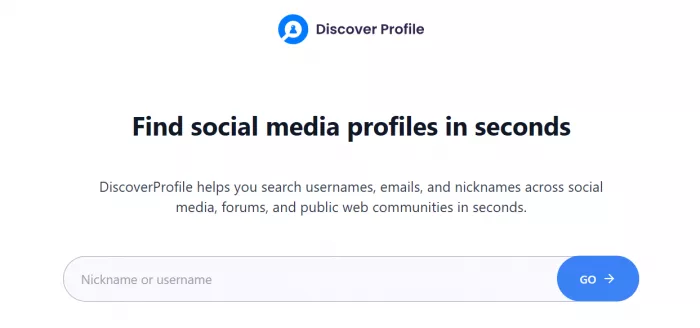
DiscoverProfile is a browser-based public-profile search tool. It lets users enter a username, nickname, name, alias, or email address and checks for possible matches across social networks, forums, gaming communities, professional platforms, developer sites, and other public websites.
The site says it searches more than 1,000 platforms, including Facebook, Instagram, TikTok, X, LinkedIn, GitHub, Reddit, Discord, Steam, Xbox Live, and creative communities. It also says the results are organized by category and linked directly to the original profiles.
That description is broadly accurate, but the word “profile finder” can create the wrong expectation. DiscoverProfile does not appear to retrieve court records, home addresses, phone ownership, criminal histories, employment records, identity documents, or financial information. It does not compare faces, access private accounts, or build a verified background report.
Its actual job is narrower and more practical. It checks where an identifier may be in use and gives the user a faster route to those pages.
This matters because username research becomes tedious very quickly. A person may use the same handle on a large social network, an old forum, a gaming account, a coding community, and a forgotten creator page. Searching each platform separately takes time, especially when the relevant profile is on a site that does not rank well in Google. DiscoverProfile reduces that manual discovery work. It does not complete the investigation.
The Search Experience
There is very little friction at the beginning. I did not have to create an account, complete an onboarding flow, enter card details, or choose a subscription before using the search box.
The interface asks for a nickname or username, although other parts of the site say that names and email addresses are also supported. Once the identifier is entered, DiscoverProfile says it checks its platform list in parallel and returns possible matches within seconds.
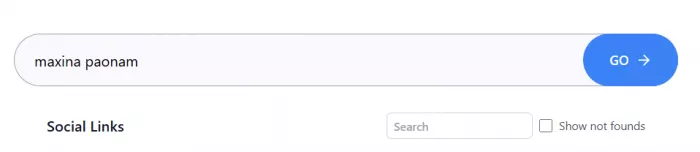
The simplicity is one of the tool’s strongest qualities. There are no complicated settings, technical installations, or command-line steps. Someone with no OSINT experience can understand the workflow immediately.
That simplicity also creates limitations. I could not narrow the search before running it with filters such as location, employer, age range, language, school, account type, or known website. The tool receives the identifier and searches broadly.
The workflow therefore has two very different stages.
1. DiscoverProfile handles the first stage by finding possible pages.
2. The user handles the second by opening those pages and checking whether they actually relate to the intended person.
Most of the meaningful work happened in that second stage.
What Appears in Results
DiscoverProfile focuses on account discovery rather than producing a complete identity report. The output directs users toward platforms where the searched identifier may exist and provides links for checking the accounts directly.
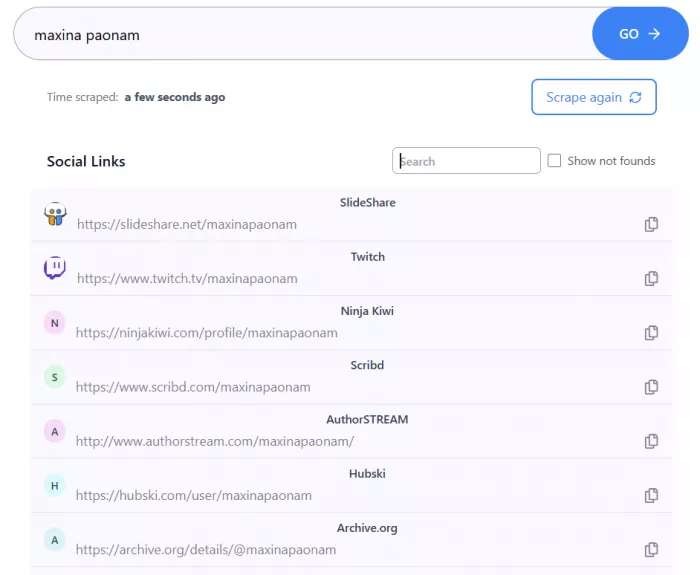
The links were the most useful part of my experience. Instead of repeating the same search across numerous websites, I could move through the possible profiles from one place.
The result list did not explain why several accounts should be treated as connected. When a profile appeared, it meant the identifier had been detected on that platform. It did not mean the account had been verified as belonging to the person I was searching for.
That became clear after opening the original pages. Some profiles shared details beyond the username, such as similar biographical information, location, interests, or personal links. Others had different photographs, languages, and posting subjects. In those cases, the username was the only shared detail.
The output also lacked context that would have helped me judge each result. I did not see a confidence score, a comparison of profile photographs, or an explanation showing which identity signals matched. The result did not clearly state whether the profile had been checked live or found through cached information.
The site describes usernames as potentially “registered, active, or reused,” but the output does not appear to provide a reliable last-active date. An accessible page can belong to an account that has not been used for years.
DiscoverProfile therefore gives users a list of possible locations, not a finished identity file.
Rare Usernames Work Better
The quality of a username search depends heavily on the username itself.
A distinctive handle is more useful because fewer people are likely to select it independently. An invented word, uncommon spelling, or unusual combination of letters and numbers can create a relatively narrow trail.
When a rare username appears on several platforms, I would still look for supporting evidence before connecting the accounts. The same personal website, matching original photographs, consistent location details, similar biography information, or direct links between profiles can make the connection more convincing.
The username alone remains an indicator, not proof.
Common handles create a different problem. A search for something broad such as techlover, john1995, or travelwithsam may return real accounts that have no relationship to one another. DiscoverProfile can be correct that each profile exists while still giving the user a misleading picture of one person’s online footprint.
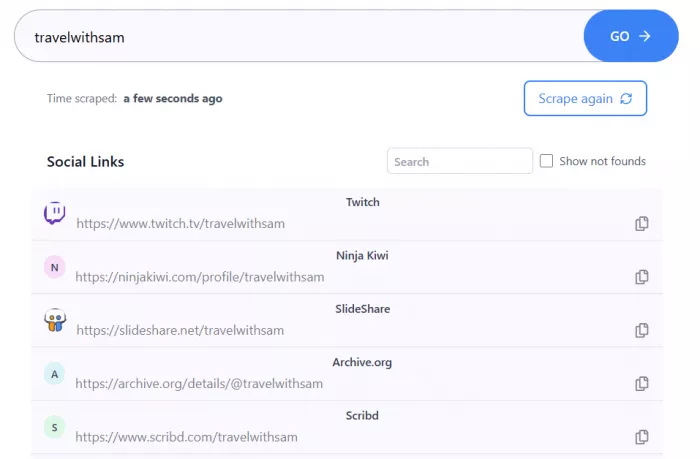
This is the most important difference in the tool:
Profile detection asks whether the username exists. Identity matching asks who controls it. DiscoverProfile is designed mainly for the first question.
That is why a long list of results is not necessarily a strong result. Five profiles with matching biographical evidence may be more useful than 50 pages that share only a generic username.
Searching by Real Name
DiscoverProfile says its social lookup can also work with a person’s name. In practice, this is much less precise than searching a known handle.
A real name is rarely unique. Without filters for city, employer, age, school, photograph, or known associates, the tool has limited ability to separate people who share the same name.
A returned page may belong to the intended person, another individual with the same name, a business account, a fan profile, an impersonator, or an inactive page. Presenting those possibilities as a bullet list would not solve the underlying problem because the real issue is the absence of identity context. The original profiles must provide that context.
A name search can still be useful when the name is unusual or when the user already knows another identifying detail. It is much weaker when the name is common and the result contains no matching location, occupation, photograph, or external link. I would use the name feature for exploration, not confirmation.
The Email Search Problem
Email search sounds more precise because an email address is usually unique. DiscoverProfile says users can enter an email and look for associated profiles across supported websites.
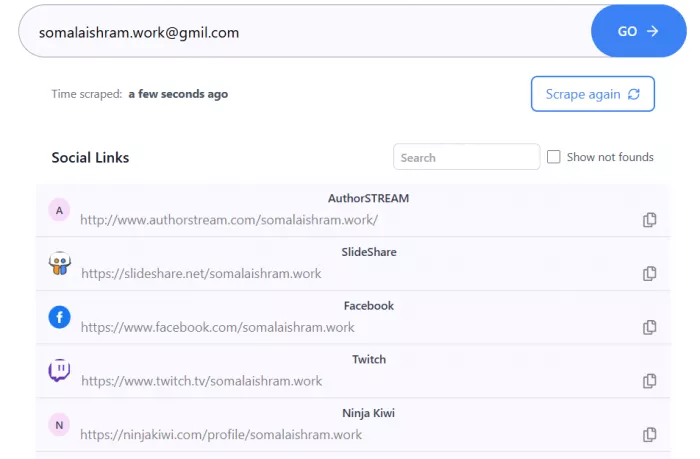
The problem is that the site does not explain how those associations are produced.
Most major social platforms do not publicly display the private email address connected to every account. An email-based match may therefore come from several different signals. The exact address may appear on a public portfolio, contact page, or profile. The text before the @ symbol may be treated as a possible username. An indexed webpage may contain both the email and social links. Cached public information may also preserve an older association.
Those methods do not have equal evidentiary value.
A profile that publicly displays the exact email is a strong connection. A profile whose username merely resembles the email prefix is much less convincing.
DiscoverProfile does not clearly show which method produced each result. That makes email output harder to evaluate than it first appears.
The lack of explanation is also relevant to privacy. A user cannot easily tell whether an email is checked only against public pages, processed through another service, converted into username variations, or retained in technical logs.
I would avoid treating an email result as confirmed unless the original source visibly supports the association.
The 1,000-Platform Claim
DiscoverProfile repeatedly says it searches more than 1,000 platforms. Its coverage reportedly includes major social networks, forums, gaming sites, professional platforms, developer communities, and creative networks.
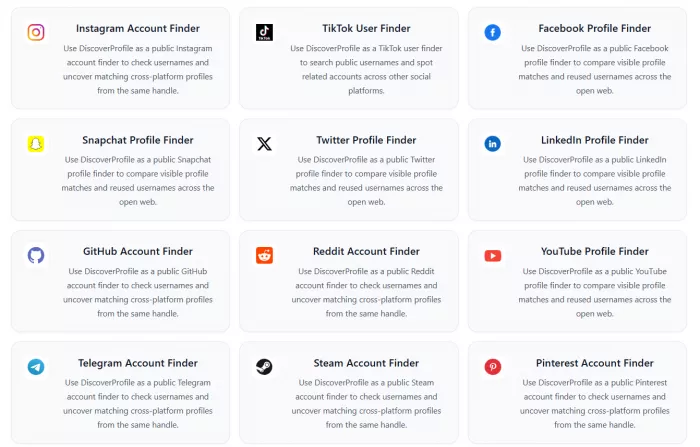
Broad coverage is valuable because smaller communities are where a tool like this can outperform ordinary manual searching. Major Instagram or LinkedIn pages are often easy to locate. An old gaming profile or niche forum account is more likely to be missed.
The problem is that DiscoverProfile does not publish a full directory of the 1,000-plus websites.
It also does not show which platforms are checked live, which depend partly on cached information, or which frequently fail because of login requirements, anti-bot systems, regional restrictions, and changing page structures.
A platform can be technically included while still producing unreliable matches.
For example, some websites redirect an invalid username to a generic page rather than returning a clear “account not found” response. An automated checker may interpret that page as a match. Other services hide profile information until a user signs in, making it difficult to confirm whether the account is active or even exists.
The number of supported platforms is therefore less important than the reliability of each returned link.
A transparent platform directory showing current support status, verification method, login requirements, and known limitations would make the coverage claim far more useful.
Accuracy and Dead Ends
DiscoverProfile says it combines cached data with real-time verification and acknowledges that occasional false positives may occur, particularly with common usernames. The site itself recommends opening important results directly.
That warning reflects the tool’s central accuracy problem.
False positives can occur when another person owns the username, a deleted page remains cached, an invalid profile redirects to a generic page, or a website changes the structure used to detect accounts.
False negatives are also possible. A genuine profile may be missed because it is private, newly created, hidden behind login, restricted by region, temporarily unavailable, or protected against automated requests.
Early comments on the product’s 2021 launch page described both patterns. One user said a self-search returned profiles that belonged to them alongside profiles that did not. Another reported links that opened to 404 pages despite being listed as matches. Those comments are old and do not measure the current version, but they identify failure modes that remain relevant to username-search tools.
DiscoverProfile does not publish a controlled accuracy test, false-positive rate, false-negative rate, or platform-by-platform reliability report.
For that reason, assigning the service a percentage such as “90 percent accurate” would be misleading. Its performance changes according to username uniqueness, platform behavior, privacy settings, and the type of match being evaluated.
Is It Really Free?
As of July 2026, DiscoverProfile describes its username search as completely free, with no registration, payment, subscription, or usage limit.
The basic search experience supports that claim. I did not encounter a paid report screen, credit system, or card requirement before reaching the profile links.
That separates DiscoverProfile from people-search sites that run a long search animation, reveal almost nothing, and then request payment.
The site does contain commercial links to separate scraping and web-data products. These buttons can appear close to the search experience and may use language such as “start free.” They are external services with their own registration requirements, trial rules, and pricing. The DiscoverProfile terms explicitly note that third-party links are outside its control and may have separate privacy practices.
For an occasional username check or personal footprint search, the free service is sufficient. It does not appear to include advanced functions such as bulk monitoring, structured exports, detailed profile comparison, or a formal downloadable identity report. The free access is genuine, but the feature set is correspondingly basic.
Privacy Is the Weakest Area
DiscoverProfile’s username page makes a strong promise: searches are not stored, logged, or tracked, queries are discarded after processing, and the person being searched is not notified.
The privacy policy is much less absolute. It says the website may store IP addresses, country of origin, URLs, download statistics, related usage information, cookies, preferences, and experience data. It also says information may be shared with trusted third parties that help operate or service the website.
These statements are not necessarily direct contradictions. The site could discard the search term while still keeping ordinary server logs and analytics data. The problem is that it does not explain the difference.
The policy does not say whether a searched username or email can appear in stored URLs or technical records. It does not provide retention periods, identify the main service providers, explain international data transfers, or provide a clear process for access and deletion requests.
The phrase “your privacy is fully protected” is therefore stronger than the documentation supports.
For a normal search of my own public username, this would not stop me from using the tool. I would be more cautious with a private alias, confidential work email, sensitive investigation, or identifier that I would not want connected to my IP address or browser activity.
Can I Trust DiscoverProfile ?
DiscoverProfile has been publicly listed since 2021 and continues to operate as a free profile-search site. Its contact page provides an email address, and the website has published privacy and terms pages. That is enough for me to regard it as a real utility rather than an obvious payment trap.
The company transparency is still limited. The standalone site does not prominently identify a registered legal operator, physical business address, jurisdiction, named privacy contact, or formal correction process.
The terms also state that the service is provided “as is,” without warranties that it will achieve intended results, operate without interruption, meet reliability standards, or remain error-free.
That legal language is common for free tools, but it reinforces the correct way to use DiscoverProfile. I trust it to generate possible leads. I do not trust it to establish identity by itself.
Legality and Safety
DiscoverProfile says it searches public information and does not access private accounts or bypass privacy settings.
Using a tool to locate an already public page is generally different from hacking or circumventing access controls. The greater legal and ethical risk lies in how the results are used.
A self-audit, brand-name check, or search for a known public handle is relatively straightforward. Employment screening, housing decisions, targeted surveillance, harassment, and attempts to expose an anonymous person are much more sensitive.
In the United States, social-media information used in third-party employment background reports can fall under the Fair Credit Reporting Act. The FTC says report providers must take reasonable steps to ensure accuracy and that the information relates to the correct person. Employers may also have disclosure and adverse-action obligations.
Social-media screening can also expose protected personal information and create discrimination concerns. The EEOC has warned that employer use of social media may implicate employment laws.
DiscoverProfile does not present itself as a regulated screening provider. I would not use it as the basis for rejecting a candidate, tenant, borrower, or insurance applicant.
There is also a personal-safety issue. A repeated username can connect professional profiles, old forum posts, gaming accounts, creator pages, and private interests. Each page may be public separately, but aggregating them creates a more revealing picture.
That information can be used for phishing, impersonation, harassment, social engineering, or doxxing. Finding a profile does not create a right to contact, monitor, expose, or accuse its owner.
Who It Is For
DiscoverProfile is most useful for people who need a quick starting point rather than a final answer.
It works well for checking where your own usernames appear, finding forgotten profiles, monitoring brand-name reuse, researching an unusual handle, or gathering public-source leads that will be verified elsewhere.
It is less useful for anyone seeking certainty from a common name, generic username, or unexplained email match.
The tool is also a poor choice for high-stakes decisions. It cannot reliably establish who owns an account, whether a profile is current, or whether all returned pages belong to one person.
Advantages and Limitations
| What worked well | What limited the experience |
| The search starts immediately without an account or payment details. | A matching username does not establish who owns the profile. |
| Direct links reduce repetitive searching across separate websites. | The result page does not compare biographies, photographs, locations, or personal links. |
| Coverage includes forums, gaming sites, developer communities, and other sources beyond major social networks. | The full list of more than 1,000 supported platforms is not published. |
| The basic lookup is currently presented as free and unlimited. | Commercial third-party links can look like part of the main service. |
| Rare usernames can produce useful and focused leads. | Common names and generic handles can produce unrelated matches. |
| The tool openly advises users to verify important findings. | No public accuracy benchmark or confidence score is available. |
| The interface requires no technical setup. | Email matching and activity status are not explained clearly. |
| The website has terms, privacy information, and a public contact address. | The privacy policy lacks detail on retention, logs, and service providers. |
Final Verdict
DiscoverProfile is useful because it reduces the dullest part of profile research. I could enter one identifier and quickly reach pages from different parts of the public web.
Its value was highest with a rare username. When several accounts also shared a personal website, location, photographs, or biographical details, the links provided a credible trail.
Its value dropped with common identifiers. A list of valid profiles can still be misleading when each belongs to a different person. The email search also lacked enough explanation for me to understand how strong each association was.
The basic service appears genuinely free, and the interface is easier to use than technical OSINT tools. The biggest weaknesses are not speed or cost. They are context, accuracy measurement, and privacy transparency.
I would use DiscoverProfile again for a personal footprint audit, brand search, username check, or early research. I would not use it to prove someone’s identity, make a hiring decision, support a serious accusation, or conclude that several accounts belong to one person.
Rating Breakdown
| Category | Rating |
| Ease of use | 4.5/5 |
| Search speed | 4.3/5 |
| Result usefulness | 3.6/5 |
| Identity accuracy | 2.8/5 |
| Pricing | 5/5 |
| Privacy transparency | 2.5/5 |
| Overall rating | 3.4/5 |
DiscoverProfile is good at showing where an identifier may appear. It is not strong enough to determine, without supporting evidence, who is behind those profiles.


Comments