MagicLight AI Review: I Turned One Script Into a Full AI Video



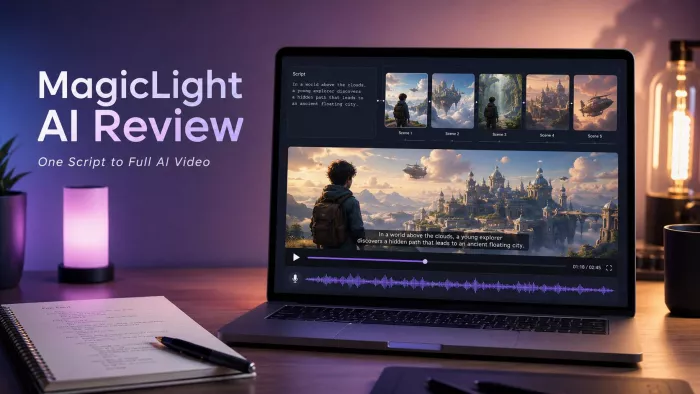
MagicLight AI caught my attention because it promises something most AI video tools still do not handle well: turning a script or story into a longer video with characters, scenes, narration, subtitles, and music. That is a bigger claim than simply generating a few seconds of AI motion.
For this review, I did not test MagicLight AI like a normal feature list. I used it the way a creator would. I gave it one complete story script and followed the process from script input to final video output. The goal was to see whether MagicLight AI could create something close to a usable story video, or whether the result would feel more like an AI slideshow with narration.
Quick Verdict
MagicLight AI is useful if you want to turn a written story or script into a structured animated video without building every scene manually. It can create a video with narration, visuals, captions, music, and recurring characters, which makes it interesting for faceless YouTube channels, children’s stories, educational explainers, and simple animated storytelling.
The result still needs review. The tool is good at creating a first draft quickly, but the output does not always feel like smooth cinematic animation. Some scenes looked like illustrated frames with camera movement rather than fully animated action.
What worked best:
● The tool understood the basic story structure.
● It created a proper sequence instead of random clips.
● Voiceover and subtitles made the video easier to follow.
● Character consistency was acceptable in simple scenes.
● The first draft gave a useful base for editing.
What needed work:
● Motion felt limited in some scenes.
● Emotional moments needed stronger visual emphasis.
● Character appearance shifted slightly in a few shots.
● Subtitles and pacing still needed manual review.
● The final video was not something I would upload blindly.
MagicLight AI is not a perfect one-click video studio. It is better described as a fast story-video builder that gives creators a usable starting point, especially if they are willing to edit weak scenes before publishing.
The Test: One Script, One Full Video
For this review, I tested MagicLight AI with a short fictional story script about a young boy named Leo who finds a glowing stone in a forest and learns a lesson about courage. I chose this script because it had enough elements to test the tool properly without making the project too complicated.
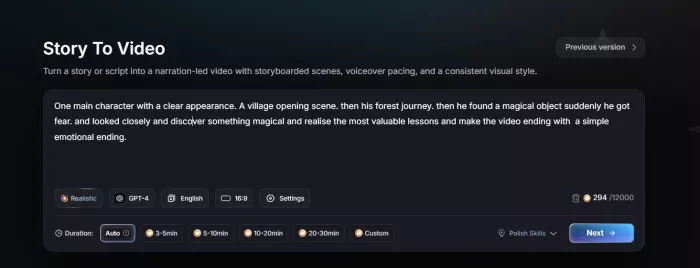
The script included:
● One main character with a clear appearance.
● A village opening scene.
● A forest journey.
● A magical object.
● A moment of fear.
● A simple emotional ending.
This made it a good test for story structure, character consistency, visuals, narration, subtitle timing, and pacing. I did not want to test it with a one-line prompt because that would not show whether MagicLight AI can actually handle a complete story.
A tool that claims long-form video generation should be judged on continuity. The real question is not whether it can create one attractive scene. The real question is whether it can carry a story from beginning to end without losing the character, mood, or flow.
What Happened After I Entered the Script
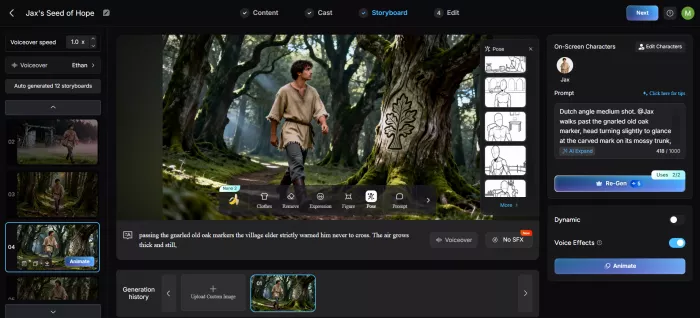
The first good thing was that MagicLight AI did not treat the script as one flat block of text. It tried to break the story into separate scenes. The village opening, the walk into the forest, the glowing stone discovery, and the final return scene were separated in a way that mostly made sense.
That matters because scene division is one of the hardest parts of turning a script into a video. If the tool misunderstands where one moment ends and the next begins, the final video becomes confusing. In my test, MagicLight AI understood the basic beginning, middle, and ending.
The weaker part was scene emphasis. Some important emotional moments were treated almost the same as simple transition scenes. For example, the moment when Leo felt afraid in the forest should have carried more tension. The tool created a darker forest scene, but the visual mood did not feel dramatic enough without adjustment.
In short, MagicLight AI understood the structure, but it did not always understand the emotional weight of each scene.
The First Draft Video: Watchable, But Not Final
The first draft looked like a proper story video. It was not just a random collection of unrelated AI clips. The narration followed the script, subtitles appeared on screen, and the visuals generally matched the story.
From a distance, the video looked usable for a simple YouTube story channel or children’s narration-style content. The forest visuals were attractive, the glowing stone scene had a nice fantasy feel, and the overall structure was easy to follow.
But once I watched closely, the limitations became clear. The video had some nice illustrated scenes, but the motion was limited. Many scenes felt like the camera was moving across still artwork rather than characters naturally acting inside the frame.
That does not make the output useless. Many faceless YouTube story videos already use limited motion, illustrated scenes, and narration. But if you expect film-like movement, natural walking, expressive body language, or complex character action, MagicLight AI may feel less advanced than dedicated AI video tools.
The first draft was useful, but it was not final.
Character Consistency: Better With Simple Details
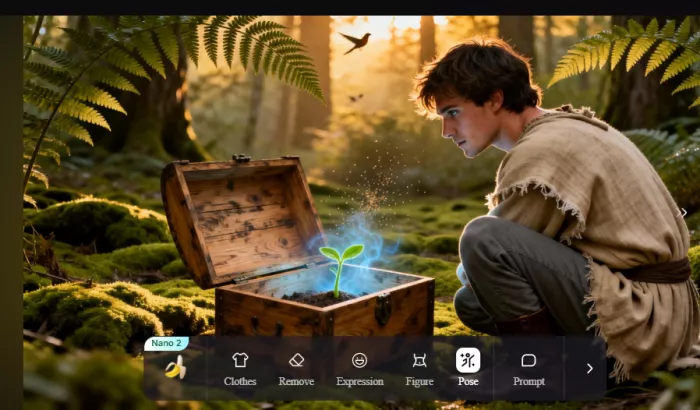
Character consistency was one of the most important parts of my test. MagicLight AI promotes story-style video creation, so the same character needs to stay recognizable across multiple scenes.
I gave the main character clear details: a young boy named Leo, curly brown hair, a yellow hoodie, and a small backpack. In simple scenes, the consistency was better than I expected. Leo remained recognizable across several shots. The hair, age, outfit direction, and general look stayed close enough that the story did not feel broken.
Still, the consistency was not perfect. In some wider shots, the outfit looked slightly different. In one scene, the face shape changed enough that I had to pause and compare it with earlier scenes. The tool did not completely lose the character, but it did not maintain perfect identity either.
My takeaway was clear: MagicLight AI works better when the character description is simple and repeated clearly. If you are creating a recurring character, do not assume the platform will remember every detail perfectly across a longer video.
For better character consistency, I would keep the description direct:
● Mention the character’s age, hair, outfit, and key accessories.
● Avoid changing the outfit too often inside the story.
● Repeat important character details in the script or setup.
● Check every scene before export, especially wide shots and emotional scenes.
Visual Quality: Good for Storytelling, Less Strong for Action
The best visuals came from scenes with clear settings. The village opening looked clean. The forest scene had atmosphere. The glowing stone moment was the strongest visual part of the test because the tool had a clear object and mood to build around.
The weaker visuals appeared when the scene required more action. Walking through the forest, reacting to fear, and returning home with confidence were harder for the tool to show naturally. Instead of fluid motion, the video often relied on gentle movement, zooms, and transitions.
This makes MagicLight AI better for narrated story videos than action-heavy animation. It performs better when the scene is built around mood, setting, narration, and simple character presence. It feels less convincing when the story requires running, fighting, dancing, crowd scenes, or detailed physical interaction.
The visual quality is good enough for simple animated storytelling, but it should not be judged like a cinematic video generator.
Choosing the Right Visual Style
One choice that affected my results more than expected was the visual style. MagicLight AI can generate a story in different looks, and the wrong one can make an otherwise decent draft feel off.
For the Leo story, a soft illustrated style suited the fantasy mood far better than a realistic one. The limited motion I noticed earlier is also less distracting in illustrated styles, because viewers already expect gentle movement from that kind of art, not lifelike action.
This is worth deciding before you generate. A children's or moral story usually looks best in a warm, illustrated style that hides the motion limits. A realistic style raises expectations the tool cannot always meet, and small flaws in movement or faces become more obvious.
My advice is to match the style to the weakest part of the tool, not the strongest. Choose a look that forgives limited motion rather than one that highlights it. It is a small decision at the start, but it shapes how finished the final video feels.
Voiceover, Subtitle and Pacing
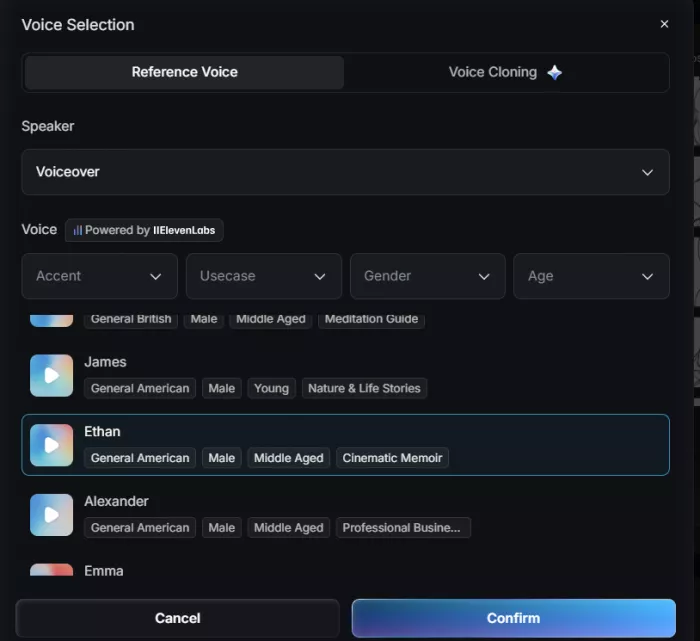
The voiceover was one of the more practical parts of the workflow. It gave the video structure and made the story easier to follow. For faceless YouTube content, narration matters because it often carries the entire video.
The voice was clear enough for a simple story video, but it still sounded AI-generated in places. Emotional lines could have used more variation. A moment of fear, wonder, or relief should sound different, but the narration did not always shift strongly enough.
The subtitles were helpful and mostly matched the narration. Still, I would review the timing before publishing. In a few places, the captions felt slightly too quick or did not land perfectly with the rhythm of the scene.
Here is how I would rate this part of the output:
| Area | My Experience |
| Voice clarity | Clear and usable for basic narration |
| Emotional delivery | Acceptable, but not highly expressive |
| Subtitle accuracy | Mostly useful, but timing needs review |
| Pacing | Good for simple stories, uneven in emotional moments |
| Publishing readiness | Usable after checking and light editing |
The video became much more watchable because of narration and subtitles, but both still needed a final human check.
Editing the Weak Parts
The editing stage is where MagicLight AI becomes more realistic as a creator tool. The first draft gives you a foundation, but you still need to check every scene. I mainly looked for three problems: visual mismatch, character drift, and pacing issues.
The emotional scenes needed the most attention. The tool understood the basic story, but it did not always understand which moments needed more drama. The fear scene in the forest, for example, needed a stronger mood, slower pacing, and more visual tension.
This is also where the credit model matters. If you regenerate weak scenes, test different styles, or adjust outputs multiple times, the final cost becomes harder to predict. A plan may look generous on paper, but the real value depends on how many usable scenes you get without repeated regeneration.
The best workflow is simple: use MagicLight AI to create the first draft, then review the video scene by scene. Keep the scenes that work, fix the scenes that weaken the story, and only export when visuals, narration, and captions feel aligned.
Taking the Video Beyond MagicLight AI
MagicLight AI does not have to be the last step. The first draft is a strong base, but some weaknesses are easier to fix in a normal video editor than by regenerating scenes and spending more credits.
The clearest example was the emotional moments. Instead of regenerating the fear scene several times, I could slow the clip down, add a short sound cue, or hold on the frame a little longer in an editor. Small timing changes often did more for the mood than a fresh generation.
The same applies to subtitles and pacing. Caption timing that felt slightly off was quicker to nudge manually, and trimming a half-second here and there smoothed out the uneven pacing.
So a realistic workflow is to let MagicLight AI build the structure, narration, and visuals, then move the export into an editor for the final polish. Treating it as the draft stage rather than the whole pipeline improves the result and keeps credit usage under control.
Long-Form Video Claim: Useful, But Needs Caution
MagicLight AI promotes long-form video generation, with videos up to 50 minutes depending on the plan. That is one of its biggest selling points because many AI video tools still focus mainly on short clips.
The long-form idea is useful, but it needs realistic expectations. A 3-minute story already needs checking for scene flow, character appearance, subtitle timing, and pacing. A 20-minute or 50-minute video multiplies those problems.
MagicLight AI’s long-form feature makes the most sense for:
● Children’s stories.
● Moral stories.
● Educational explainers.
● History-style narration.
● Religious stories.
● Faceless storytelling channels.
It is less convincing for cinematic fiction, complex animation, action-heavy storytelling, or videos where every scene needs detailed motion. The longer the video gets, the more important manual review becomes.
How to Write a Script That MagicLight AI Handles Well
After testing it, one thing was clear: the output depends heavily on how the script is written. MagicLight AI splits your text into scenes, so a vague or messy script forces the tool to guess, and the guesses are where most weak scenes come from.
The scripts that worked best were written in clear, visual beats. Short lines that each described one moment gave the tool cleaner scene breaks, and when I described what could actually be seen, not just what the character felt, the visuals matched the story more closely.
A few things that made a noticeable difference:
● Keep each scene to one clear action so the tool does not merge two ideas into one shot.
● Describe the setting first, then the character, so the scene has a visual anchor.
● Repeat key character details instead of assuming the tool remembers them.
● Mark emotional moments clearly, since the tool treats them like ordinary scenes otherwise.
The takeaway is simple. MagicLight AI is only as structured as the script you give it, and a little effort on the input saves a lot of editing later.
MagicLight AI Pricing and Plans
MagicLight AI uses a credit-based pricing model. That means you are not paying for unlimited video creation. Each plan gives you a credit allowance, and credits are used for video generation and related features.
The current pricing structure includes a free plan and five paid plans.
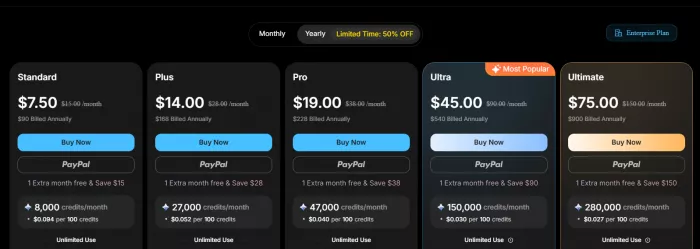
The Standard plan is the safest starting point if you want to test MagicLight AI seriously without spending too much. The Pro plan makes more sense for creators who plan to generate story videos regularly. Ultra and Max are more suitable for heavy creators or small teams that need a larger monthly production volume.
The pricing is not only about the monthly amount. The real question is how many usable videos you can produce from your credits. If the first draft is close to what you need, the value is better. If you need many regenerations, the cost becomes harder to judge.
What Real Users Are Saying
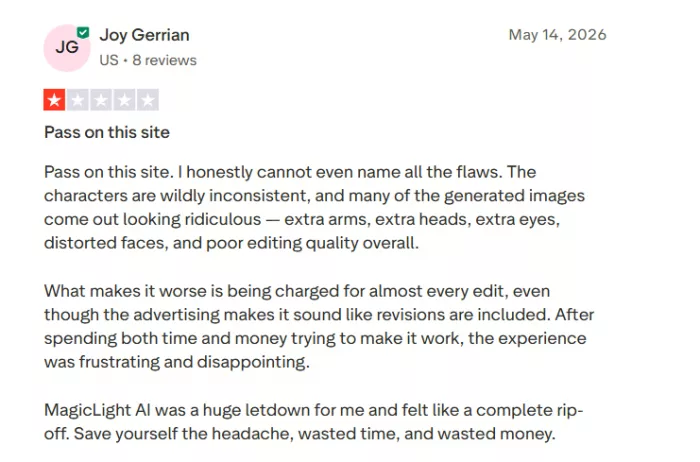
Real user feedback around MagicLight AI is mixed. App store ratings are more positive, while Trustpilot and Reddit feedback is more cautious. That split is important because it shows the tool can impress some users while disappointing others who expect stronger animation quality or smoother reliability.
The most common positive reaction is that MagicLight AI saves time. Users like the idea of turning a script into a full video with visuals, narration, captions, and music. This makes sense because the tool does reduce the amount of manual work needed to create a simple story video.
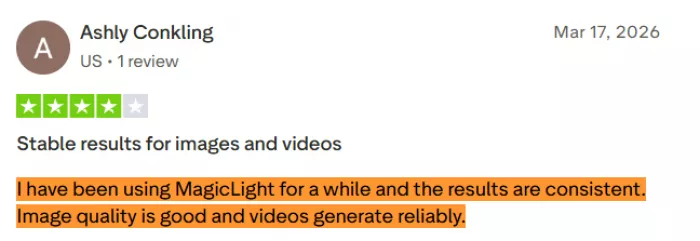
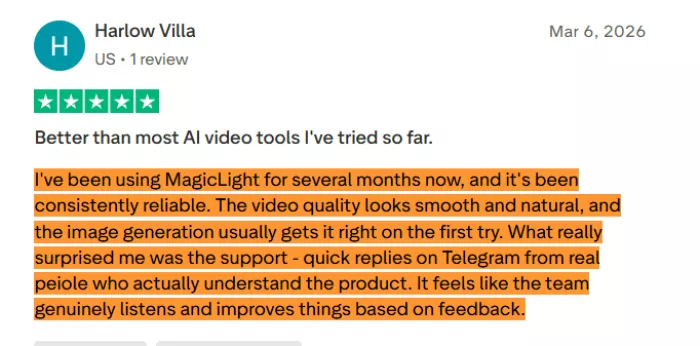
The most common complaints are about output quality, credit usage, and whether the animation feels real enough. That matches my own experience. MagicLight AI is promising, but users should test it carefully before relying on it for regular production.
Strengths and Limitations
MagicLight AI’s biggest strength is that it handles more of the story-video workflow than a normal AI clip generator. It does not only create visuals. It can help create scenes, voiceover, subtitles, music, and a structured story video from one script.
Its biggest limitation is motion quality. The output can look good for illustrated storytelling, but it does not always feel like natural animation. The longer the video gets, the more important it becomes to review character consistency, pacing, and scene logic.
| Strengths | Limitations |
| Turns scripts and stories into full video drafts with scenes, voice, subtitles, and music. | Motion can feel like moving illustrations rather than smooth animation. |
| Useful for faceless YouTube, children’s stories, explainers, and narrated videos. | Long videos need careful review before publishing. |
| Character consistency is better when the character description is clear. | Character details can still shift across scenes. |
| Saves time compared with manually building every scene. | Credit usage can increase with regenerations and edits. |
| Good for simple stories and structured scripts. | Not ideal for cinematic action or complex movement. |
Who Should Use MagicLight AI?
MagicLight AI makes the most sense for creators who want to produce story-based videos without handling every production step manually. It is useful for faceless YouTube channels, children’s story creators, educational channels, motivational video makers, and simple animated explainers.
It is also useful for writers who want to visualize a story quickly. If you already have a script, MagicLight AI can help turn it into a video draft faster than building scenes from scratch.
MagicLight AI is a good fit for users who want:
● Script-to-video generation.
● Simple animated story videos.
● Voiceover and subtitles in one workflow.
● Long-form narration videos.
● Faster first drafts for YouTube content.
● Basic character-based storytelling.
Who Should Avoid It?
MagicLight AI is not the best choice for creators who want high-end cinematic AI video. If your priority is realistic movement, advanced camera control, dramatic action, or professional film-style shots, tools like Runway, Kling, or Luma may be stronger options.
It is also not ideal for users who expect a perfect video from one click. MagicLight AI can create a strong draft, but the final result still needs review. If you are not willing to check scenes, regenerate weak parts, and adjust pacing, the output may feel unfinished.
Best MagicLight AI Alternatives
Runway AI is better for cinematic AI video, visual effects, and advanced creative editing. It is more suitable for short polished clips than long narrated story videos.
Kling AI is stronger for realistic motion and image-to-video generation. It is a better fit when visual realism matters more than long-form storytelling.
Pika AI works well for short creative clips, stylized animation, and social media experiments. It is easier for quick video ideas but less focused on full story structure.
InVideo AI is better for faceless YouTube videos using stock footage, captions, voiceover, and script-to-video workflows. It is more practical if you want explainer-style content rather than AI-generated story animation.
HeyGen is better for avatar videos, business explainers, training content, and multilingual presenter-style videos. It is not a story animation tool, but it is stronger for talking-head communication.
Synthesia is useful for corporate training, onboarding, and professional avatar-led videos. It is more business-focused than MagicLight AI.
Luma Dream Machine is better for cinematic short clips, camera movement, and realistic visual experiments. It is not built for long-form story videos, but it can produce stronger short visual moments.
My Personal Rating
| Category | Rating | Why I Rated It This Way |
| Script-to-video workflow | 4.1/5 | It understood the story structure and created a usable first draft. |
| Story flow | 4.0/5 | The beginning, middle, and ending were easy to follow. |
| Visual quality | 3.7/5 | Strong for illustrated storytelling, weaker for action-heavy scenes. |
| Character consistency | 3.8/5 | Good with simple details, but not perfect across all scenes. |
| Voiceover | 3.8/5 | Clear and usable, but emotional delivery felt limited. |
| Subtitles | 3.9/5 | Helpful, though timing still needs checking. |
| Motion quality | 3.3/5 | More like animated illustrations than smooth cinematic video. |
| Editing flexibility | 3.7/5 | Useful for fixing drafts, but weak scenes may cost extra credits. |
| Pricing value | 3.6/5 | Fair if outputs are usable, less clear if many regenerations are needed. |
| Overall rating | 3.8/5 | A useful story-video builder, but not a perfect AI animation studio. |
Final Verdict: Is MagicLight AI Worth It?
MagicLight AI is worth trying if your goal is to turn scripts or stories into structured animated videos quickly. It gives creators a way to move from written text to a video draft with scenes, narration, subtitles, music, and recurring characters. That is useful for faceless YouTube channels, children’s stories, educational explainers, and simple long-form storytelling.
The tool is not a replacement for a professional animator or a cinematic AI video model. Its motion quality can feel limited, and some scenes may look more like animated illustrations than full video. Character consistency is helpful but not flawless. Long videos are possible, but they need careful review before publishing.
After testing it with one complete story script, my view is clear: MagicLight AI is strongest as a first-draft story-video generator. It can save time, create structure, and give creators a usable base. But the best results come when you treat the output as something to review and polish, not something to upload blindly after one generation.
Comments

David Donaldson
Oct 14, 2026Been using this for my faceless kids story channel and it's a huge time saver. Script in and I get a full video with narration and subtitles in one go. Still edit a bit but it beats building every scene by hand. Love it.
Login To Reply ↪
Megnath Ronan
Oct 7, 2026Credits run out fast. Every time a scene came out weak I had to regenerate and watch my credits disappear. By the time I had a usable video I'd burned through way more than I planned. Pricing feels misleading.
Login To Reply ↪

Sandy Bullock
Oct 17, 2026Character consistency was better than I thought in simple scenes but it slipped in wide shots, had to pause and compare a couple times. Works if your story is simple. Anything with action and it struggles.
Login To Reply ↪