MotionMuse AI Review: The NSFW Video Generator Behind the Simple Interface



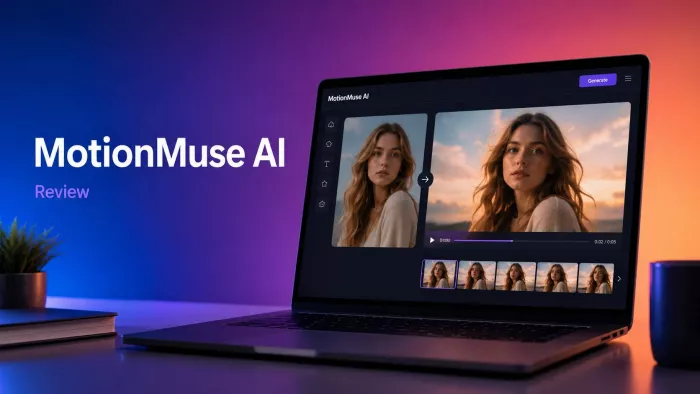
MotionMuse AI is not the kind of AI video tool that needs a long explanation before readers understand the pitch. It takes a still image and turns it into a short animated video. That is the surface-level appeal. Upload a picture, choose a motion style or write a prompt, and the platform generates a few seconds of movement.
But MotionMuse AI becomes more interesting when you look beyond that simple promise. It sits between two very different markets. On one side, it works like a quick image-to-video generator for creators who want short animated clips. On the other side, its main branding leans clearly into NSFW AI video generation, which makes privacy, consent, and audience suitability impossible to ignore.
That split identity is what makes MotionMuse AI worth reviewing carefully. It is not just a question of whether the tool can animate images. The better question is whether it is useful, safe enough for your use case, and clear enough about what kind of audience it wants to serve.
The Short Version First
| Area | MotionMuse AI Assessment |
| Main function | Turns still images into short AI-generated videos |
| Best-known use | Image-to-video animation with adult-oriented options |
| Output length | Short clips, usually around a few seconds |
| Ease of use | Beginner-friendly and fast to understand |
| Creative control | Useful for prompts and templates, but not deeply editable |
| NSFW support | A major part of its public positioning |
| Best for | AI art users, character creators, short visual experiments, adult-oriented creators |
| Not ideal for | Schools, corporate teams, brand-safe marketing, sensitive personal images |
| Main concern | Consent, privacy, and limited professional control |
| Overall verdict | Useful for quick AI motion, but not a tool for every audience |
The Real Pitch: Make a Still Image Move
MotionMuse AI’s core feature is image-to-video generation. The user starts with a still image, then the AI adds motion. That movement can be based on a template, a prompt, or a selected animation style.
This makes the tool attractive to people who already have images but do not want to learn video editing. An AI artist can animate a portrait. A creator can turn a static visual into a short social clip. A character-based account can create quick motion from a generated face or fantasy image. Someone testing ideas can use it as a fast visual sketchpad.
The workflow is built around speed rather than deep control. MotionMuse AI is not asking users to edit frames, adjust keyframes, build timelines, or manage layers. It is closer to a generator than a video editor.
That is both the strength and the limitation. It removes friction, but it also means the final result depends heavily on the model, the uploaded image, and how well the prompt is interpreted.
The NSFW Side Is Not a Footnote
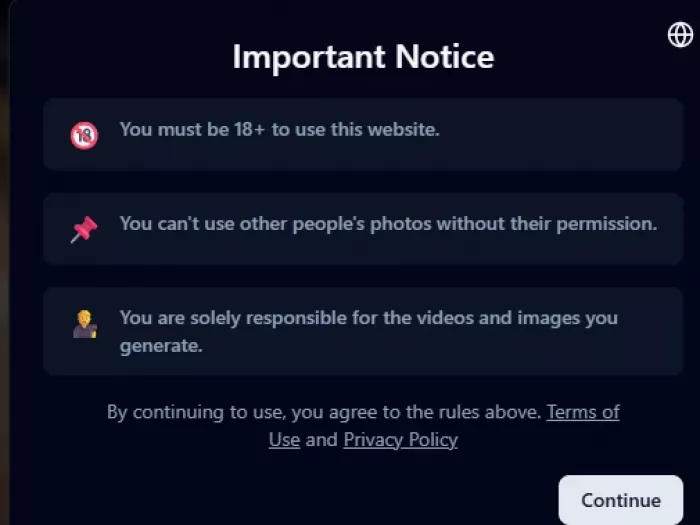
Many AI tools hide their adult features behind vague language. MotionMuse AI is more direct. Its main domain is positioned around NSFW AI video generation, and that changes how the platform should be understood.
This is important because NSFW support is not just another feature category. It affects who should use the tool, where it should be used, what kind of images should be uploaded, and how seriously users should think about consent.
For adult-oriented creators, MotionMuse AI may feel more flexible than mainstream AI video tools that block or restrict sexualized content. That permissive positioning is likely part of its appeal. Users looking for adult AI animation, fantasy character clips, or more open image-to-video generation may see MotionMuse as a better fit than heavily moderated tools.
For general users, the same positioning can be a drawback. A school, workplace, corporate marketing team, or family-friendly creator may not want to use a tool publicly associated with NSFW video generation. Even if they only use harmless images, the product’s identity may still create brand-safety concerns.
This is the most important distinction in the review: MotionMuse AI may be useful, but it is not neutral in how it presents itself.
What MotionMuse AI Can Do
MotionMuse AI is built around short, direct generation rather than a broad professional editing suite. The features are practical if your goal is to animate images quickly.
| Feature | What It Means | Why It Matters |
| Image-to-video generation | Converts still images into short animated clips | This is the main reason to use the tool |
| Templates | Lets users choose ready-made motion styles | Helps beginners avoid complicated prompts |
| Custom prompts | Allows users to describe the movement they want | Gives more control than one-click animation |
| Short video clips | Generates quick motion outputs rather than long videos | Good for social snippets and fast experiments |
| Web-based access | Runs through the browser | No advanced editing setup is needed |
| Credit-based usage | Users generate videos using credits or paid access | Good for testing, but heavy use may cost more |
| Telegram bot access | Allows image and video generation through Telegram | Useful for casual or mobile-first users |
| NSFW generation | Supports adult-oriented AI video workflows | Appeals to some users, but limits mainstream suitability |
| AI training tools | Some paid features mention training utilities | Useful for users who want more personalized generation |
| Multiple templates | Template access can speed up repeated generation | Useful for users who do not want to prompt from scratch |
The feature set is not complicated. MotionMuse AI wants to make image animation quick. Its more controversial edge comes from the kind of content it allows or markets around.
How It Works in Practice
The process is simple enough for a beginner to follow without much instruction.
1. Upload an image : The image becomes the starting frame for the video. A clean, sharp, well-lit image usually gives the AI a better chance of producing stable motion.
2. Choose a template or write a prompt : A template gives the tool a ready-made motion direction. A prompt lets the user describe movement, mood, expression, camera motion, or visual style.
3. Generate the clip : The platform processes the image and creates a short video. This usually uses credits or plan access.
4. Review the result carefully : This step matters because AI video can look good at first glance but show problems on replay. Faces may shift, backgrounds may bend, or movement may feel unnatural.
5. Download or regenerate : If the result works, the user can download it. If not, they may need to change the prompt, use a cleaner image, or spend more credits on another generation.
The workflow is fast, but it is not guaranteed. Like most AI video tools, MotionMuse AI may require trial and error before producing something usable.
Where the Tool Actually Feels Useful
MotionMuse AI is most useful when the goal is short visual motion, not full video production. It is best treated as a quick animation assistant.
It can help with:
● Turning AI-generated portraits into short moving clips.
● Creating fantasy, avatar, or character-style visuals.
● Making short social media clips from static images.
● Testing motion ideas before using a more advanced video platform.
● Adding life to concept art, illustrations, or stylized images.
● Creating adult-oriented AI visuals where mainstream tools may be more restrictive.
The tool makes less sense when the user needs a polished multi-scene video, brand-controlled campaign asset, realistic human motion, or professional editing flexibility.
Output Quality: Good Inputs Matter More Than Big Prompts
The quality of MotionMuse AI output depends heavily on the uploaded image. This is normal for image-to-video tools, but it is worth saying clearly because users often blame the tool when the input itself is difficult.
A clear portrait or centered subject is more likely to animate well. A low-resolution image, crowded background, awkward pose, or distorted AI-generated character can produce weaker results.
The best results usually come from:
● A sharp image with a clear subject.
● A simple background that does not compete with the main figure.
● A prompt that asks for one clear type of movement.
● A subject that is not blocked by hands, hair, objects, or complex clothing.
● A realistic expectation that the final clip will be short and experimental.
The weaker outputs may show common AI video problems. Faces can drift. Hands can look strange. Backgrounds can ripple. Clothing and hair may move in ways that do not fully match physics. Motion may also feel repetitive because the clip length is short.
MotionMuse AI can create interesting results, but it should not be judged like a full cinematic video system. It is better viewed as a quick animation tool where some outputs will need retries.
The Privacy and Consent Question
MotionMuse AI’s NSFW positioning makes privacy more important than usual. Any image-to-video tool can create problems when users upload images of real people, but the risk becomes sharper when adult-oriented generation is part of the platform’s identity.
The safe rule is simple: do not upload a real person’s image without clear permission.
This applies to friends, partners, influencers, public figures, coworkers, classmates, and strangers. Even if the generated clip is not explicit, creating animated media from someone’s face or body without consent can be invasive. If adult-style generation is involved, the risk becomes much more serious.
Users should be careful with:
● Personal photos.
● Images of real people.
● Private or intimate images.
● Client images.
● Workplace images.
● Public figure images.
● Any content that could be misleading or reputationally harmful.
For safer use, MotionMuse AI is better suited to fictional characters, AI-generated images, licensed visuals, or original creative assets where the user owns the rights and understands the risks.
Pricing and Credits
MotionMuse AI appears to use a credit or subscription-based structure. That is common in AI video because generation is resource-heavy. The public pages mention free credits in some access points and paid plans for heavier usage.
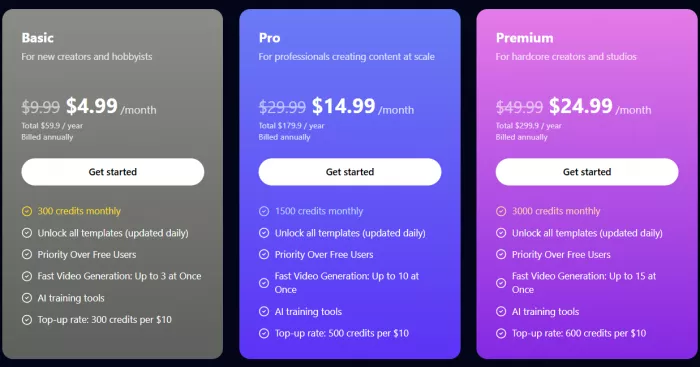
This pricing model can be fine for casual testing, but users should pay attention to how quickly credits disappear. AI video often requires multiple attempts. One prompt may produce a weak clip. Another may create motion that looks good but changes the face. A third may finally work. Those retries can make a credit system feel more expensive than expected.
The free access is useful for testing the interface, but serious users should check the plan details before building a workflow around it.
Public Reviews and Trust Signals
Public feedback around MotionMuse AI is still limited, but the discussion that does appear is easy to read: users are mostly curious about whether the tool can create realistic image-to-video clips, whether its NSFW output is actually good, and whether the pricing is worth it.
The main thing users seem to want is simple: upload an image and get a short video that looks natural without wasting too many credits. They also want better control over movement, face consistency, and camera motion, especially when using portrait or character-style images. reddit
Common positive expectations include:
● Fast image-to-video generation without editing skills.
● NSFW video options that are less restricted than mainstream tools.
● Short clips that look realistic enough for sharing.
● Templates and prompts that make the workflow easy.
The complaints are more practical. Users worry about credit usage, unclear value for money, weak or failed outputs, and whether the tool is safe enough to trust with personal images. Reddit discussions also show some concern around safety, pricing, and complaints about credits or promotional spam. reddit
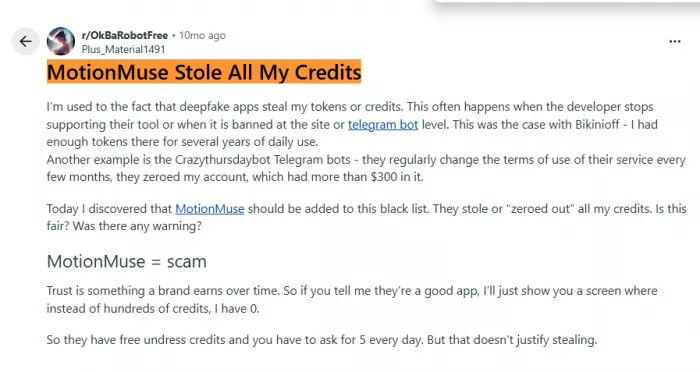
MotionMuse AI attracts attention because it promises quick and flexible AI video generation, especially in the NSFW space. But users still want clearer pricing, stronger output consistency, better credit transparency, and more proof that the platform handles uploads responsibly.
MotionMuse AI Compared With Safer or More Professional Alternatives
MotionMuse AI is not competing with every AI video tool in the same way. Its adult-oriented positioning gives it a different audience from more polished, brand-safe platforms.
| Tool | Best Fit | How It Differs From MotionMuse AI |
| MotionMuse AI | Quick image-to-video clips and adult-oriented generation | More permissive, but less suitable for brand-safe use |
| Runway | Professional AI video creation and editing | Better for serious creators and production workflows |
| Luma AI | Cinematic image-to-video and realistic camera motion | Stronger for polished visual scenes |
| Kling | Realistic AI video generation | Better for motion quality and visual realism |
| Pika | Short creative AI video clips | More general-purpose and creator-friendly |
| Adobe Firefly Video | Commercial and brand-safe creative work | Safer for teams, brands, and professional use |
| Hailuo | Fast AI video experiments | Good for testing short-form video ideas |
| ChatGPT/Sora-style tools | Broader creative AI video workflows | More general, depending on access and content rules |
MotionMuse AI’s advantage is not that it is the most professional tool. Its advantage is speed, simplicity, and permissive positioning. That will matter to some users and disqualify it for others.
The Good and the Risky
| What Works Well | What Needs Caution |
| The upload-to-video workflow is simple | NSFW positioning limits where the tool is appropriate |
| Templates make it easier for beginners | Adult generation raises privacy and consent concerns |
| Custom prompts offer creative flexibility | Output may need several retries |
| Short clips are useful for quick content experiments | Not ideal for professional long-form production |
| Web and bot access make the tool easy to try | Public trust signals are still limited |
| It can animate AI art and fictional characters quickly | Real-person images should be handled very carefully |
| It may appeal to users needing fewer content restrictions | Brand-safe users may prefer more mainstream alternatives |
Who Should Use MotionMuse AI?
MotionMuse AI is best for users who know exactly what kind of tool they are dealing with. If the goal is fast image animation, short AI-generated motion, or adult-oriented creative output, it may be worth testing.
It makes sense for users who want:
● A simple image-to-video generator.
● Fast short clips from still images.
● Template-based AI video creation.
● Prompt-based motion experiments.
● Adult-oriented AI video options.
● A tool for fictional, AI-generated, or licensed images.
Who Should Avoid It?
MotionMuse AI is not the right choice for everyone, even if the technology sounds useful.
It is probably not the right fit for users who need:
● A workplace-safe creative tool.
● A school-friendly AI video platform.
● A brand-safe video generator.
● Strong public review evidence before paying.
● Long videos with story continuity.
● Frame-level editing control.
● A platform for uploading real people’s images casually.
● A tool with a fully mainstream professional identity.
For those users, a more established AI video platform may be the better choice.
Final Verdict
MotionMuse AI is a fast and accessible image-to-video generator with a clear adult-oriented edge. Its core function is useful: upload an image, add a prompt or template, and generate a short animated clip. For AI art users, character creators, experimental social media creators, and adult-oriented creators, that workflow can be valuable.
Its biggest strength is simplicity. It removes the need for editing knowledge and turns still images into motion quickly. Its template and prompt-based approach makes it easy to test ideas without building a full video project.
Its biggest weakness is suitability. MotionMuse AI’s NSFW positioning is central to how the tool is presented, and that makes it unsuitable for many professional, educational, or brand-safe environments. It also increases the importance of privacy and consent. Users should avoid uploading images of real people unless they have clear permission and understand the possible risks.
The fair conclusion is this: MotionMuse AI is worth trying if you want quick image-to-video generation and are comfortable with its adult-oriented positioning. It is not the best choice for corporate teams, schools, mainstream brands, or users who need polished long-form video control. Used carefully with fictional, licensed, or AI-generated images, it can be a useful creative tool. Used carelessly with real-person images, it can quickly become risky.


Comments