Pica AI Review: Three Tools in One, But Not All Equally Strong



After using Pica AI, I would not describe it as one simple AI photo editor. It feels more like three different tools inside one platform: a photo enhancer, a face swap tool, and an AI headshot generator.
That difference matters because each feature gives a different kind of result. The photo enhancer felt the most practical. The face swap tool was the most fun, but also the one that needed the most careful checking. The AI headshot feature was useful, but it was also where I noticed the biggest gap between “looks professional” and “looks truly like me.”
Pica AI as a Photo Enhancer
The photo enhancer was the first part I tested because it is the most everyday use case. Most people have at least a few photos that are slightly blurry, low-resolution, old, faded, or not clean enough for posting. Pica AI tries to fix that with a very simple upload-and-enhance process.
The workflow was easy. I uploaded the image, waited for the AI to process it, and compared the result with the original. There was no complicated editing panel or manual retouching process. That is a good thing for casual users. Pica AI clearly wants to remove the technical work and give users a cleaner image quickly.
On a normal soft or slightly blurry portrait, the enhancer made the image look sharper and more usable. The face had more definition, the photo looked cleaner, and the overall result was easier to use for a profile picture or social post. This is where Pica AI felt most useful to me. It did not require effort, and the improvement was easy to notice.
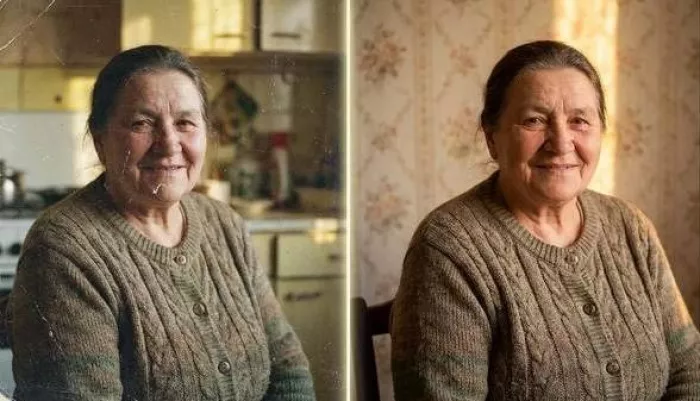
But I also noticed the usual problem with AI photo enhancers: the image can look better without looking completely natural. When Pica AI sharpens a face, it sometimes creates a polished look rather than a truly restored look. Skin texture can become too smooth, small details can disappear, and the final image can feel slightly AI-cleaned.
| Test area | What I noticed |
| Slightly blurry portrait | The face became clearer and more usable for casual posting |
| Low-quality image | The photo looked cleaner, but some details felt AI-created |
| Old or faded photo | The result looked more shareable, but I would still keep the original |
| Face close-up | Skin and eyes improved, but over-smoothing needed checking |
The enhancer is good when the original image is not completely damaged. If the photo already has enough detail, Pica AI can improve it in a useful way. If the image is too blurry or heavily compressed, the result starts to feel more like AI prediction than real restoration.
That is not a deal-breaker for casual use. For family albums, profile photos, old pictures, and social media, the enhancer does its job well. But I would not use it as a serious restoration tool for anything that needs accuracy. It improves appearance. It does not guarantee truth.
Pica AI as a Face Swap Tool
The face swap feature is the part of Pica AI that feels the most entertaining. It lets you replace faces in photos without doing manual masking, cutting, blending, or editing. For casual users, that is the appeal. You do not need Photoshop skills. You upload, generate, and check the result.
When I tested face swap with cleaner images, Pica AI handled the basic job well. If the source face was clear and the target image had similar lighting and face direction, the swap looked convincing enough for fun edits. The face blended into the image, the expression stayed usable, and the result was good enough for casual social content.
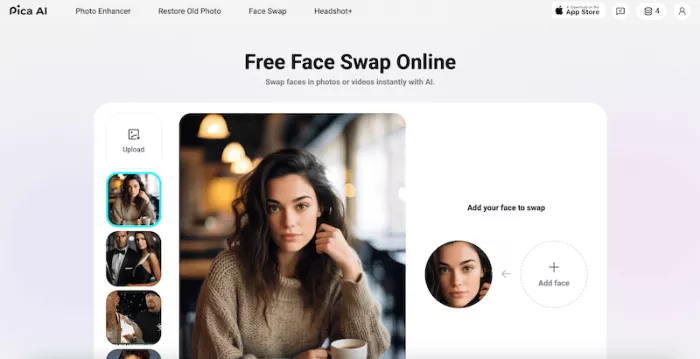
The feature becomes weaker when the conditions are not ideal. A side angle, different lighting, unusual expression, messy hairline, or mismatched skin tone can make the edit visible. The face may sit correctly, but the eyes, jawline, neck, or forehead area can reveal that the image was altered.
This is where I learned not to trust the small preview. A face swap can look fine in a small view but show problems when opened full size. The edges around the face, the expression, and the lighting match are the first things I checked before deciding whether the result was usable.
Pica AI’s face swap tool works best when:
● The source face is clear, front-facing, and not covered by shadows, glasses, or heavy blur.
● The target image has a similar head angle, expression, and lighting direction.
● The final use is casual, playful, fictional, or clearly meant for entertainment.
● The user checks the result at full size before sharing or downloading it.
The biggest issue with face swap is not only technical quality. It is also consent. A tool like this changes identity, so I would not use it casually with someone else’s face. Uploading your own image for a fun edit is one thing. Using another person’s face without permission is different, especially if the final image could mislead people or damage someone’s reputation.
As a fun AI editing feature, Pica AI’s face swap is useful. As a serious realistic identity tool, it needs caution. It can create impressive results, but it also creates responsibility for the person using it.
Pica AI as an AI Headshot Tool
The AI headshot feature is the one I was most curious about because it has a very practical promise. A lot of people need better profile photos for LinkedIn, resumes, business pages, author bios, freelance profiles, or social accounts. A proper photo shoot takes time and money, so the idea of turning a normal selfie into a polished headshot is attractive.
Pica AI makes this process simple. You upload a photo and let the tool generate a cleaner, more professional-looking version. The result can look more formal than the original, with better lighting, cleaner background, sharper facial detail, and a more polished presentation.
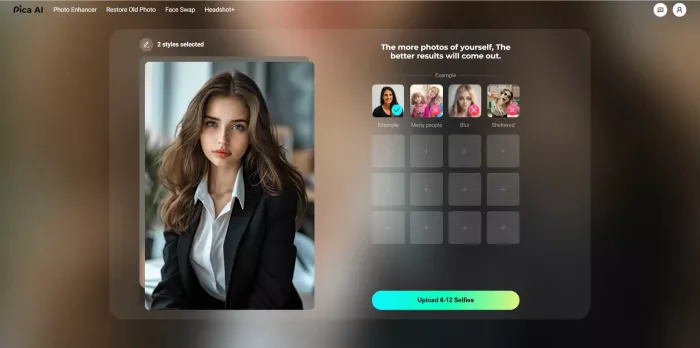
But this was also the feature where I checked the output most carefully. A headshot is not just a nice image. It represents a person. If the AI changes the face too much, the result becomes less useful even if it looks visually better.
The headshot results looked polished, but I noticed the same issue that appears in many AI headshot tools: the face can become slightly idealized. Skin looks smoother, the jawline can look more shaped, the eyes can appear brighter, and the overall image can feel more refined than real. That may look impressive at first, but for professional use, accuracy matters more than polish.
A good AI headshot should still look like the person on a normal day. It should not feel like a different version of them. That is the test I used when judging Pica AI’s headshot output. I did not only ask, “Does this look good?” I asked, “Would someone who knows this person recognize this as natural?”
The AI headshot tool is useful when:
● You need quick profile photo options and do not have time for a real shoot.
● You want a cleaner image for social profiles, personal branding, or casual professional use.
● You are willing to compare multiple outputs instead of trusting the first result.
● You care about looking natural, not just polished.
For me, this feature works best as an option generator. It gives you possible headshots to review, but it should not automatically become your final professional photo. I would generate several versions, compare them with the original face, zoom in, and choose the one that looks the most natural.
Which Part Works Best?
The photo enhancer worked best for me because it solves the clearest problem. A blurry or low-quality photo needs to look cleaner. That is a simple goal, and Pica AI handles it well when the original image is not too damaged.
The enhancer also carries less risk than the other two tools. It does not replace identity like face swap, and it does not create a professional version of a person like the headshot tool. It simply improves an image. That makes it easier to judge and easier to recommend.
| Pica AI feature | How it felt after testing |
| Photo enhancer | The most practical and reliable part for everyday users |
| Face swap | The most fun feature, but dependent on image quality and consent |
| AI headshot | Useful, but the output needs careful checking before professional use |
The enhancer is not perfect. It can still over-smooth faces or create artificial sharpness. But out of the three tools, it felt the most dependable for normal use. If someone asked me which part of Pica AI to try first, I would point them to the enhancer.
Which Part Feels Weakest?
The AI headshot tool felt like the weakest part, not because it failed, but because the standard is higher. A face swap can look a little artificial and still be fun. An old photo can look slightly cleaned up and still be useful. A professional headshot has to look accurate.
That is where the headshot feature becomes tricky. Some outputs look good, but they also feel slightly too polished. If the face changes even a little, the image loses trust. For a casual profile, that may be acceptable. For LinkedIn, a resume, or a client-facing page, it matters.
The face swap feature also has weaknesses, especially with lighting and angles, but users usually understand that face swap is experimental. The headshot feature feels more serious, so the result needs to be judged more strictly.
The headshot tool is not useless. It is actually helpful for creating options. But I would not use it blindly as a final professional image. It needs review, comparison, and a bit of judgment.
The Workflow: Fast, But Mostly One-Click
Pica AI’s workflow is one of its biggest strengths. The tool is easy to use, even if you have no editing experience. You choose the feature, upload the image, wait for the AI result, and download it if it works.
That simplicity makes Pica AI friendly for beginners. It does not ask users to understand masks, layers, lighting correction, retouching, or prompt writing. The tool does the technical work in the background.
But the same simplicity also creates a limitation. Pica AI is fast, but it does not give deep control. If the face swap looks slightly wrong, the headshot feels over-processed, or the enhancer makes the skin too smooth, there are not many manual controls to fix the exact problem. The usual solution is to regenerate, try another image, or move to a more advanced editor.
| Workflow stage | My experience |
| Uploading | Simple and quick, with no learning curve |
| Generating | Easy, but the result depends heavily on the input image |
| Reviewing | Necessary because small previews can hide errors |
| Regenerating | Useful, but repeated attempts can become frustrating |
| Downloading | Simple when the output is good enough |
This workflow is best for quick results. It is not built for users who want fine control over every part of the image. Pica AI is not trying to replace Photoshop. It is made for people who want fast AI edits and are willing to accept some unpredictability.
How Pica AI Handles Different Types of Images
One thing I noticed across all three tools is that Pica AI does not treat every image the same way. The result depends heavily on what you upload, and that pattern was consistent enough to be worth explaining on its own.
Clear, well-lit, front-facing photos gave me the best results in every feature. When the lighting was even and the face was sharp, the enhancer, face swap, and headshot tool all performed closer to their promise. The AI had enough real detail to work with, so it was improving an image rather than guessing at one.
The trouble started with harder inputs. Heavily compressed photos, dark or uneven lighting, side angles, and group shots all pushed the AI into prediction mode, where it fills in detail that was never there. That is when faces start to look invented instead of restored.
| Image type | How Pica AI handled it |
|---|---|
| Clear, front-facing portrait | Strongest results across all three tools |
| Low light or heavy shadows | Usable, but detail often looked AI-filled |
| Side angle or tilted face | Weaker, especially for face swap |
| Group photo | Least reliable, the AI struggled to stay consistent |
The simple lesson for me was that input quality decides output quality more than the feature itself. Before blaming the tool for a weak result, it is worth checking whether the original image gave it a fair chance.
Pricing: Good for Testing, Risky for Heavy Use
Pica AI is easier to approach when you start with testing. The free credits or free trial-style access are useful because image results vary a lot. One photo can come out well, while another can need multiple attempts.

The important thing to understand is that the real cost of an AI image tool is not always one generation. It is the number of generations needed to get one usable result. That matters with Pica AI because face swaps and AI headshots often need more than one try.
If the first result works, the tool feels affordable. If you need several generations to get one good headshot or one natural face swap, the cost feels different. That is why I would not subscribe or buy a larger pack before testing the exact feature I need.
Before paying, I would check:
● Whether the specific feature I need works well on my own images, not only on sample images.
● How many credits each generation uses and whether weak outputs still consume credits.
● Whether I need a one-time pack or a recurring subscription.
● Whether payment and cancellation are handled through the app store or web checkout.
Pica AI is good for light use and testing. It becomes riskier for heavy use if you need repeated attempts to get acceptable results.
Can You Use Pica AI Images Commercially?
This is a question I kept coming back to, because a cleaner headshot or a polished photo is often meant for a profile, a business page, or client work, not just casual fun.
For personal use, such as your own social profiles or a better picture of yourself, I did not see much to worry about. The image is of you, it is for you, and the stakes are low. That is the situation Pica AI seems most comfortable with.
Commercial and client use is where I would slow down. If you plan to use a generated image for a paid service, a brand, or anything tied to someone else's identity, the usage rights and licensing terms matter a great deal, and those terms can change. I would read the current rules on the official site before building anything commercial around the output rather than assuming a generated image is automatically free to use.
My own rule was to keep Pica AI's results for low-stakes, personal situations unless I had clearly confirmed otherwise. It is a useful tool for quick images, but "it looks professional" is not the same as "I am cleared to use it professionally."
Privacy: The Face Data Problem
Privacy is not a small detail with Pica AI. The tool works with faces, uploaded photos, generated images, and sometimes videos. That makes it more sensitive than a normal image editor.
A face is personal. It can identify a person, and it can be misused if handled carelessly. That is why I treated Pica AI differently from a basic background remover or color correction tool.
Pica AI’s privacy materials explain that the service can process uploaded photos, generated content, metadata, device information, subscription details, and face-related information such as facial feature locations and shapes. It also separates uploaded content from generated content, which is important because users need to understand what happens to both the original image and the AI-created result.
For normal profile edits or casual experiments, users may be comfortable with that. For sensitive images, I would be much more careful.
I would avoid uploading:
● Private family photos that include children or people who did not agree to AI editing.
● Identity documents, medical images, legal evidence, intimate images, or anything highly sensitive.
● Someone else’s face for misleading, romantic, political, commercial, or reputation-related use.
● Client photos or professional images unless the rights and permissions are clear.
My rule is simple: if I would not feel comfortable sending the image to a cloud-based AI service, I would not upload it to Pica AI. The tool is useful, but face-based AI tools should never be used casually with sensitive images.
Other Real User Experience
My experience with Pica AI matches the kind of mixed reaction many AI photo tools get. When the output is good, the tool feels impressive and convenient. When the output is weak, the problem feels more frustrating because you may have spent credits, time, or uploaded a personal image.
The strongest part of the user experience is how easy the tool feels. There is no heavy setup. The features are direct. The results are fast enough for casual testing. Someone who has never used an AI photo editor can understand the basic workflow quickly.

The weaker side is consistency. Pica AI does not perform the same way on every image. It depends on lighting, sharpness, face angle, resolution, and the type of result you want. That is why some users will love it for quick edits, while others may feel disappointed if they expect perfect professional results.
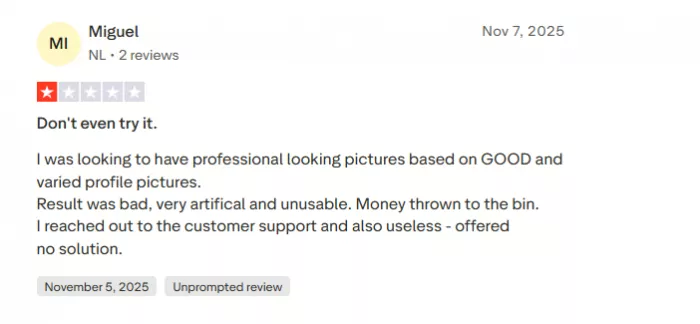
The best experience comes when users treat Pica AI as a testing tool first. Upload a few images, check each output carefully, and only pay if the tool performs well on the kind of images you actually use.
A Quick Checklist Before You Use Pica AI
After testing the three tools, I found myself repeating the same few checks every time. Running through them saved me credits and stopped me from trusting a weak result too quickly.
Before uploading and generating, I would pause on these:
● Is the original image clear enough to give the AI something real to work with?
● Do I actually own this image, or have permission to edit the face in it?
● Which specific feature am I using, and have I tested it on my own photos before paying?
● Am I ready to zoom in and check the full-size result, not just the small preview?
None of these take long, but together they changed how I used the tool. Most of my disappointing results came from skipping one of them, usually uploading a weak image or trusting a tidy-looking preview. Treating Pica AI as something that needs a quick check first, rather than a one-click fix, made the whole experience more reliable.
Pica AI vs Alternatives
Pica AI is useful because it combines several photo tasks in one place. But it is not automatically the best option for every use case. Some alternatives are stronger for specific jobs.
| Alternative | Best for | Why compare it with Pica AI |
| Remini | Photo enhancement and old photo repair | Better if your main goal is improving blurry or low-quality portraits |
| Fotor | General AI photo editing | Better if you want a broader editing workspace with more tools |
| Remaker AI | Face swap and AI image edits | Worth comparing if face swap is your main reason for using Pica AI |
| Reface | Entertainment-style face swaps | Better for playful, meme-style face swap content |
| Canva | Social media designs and profile visuals | Better if the final image needs to become a post, banner, or thumbnail |
| Photoshop | Professional manual editing | Better when control, accuracy, and detailed finishing matter |
Pica AI’s advantage is convenience. It gives you enhancement, face swap, and headshot features in one place. Its disadvantage is depth. Specialist tools can be better in their own category, and professional editors still give more control.
If I only wanted photo repair, I would compare it with Remini. If I only wanted social media design, Canva would make more sense. If I needed precise editing, Photoshop would still be the stronger choice.
Final Verdict: One Tool I Would Use Carefully
Pica AI is useful, but I would not judge it as one single tool. After testing the three main parts, I see it as three different experiences. The photo enhancer is the most practical. The face swap tool is the most entertaining. The AI headshot tool is convenient, but it needs the most careful review.
I would use Pica AI for quick photo cleanup, old image repair, casual face swaps, and profile photo experiments. I would not use it blindly for sensitive personal images, client work, identity-related photos, or final professional headshots without checking the result closely.
The best way to use Pica AI is to test it feature by feature. Do not assume one good result means the whole platform is equally strong. Try the enhancer, face swap, and headshot tool separately. Zoom in before downloading. Compare the output with the original. Pay only if it works well on your own images.
For me, Pica AI is useful, but it is not a tool I would trust without checking the final image. It is fast, simple, and sometimes impressive, but it works best when used with realistic expectations.


Comments