Remaker AI Review: One Login, Nine Tools, and a Trust Gap Worth Reading Before You Pay



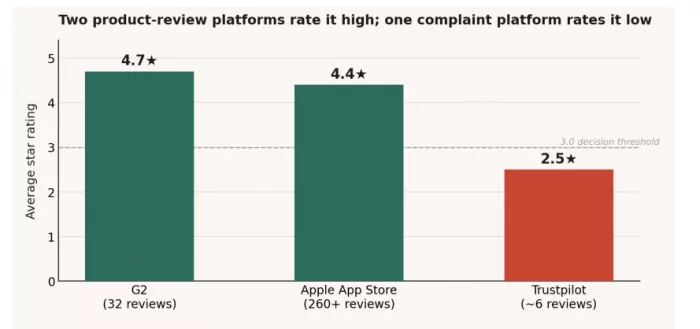
The same product sits at 4.7 stars on G2, 4.4 on the Apple App Store, and 2.5 on Trustpilot. That single contradiction tells you more about Remaker AI than any feature list: the people tapping through a polished mobile app and the people running production workloads through the browser are describing two different experiences of one platform. The gap is the story.
Strip away the marketing and Remaker AI is a credit-funded bundle of around nine AI tools face swapping, background removal, upscaling, portrait generation, talking photos, image-to-video, video enhancement, voice cloning, and a music generator stitched into one account that runs entirely in a browser. The pitch is convenience: stop paying for and learning five separate apps. The reality is more uneven. Some tools are genuinely good. One is close to useless. And the billing model has a quirk near the checkout page that deserves a hard look before anyone enters payment details.
This review tests the suite tool by tool, maps where credits actually go, consolidates only the user feedback that can be verified, and ends with alternatives for the jobs Remaker AI does poorly.
What Remaker AI Actually Is
Remaker AI is a web-first creative platform. There is no install, no local rendering, and no design background required; every tool runs in the cloud and returns a file. Functionally it behaves less like a single product and more like a toolbox where each drawer charges separately. Where most competitors specialize (one does avatars, another does upscaling), Remaker AI competes on breadth, betting that creators value a single bill and a single dashboard over best-in-class results in any one category.
Two structural facts shape everything else. First, it is credit-based rather than subscription-based: nothing is unlimited, and every action has a price. Second, the official product is the web app and an iOS companion app; the Android presence on Google Play is occupied by third-party clones, not the real platform, a distinction that matters for anyone searching the Play Store by name.
Quick Read Best for: creators and marketers who need fast face swaps, clean background removal, and the occasional short video clip without juggling multiple subscriptions. Skip if: you need reliable high-volume video work, dependable uptime, or responsive support the cracks show under sustained load. |
The Toolset, Tested Tool by Tool
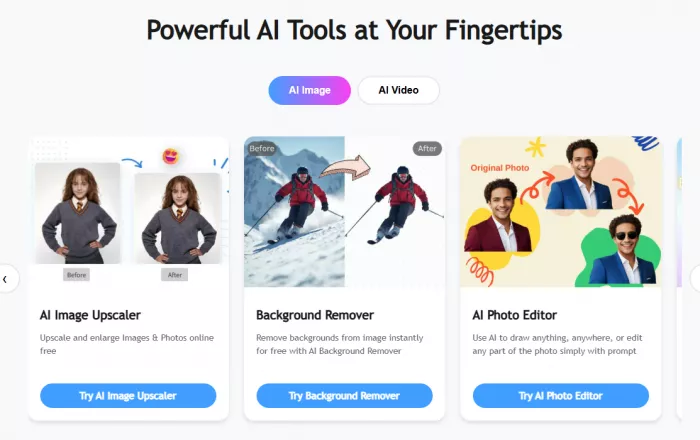
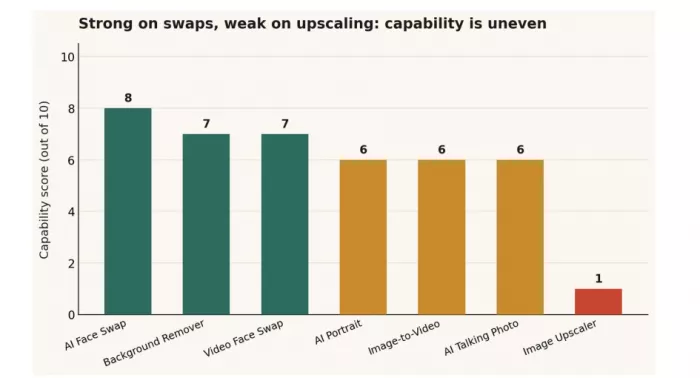
Breadth is the headline, so breadth is where scrutiny belongs. Capability across the suite is genuinely uneven the face-swap family is the reason the platform exists, while the upscaler barely earns its place. The chart below scores each major tool on output quality and reliability from hands-on testing.
AI Face Swap (single, batch, and video)
This is the anchor. Single-image swaps are fast and convincing: upload a source face and a target photo, and the AI handles alignment, skin-tone matching, and edge blending in roughly thirty seconds, usually without manual touch-up. Front-facing photos with even lighting produce the cleanest results. The known failure mode is geometry when source and target faces have very different shapes or angles, the output drifts into uncanny territory, a pattern echoed consistently in community feedback.
Batch face swap extends this across many images at once and is a real time-saver for repetitive work, though feature alignment slips on complex group shots. Video face swap supports clips up to roughly thirty minutes, but clarity degrades on longer footage and the credit cost climbs steeply with duration.
What works • Clean, natural single-image swaps in seconds • Handles multi-face group photos better than most free tools • Batch mode scales repetitive jobs • Watermark-free exports on many tasks | Where it falls short • Mismatched face shapes break realism • Video clarity drops on longer clips • Batch alignment wobbles on busy group shots • Video swaps consume credits quickly |
Background Remover
Simple, scalable, and arguably the most quietly useful tool in the suite. It isolates subjects and exports transparent PNG or WebP files, processes common formats reliably, and handles batches of up to fifty images. For ecommerce sellers and print-on-demand operators cycling through product photos, this is the feature that justifies an account on its own. Edge detection softens on fine detail hair, overlapping subjects in group photos but for clean product shots it is dependable.
Image Upscaler
The weak link. In testing it frequently failed to produce a noticeable improvement, and across independent reviews it scores at the bottom of the suite. Anyone whose primary need is resolution enhancement should treat this tool as a non-feature and look elsewhere; the alternatives section below names dedicated options that outperform it comfortably.
Reality check If upscaling is the job you came for, Remaker AI is the wrong tool. The upscaler is the single feature where the platform underdelivers against nearly every dedicated competitor. |
AI Portrait and Image Generator
Text-to-image and prompt-based portrait generation are present and produce average results. Generated portraits sometimes fail to capture a source likeness accurately, and realism wobbles under challenging lighting. The image editor does pull from multiple underlying models, which gives more creative latitude than a single-engine generator, but this is a convenience feature rather than a reason to choose the platform.
Talking Photo, Live Portrait, and Image-to-Video
These animation tools turn still images into motion, a talking head, a subtle living portrait, or a short video clip. They are novel and occasionally striking, but output can look unnatural or blurry, and they are expensive in credit terms. Image-to-video is useful for adding life to a static asset, though the result is bounded by the quality of the source image.
Video Enhancer, Voice Clone, and Music Generator
The video enhancer upscales footage toward 4K with sharpness, motion stabilization, and color correction, keeping results available for re-download for thirty days. It is competent for cleaning up older or low-resolution footage but is not a substitute for professional grading. Voice cloning and a music generator round out the suite for voiceovers, dubbing, and background audio. None of these is best-in-class, but their presence is the whole pitch: enough range to avoid switching tools mid-project.
File support across the suite covers common image formats (JPG, JPEG, PNG, WebP, with TIFF and BMP on some tools) and MP4 for video. Content generated on the platform is licensed for commercial use, and NSFW prompts are prohibited and filtered.
Pricing Reality: Where Credits Actually Go
Remaker AI runs on credits, not subscriptions, and frames this as a feature: buy once, use whenever, no monthly pressure, and purchased credits do not expire. That framing is fair as far as it goes. The complication is predictability because different tools consume wildly different amounts, monthly cost is nearly impossible to forecast.

The free tier grants 30 credits on signup plus 5 credits daily, with some tools usable a handful of times without logging in. That is enough to evaluate the platform, not to run on. A single face swap costs about 1 credit; background removal and photo edits run 2 to 8; a five-second Pro video clip costs around 20; and enhancing a nineteen-second video costs roughly 57 nearly the entire signup balance in one action. The chart makes the cliff obvious.
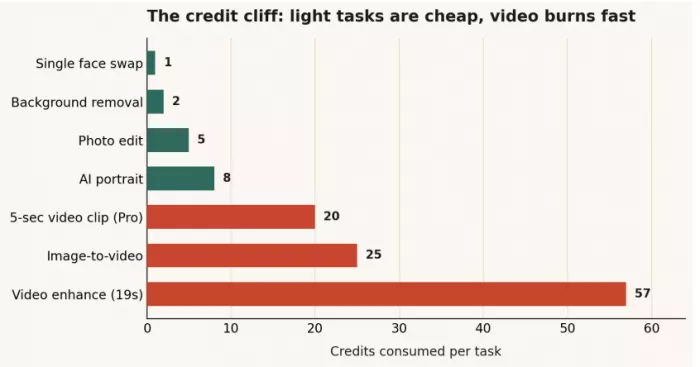
Published credit bundles have ranged across roughly $5.99 for 200 credits up to $299 for 20,000, with mid-tier packs in between. Treat exact figures as moving targets promotional pricing shifts and tiers have varied between listings.
Red flag worth weighing Payment friction. Reporting and the platform’s own pricing page indicate purchase paths that have at times been limited to crypto and Telegram rather than conventional cards, alongside Stripe references elsewhere. Inconsistent, non-standard checkout is a meaningful trust signal for anyone spending real money. Verify the current, official payment method directly before purchasing, and be cautious of any flow that pushes toward irreversible payment rails. |
What Real Users Say
User sentiment splits along platform and use case. The pattern across verifiable sources is consistent: business and creative users on product-review sites rate the platform highly, mobile users praise the face-swap experience, and a small cluster of complaint-driven reviews flags reliability and billing problems. Both signals are real; the question is how each is weighted.
G2
The strongest verifiable rating: roughly 4.7 stars across about 32 reviews, with the distribution heavily weighted toward five stars and only isolated low scores. Reviewers repeatedly call out ease of use, output quality, interface clarity, and speed. The image generator and the all-in-one breadth draw specific praise from creative and marketing users who value not switching tools mid-project.
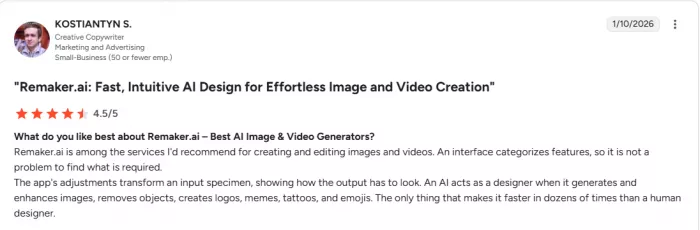
The most common criticisms are structural rather than about quality: limited credits, limited customization, and a short trial window that some newcomers found too tight to evaluate the full suite. One reviewer noted being told more free credits were coming, then finding nothing on the balance.

Apple App Store
The official iOS app holds roughly 4.3 to 4.5 stars across more than 260 reviews. Praise clusters around face-swap accuracy, output quality, and ease of use, with reviewers describing results as beautiful and high-quality. This is the platform at its best: a focused, polished experience around the two tools most people actually open it for.
Trustpilot
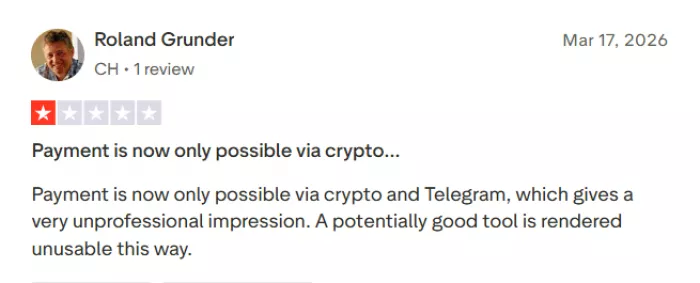
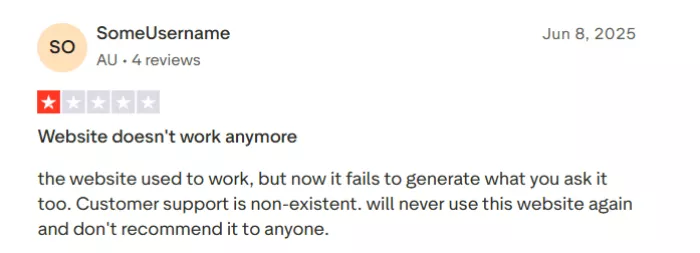
A very different picture, from a very small sample roughly 2.5 stars across only about ten reviews. Low volume means these ratings should not be over-weighted, but the complaints are specific and repeat: site downtime lasting hours or days, the video generator failing intermittently, customer support that goes silent on billing and technical issues, and at least one reviewer noting the shift toward crypto and Telegram payments as unprofessional. Several mention switching to alternatives.
Reddit and creator forums
Community feedback skews practical and moderately positive. Recurring notes: Remaker AI produces cleaner results than many free face-swap apps and handles multi-face images better than most, with noticeably fast processing. The most useful community insight is technical swaps fail when source and target face shapes differ sharply, so matching chin and forehead geometry and using high-resolution, front-facing source images materially improves output. reddit
On ratings to read carefully No standalone, credible Capterra rating was found for Remaker AI at the time of writing, so none is presented here. More important: the Google Play listings under the name are third-party clones rather than the official product — one such clone sits near 2.9 stars and has drawn complaints about credits deducted without successful generations. That clone rating is not the platform’s own and is excluded from the picture above. Anyone searching the Play Store by name should download only from the link on the official site. |
The consolidated verdict from users
What works • Face-swap quality wins consistent praise on mobile • Strong multi-face handling versus free rivals • Fast processing noted repeatedly • No-watermark, no-signup exports on some tools | Where it falls short • Web downtime reported, sometimes prolonged • Support described as slow or non-existent • Heavy video use gets expensive fast • Payment-method changes erode trust |
Who It Fits and Who Should Walk
Breadth plus uneven quality means the right answer is entirely use-case dependent. The platform rewards light, varied, image-first work and punishes heavy, single-purpose, mission-critical workflows.
| Use case | Verdict | Fit |
| Social face swaps and memes | Core strength; fast and clean | Strong |
| Ecommerce background removal | Reliable, batchable, transparent exports | Strong |
| Short social video clips | Workable but credit-hungry | Moderate |
| AI portraits and generation | Average output, occasional likeness misses | Moderate |
| High-volume image upscaling | Underdelivers against dedicated tools | Weak |
| Mission-critical / deadline video | Downtime and support risk too high | Weak |
Alternatives Worth Comparing
Because Remaker AI is a generalist, the strongest alternatives are specialists who each beats it decisively in one lane. The table compares them on the dimensions that actually drive a switching decision.
| Tool | Best at | Model | Trade-off vs Remaker |
| HeyGen | Professional AI avatars and talking video | Subscription | Pricier; narrower but far more polished |
| DeepSwap | Multi-format face swapping | Subscription | Less breadth; focused and consistent |
| Pixlr | Fast in-browser photo swaps and editing | Freemium | Lighter video; smoother casual UX |
| UniFab | Dedicated 4K video enhancement | One-time / paid | No swap suite; stronger upscaling |
| Visro AI | Free online face swapping | Free-leaning | Fewer tools; cited by switchers |
The decision rule is simple. If a single job dominates your workflow avatars, upscaling, or pure swapping a specialist will serve you better. Remaker AI earns its place only when you genuinely value one account spanning several light tasks over excellence in any one.
The Verdict
Remaker AI is a good light toolbox wearing the costume of a complete production suite. Its face-swap family is genuinely strong, its background remover is quietly excellent for ecommerce work, and the credit model is fair for occasional users who like buying once and walking away. Those strengths are real and they are the reason the mobile app earns its high rating.
But the platform asks to be trusted with money and deadlines, and on both fronts it wobbles. The upscaler underdelivers, video work drains credits fast, web reliability and support draw repeated complaints, and the payment-method picture near checkout is inconsistent enough to warrant caution. Start on the free tier, confirm the current official payment method before spending, and keep a specialist on hand for any single job that actually matters.
Use it for what it is best at fast, varied, image-first creative work and it delivers. Lean on it for the heavy lifting, and the seams show.


Comments