6 Best Milkshake Alternatives: Better Bio-Link Apps for Creators

Sakshi Purna
I've always found Milkshake's swipeable website format interesting, especially for creators who prefer building everything from their phones. However, its card-based approach isn't ideal for every creator. Some need a proper portfolio, others want better link tracking, and many need more control over selling products or collecting leads.
I narrowed the options down to six Milkshake alternatives based on their features, pricing, customization, and usefulness for different creator workflows. Each serves a distinct purpose, so the comparison focuses on what actually separates them.
Best Milkshake Alternatives at a Glance
| Tool | Best for | Free plan | Starting paid price |
| Tieup.io | Creator portfolios and collaborations | Yes | Contact for pricing |
| Beacons | Creator businesses and marketing | Yes | $10/month |
| Linktree | Link management and analytics | Yes | $7/month* |
| Carrd | Custom personal websites | Yes | $9/year |
| Stan Store | Courses and digital products | No | $29/month |
| Taplink | Lead capture and service pages | Yes | $4/month* |
*Linktree's listed price requires annual billing. Taplink's listed price is based on annual billing.
How I Selected These Alternatives
I kept the selection focused on platforms that offer a clear reason to move beyond Milkshake's swipeable page format. Instead of ranking tools by the total number of advertised features, I compared their practical usefulness for different creator needs.
The evaluation covered four areas:
● Page flexibility: The available control over content organization, visual design, and branding.
● Creator functionality: Support for portfolios, product promotion, selling tools, analytics, and audience management.
● Pricing transparency: Free-plan limitations, subscription costs, transaction fees, and features locked behind upgrades.
● Platform suitability: Whether the service is better suited to influencers, freelancers, educators, or small businesses.
I reviewed available product documentation, feature descriptions, and published pricing information, with prices checked in November 2026. This is a feature-based comparison rather than a claim of hands-on testing, and no unverified performance or conversion results were used.
1. Tieup.io: Best for Creator Portfolios
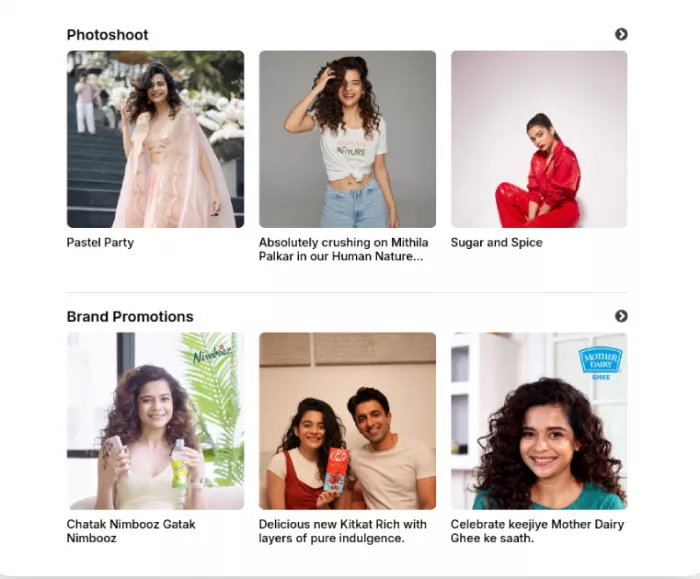
Tieup.io takes a portfolio-first approach to bio links. Instead of limiting a creator's page to a collection of buttons, it provides a customizable content wall for displaying projects, videos, social profiles, endorsed products, and brand collaborations.
Its biggest advantage is how it brings different parts of a creator's professional identity together. Previous campaigns can sit alongside current projects and affiliate recommendations, giving brands a clearer picture of the creator's work.
What makes it useful?
● Portfolio presentation: Showcase videos, past projects, and brand endorsements within an organized public profile.
● Customizable wall: Arrange content sections and promotional links according to their importance.
● Affiliate promotion: Display recommended products and promotional codes alongside regular creator content.
Where it falls short: Tieup.io doesn't offer native course hosting, built-in email marketing, or a dedicated product checkout. Its focus remains on showcasing content and connecting visitors to relevant destinations.
Pricing: Free plan available. Contact Tieup.io for premium pricing details.
Bottom line: Tieup.io is particularly suitable for influencers, freelancers, and affiliate creators who need a presentable portfolio rather than a conventional link directory.
2. Beacons: Best for Creator Businesses
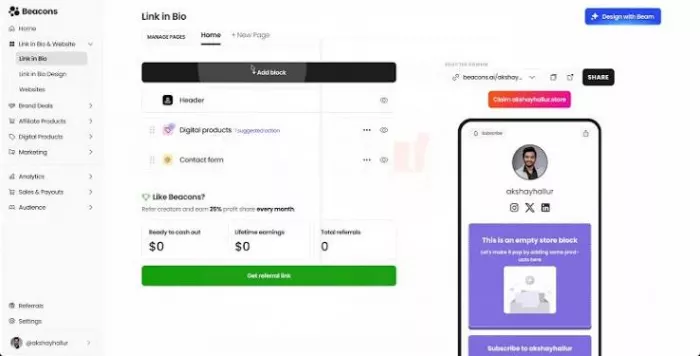
Beacons combines a bio-link builder with tools for managing a creator business. Its dashboard includes a storefront, email marketing, a media kit, audience analytics, and Instagram DM automation.
The platform's strongest feature is the connection between audience engagement and monetization. Its email tools support subscriber communication, while the storefront handles digital products and memberships. The media kit also provides a separate space for presenting creator statistics to potential partners.
Key capabilities
| Feature | What it provides |
| Storefront | Digital downloads, memberships, and courses on eligible plans |
| Email tools | Subscriber management and campaigns |
| Media kit | Creator statistics for brand partnerships |
| Smart Reply | Automated Instagram DM interactions |
Where it falls short: Beacons' free and Creator plans charge a 9% seller fee. Removing that platform fee requires Creator Plus, which increases the monthly subscription cost. The larger dashboard also introduces features that basic bio-link users may not need.
Pricing: Free plan available. Creator starts at $10/month, while Creator Plus costs $30/month.
Bottom line: Beacons is well suited to creators managing product sales, email subscribers, and brand partnerships from one platform.
3. Linktree: Best for Link Management
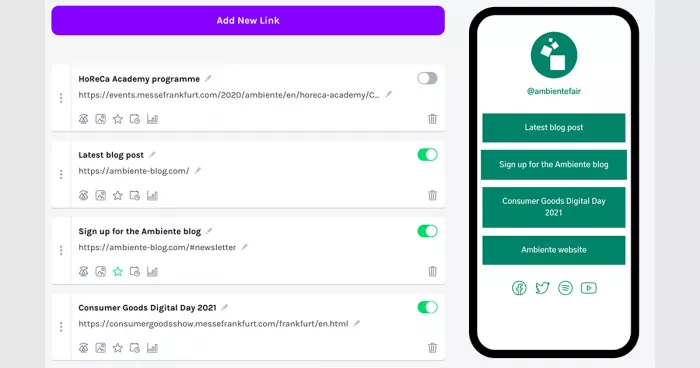
Linktree focuses on organizing online destinations and measuring visitor activity. Its page builder allows creators to add social profiles, promotional links, newsletters, product listings, and other destinations within a familiar vertical layout.
Its analytics and promotional controls are particularly useful for creators who update their pages regularly. Featured links can receive greater visibility, while higher-tier plans offer scheduling, advanced performance reporting, and rules for directing visitors.
Where it performs well
● Link organization: Group important destinations into one accessible, mobile-friendly profile.
● Performance tracking: Monitor visitor engagement and identify links attracting the most attention.
● Campaign controls: Use scheduling and featured-link options to manage promotional content.
Where it falls short: Linktree's standard layout offers less freedom than a standalone website builder. Branding removal, richer customization, and several advanced analytics features require paid subscriptions.
Pricing: Free plan available. Starter starts at $7/month with annual billing, and Pro starts at $14/month with annual billing.
Bottom line: Linktree works well for social media creators and marketers who want straightforward link management supported by useful traffic data.
4. Carrd: Best for Custom One-Page Websites
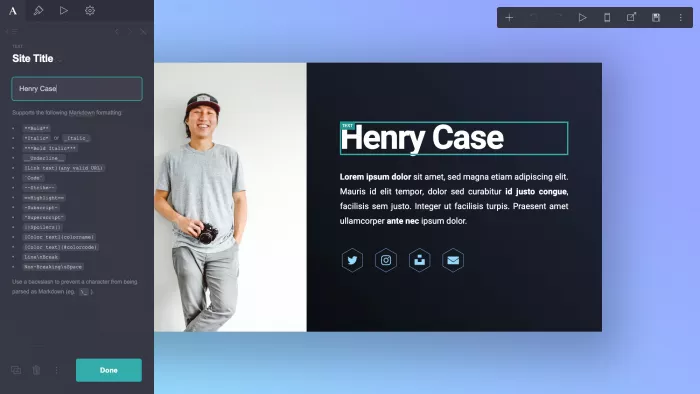
Carrd is a one-page website builder rather than a dedicated bio-link platform. It gives creators control over layouts, typography, images, buttons, and content sections, making it suitable for building a more distinctive online presence.
Its editor supports responsive designs and reusable templates. Paid plans extend the builder with custom domains, embedded third-party tools, contact forms, and website analytics.
What can you create?
| Page format | Content supported |
| Personal website | Biography, social profiles, and contact details |
| Portfolio | Selected work and project descriptions |
| Promotional page | Campaign information and signup actions |
| Service page | Offer descriptions and inquiry forms |
Where it falls short: Carrd requires more manual layout work than a traditional bio-link application. It also relies on third-party integrations for many selling and marketing functions rather than providing a dedicated creator-commerce dashboard.
Pricing: Free plan supports three websites. Pro Lite starts at $9/year, while Pro Standard costs $19/year.
Bottom line: Carrd is a strong option for designers, photographers, and professionals who prioritize website appearance and custom branding.
5. Stan Store: Best for Digital Product Sales
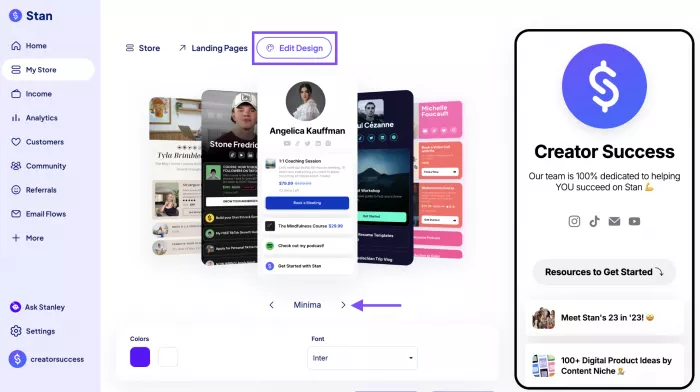
Stan Store focuses on selling directly through a creator's bio link. Its mobile-friendly storefront supports digital downloads, online courses, memberships, and coaching appointments.
The platform includes product management, payment integrations, booking tools, and sales analytics. It also supports lead magnets and recurring subscriptions, allowing creators to manage different types of offers without maintaining a separate website.
Selling capabilities
● Digital downloads: Sell ebooks, templates, guides, and other downloadable resources.
● Online courses: Create and deliver educational products through the built-in course system.
● Coaching appointments: Offer bookable sessions through integrated scheduling tools.
● Subscriptions: Manage recurring payments for eligible products or memberships.
Where it falls short: Stan Store has no permanent free plan, making it relatively expensive for creators who haven't started monetizing. Although Stan charges no platform transaction fee, Stripe or PayPal processing fees still apply.
Pricing: Creator costs $29/month, and Creator Pro costs $99/month.
Bottom line: Stan Store is most useful for educators, coaches, and creators with digital products to sell, rather than those who only need a profile page.
6. Taplink: Best for Leads and Customer Inquiries
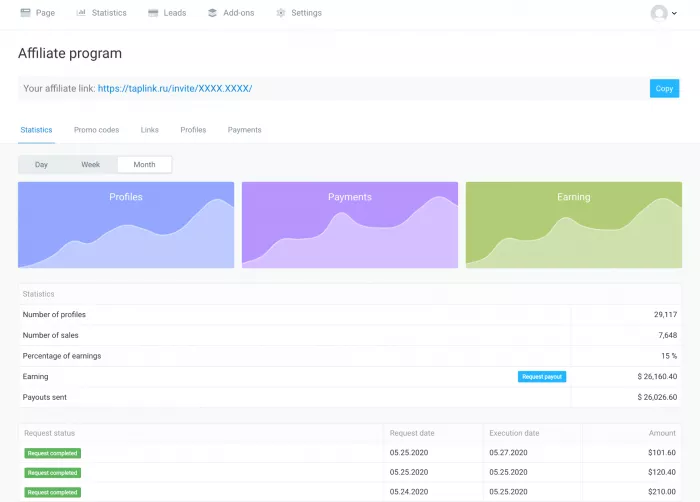
Taplink provides a block-based landing-page builder with tools designed around customer inquiries and sales. Its pages can contain messaging links, service descriptions, videos, price lists, application forms, and payment options.
The platform is particularly relevant for service-based creators and small businesses. Its Business plan adds lead capture, CRM functionality, automated emails, and payment notifications, keeping customer interactions connected to the landing page.
Practical features
| Feature | Main function |
| Messaging buttons | Direct customer communication |
| Application forms | Collect lead information |
| Price lists | Present service charges |
| CRM | Organize customer inquiries |
| Payment options | Accept supported transactions |
Where it falls short: Advanced features are restricted to paid tiers. Taplink also requires users to purchase at least three months of a paid plan, so the advertised monthly price doesn't represent a month-to-month subscription.
Pricing: Free Basic plan available. Pro starts at $4/month and Business at $8/month with annual billing.
Bottom line: Taplink fits consultants, freelancers, and service providers who need a bio page that supports inquiries, lead collection, and customer communication.
What to Check Before Switching
Moving away from Milkshake involves more than choosing a different page design. The replacement should support the content and actions already connected to a creator's social profiles.
A few details deserve attention before publishing a new bio link:
● Existing destinations: Transfer important links and confirm that product pages, booking forms, and promotional URLs still work.
● Mobile presentation: Check text readability, image cropping, button spacing, and navigation on smaller screens.
● Domain and branding: Verify whether custom domains and platform-branding removal are included in the selected plan.
● Sales costs: Review transaction fees, payment-processing charges, and subscription commitments before using paid features.
Milkshake itself also supports Sell Cards for digital products and services through Stripe, with the feature introduced in beta in July 2026. Its selling capabilities should therefore be assessed against the specific tools a creator needs, rather than treating it as a link-only platform.
Final Verdict
After comparing these six platforms, I find that the biggest differences are not in how many links they support, but in what they allow creators to do with the page. Each one addresses a different part of the creator workflow, from presenting previous work to managing paid products.
Tieup.io is my first pick for portfolio-focused creators. Its emphasis on showcasing projects, collaborations, and promotional content makes it particularly relevant for influencers and freelancers building a professional presence. I would put Beacons ahead for managing a wider creator business, while Stan Store makes more sense when selling courses and digital products is the main priority.
Carrd stands out for design flexibility, Linktree for organized link management, and Taplink for collecting service inquiries. Milkshake still has a place for creators who prefer its swipeable, phone-first experience, but these alternatives provide more specialized options as their requirements change.


Comments