Business Automation Made Simple: Best AI Tools You Can Start Using Today



Business automation is no longer just about “if this, then that” rules; AI can now read data, make decisions, and trigger complex workflows across your stack with almost no code. The right tools quietly handle the repetitive work so your team can focus on sales, strategy, and customers instead of copy‑pasting between tabs.
Below are 8 of the best AI tools for business automation right now, with features, prices, and ideal use cases to help you choose quickly.
1. Zapier : Connect Everything with AI
Zapier is the default choice for automating workflows between cloud apps, and its newer AI features make it even more powerful. It connects thousands of tools CRMs, email platforms, spreadsheets, project tools and lets you trigger actions based on events like new leads, form fills, sales, or support tickets. AI steps can summarize text, classify messages, extract data, or generate content as part of the same workflow, all built through a visual editor.
Because Zapier sits in the middle of your stack, it becomes the “automation glue” that ties everything together. You can start with simple automations like sending Slack alerts when a new deal closes and then evolve into multi‑step workflows that update CRM fields, generate personalized emails, and log activity in your analytics tools automatically. Templates help you launch common business recipes without starting from a blank canvas.
Zapier overview
| Category | Details |
| Main use cases | Cross‑app workflows, lead routing, notifications, content automation. |
| Core strength | Connects 9,000+ apps with AI steps for text and data tasks. |
| Limitations | Can get expensive at high task volume; complex zaps need thoughtful design. |
| Free plan | Yes, limited tasks and features. |
| Starting price | Free; paid plans from 19.99 USD/month (Starter, billed annually). |
| Best for | Teams that want plug‑and‑play automation across many SaaS tools. |
2. Make (Integromat) : Visual Automation for Power Users
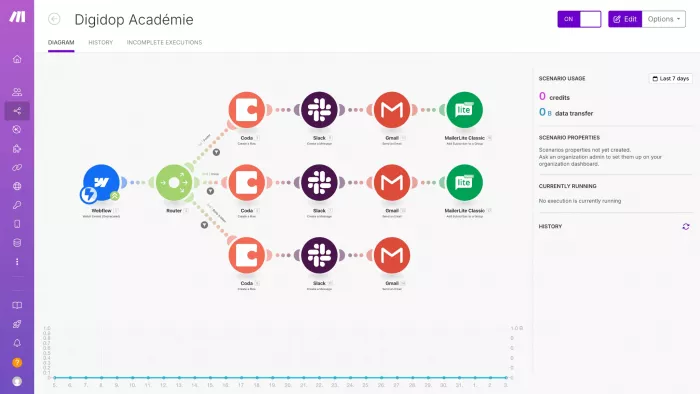
Make (formerly Integromat) is a visual automation platform that appeals to users who want more control than basic “recipe” tools. You design workflows as diagrams, connecting apps and services with drag‑and‑drop modules and branching logic. This is ideal for more complex processes such as multi‑step approvals, multi‑channel notifications, or advanced data transformations. AI modules can summarize or classify data and feed results into downstream steps.
Compared to simpler tools, Make offers deeper control over how data moves, with routing, filters, and custom error handling options. That flexibility makes it attractive when automations touch several teams and systems. The trade‑off is that the richer interface and options reward users who are comfortable thinking in terms of workflows and logic rather than just toggling a single switch.
Make overview
| Category | Details |
| Main use cases | Complex multi‑step workflows, data routing, cross‑team processes. |
| Core strength | Visual, node‑based builder with advanced logic and routing. |
| Limitations | Steeper learning curve; large scenarios can become hard to maintain. |
| Free plan | Yes, Free tier with up to 1,000 operations/month. |
| Starting price | Free; Core plan from 9 USD/month for 10,000 operations. |
| Best for | Ops and technical users who want fine‑grained control without full coding. |
3. n8n : Self‑Hosted Automation with AI
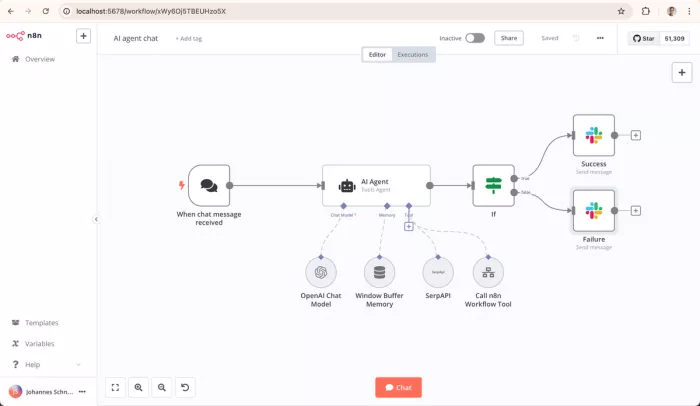
n8n is an open, self‑hostable workflow automation platform that gives technical teams maximum control over data and infrastructure. You can run it on your own server or use n8n Cloud, connect to hundreds of apps and APIs, and add AI steps for text analysis or generation. The visual editor feels familiar if you’ve used other workflow tools, but you face fewer artificial limits if you self‑host.
For businesses that care about compliance, privacy, or cost at scale, n8n stands out because self‑hosting removes per‑task pricing limits and keeps data under your control. Developers can extend it with custom nodes, which is useful when integrating internal systems or niche tools. It’s powerful, but best suited to teams that are comfortable managing infrastructure.
n8n overview
| Category | Details |
| Main use cases | Technical workflows, custom integrations, data‑sensitive automation. |
| Core strength | Self‑hosted, open‑source model with high flexibility and extensibility. |
| Limitations | Requires setup, hosting, and maintenance; cloud plans have execution limits. |
| Free plan | Yes, free self‑hosted Community Edition; cloud has free trial. |
| Starting price | Self‑hosted free; cloud starter around 20–24 USD/month range. |
| Best for | Developer‑led teams that want control over infrastructure and pricing. |
4. Microsoft Power Automate : Automation for Microsoft 365
Microsoft Power Automate is built for organizations living in the Microsoft ecosystem. It connects Outlook, SharePoint, Teams, Excel, Dynamics, and other services, and now uses Copilot to turn natural‑language descriptions into suggested flows. You can automate approvals, document routing, notifications, and data synchronization across your Microsoft stack without much code.
Because it is deeply integrated with Microsoft 365, Power Automate can act on data stored in OneDrive, Dataverse, and Dynamics while respecting your existing permissions model. It also offers RPA (robotic process automation) to automate legacy desktop applications and on‑prem systems, which matters for enterprises that aren’t fully cloud‑native. Licensing can be complex, but for Microsoft‑centric organizations, it consolidates a lot of automation power in one place.
Power Automate overview
| Category | Details |
| Main use cases | Document workflows, approvals, internal processes in MS‑centric orgs. |
| Core strength | Deep Microsoft 365/Dynamics integration plus RPA for legacy apps. |
| Limitations | Best value only if you’re already in Microsoft; licensing is complex. |
| Free plan | No standalone free tier; some capabilities included in Microsoft 365 licenses. |
| Starting price | Cloud plans generally from about 15 USD/user/month for attended RPA/flows. |
| Best for | Companies standardised on Microsoft looking to automate across their stack. |
5. UiPath : Enterprise‑Grade RPA with AI
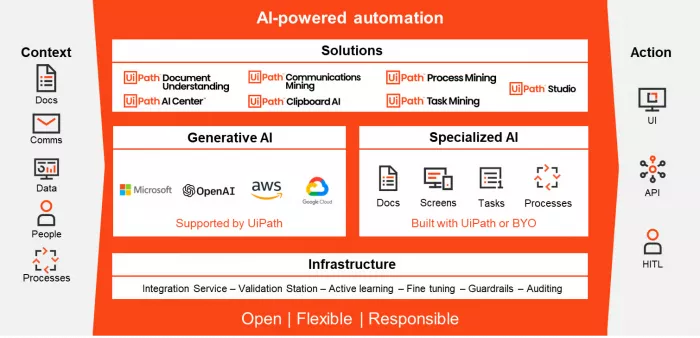
UiPath is a leading robotic process automation platform built to automate high‑volume, rules‑based tasks, especially in enterprise environments. Bots can mimic user actions in desktop and web apps, and AI capabilities help interpret documents, classify requests, and extract information from unstructured sources. This makes UiPath a strong fit for finance, shared services, and operations teams that still rely heavily on legacy or on‑screen systems.
Beyond bots, UiPath includes tools for discovering automation opportunities, designing and orchestrating workflows, and monitoring performance at scale. Governance, role‑based access, and audit features support compliance needs for regulated industries. The flip side is that implementation usually involves IT, change management, and clear process mapping, which is overkill for very small teams.
UiPath overview
| Category | Details |
| Main use cases | Finance ops, back‑office processing, high‑volume desktop tasks. |
| Core strength | RPA bots plus AI document understanding for legacy and UI‑based work. |
| Limitations | More complex to deploy; costs and scope grow together, needs IT support. |
| Free plan | Community Edition free for individuals and small teams. |
| Starting price | Cloud user plans roughly from 25 USD/user/month, with enterprise tiers above. |
| Best for | Mid‑size and large enterprises automating structured, repetitive processes. |
6. Gumloop : AI‑First Data Processing

Gumloop focuses on automating data‑heavy workflows, especially around unstructured content like PDFs, forms, and spreadsheets. It uses AI to read, extract, and validate information, then passes structured outputs into your existing toolsCRMs, accounting platforms, or internal systems. This dramatically reduces manual data entry and review in operations and back‑office teams.
Workflows in Gumloop can chain together tasks like “read invoice,” “extract key fields,” “check totals,” and “write to database,” making it a good fit when the main bottleneck is interpreting documents rather than just moving data between apps. It’s more specialised than general workflow platforms, but that focus often means faster implementation for document‑centric processes.
Gumloop overview
| Category | Details |
| Main use cases | Invoice and form processing, data cleanup, enrichment pipelines. |
| Core strength | AI‑driven extraction and transformation of unstructured data. |
| Limitations | Narrower scope; not a full replacement for general automation platforms. |
| Free plan | Yes, free tier with limited usage. |
| Starting price | Paid plans from about 37 USD/month for higher volume. |
| Best for | Ops teams drowning in documents who want to auto‑extract and validate data. |
7. HubSpot with AI : CRM‑Driven Automation

HubSpot combines CRM, marketing, sales, and service tools, and has added AI assistants and automation to streamline customer‑facing workflows. You can automate email sequences, lead scoring, contact enrichment, and ticket routing, with AI helping to write emails, summarize interactions, and suggest follow‑ups. Because automation is built into the CRM, flows are tightly anchored to lifecycle stages, deal pipelines, and support queues.
For teams already using HubSpot, this consolidation means less reliance on external tools for core sales and marketing automation. You can still integrate with other apps, but many everyday processes/outreach, nurture, renewals, and support responses can run from inside a single platform, with analytics tied back to contact and company records.
HubSpot AI overview
| Category | Details |
| Main use cases | Lead nurturing, sales sequences, ticket automation, customer comms. |
| Core strength | Customer‑centric automation inside a unified CRM platform. |
| Limitations | Advanced automation and higher volumes sit behind paid hubs; costs climb as contacts grow. |
| Free plan | Yes, free CRM with limited automation features. |
| Starting price | Starter hubs from roughly 15 USD/month, scaling with hubs and contacts. |
| Best for | Growth teams who want CRM + automation in one place rather than stitching multiple tools. |
8. Notion AI : Internal Workflows and Knowledge Automation
Notion AI extends Notion’s workspace with AI features that help you draft, rewrite, and summarize content across docs, tasks, and databases. Inside project spaces, AI can turn raw meeting notes into structured summaries, generate action items, or reformat text into SOPs and briefs. Combined with templates and databases, this creates lightweight automation for internal workflows without feeling like a technical tool.
While Notion AI is not a workflow runner like Zapier or Make, it significantly cuts manual effort in knowledge work and coordination: status updates, project documentation, and content planning become faster. External automation tools can then push and pull data from Notion, giving you a hybrid setup where AI handles the “thinking” parts of internal work and other tools handle cross‑app orchestration.
Notion AI overview
| Category | Details |
| Main use cases | Docs, knowledge management, project notes, internal processes. |
| Core strength | AI‑assisted writing, summarizing, and structuring of internal work. |
| Limitations | Not a full automation hub; needs external tools for cross‑app flows. |
| Free plan | Yes, Notion has a free tier; AI is a paid add‑on. |
| Starting price | AI add‑on around 8–10 USD/user/month on top of a Notion plan. |
| Best for | Teams that live in Notion and want AI to reduce documentation overhead. |
Final Word: Match the Tool to the Bottleneck
“Best” automation isn’t a single tool; it’s the one that hits your current bottleneck whether that’s cross‑app busywork, messy data, legacy systems, or CRM follow‑up. A lean stack might start with Zapier or Make for general workflows, layer in HubSpot or Notion AI for customer and knowledge work, and then add n8n or UiPath when control, compliance, and scale become critical.
The most important move is to pick one painful process and automate it this week so your team sees the win and you can iterate from there, instead of endlessly comparing tools.


Comments