
First, the thing nobody updated
Instagram let go of the single-link limit back in April 2023. You can now add up to five links directly in your bio, no third-party tool required, and that is still how it works today. If you have been running your account around the “one link” constraint or paying for a tool purely to dodge it some of that may no longer be necessary.
That does not make link-in-bio tools pointless. It changes when they are worth it, which we will get to. First, the mechanics.
One constraint to know before you start: you manage these links from the Instagram app on your phone. The desktop site does not give you the same controls, so grab your phone for this part.
Pick your path
This guide is not strictly linear, because the right setup depends on what you are trying to do. Jump to whichever of these sounds like you:
• You just need one working link: a shop, a site, a booking page. Read the next section and you are done.
• You have a few destinations to share. Skip ahead to adding up to five links, and pay attention to the ordering part.
• You are a creator or business juggling more than a handful of links. The page-based approach further down was built for you.
Add a single link (the base case)
1. Open Instagram on your phone and go to your profile.
2. Tap Edit profile.
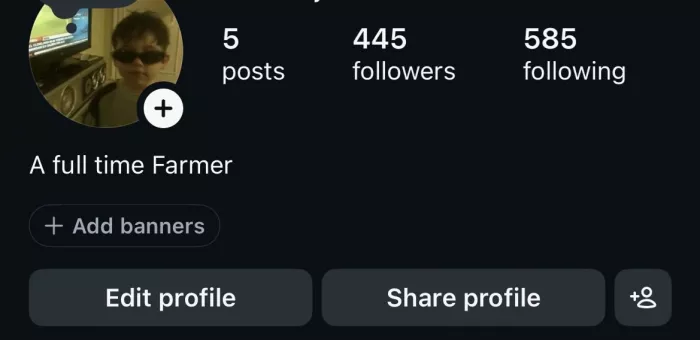
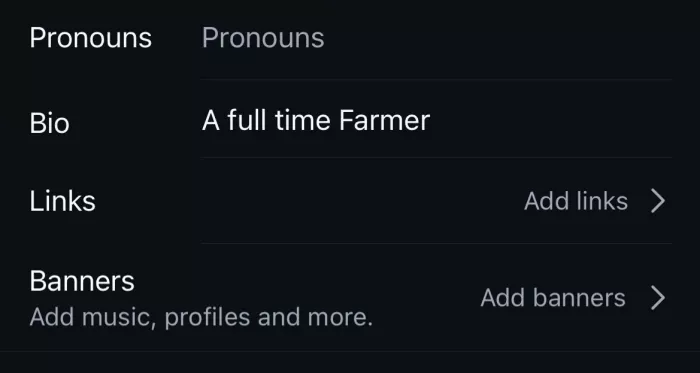
3. Tap Links, then Add external link.
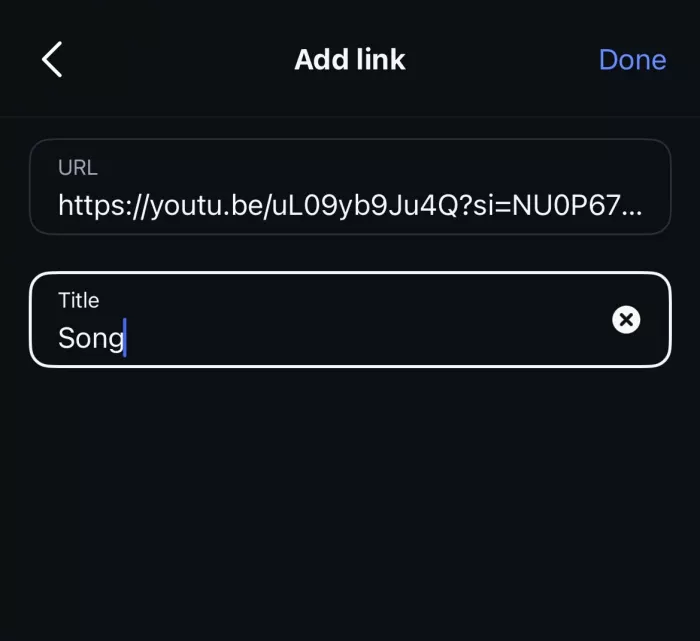
4. Paste your URL include the https:// and give it a short, clear title.
5. Save.
Your link now sits under your bio text as a tappable item. Two things trip people up here. The first: a URL only becomes clickable when it lives in the Links field. Type it into the bio text box itself and it stays as grey, unclickable characters.
The second: the title you give a link is what visitors actually see, so “Book a session” reads far better than a raw web address ending in a string of tracking characters. Treat the title as a tiny piece of copywriting, not an afterthought.
Add up to five links
Adding more is the same step, repeated:
1. In Edit profile, tap Links, then Add external link again.
2. Paste the next URL, title it, and save.
3. Repeat until you have added the ones you want, up to five.
Here is the part that should change how you think about it: Instagram does not show all five equally. Your first link gets prime placement right under your bio. The rest fold away behind a small “and X more” style prompt that a visitor has to tap to open and most people never tap it.
So five slots do not mean five equal chances. Slot one does the heavy lifting, and the other four are there for the motivated minority who go looking.
The ordering logic (this is the real work)
Because placement is so lopsided, the order of your links matters more than how many you have. Treat slot one as the single most valuable action you want someone to take right now, not your evergreen homepage by default, but whatever is actually driving your goal this week.
• Lead with the time-sensitive or highest-converting link, and demote the “about us” style pages. The thing you would be sad for someone to miss goes first.
• Write titles as actions and outcomes, not labels. “Get the discount code” or “Watch the new video” beats “Website” every time, because it tells someone what happens when they tap.
• Resist filling all five slots just because they exist. Every extra link splits attention and pushes your priority further down the pile; two sharp links usually outperform five scattered ones.
The same principle matters on a link-in-bio landing page that converts: more destinations are not automatically better if they make the next step harder to choose.
If you rotate a launch, a sale, or a new drop, this is where you make the swap. Reorder for the moment rather than leaving a stale link sitting in the top spot for months.
When one link should become a whole page
Native links are free and load instantly, so for most accounts they are the right answer. But there is a clear line past which a dedicated link-in-bio page starts to earn its keep. You are over that line when any of these is true: you have more than five destinations, you want to see which links people actually click, you need the page to carry your branding, or you want to change links without editing your profile every time.
A link-in-bio page is just a single mobile page, sitting behind one URL, that holds as many links as you like. You drop that one URL into your bio and it opens into your full list. Here is the honest comparison:
| Metric | Native bio links | Link-in-bio page |
| Cost | Free | Free tier on most tools; paid for extras |
| Number of links | Up to 5 | Effectively unlimited |
| Click analytics | None | Yes see what gets tapped |
| Branding & layout | Fixed Instagram style | Your colours, logo, order |
| Load speed | Instant | Depends on the tool |
| Editing | In-app, one at a time | From a dashboard, all at once |
The move a lot of accounts settle on now is a hybrid: use four native slots for your top time-sensitive links, since they load instantly, and point the fifth slot at a link-in-bio page that holds everything else. You get native speed where it counts and unlimited depth for the long tail.
Setting up the page (whichever tool you pick)
The process is the same across services:
1. Create a page on a link-in-bio service and add your destinations, each with a clear label.
2. Copy the page’s URL.
3. Paste it into a link slot in your Instagram bio, or into the Website field.
Popular options include Linktree, which is the best-known and covers analytics and branding, along with a range of lighter free tools if all you need is a fast, no-frills list.If tracking matters, bio link analytics can also show which destinations people actually choose once they reach the page. The tool matters less than one habit: weight everything toward speed.
Most followers open your link inside Instagram’s own in-app browser, which is slower than a normal one. A page that takes a beat too long loses taps before anyone even sees your links. A light page that loads instantly will out-convert a beautiful one that stalls so treat load time as a feature, not a nicety.
Links live in more places than your bio
Your bio is not the only spot a link can go, and knowing the difference saves a lot of confusion:
| Location | Clickable? |
| Bio Links field | Yes |
| Story link sticker | Yes |
| Post caption | No shows as plain text |
| Comment | No shows as plain text |
| Direct message | Yes |
The Story link sticker is the one worth using deliberately. It is what replaced the old “swipe up” Instagram that retired swipe-up back in 2021 and it now works on any account, not just large ones. Add the sticker to a Story and you can rename its text so it reads “Read more” or “Shop the drop” instead of showing a bare URL. It is one sticker per slide, so to point at several places, use a multi-slide Story with a different sticker on each.
The real trap is captions and comments. Paste a link there and it appears as plain text that people would have to copy and retype, which almost nobody does. If you catch yourself typing “link in comments,” send people to your bio or a Story sticker instead.
Knowing whether any of it worked
Native bio links have one genuine weakness: they tell you nothing. Instagram will not show you how many people tapped a given link, so you are left guessing about what is working and what is dead weight. That blind spot is the strongest practical reason to care about tracking at all.
The simple fix is a UTM tag, a short piece of text you add to the end of a URL, something like ?utm_source=instagram, so your website analytics can tell you that a visitor arrived from your Instagram bio specifically. It takes a minute to set up and turns “I think the bio link does something” into an actual number you can act on.
If tagging URLs by hand feels fiddly, this is the other place a link-in-bio tool quietly pays off: most of them show click counts per link out of the box, with no tagging required.
Where people go wrong
The failure points here are remarkably consistent. Worth a quick scan before you call your setup done:
• Typing the URL into the bio text box instead of the Links field, so it never becomes clickable in the first place.
• Leaving off the https://, which can stop the link from saving or opening the way you expect.
• Trying to set links up on desktop and finding the controls missing. This is a phone job, start to finish.
• Using vague titles like “Link” or “Website” that give a visitor no reason to tap.
• Cramming all five slots when two clear links would have converted better and kept the priority visible.
• Pointing the bio at a link-in-bio page that loads slowly, quietly losing the taps you worked to earn.
The verdict
The short version: you are not limited to one link, and have not been for years, so the first move is to stop designing your account around a rule that no longer exists. For most people the right setup is one or two sharp native links, ordered so the single most important one sits in slot one. Add a link-in-bio page only when you genuinely cross the line to more than five destinations, or a real need for click data and branding.
| If you do one thing today: open your profile, look at whatever link is currently in slot one, and ask whether it is truly the single action you most want a visitor to take. If it is not, swap it. That one change tends to matter more than any tool you could add. |


Comments