Hypernatural AI Review: From First Login to Final Video Export



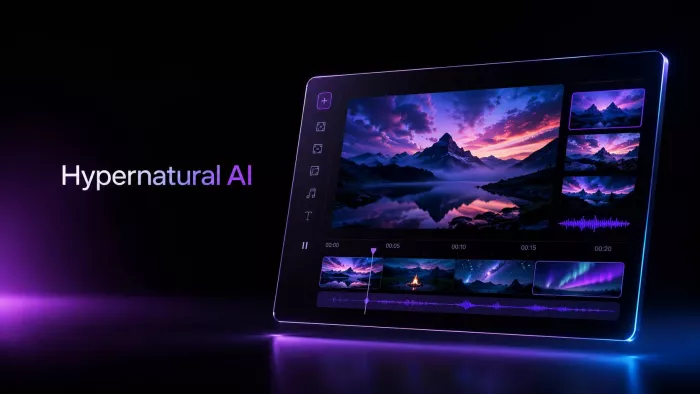
Hypernatural AI is designed for people who want to turn an idea into a video without building every scene, caption, voiceover, and visual from scratch. It brings script writing, AI visuals, narration, captions, character tools, styles, and editing into one video creation flow. The official site presents it as an AI video editor for storytellers, with features such as Characters, Custom Style, Script to Video, AI Video Editor, Brand, Custom Voices, and Captions.
What makes Hypernatural interesting is not only that it can generate a video. Many tools can do that now. The real question is whether it can guide a user from a rough idea to something that feels ready enough for Shorts, Reels, TikTok, educational clips, or social storytelling.
Getting Started After Login
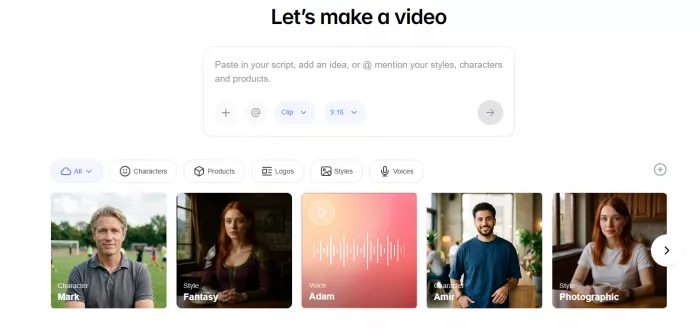
The first thing that stands out is how direct the product feels. Hypernatural does not open like a traditional editing program with a blank timeline, empty tracks, and a long list of manual controls. It pushes the user toward creation quickly. The starting point can be an idea, a script, a blog post, a podcast, a video, or another piece of content. Google Play describes the app as a tool that can start from an idea, script, blog post, podcast, or video and turn it into shareable content.
That makes the tool easier for non-editors. A creator does not need to search for B-roll, record a voiceover, make captions, animate scenes, and then assemble everything manually. Hypernatural tries to connect those steps into one guided workflow.
The interface is best understood as a production path rather than a full editing workspace. You start with the message, choose the format and direction, generate the first draft, then improve the video through editing. This approach fits creators, marketers, educators, writers, podcasters, and small teams who need video drafts quickly.
Starting a New Video
The workflow begins with the idea. A user can type a short prompt, paste a script, or use existing content. The quality of this first input matters a lot. A vague idea can still generate a video, but the result may feel generic. A clearer brief gives Hypernatural more direction.
A strong input should include:
● The topic of the video, so the tool understands what the content is about.
● The target audience, because a creator video and a business explainer need different language.
● The platform, since TikTok, YouTube Shorts, Instagram Reels, and educational videos have different pacing.
● The tone, because a calm explainer and a dramatic story need different voices and visuals.
● The expected length, so the script does not become too thin or too crowded.
Business Insider described Hypernatural’s creation flow as entering a prompt, choosing a style, length, and size, generating a script, selecting narrator voices and characters, and then moving into an editing page where scenes can be rearranged or reanimated.
This is where Hypernatural saves time. It does not simply ask for a prompt and return a random clip. It builds a structured draft with scenes, narration, and visual direction. That is useful when the user has an idea but does not want to start from a blank editor.
Script Generation
The script stage is one of the most important parts of Hypernatural. If the script is weak, the rest of the video becomes harder to fix. In use, Hypernatural is good at creating a clear structure. It can take a basic topic and turn it into an opening, a few supporting points, and a closing takeaway.
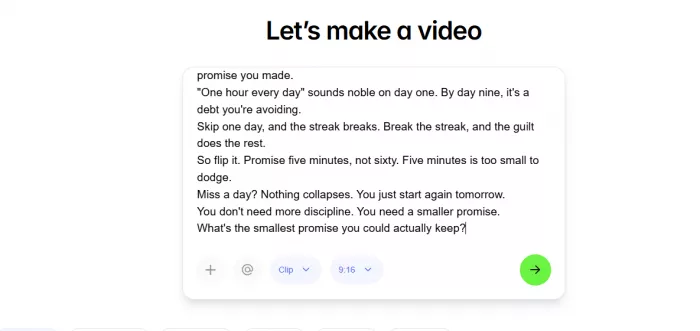
The script is usually better as a starting draft than a final version. The flow can be logical, but some lines may sound too safe or familiar. This is common with AI video tools because they often choose clear but predictable phrasing. The best results come when the user edits the hook, removes broad lines, and adds more specific examples.
Hypernatural works better when it is treated like a script assistant rather than a finished writer. It can organize the message quickly, but the final tone still needs human taste. A creator who already knows the angle will get a better result than someone who expects the tool to decide everything from one sentence.
Choosing the Visual Style
After the script, the next important step is the visual style. This is where Hypernatural feels different from older blog-to-video tools. It is not only placing stock clips behind text. It tries to create a visual story around the script using styles, scenes, characters, and AI-generated assets.
The official site of Hypernatural can create videos from scripts, visuals, and audio, and its feature list includes characters, custom styles, brand tools, custom voices, captions, and an AI video editor.
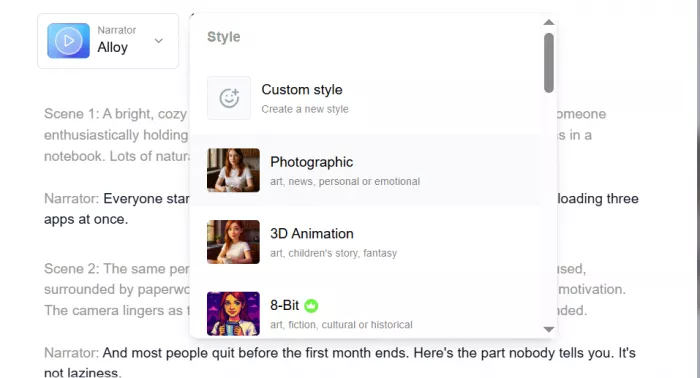
The strongest visuals usually come from specific script lines. If the script says something concrete, the scene has a clearer job. If the script is broad, the visual may look polished but not very meaningful. For example, a line about turning one idea into a Reel, carousel, caption, and poll gives the tool a clearer scene direction than a line like “content should work harder.”
Character consistency is another useful part of the tool. Hypernatural promotes consistent characters as part of its video storytelling experience, and the App Store description also highlights consistent characters, custom styles, expressive character voices, and simple controls for pacing, transitions, and tone.
This matters for story videos. If a character changes too much between scenes, the whole video starts to feel artificial. Hypernatural does a better job when the video is designed around a clear style and repeated visual identity.
| Stage | What Hypernatural Handles | What Still Needs Checking |
| Idea input | Turns a rough topic into a video direction | The prompt should be specific enough to avoid generic output |
| Script | Creates a structured first draft | Hook, examples, and wording may need editing |
| Visuals | Builds scenes around the script | Some scenes may need regeneration |
| Voiceover | Adds AI narration | Voice choice affects how natural the video feels |
| Captions | Creates readable social-style text | Timing, line breaks, and mobile readability need review |
| Editing | Allows changes after generation | It is not a full professional timeline editor |
Adding Voiceover
Voiceover can make or break the final video. Hypernatural includes AI voiceover and custom voice options, which helps users create narrated videos without recording their own audio. The Google Play listing mentions AI voiceovers and says users can choose from a range of AI narrators.
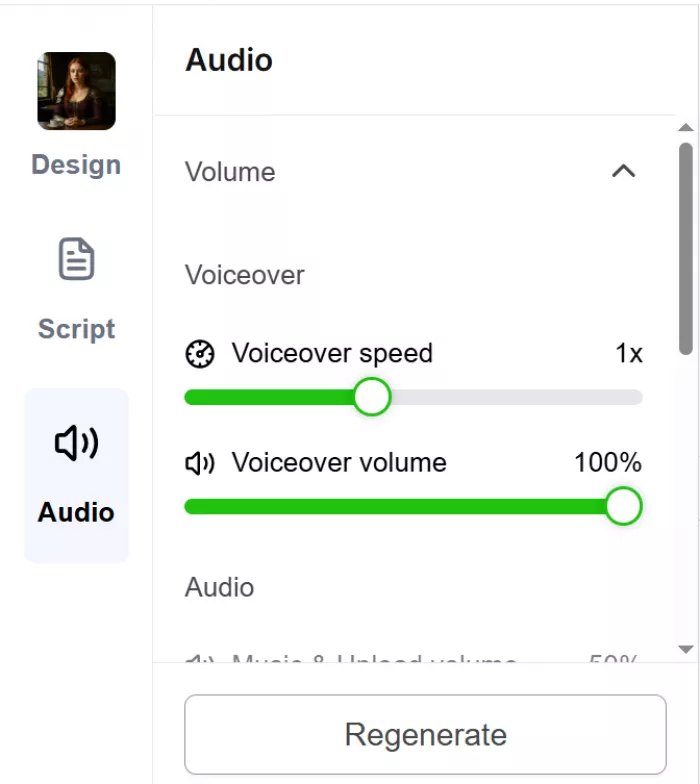
The narration is useful for explainers, story videos, and faceless content, but the voice should not be selected casually. A flat narrator can make a decent script feel robotic. A warmer voice can make the same script more watchable.
The best approach is to test a few voices before exporting. Short-form videos depend heavily on rhythm. If the voice is too slow, the video drags. If it is too fast, the captions become harder to follow. Hypernatural gives the voice layer, but the user still has to judge whether it fits the message.
Captions and Mobile Readability
Captions are one of the most practical parts of Hypernatural. Most short-form videos are watched quickly, often without sound. A video can have good visuals and narration, but if the captions are hard to read, the output will feel unfinished.
Hypernatural lists captions as a core feature and can customize color palettes, fonts, and captions to match their style.
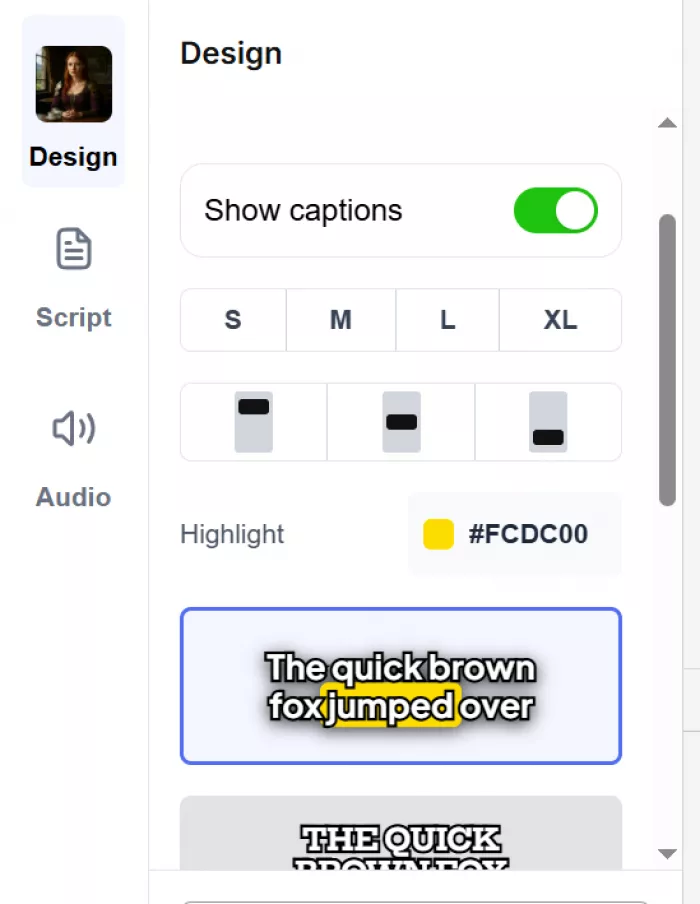
The captions make the video feel closer to a publishable social post. They help viewers follow the message without relying only on audio. Still, they should be checked before export. Line breaks, text length, timing, and placement matter a lot on a phone screen.
A good caption layer should feel easy to scan. It should not crowd the video, cover important visuals, or stay on screen too long. Hypernatural handles the heavy caption work, but the final check should still be manual.
Editing the Generated Draft
The editing stage is where Hypernatural becomes more useful than a basic one-click generator. Once the first draft is ready, the user can refine the video instead of accepting the first output.

Business Insider noted that Hypernatural moves users into an editing page where they can rearrange scenes, edit the script, reanimate scenes, or use AI-generated video assets.
This editing layer is important because the first version is rarely perfect. The hook may need tightening. A scene may not match the script. The voice may feel too flat. Captions may need shorter lines. Hypernatural gives enough room to fix those issues without leaving the platform.
The limitation is control. Hypernatural is not Premiere Pro, After Effects, or DaVinci Resolve. It does not offer deep frame-level editing, advanced masking, complex animation control, or detailed color work. The tool is built for faster production, not precision post-production.
That makes it best for creators who want a strong draft and quick edits. It is less suitable for users who need exact control over every frame.
Exporting the Video
Export is the moment where the video either feels usable or still needs work. Hypernatural’s paid plans include features such as HD exports and no watermark, while the free version is better suited for testing the workflow first. Its pricing FAQ says credits are used for custom visuals, animations, and premium narration, and unused credits roll over while the subscription remains active.
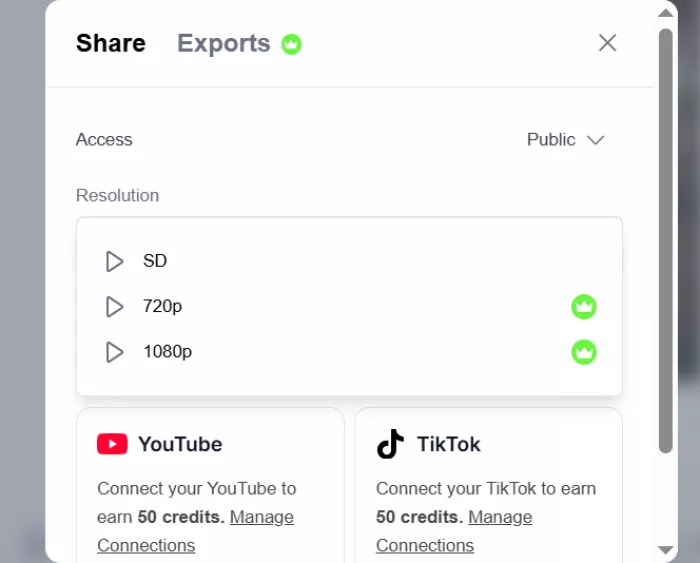
The final output is strongest when the video is short, clear, and social-first. Faceless explainers, simple story videos, educational clips, product explainers, and repurposed content are good matches. The output may not feel like a high-end brand film, but it can be close enough for creators who need quick, structured video drafts.
Before exporting, it is worth checking five things:
● The first few seconds should clearly explain why the viewer should keep watching.
● The visuals should support the message instead of feeling like decoration.
● The voice should match the topic and not sound disconnected from the script.
● Captions should be readable on a phone screen, not only on a desktop preview.
● The final video should be watched once from start to finish before posting.
This last step is important. Hypernatural can produce the video, but the user still needs to approve it with an editor’s eye.
Supported Platforms, Formats and Requirements
Before committing to a workflow, it helps to know what Hypernatural needs to run and what it produces. The tool is built to be light rather than demanding.
It is available as a mobile app on both the App Store and Google Play, and the creation flow works without a heavy desktop setup. Because generation happens in the cloud, a stable internet connection matters more than a powerful machine, which suits creators working from a phone or a modest laptop.
On output, the tool is shaped around short-form video. It supports the vertical and square formats Reels, Shorts, and TikTok depend on, and paid plans unlock HD exports without a watermark. The free version is enough to test the flow but is better treated as a trial. Users who need very high resolutions or long-form exports should confirm those details against the current plan before relying on it.
Pricing and Credit Use
Hypernatural has a free starting option and paid plans. The company offers a free version and paid tiers up to $39 per month.
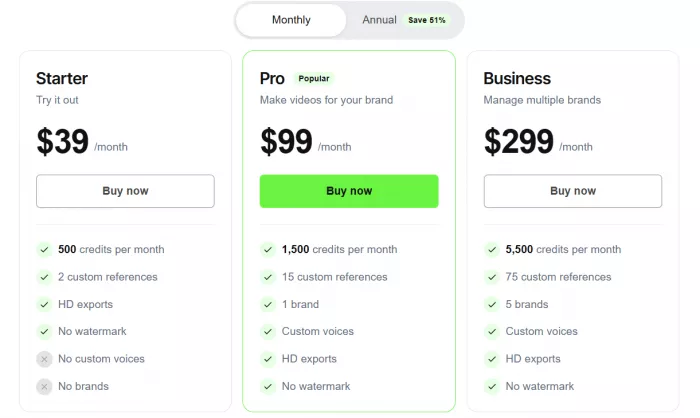
The pricing page also explains how credits work. Credits are used for custom visuals, animations, and premium narration. Monthly credits refresh based on the original purchase date, annual plans receive the full year’s credits upfront, and unused credits roll over while the subscription remains active.
| Pricing Area | Practical Meaning |
| Free access | Best for testing whether the workflow fits your content style |
| Creator plan | Better for solo creators who make videos regularly |
| Higher plans | More useful for heavier production and custom assets |
| Credits | Important for users who regenerate visuals, animations, or premium narration |
| Rollover | Helpful because unused credits can accumulate while the subscription stays active |
The credit system is the part users should understand before paying. A single clean video may not feel expensive, but frequent regeneration can change the real cost. If you test multiple styles, voices, and scene versions, credits become part of the creative process.
What Other Users Say
Public feedback around Hypernatural is mostly positive on app stores, but there are still some concerns worth noting.
On the App Store listing, Hypernatural shows a 4.7 rating from 252 ratings. The listing describes it as a free app with in-app purchases in the Photo & Video category.
Google Play shows stronger volume, listing Hypernatural at 4.6 stars with 7.91K reviews and more than 1 lakh downloads. The same page says the app allows users to create up to 4 videos for free and includes smart script tools, generative styles, AI voiceovers, dynamic visual effects, and caption customization.
The positive feedback usually focuses on ease of use, quick video creation, and the ability to turn written or spoken ideas into visual content.
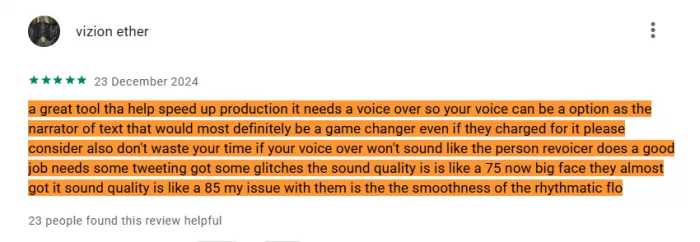
The critical comments are also useful. Some Google Play reviewers complain about subscription confusion, credit usage, voice quality, character mismatch, and outputs that did not meet expectations.
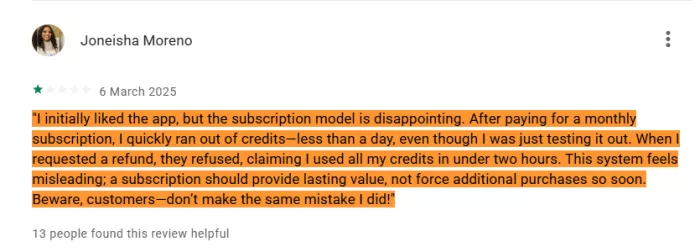
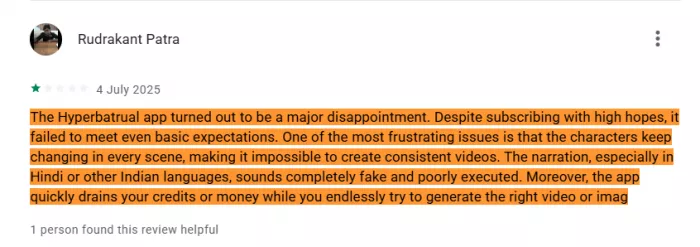
That gives a balanced picture. Hypernatural has clear appeal, especially for fast social video creation, but users should test it with their own topic before relying on it for regular work.
What Worked Well
Hypernatural works well because it brings several video production steps into one place. A user can move from idea to script, then to scenes, narration, captions, editing, and export without building the whole video manually.
The biggest strength is speed. The tool removes the hardest early step, which is turning a blank idea into a full draft. It is especially helpful for creators who publish often and need repeatable formats.
The second strength is the complete workflow. Many AI tools only generate visuals or only create voiceovers. Hypernatural tries to connect the whole process, which makes it easier for solo creators and small teams.
The third strength is social-video readiness. Captions, narration, styles, and short-form pacing make it more useful for Reels, Shorts, TikTok, and educational clips.
The fourth strength is character and style consistency. These features are important for creators who want videos to feel like part of a series rather than random one-off outputs.
Where It Needs More Control
Hypernatural still needs human editing. The script can sound generic if the input is weak. Some visuals may look clean but too broad. The wrong voice can make the video feel robotic. Captions need checking before export.
The credit system also needs attention. Users who experiment heavily may use credits faster than expected. This is not a problem for everyone, but frequent creators should understand how credits work before choosing a paid plan.
The tool is also not meant for advanced editing. It does not replace a professional video editor for brand films, cinematic scenes, detailed animation, complex timelines, or exact visual control.
Hypernatural is strongest when it is used as a fast production assistant. It is weaker when treated as a one-click final editor.
Tips to Get Better Results
Most of Hypernatural's weak points can be reduced with a better approach rather than a better plan.
First, write a specific brief. A prompt that names the topic, audience, platform, tone, and length gives the tool far more direction than one vague sentence, and the output needs less editing later.
Second, treat the first script as a draft. Rewriting the hook and replacing broad lines with concrete examples does more for the video than any style setting.
Third, test voices before spending credits. The same script can feel flat or engaging depending on the narrator, so a quick comparison is worth the minute.
Finally, watch the full video once on a phone before exporting. Captions and pacing read differently on mobile than on a desktop preview, and that last check is what separates a rough draft from a publishable post.
Best Use Cases
Hypernatural is a good fit for faceless YouTube Shorts, Instagram Reels, TikTok videos, educational explainers, story-led clips, podcast repurposing, blog-to-video content, product explainers, and simple campaign drafts.
It is also useful for writers and podcasters who already have content but want to turn that material into video without recording themselves.
It may not be the right fit for filmmakers, advanced editors, strict brand teams, or users who need exact scene control.
How Hypernatural Compares to Other AI Video Tools
| Tool | Core Job | Visual Approach | Best For |
|---|---|---|---|
| Hypernatural | Idea to full video | AI characters, styles, generated scenes | Story-led and faceless short-form |
| Pictory | Script/blog to video | Stock footage + templates | Repurposing text into simple videos |
| InVideo AI | Prompt to video | Stock clips + templated scenes | Quick social and marketing videos |
| Opus Clip | Long video to short clips | Cuts existing footage | Turning long uploads into Shorts/Reels |
Rating Snapshot
| Review Area | Rating | Quick Take |
| Ease of Use | 4.3/5 | The workflow is simple enough for non-editors and does not feel technical. |
| Script Generation | 3.8/5 | Good for structure, but the wording still needs human polishing. |
| Visual Quality | 3.9/5 | Strong for stylized explainers and faceless videos, weaker with very specific scenes. |
| Voiceover | 3.7/5 | Useful, but the final quality depends heavily on the narrator you choose. |
| Captions | 4.0/5 | Helpful for social videos, though timing and line breaks should be checked. |
| Editing Control | 3.5/5 | Good for quick fixes, but not deep enough for professional editing work. |
| Pricing Value | 3.6/5 | Fair for regular short-form creators, but credit use needs attention. |
| Overall | 3.9/5 | A strong AI video assistant for fast social-ready drafts, not a full editor replacement. |
Final Verdict
Hypernatural AI is useful for anyone who wants to create short videos without handling every production step manually. The flow from login to export is simple: start with an idea, generate a script, choose a style, add narration, review captions, edit weak scenes, and export the final video.
Its strongest value is speed. It helps turn rough ideas into structured video drafts faster than a manual workflow. It also brings together the pieces creators usually handle across different tools: script, visuals, voiceover, captions, style, and editing.
The output still needs review. Hypernatural can produce a strong first draft, but the final quality depends on the user’s brief, edits, voice choice, caption check, and scene review. It is not a replacement for a skilled editor, but it is a practical AI video assistant for creators, educators, marketers, podcasters, and small teams.
Hypernatural is best for faceless videos, explainers, story-led shorts, and content repurposing. It is less suitable for cinematic production, strict brand work, and users who expect perfect results from one prompt.
Comments

Shrinivash K
Oct 3, 2026The subscription and credit thing drove me up a wall. I was testing different styles and voices like you're supposed to and watched my credits evaporate way faster than I expected, regenerating one scene a few times costs real money. And the narrator voices I tried all had this flat, slightly robotic drag that made a decent script sound lifeless.
Login To Reply ↪

Kenny Bekham
Oct 6, 2026I run a faceless history channel and used to spend a whole evening on ONE short by scripting, hunting B-roll, recording narration, timing captions. Pasted a blog post into Hypernatural and had a structured draft with scenes and voiceover in like fifteen minutes. I actually sat back and went "oh." The captions came out clean enough to post with barely a tweak. This bought me my weekends back.
Login To Reply ↪