Unblocked YouTube Explained: The Ultimate 2026 Guide to Safe YouTube Proxy Sites



Unblocked YouTube has quietly become its own ecosystem of tools and tricks built around a simple promise: “watch YouTube even when youtube.com is blocked.” Instead of relying on heavy apps or system‑level changes, these tools mostly live in the browser and act as middlemen between you and YouTube, which makes them especially popular on school, office, and shared computers.
What “Unblocked YouTube” Actually Means

When people search “unblocked YouTube”, they usually aren’t thinking about full‑blown VPN suites. They want something lighter: a way to open YouTube videos in a browser even if youtube.com is blocked by a network administrator, ISP, or local rules.
At a technical level, most “unblocked YouTube” solutions are proxies. Instead of your browser talking directly to YouTube, it talks to a proxy server. That server fetches the YouTube page and video, rewrites it so everything loads through its own domain, and then sends the result back to your browser. To the school or office firewall, it looks like you’re visiting the proxy site, not YouTube.
You’ll see this marketed with names like “YouTube Unblocked”, “Unblock YouTube Proxy”, “YouTube proxy websites”, or similar. They all aim to solve one problem: bypass domain‑level or basic content filters that target youtube.com.
Common labels vs what they are
| Term users see | What it usually means in practice |
| “Unblocked YouTube website” | A web‑based proxy page specialised for YouTube links. |
| “Free YouTube proxy” | A generic proxy that supports streaming YouTube via its servers. |
| “YouTube unblocker extension” | A browser add‑on that transparently routes YouTube traffic through an external server. |
| “YouTube proxy network” | A professional proxy service whose IPs and endpoints can be used to access YouTube from different regions. |
The key point: “unblocked YouTube” is not a single product. It’s a family of proxy‑style tools with very different levels of polish, privacy, and performance.
Why YouTube Gets Blocked In The First Place
To understand where unblocked‑YouTube tools fit, it helps to see how and why YouTube gets blocked. Different block types respond to different solutions.
Schools and offices often block YouTube to reduce distractions and bandwidth use. ISPs and governments sometimes restrict it for regulatory, copyright, or political reasons. Device owners (parents, IT admins) can also block YouTube at the device level.
Here are the main patterns:
| Type of block | Typical environment | What the user sees | Can a browser‑based unblocked‑YouTube tool help? |
| DNS / domain block | School or office Wi‑Fi uses DNS filters to block youtube.com. | YouTube site won’t load; “site can’t be reached” or a block page appears. | Often yes. Proxy sites live on different domains, so they bypass simple domain filters. |
| Category / firewall block | Enterprise or school firewall categorizes YouTube as “streaming/media”. | Access denied page; sometimes all video platforms blocked. | Sometimes. If the proxy domain isn’t categorized yet, it can slip through until IT blocks it too. |
| Device‑level admin block | Managed Chromebooks, office PCs, parental controls. | YouTube site or app blocked regardless of network; browser policies may restrict sites. | Works only if the proxy domain itself isn’t blocked and the browser can still reach it. |
| Geo‑restriction / country‑level censorship | Countries or ISPs restricting YouTube or specific videos. | “Video not available in your country” or entire YouTube unavailable. | Depends. Some proxies in other regions help; strong national firewalls often require VPN/proxy networks instead. |
That matrix explains why unblocked‑YouTube sites are so popular in schools and offices: when the block is simple (domain or category), swapping the domain via a proxy is often enough.
The Main Types Of Unblocked‑YouTube Tools
Within this world, there are four core categories. Understanding them helps you review the space in a structured way.
Dedicated YouTube Proxy Websites
These are sites built specifically around YouTube. You open their homepage, paste a YouTube URL, or sometimes search from within their interface. Behind the scenes, they fetch the video and wrap it in a custom player.
Providers like these typically emphasise:
● One‑click playback of YouTube links.
● No installation or sign‑up required.
● SSL (HTTPS) access so the connection between you and the proxy is at least encrypted in transit.
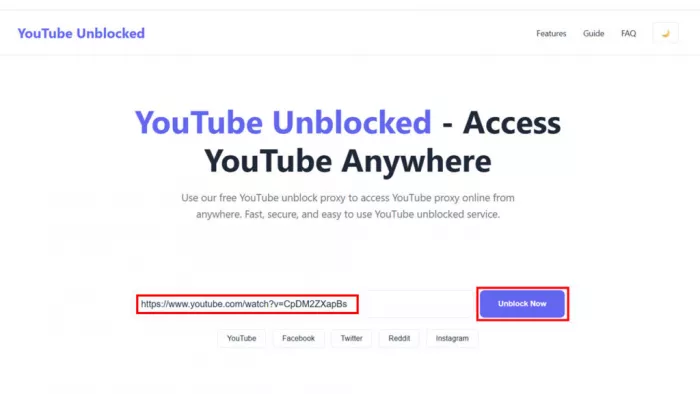
The user experience is usually minimal: a clean video frame, simple controls, and not much of the full YouTube environment. Many don’t support logging into Google accounts at all, or if they do, it’s fragile and not recommended for security reasons.
Generic Web Proxies That Support YouTube
Generic web proxies are designed to open many blocked sites, not just YouTube. You’ll see names like “free SSL web proxy” or “unblock any website”. You type in the full YouTube URL, and the proxy tries to load the entire YouTube page through its backend.
Because YouTube is script‑heavy and constantly updated, these generic proxies are a bit hit‑and‑miss:
● Sometimes they show the full YouTube layout but break certain buttons or scripts.
● Embedded players, comments, and suggestion panels may not work consistently.
● Video playback may be less optimized than on sites tuned specifically for YouTube.
Their advantage is versatility: if your main goal is simply “load blocked sites in this browser”, they can handle more than just YouTube.
Browser Extensions And “YouTube Unblocker” Add‑ons
Some tools come as browser extensions listed in add‑on stores. These typically intercept YouTube requests in the browser and redirect them through a proxy server, all behind the scenes.
For users, this can feel like magic:
● You still type youtube.com as usual.
● The extension silently routes the traffic via its server so YouTube appears “unblocked” in the normal interface.
The experience is often smoother than using a separate proxy site, because you keep the original layout, comments, playlists, and account features when they work. The catch is that extensions require installation permissions, and many managed devices or corporate environments block extension installs or only allow whitelisted ones.
Paid Proxy Networks Used For YouTube
At the high end, there are commercial proxy networks (often used for marketing, research, and automation) that provide large pools of residential or datacenter IPs. You configure these IPs in your browser or tool as HTTP/SOCKS proxies and then browse as if you were in that IP’s location.
For YouTube, that means:
● More reliable region spoofing and IP reputation compared to random free proxies.
● Better infrastructure and bandwidth, often suitable for HD streaming.
However, they are designed for advanced users and businesses, not casual students. You pay for traffic or IPs, and you need to know how to configure proxy settings correctly.
Snapshot comparison of unblocked‑YouTube tool types
| Feature / aspect | Dedicated YouTube proxy sites | Generic web proxies | Browser unblocker extensions | Paid proxy networks for YouTube |
| Main goal | Simple YouTube playback via custom interface. | Open many blocked sites including YouTube. | Make normal YouTube site work despite blocks. | Provide IPs/locations to access YouTube like a local user. |
| Setup | Open site, paste URL. | Open site, enter full URL. | Install extension, toggle on. | Configure proxy in browser/app. |
| Install required | No | No | Yes | No app, but manual config |
| Interface | Custom player, stripped‑down controls. | Attempts full site, sometimes broken UI. | Original YouTube UI. | Original YouTube UI |
| Typical cost | Free, ad‑supported. | Free, ad‑supported. | Free or freemium. | Paid (subscription / per‑GB). |
| Best for | Locked‑down school/office browsers needing quick playback. | Users wanting to open multiple blocked sites from one portal. | Semi‑managed or personal machines where extensions are allowed. | Power users, marketers, testers needing stable geo‑control. |
Real‑World User Experience And Performance
From a user’s perspective, “does it work and is it watchable?” matters more than any protocol diagram. Unblocked‑YouTube tools deliver very mixed experiences depending on the provider type and network conditions.
Interface And Features
Dedicated YouTube proxies mostly give you a simplified player and fewer distractions. That can be a plus for pure viewing, but it also means you often lose:
● Native comments and replies.
● Live chat on streams.
● Full access to playlists, channel pages, and community tabs.
Generic web proxies try to reproduce the full YouTube experience, but because they must rewrite URLs and scripts, certain interactive elements can misbehave. Playlists might not advance smoothly, recommendation sidebars may fail to load, or some buttons might lead nowhere.
Extensions and paid proxies that preserve the original site tend to provide the most feature‑complete experience, as you’re effectively just changing the path to YouTube, not the site itself.
Speed, Buffering, And Video Quality
Every unblocked‑YouTube solution adds at least one extra hop: traffic goes from YouTube to the proxy and then from the proxy to your device. On congested or under‑powered proxies, this manifests as:
● Slower initial page and thumbnail loading.
● Frequent buffering, especially when you jump around in the timeline.
● Difficulty maintaining stable HD or 4K streams.
Free proxies, in particular, share resources across many users and sessions. It’s common to see them recommended for quick 480p/720p classroom clips rather than long HD binge sessions. Paid proxy networks can deliver better consistency but require both configuration and budget.
For many users, the sweet spot is “good enough for a short how‑to video or a song,” not “perfect for two hours of live sports in 4K.”
Device Coverage
A crucial distinction is where these tools actually work:
● Browser‑only solutions (most sites and some extensions) only help you in that particular browser. Your YouTube app on the same device remains blocked.
● Configuration‑level proxies and professional networks can help across multiple apps, but you must wire them into each context that supports proxies.
In contrast, a VPN operates at device level, covering browsers and apps at once. That’s one reason unblocked‑YouTube tools are perfect for locked‑down, browser‑only environments but less ideal on your own multi‑device setup.
Safety, Privacy, And Policy Risks
Any serious review has to go beyond “it works” and address “is it safe to use this regularly?” This is where many unblocked‑YouTube tools are weakest.
What Proxy Operators Can See
When you use a web‑based unblocked‑YouTube site, the operator’s server sits right between you and YouTube. That means they can, in principle:
● See the video URLs and pages you request.
● Log your IP address, user agent, and timing.
● Inject banners, pop‑ups, or tracking scripts into the proxied pages.
Some providers clearly describe minimal logging and security practices. Many free sites provide little or no transparency. For casual viewing of public content, this may be a trade‑off people accept; for anything account‑related or sensitive, it’s risky.
Logging In To Your Google/YouTube Account
Multiple security‑oriented resources explicitly warn against logging into your Google account via random unblocked‑YouTube proxies. Even if the site uses HTTPS between you and them, your session still passes through the proxy’s infrastructure.
A user‑first rule of thumb:
● Treat these sites as “view only.”
● Avoid any action that involves entering passwords, codes, or personal details.
● Reserve your real YouTube account and channel management for direct connections or more robust privacy tools on devices you control.
Ads, Pop‑Ups, And Potential Malware
Since most unblocked‑YouTube sites are free, they rely heavily on monetization:
● Display ads on their pages.
● Redirect through ad networks before loading the video.
● Use pop‑under windows, notifications, or other aggressive formats.
This can be annoying, but also risky if low‑quality ad networks allow scam or malware creatives through. Using a modern browser with built‑in security and being cautious about what you click becomes essential.
Policy And Legal Considerations
Finally, there’s the rule‑of‑the‑network factor. Schools, universities, and workplaces typically have acceptable‑use policies. Bypassing their filters may violate those policies, even if the method is simple and technically legal in your jurisdiction.
There’s also no change to YouTube’s own terms of service or copyright laws. Unblocking a video doesn’t grant extra rights to download, redistribute, or misuse it.
A user‑first article should encourage readers to:
● Check the rules of the network they’re on.
● Prefer using their own devices and connections for unrestricted viewing.
● Separate “can I” from “should I”.
Comparing Unblocked YouTube To VPN
VPNs and unblocked‑YouTube tools both solve “YouTube is blocked” problems, but they do so at very different layers. Keeping the comparison short and clear helps your article while maintaining focus on proxies.
| Factor | Unblocked‑YouTube tools (proxies, sites, extensions) | VPN (context only) |
| How it works | Browser or app sends YouTube requests to a proxy; proxy fetches and rewrites YouTube under its own domain. | Device creates an encrypted tunnel to a VPN server; all traffic (including YouTube) flows through that server. |
| Scope | Usually limited to the browser or tab using the proxy. | Device‑wide: browsers, apps, and sometimes entire home networks. |
| Encryption & privacy | HTTPS between you and proxy, but proxy sees content; free tools may log and inject ads. | End‑to‑end encryption between device and VPN server; reputable services advertise strict no‑logs policies. |
| Ease on locked devices | Very high: only a browser needed, no install. | Often low: app installs may be blocked by admins. |
| Streaming reliability | Fine for short clips and moderate quality; can buffer with HD/4K and heavy load. | Better suited to ongoing HD/4K and live streaming if servers and bandwidth are good. |
| Best fit | School/office/shared machines where you just need quick browser‑only access. | Personal devices where you want privacy and reliable access across apps and locations. |
Unblocked‑YouTube tools are the quick browser fix when you can’t install anything. VPNs are the heavier, more private solution you use on devices you control when YouTube (and everything else) needs to work consistently.
Scenario‑Based Recommendations Inside The Unblocked‑YouTube World
| User scenario | Environment & constraints | Best unblocked‑YouTube option | Why it fits |
| Student on school Chromebook | School Wi‑Fi, browser available, no install rights. | Dedicated YouTube proxy sites with simple players, used briefly and without logging in. | No install needed; works through browser; minimal configuration. |
| Office worker needing occasional how‑to or training videos | Office network, monitored PC, limited install rights. | Generic web proxies or dedicated YouTube proxies during short sessions, respecting company policy. | Quick way to view a few videos without system changes. |
| User on shared library or lab computer | Public PCs with strict controls. | Dedicated proxies in private/incognito windows, no logins, close tabs after use. | Leaves minimal trace on shared machines and doesn’t require permissions. |
| Marketer or QA tester checking how content appears in other countries | Personal laptop or workstation. | Paid proxy networks configured in browser for stable geo‑specific IPs. | Offers controlled regions, better reliability, and professional logging/SLAs. |
| Home user with soft ISP or router‑level filters | Personal devices, router using “safe” filters. | Start with browser‑based proxies for occasional videos; consider more robust methods later. | Simple testing of whether a proxy can bypass soft filters without reconfiguring the whole network. |
How To Choose A Safer, More Reliable Unblocked‑YouTube Site
Not all proxies are equal. A user‑first piece should help readers recognise better‑behaving options and avoid obvious red flags.
Focus on a few practical guidelines:
1. Prefer sites that use HTTPS (the padlock) so your connection to the proxy itself is encrypted. This doesn’t fix logging, but it prevents basic eavesdropping on your local network.
2. Look for some level of transparency: a basic about page, FAQ, or documentation is better than a completely anonymous single‑page domain with no information.
3. Test with non‑sensitive content first. Try a public music video or tutorial before relying on a site for anything important.
4. Avoid entering Google credentials, email, or payment details through these proxies. Keep them for “view only” use.
5. Use a separate browser or profile for experimenting with unblocked‑YouTube tools, so your main browsing history and logins stay isolated.
These steps don’t eliminate risk, but they tilt the balance toward more informed and safer use.
Final Verdict
Unblocked‑YouTube tools sit in a very specific sweet spot: they are incredibly handy when you are stuck with a restricted browser and zero install rights, and largely unnecessary once you move to a device and network you fully control.
They shine as quick, low‑friction solutions for students, office workers, and people on shared or public machines who just need to watch a couple of videos without fighting system settings. At the same time, their trade‑offs in privacy, stability, and feature completeness mean they are not ideal for heavy, long‑term, or account‑sensitive YouTube usage.


Comments