What is InstaSuperSave? Reviews and Alternatives 2026



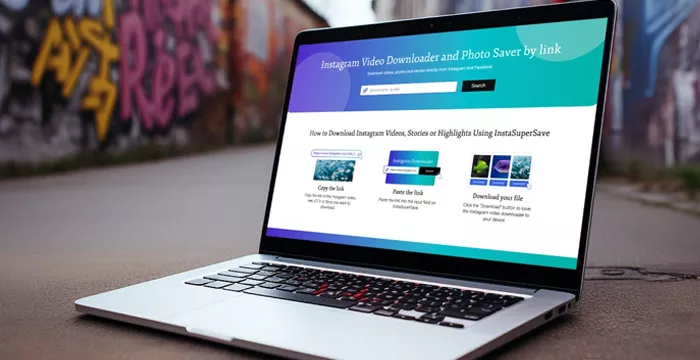
InstaSuperSave simplifies content downloading. In this article, we will explore the features, advantages, and limitations of InstaSuperSave. We will also include real customer reviews to provide a balanced perspective.
What is InstaSuperSave?
Sometimes you come across something on Instagram you want to save—maybe a video, a reel, or a post, but there's no built-in way to download it. InstaSuperSave is a website that helps with that. You don’t need to download an app or sign up. You just grab the link to the post, paste it on their site, and it gives you a download link in return. That’s pretty much all it does, nothing fancy, just a way to save public content for later viewing.
Key Features of InstaSuperSave
- Photo and Video Downloader: The photo downloader enables users to save high-quality images directly from Instagram. Users can save videos in HD quality without compromising clarity.
- Story and Reel Downloader: Stories disappear after 24 hours, which can make it tricky to save them. InstaSuperSave allows users to download stories and reels.
- IGTV Downloader: InstaSuperSave lets users save the videos, as IGTV videos are often lengthy and not easy to watch in one sitting.
- Profile Picture Downloader: Many Instagram users wish to download profile pictures in full resolution. InstaSuperSave addresses this by providing a simple way to save profile images without losing quality.
- Facebook Downloader: Download Facebook videos seamlessly, copy the video link, paste it into InstaSuperSave, and save it in your desired quality.
InstaSuperSave Has Expanded Beyond Instagram
InstaSuperSave now covers more than basic Instagram downloads. Its current site includes tools for Instagram videos, Stories and Highlights, along with Facebook and Threads video downloads. It also promotes an Android app.
The service still works mainly through copied links, so it remains a straightforward downloader rather than a broader content management tool.
How Does InstaSuperSave Work?
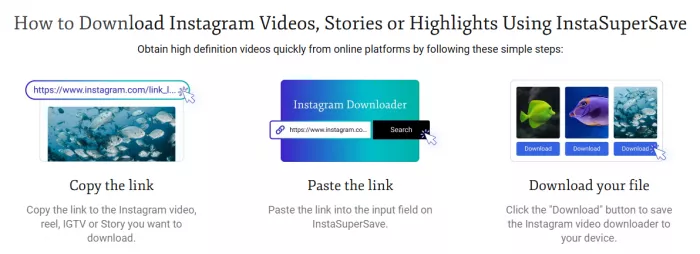
Step 1: Open Instagram and navigate to the content you want to download.
Step 2: Copy the link (URL) of the photo, video, story, or IGTV.
Step 3: Visit the InstaSuperSave website.
Step 4: Paste the link into the designated search bar.
Step 5: Click the download button.
Step 6: A download link will appear, allowing you to save the content directly to your device.
What Download Quality Can You Expect?
InstaSuperSave promotes HD downloads and supports common video formats. However, the final quality still depends heavily on the original upload.
A low-resolution Instagram video cannot become genuinely high-resolution simply through downloading. If quality matters, it is better to compare the saved file with the original post before reusing it elsewhere.
Pros of Using InstaSuperSave
- Fast Download Speeds: InstaSuperSave processes downloads quickly.
- Completely Free to Use: One of its most significant advantages is that it is free.
- Works Across Devices: Whether you are using a PC, smartphone, or tablet, InstaSuperSave works seamlessly across different devices.
- Wide Content Support: From photos to IGTV, InstaSuperSave supports all forms of Instagram content.
Cons of Using InstaSuperSave
- Inconsistent Performance: Users have reported occasional issues when downloading content. Sometimes, the tool fails to process private account links or videos.
- Limited to Public Accounts: InstaSuperSave cannot access content from private accounts.
- No Editing Options: InstaSuperSave does not offer any editing options for downloaded content.
- Legal and Ethical Concerns: Downloading content without the original creator’s consent may violate Instagram’s terms of service.
- Ad-Populated Interface: Since the tool is free, it relies on advertisements for revenue. Users may encounter ads while navigating the website.
What About Privacy and Safety?
One positive point is that InstaSuperSave does not require an Instagram username or password for normal web downloads. Users generally only need to paste the public content URL.
Still, avoiding a login does not mean a service collects no data at all. It is safer to provide only the link required for downloading and avoid entering account credentials into third-party downloader tools.
Customer Reviews: What Do Users Say?
Positive Feedback
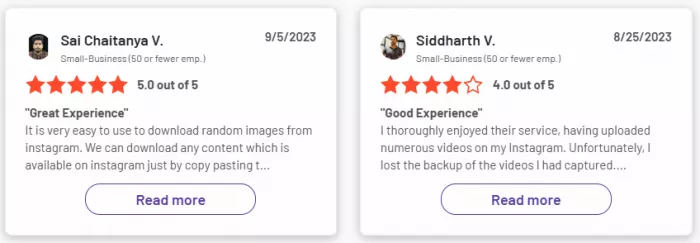
- “I lost an important Instagram video and couldn’t find a way to save it. InstaSuperSave helped me download it quickly and in good quality.”
- “It’s super easy to use. I just paste the link, and it works every time. Great tool for saving stories!”
- “I love that I don’t have to install any software. It works fine on my phone and laptop.”
Negative Feedback:
- “The tool sometimes fails to download videos, especially when the account has restrictions.”
- “The ads are annoying. I wish there were a cleaner, ad-free version.”
- “The quality of the downloads is not always perfect. Larger videos lose some resolution.”
Why InstaSuperSave Sometimes Fails
Download failures are often linked to the content itself rather than the entire service. Private profiles, expired Stories, deleted posts and incorrect URLs can all prevent a successful download.
Before switching tools, check that:
- The original post is still publicly accessible.
- The copied URL is complete and correct.
- The content does not come from a private account.
- The Story or post has not expired or been removed.
These checks can quickly show whether the problem is with InstaSuperSave or the source content.
Top 3 Alternatives to InstaSuperSave
InstaSuperSave is convenient for quick downloads, but other tools may be a better fit depending on the type and amount of Instagram content being saved.
1. SnapInsta
SnapInsta follows a similar approach to InstaSuperSave. Users copy the link to an Instagram post, Reel, photo or video and paste it into the downloader. Its simple browser-based format makes it suitable for occasional downloads without installing desktop software.
It is a straightforward alternative for users who mainly want a quick way to save individual pieces of public Instagram content.
2. FastDL
FastDL is another browser-based option with dedicated downloaders for photos, videos, Reels, Stories and carousel posts. It can extract individual images from multi-photo posts and saves supported media directly to the device.
Its wider support for different Instagram formats makes it useful when downloads go beyond standard videos or Reels.
3. Inflact
Inflact is a more feature-heavy alternative. Along with photos, Reels, Stories and Highlights, it supports multiple-post and full-profile downloads from public accounts. It also offers cloud storage and bulk downloading for paid users.
The free version has tighter download limits, so Inflact makes more sense for people who need additional organization or bulk-saving features rather than occasional downloads.
Ultimately, InstaSuperSave serves its purpose for users looking for a quick, free, and easy way to download Instagram content. However, users must use it responsibly and respect the rights of content creators. If you’re someone who regularly saves Instagram posts, this tool is worth exploring, but it’s always good to have alternatives as a backup.


Comments