
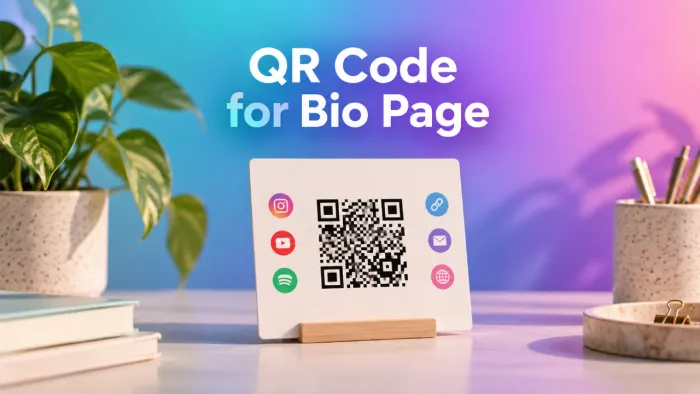
A link-in-bio page is useful when someone can click it directly from a social profile. But what happens when you want to share that same page on a business card, product package, or event poster?
A QR code makes your page accessible without requiring visitors to type a URL or search for your username. You can create one for free, customize its appearance, and use it across multiple promotional materials. The important part is making sure the code remains scannable and leads to a page worth visiting.
Create Your First QR Code
The quickest way to create a QR code is to convert your existing link-in-bio URL into a scannable image. You do not need a separate website, coding knowledge, or a paid QR code subscription.
You only need a published link-in-bio page and a QR code generator that supports website addresses.
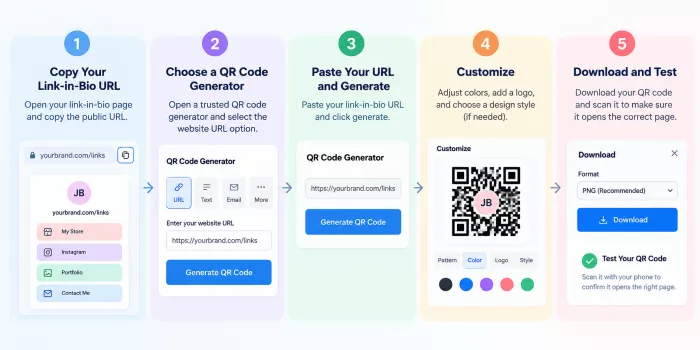
Step 1: Get your public page link
Open your link-in-bio page and copy the URL from your browser or platform dashboard. Make sure it is the published address rather than an editing link.
For example, your destination might look like yourbrand.com/links, where visitors can find your social profiles, portfolio, products, and contact details.
Step 2: Generate the code
Open a QR code generator, select the website URL option, and paste your link.
Free tools such as Adobe Express can generate a standard QR code for a website address. Some link-in-bio services also include their own QR code options.
Generate the code and check the destination before downloading it.
Step 3: Download the image
Choose an available format, such as PNG for digital graphics or SVG for scalable designs. Save the original file so you can reuse it without repeatedly taking screenshots or reducing its quality.
Step 4: Scan it yourself
Open your phone's camera and scan the generated code. Confirm that it opens the correct page, not an editor dashboard, expired link, or unrelated redirect.
Your QR code is now ready to use, although it is worth checking a few details before publishing it widely.
Make the Destination Worth Opening
Creating a QR code takes minutes. Preparing the page behind it deserves more thought because visitors may be encountering your brand for the first time.
Consider a freelance designer who adds a QR code to a business card. A potential client scans it expecting work samples but finds a page with ten unrelated social links and an outdated personal blog. The QR code works, yet the experience does not support the visitor's original interest.
Before distributing your code, review the page from the perspective of someone unfamiliar with your profile. A properly structured bio link page should establish who you are, highlight important links before secondary destinations, and make every button's purpose clear.
The first screen should establish who you are and what visitors can do next. Important links should appear before secondary destinations, and every button should have a recognizable purpose.
A useful link-in-bio page might prioritize:
● Portfolio or primary offer: Give visitors direct access to the work, product, or service that motivated them to scan.
● Contact or booking option: Make it easy to continue the interaction without searching through several social profiles.
● Supporting links: Include relevant social accounts, testimonials, resources, or additional information without overwhelming the page.
You do not need to remove every secondary link. The objective is to establish a clear order so visitors can find what matters to them.
One QR Code, Changing Links
One of the most useful advantages of linking a QR code to a bio page is that the code can remain unchanged while the contents of the page evolve.
Suppose a creator prints 500 business cards with a QR code pointing to their link-in-bio page. Initially, the page highlights a portfolio and Instagram account. Three months later, the creator launches an online store and wants visitors to see the new products first.
They can update the links on the page without reprinting the business cards, provided its public URL remains unchanged.
This is possible even with a static QR code, which permanently stores the destination address.
A dynamic QR code works differently. It typically uses a managed redirect, allowing the code's final destination to be changed through a service.
For most personal link-in-bio pages, a static code pointing to a stable URL is sufficient. Dynamic codes become more relevant when you need to replace the entire destination or require provider-level scan analytics. The distinction matters because some dynamic services charge ongoing fees or depend on active subscriptions.
Design for Scanning, Not Decoration
QR code generators often provide customization options, including brand colors, rounded patterns, logos, and decorative backgrounds. While these features can make a design more recognizable, too much customization can reduce its reliability.
The traditional dark pattern on a light background remains a practical choice because it provides strong contrast. Other color combinations can work, but they should be tested rather than assumed to be readable.
Pay attention to three design details.
1. Contrast: Keep a noticeable difference between the code and its background. Avoid pale combinations, complex gradients, and photographs behind the pattern.
2. Clear surrounding space: QR codes require a blank margin, commonly called a quiet zone. For standard QR codes, this margin should be at least four modules wide on each side.
3. Logo placement: Adding a small central logo may be possible with appropriate error correction, but covering too much of the pattern can make scanning unreliable.
A visually simple code with a clear label often performs its intended function better than one designed to resemble an elaborate illustration.
The Business Card Example
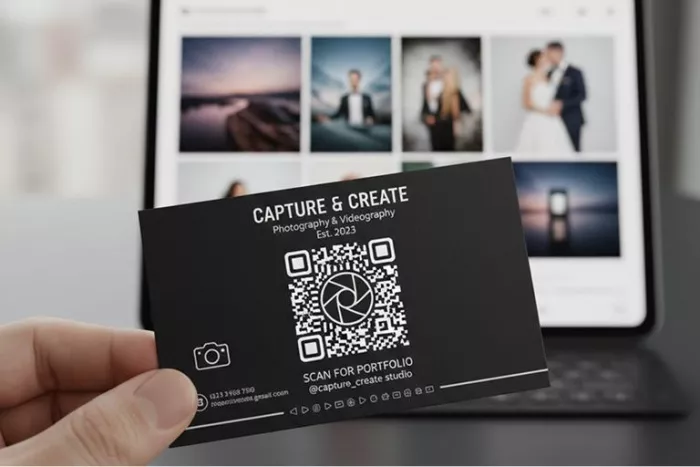
A business card is a good example of how QR codes connect traditional networking with digital information. Instead of listing every social account and portfolio address on a small card, you can include one QR code directing visitors to a link-in-bio page.
A practical arrangement would place your name, profession, and essential contact details on the front. The reverse could contain the QR code alongside a short instruction such as "View Portfolio & Work Samples."
This gives the code a purpose without requiring visitors to guess what it opens. The landing page can then present your latest projects, booking information, and relevant social profiles.
For business cards, a QR code around 2 × 2 cm is a reasonable starting point for a simple URL, but it is not a guaranteed minimum. Dense patterns, print quality, and camera capabilities may require a larger size. Always test an actual printed sample at its final dimensions before ordering a full batch.
Beyond Business Cards
QR codes can be useful wherever visitors have a reason and enough time to scan them. The placement should reflect what people expect from the destination.
A code on product packaging serves a different purpose from one displayed at a networking event.
| Placement | Reason to scan | Useful page content |
| Product packaging | Explore the brand | Product guides, store, support |
| Event poster | Discover more details | Registration, schedule, social links |
| Creator merchandise | Follow the creator | Social profiles, shop, recent work |
| Market stall | Browse available products | Catalog, ordering, contact details |
| Portfolio booklet | View additional projects | Full portfolio, testimonials, booking |
Physical placement also affects usability. Codes printed on curved surfaces, placed behind reflective materials, or displayed too far from visitors may be difficult to scan.
For online promotions, a QR code is not always necessary. If people are viewing content on their own phones, a clickable link is usually more convenient than asking them to scan a code displayed on the same device.
Give the Scan a Clear Purpose
A QR code is a navigation tool, not an explanation of what visitors will find. Simply displaying one without context creates an unnecessary decision. People may hesitate because they do not know whether it leads to a store, social profile, download, or unfamiliar website.
A short instruction helps establish expectations.
Compare these examples:
● "Scan Me" gives no meaningful information about the destination.
● "Explore My Handmade Collection" makes sense on packaging or a market display.
● "See My Latest Projects" works well for creative portfolios and professional materials.
● "Find All My Social Links" suits creators who want visitors to explore multiple profiles.
The message should describe something immediately available on the landing page. If the code promises booking information, that option should be easy to find after scanning. Avoid burying the promised destination beneath unrelated links.
Check the Printed Version
Testing a QR code on your computer screen is useful, but it does not guarantee the printed version will work equally well. Image resizing, printing quality, surface materials, and lighting can all affect scanning.
For small printed items, use a sharp image rather than enlarging a low-resolution file. SVG is useful for scalable designs, while a sufficiently high-resolution PNG can work for fixed-size materials.
Print a sample and check it with more than one phone if possible. Test from a normal viewing distance rather than placing the camera directly against the code.
Also confirm that the scanned address is recognizable and that the destination loads properly over a mobile connection. For posters and signage, distance becomes particularly important. A code placed several feet away needs to be larger than one on a business card.
There is no universally reliable print size for every situation. Actual testing is more useful than relying on a single measurement.
Can You Measure the Results?
QR codes can bring visitors to a link-in-bio page, but understanding link-in-bio analytics requires distinguishing between scans, page visits, and individual link clicks. Each measurement reveals a different part of how visitors interact with the page.
A static QR code does not record scans by itself. However, you may be able to track visits through website analytics, tagged URLs, or features provided by your link-in-bio platform.
Dynamic QR services often offer scan analytics, although availability and pricing vary.
Three measurements tell different stories:
| Measurement | What it indicates |
| Scan requests | Activity recorded by a managed QR redirect |
| Landing-page visits | People or sessions reaching the destination, depending on the analytics system |
| Link clicks | Interactions with individual destinations on the bio page |
Suppose a creator distributes QR codes at an exhibition. Their page receives 120 visits associated with the event, but only eight people click the booking link.
That information raises a more useful question than scan totals alone: did visitors find the information they expected, and was the booking option sufficiently clear? Tracking can help answer that question, especially when results are compared across different events or placements. It cannot establish every visitor's intention.
What Happens if Your Link Changes?
Changing an individual button on your link-in-bio page is different from changing the address of the page itself. If your QR code points to yourbrand.com/links, updating the destinations inside that page does not affect the encoded URL.
However, if you delete the page or move it to a new address, a static QR code will continue pointing to the original URL. This matters for printed materials that may remain in circulation for years.
If you control the original domain, a properly configured redirect may preserve access after a page moves. Otherwise, you may need to generate and distribute a replacement code.
For dynamic QR codes, the provider may allow you to change the final destination without changing the printed image.
Before distributing large quantities of materials, choose a stable public URL and understand whether your QR service depends on an ongoing subscription.
Keep the Code Trustworthy
People cannot easily determine a QR code's destination merely by looking at its pattern. This makes transparency important, particularly when asking unfamiliar visitors to scan.
Use a recognizable business or creator name beside the code, and avoid unnecessary URL-shortening services that obscure the destination. When choosing a QR generator, review whether it requires an account, inserts additional redirects, or places conditions on continued access.
For promotional materials, it is sensible to retain control over the landing-page URL rather than depending entirely on a service that could become unavailable.
You should also inspect physical codes periodically. In public locations, a fraudulent sticker could be placed over a legitimate QR code and redirect visitors elsewhere. A code that continues working technically is not enough. Its destination must remain accurate, secure, and consistent with what visitors were promised.
Build Around the Next Action
Once the QR code is created, the most useful improvement may have nothing to do with the code itself. Consider a handmade jewelry seller who places a QR code inside product packaging. Customers scan it because they want to explore the brand or find additional products.
If the landing page begins with unrelated social profiles, customers may leave before finding the store.
A better arrangement would place the collection, care instructions, or relevant shopping links first, followed by supporting social content.
The same principle applies to freelancers, educators, artists, and event organizers. The next action should correspond to the reason someone encountered the QR code.
This does not require a different landing page for every placement. It requires organizing the existing page thoughtfully and adjusting priorities as visitor needs change.
Make Every Scan Count
Making a QR code for a link-in-bio page is straightforward, and a free static generator will meet most everyday needs. The real decisions involve choosing a stable URL, keeping the design readable, and making the destination useful.
For creators and small businesses, I would favor one reliable QR code linked to a regularly updated bio page rather than generating a new code every time a product, project, or social profile changes.
A successful QR code does more than open a webpage. It helps someone move from discovering your brand to finding exactly what they came for.

Comments