Link in Bio for Coaches: What to Include to Get More Bookings

Christine Davis
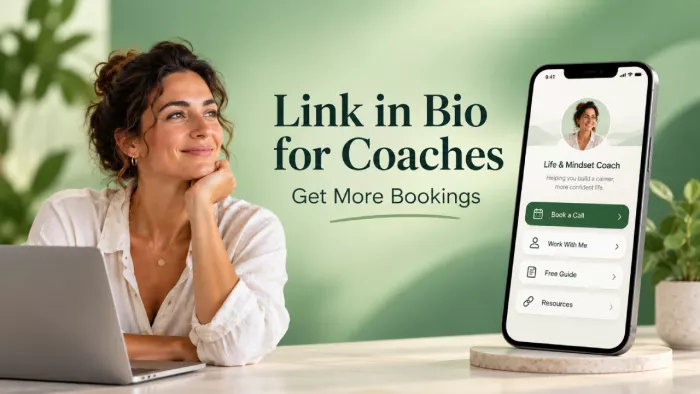
A potential client watches your content, visits your profile, and taps your bio link. But instead of finding a clear next step, they encounter several unrelated links and leave without booking.
For coaches, a link-in-bio page should do more than organize content. It should explain your services, establish trust, and make scheduling easy. A well-structured page can help convert existing profile traffic into consultations without relying entirely on attracting more followers.
Why Your Link in Bio Decides Your Bookings
Social media content introduces people to your expertise, but the bio link often determines what happens next. Someone interested in your coaching needs a clear route from exploring your profile to understanding your services and scheduling a conversation.
Many coaches treat this page as a directory, including podcasts, newsletters, free resources, websites, and booking calendars without establishing priorities. This creates unnecessary decisions for visitors who may have only a few moments to explore.
A useful bio page answers three questions immediately: What does this coach help with? Why should I trust them? What should I do next? Clear answers make the page more effective than an attractive collection of links with no obvious purpose.
The One-Goal Rule for a Coaching Bio
A link-in-bio landing page should prioritize one primary action. For coaches acquiring clients through consultations, this is usually booking an introductory call.
When five equally prominent buttons compete for attention, visitors must decide which destination matters. The page should make that decision easier. A business coach, for example, could feature "Book a 20-Minute Discovery Call" as the main button. Testimonials, service descriptions, and free resources can appear below it.
The primary goal should reflect the business model. Coaches selling workshops might prioritize registration, while those offering premium individual programs may prefer qualified consultation calls.
The principle is one clear goal supported by a few relevant secondary actions. Every additional link should help visitors understand the offer or move toward an appropriate next step.
Matching the Page to Where Visitors Are
Not everyone visiting a coaching profile is ready to purchase. Some already understand your work, while others discovered your content minutes earlier.
A useful page accommodates three common visitor groups:
● Ready-to-book visitors: These people understand the offer and want to discuss working together. A visible booking button and direct calendar access help them schedule without delays.
● Interested but hesitant visitors: They need reassurance about your experience, coaching methods, and suitability. Testimonials, client stories, and service explanations help address their concerns.
● Curious first-time visitors: They may be exploring a problem without considering paid coaching. A relevant checklist, guide, or short training gives them a lower-commitment next step.
For example, a career coach could lead with a discovery call, include a brief client success story, and offer an interview preparation checklist below. This structure serves different levels of interest while maintaining a clear booking priority.
The Booking Button That Comes First
When consultations are the main conversion goal, the booking button should appear near the top of the page, ideally within the first mobile screen.
Its label should communicate exactly what visitors receive. "Book Your Free 20-Minute Discovery Call" is more informative than "Book Now," provided the session is genuinely free.
An effective booking section includes:
● A specific action: Explain whether visitors are scheduling a discovery call, paid consultation, or introductory assessment.
● A short description: State what the conversation covers and how long it lasts.
● Clear expectations: Mention applicable fees, preparation requirements, or an application process before visitors schedule.
● Direct calendar access: Send visitors to the scheduling page rather than making them navigate a general website.
The button should have enough visual contrast to stand out from secondary links. On longer pages, repeating it after the testimonials provides another convenient opportunity to book. The goal is to remove obstacles when visitors are ready, not pressure everyone into scheduling immediately.
Proof That Earns Instant Trust
Coaching often involves personal goals, professional challenges, and financial commitments. Visitors need credible evidence before trusting someone with their time or money.
General statements such as "helping people reach their potential" provide little information about professional experience.
Specific evidence is more useful:
● Outcome-focused testimonials: A client describing improved interview confidence or clearer business priorities offers more context than a generic compliment.
● Relevant credentials: Certifications, training, industry experience, and previous professional roles can help establish expertise.
● Short success stories: Explain a client's original challenge, the coaching approach, and the reported outcome without making exaggerated promises.
A business coach might feature an authorized testimonial describing how a client improved pricing decisions or sales conversations.
Keep this section selective. Two meaningful testimonials and one relevant credential can communicate more than a long collection of unspecific praise. Use genuine evidence, obtain permission before publishing client details, and avoid presenting individual outcomes as guaranteed results.
A Free Resource to Capture the Not-Ready
Most first-time visitors will not immediately schedule a consultation. A useful free resource offers another way to begin a relationship.
The resource should address a specific problem connected to the coaching service. A productivity coach could provide a weekly planning template, while a career coach might offer a salary negotiation worksheet.
The strongest resources are practical, easy to consume, and relevant to the paid offer.
Visitors can receive the material in exchange for an email address, with appropriate consent for further marketing communications. A follow-up sequence can then provide additional guidance, explain the coaching approach, and eventually introduce the opportunity to schedule a call.
Avoid sending immediate, repetitive promotional messages. The purpose is to build confidence and maintain a useful connection. A free resource should support the booking process rather than replace it. People who are ready to schedule should still find the calendar immediately.
A Positioning Line That Filters the Right Clients
A short positioning statement near the top helps visitors recognize whether your coaching matches their needs. Descriptions such as "life coach" or "business mentor" identify broad categories but reveal little about the audience or services.
A more useful statement identifies the intended client and the problem being addressed. For example, "I help new managers build confidence in difficult workplace conversations" communicates more than "Helping leaders achieve success."
Similarly, a career coach could use "Career coaching for professionals preparing for management roles." This clarity attracts more relevant inquiries and reduces conversations with people looking for unrelated services.
The statement should also match the content that brought visitors to your page. Someone arriving from a post about career transitions should quickly understand how your coaching relates to that challenge.
Avoid guaranteed income, promotion, or personal transformation claims. Effective positioning communicates a clear service without creating unrealistic expectations.
Ordering Links by Priority, Not Habit
Link order determines which options visitors encounter first. On mobile devices, links further down the page may receive less attention simply because they require additional scrolling.
For most consultation-based coaching businesses, three to five relevant links provide a practical starting point.
A suitable order is:
● Book a discovery call: The primary conversion action for visitors interested in discussing your coaching services.
● Download a free resource: A lower-commitment option for people who want guidance before considering a consultation.
● Read client experiences: Testimonials or success stories that help visitors evaluate your approach.
● Explore coaching programs: A concise explanation of available packages, session formats, and intended clients.
Some coaches may need an additional workshop registration or membership link. Include it only when it supports a meaningful business objective.
A podcast episode explaining your coaching method might deserve space, while an unrelated social profile probably does not. The goal is not to minimize links at all costs. It is to make every link useful within the visitor's decision process.
Cutting Friction From the Booking Step
A visitor clicking your booking button has already expressed interest. The scheduling process should make completing that decision straightforward. Problems arise when calendars load slowly, require unnecessary registration, or request excessive information before showing availability.
An efficient process should allow visitors to:
1. Open the correct scheduling page directly from the booking button.
2. Understand the session's duration, purpose, format, and price.
3. Select an available appointment in their local time zone.
4. Complete a short form requesting only necessary information.
5. Receive clear confirmation and instructions for joining or rescheduling.
For a free introductory call, a name, email address, and brief question about the visitor's goals may be sufficient. Detailed intake forms can be completed later when appropriate.
Also distinguish discovery calls from full coaching sessions. Visitors should understand whether the appointment is an introductory discussion or a paid service. Test the entire process on a mobile device, including appointment confirmation and calendar notifications.
Microcopy That Turns Taps Into Bookings
Button wording helps visitors understand what happens after they click. Generic labels create uncertainty, while specific language communicates the destination or benefit.
For instance, "Explore My Coaching Programs" explains more than "Learn More."
| Weak label | Stronger label |
| Click here | Book your free strategy call |
| My coaching | Explore one-on-one coaching |
| Freebie | Get the 5-step burnout checklist |
| Learn more | See how coaching works |
| Testimonials | Read client experiences |
| Contact me | Ask about coaching availability |
Strong labels combine a recognizable action with clear expectations. Supporting text can also help. A line such as "20 minutes · Online · No obligation" beneath a discovery call button communicates useful details without requiring another page, assuming those terms accurately describe the offer.
Avoid misleading urgency or promises. A button advertising a free consultation should not unexpectedly open a paid booking form. Small wording changes can be tested over time, but actual visitor behavior should guide decisions.
Picking the Right Link-in-Bio Tool
The right platform depends on the coaching business's needs. Someone directing visitors to an existing calendar may need fewer features than a coach selling digital resources, workshops, and individual sessions.
Three common options cover most requirements.
| Option | Best for | Trade-off |
| Link aggregator, such as Linktree, tieup | Quick setup and links to existing services | Advanced booking or email features may require integrations or specific plans |
| Creator platform, such as Stan Store | Selling consultations, resources, and digital products | Subscription costs and additional setup |
| Custom landing page | Tailored branding, testimonials, and booking flows | More design and maintenance work |
A basic link aggregator can work well with an external scheduler. Creator platforms may suit businesses that want payments, digital products, and bookings managed together. Custom landing pages offer greater control over the arrangement of testimonials, service explanations, and conversion elements.
Before choosing, check mobile usability, scheduling integrations, email collection, available analytics, and total cost. The platform matters less than whether visitors can understand the offer and complete the intended action without unnecessary steps.
Mistakes That Quietly Kill Bookings
Many coaching bio pages look professional but fail to provide a clear path toward booking.
Common problems include:
● Too many competing links: Visitors struggle to identify which destination is relevant to their needs.
● No obvious primary action: Booking, shopping, reading, and subscribing all receive equal attention.
● Weak credibility signals: There is little evidence of relevant experience, coaching methods, or previous client outcomes.
● Outdated information: Broken links, unavailable sessions, and expired offers create confusion.
● Unnecessary navigation: Visitors are sent to a general homepage instead of a direct booking destination.
● Poor mobile usability: Small buttons, slow-loading pages, and difficult forms discourage completion.
Another mistake is failing to measure results. Coaches should track link-in-bio performance through page visits, booking-button clicks, completed appointments, and qualified inquiries.
For example, if a page receives 300 visits, 30 booking clicks, and three completed appointments, examining the scheduling experience may help explain why visitors leave before finishing.
Those figures do not establish the cause on their own. They provide a starting point for investigating whether the issue involves unclear expectations, appointment availability, or technical friction. Regular reviews help keep the page aligned with current services and visitor needs.
Conclusion
A coaching link-in-bio page should connect social media interest with a clear, appropriate next step. It doesn't need complicated design or an extensive collection of links to accomplish that purpose.
Start with precise positioning, make the booking option prominent, and support it with relevant testimonials and service information. Include a useful free resource for visitors who need more time before considering coaching.
Most importantly, keep the scheduling experience straightforward and transparent. A better-organized bio page cannot guarantee more clients, but it can remove avoidable barriers and help genuinely interested visitors take the next step toward working with you.


Comments