PromptSeen Review: Is This AI Prompt Library Actually Useful for Creators?

Olivia
Knowing that you want a “cinematic portrait” or a “luxury editorial photo” is one thing. Explaining the lighting, framing, camera angle, expression, background, and color treatment well enough for an AI model to understand is another.
That is the problem PromptSeen is built around. I spent time browsing its prompt library and working with a couple of different prompt styles to see whether it genuinely makes AI image creation easier or simply gives users longer text to paste into another tool.
My takeaway is fairly clear: PromptSeen is most useful at the beginning of the creative process, but its prompts become much more valuable when you edit them rather than treat them as finished instructions.
PromptSeen Comes Before Generation
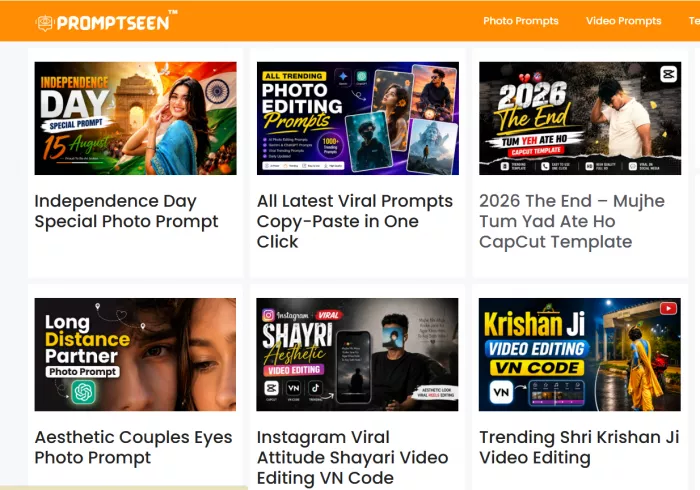
PromptSeen is easy to misunderstand if you arrive expecting another AI image generator.
It is primarily a prompt discovery platform. You browse visual ideas, open a prompt that matches the type of image or video you want, copy the instructions, and then use those instructions inside a compatible AI generation tool.
The distinction matters because PromptSeen does not control the final rendering quality. Its job is to improve the instructions that reach the model.
A typical workflow looks like this:
Visual idea → PromptSeen prompt → customization → AI generator → first result → refinement
That places PromptSeen somewhere between inspiration and production. For a creator who already knows exactly how to describe focal length, lighting direction, depth of field, composition, subject placement, and continuity, that middle layer may not be essential. For someone who simply knows that they want a polished Instagram portrait or cinematic scene, it can remove a surprisingly difficult part of the process.
Browsing Feels Built Around Ideas
PromptSeen feels less like a technical database and more like a visual inspiration library.
You are not expected to arrive knowing whether you want soft directional light, an 85mm portrait feel, shallow depth of field, or a specific form of cinematic grading. You can start from an image or visual treatment you like and work backwards. That makes the platform approachable.
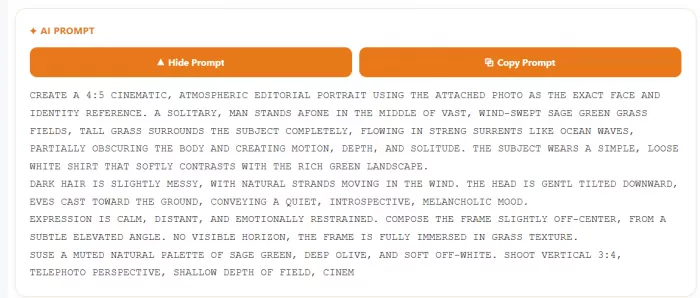
While browsing, I found that previews were often more useful than the prompt titles themselves. A creator may not know the terminology behind a particular style, but they can immediately recognize whether a result looks suitable for a profile image, fashion post, campaign visual, travel edit, or short-form video.
The trade-off is that PromptSeen naturally leans toward styles that are already visually popular. Viral portraits, cinematic treatments, dramatic lighting, polished lifestyle images, and social-media-friendly aesthetics appear frequently.
That makes discovery quick, but originality depends on what you do after discovering the prompt.
| Area | My Take |
| Finding ideas | Easy when you want a recognizable visual direction |
| Understanding the result | Preview images make the intention relatively clear |
| Prompt detail | Often much deeper than a beginner would write alone |
| Creator usefulness | Strongest for social images, portraits, visual concepts, and short video ideas |
| Originality | Depends heavily on customization |
The library works best when you see it as creative scaffolding, not a collection of finished creative decisions.
Trying the Prompts Changed the Value
I did not see much point in trying ten variations of the same portrait prompt. Instead, I spent more time with a couple of prompts that approached generation differently.
One was centered on a cinematic portrait. What stood out was that it did not stop at describing the person. It also described how the person should be photographed. That distinction is important.

A beginner might write something like: “Create a realistic cinematic portrait of a man.”
There is very little information there about what “cinematic” actually means.
A detailed PromptSeen-style prompt can go much further by describing the direction and intensity of the light, facial texture, background treatment, clothing, expression, framing, color mood, and camera feel.
Those details do not guarantee a perfect image, but they reduce the number of decisions the model has to make on its own.
The other prompt I explored was more complex and focused on video. What caught my attention there was how much of the instruction was devoted not to what should happen, but to what should remain consistent while it happens.
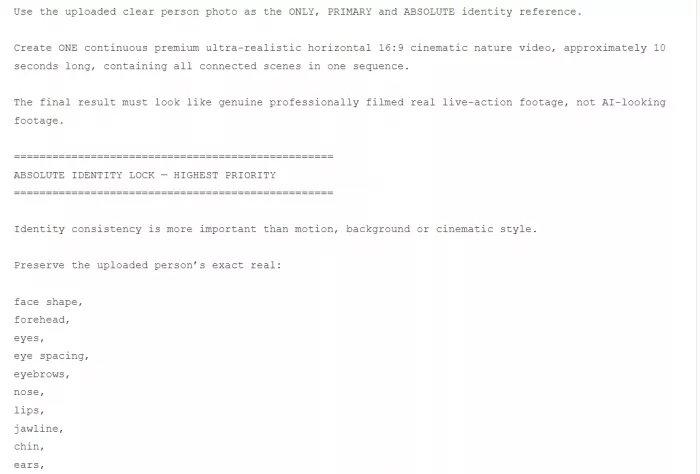
The prompt dealt with identity, clothing, environment, movement, camera behavior, and scene continuity.
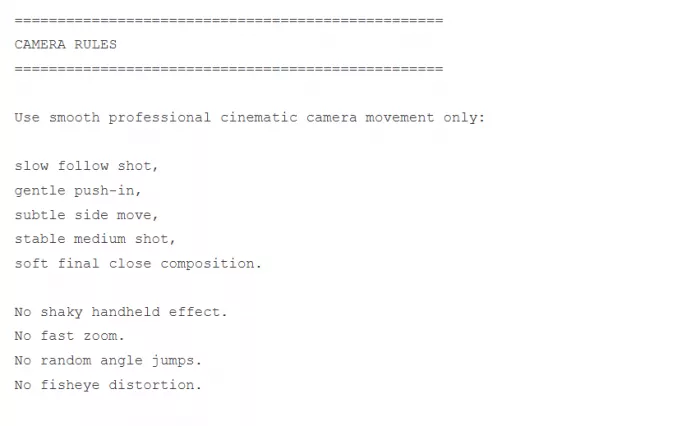
That exposed an important difference between image prompting and video prompting. For an image, you primarily describe a moment. For video, you also have to describe what should remain stable between moments.
That makes PromptSeen's more structured prompts useful as examples of how generative instructions are evolving beyond simple descriptive sentences.
Structure Matters More Than Length
One thing I would not do is assume that a longer prompt is automatically a better prompt. Some AI prompts look sophisticated because they contain several paragraphs of visual language, but not every adjective materially improves the result.
What matters more is whether the prompt makes useful decisions. A strong visual prompt usually addresses several layers at once: the subject, environment, composition, lighting, styling, camera treatment, color direction, and any details that need to remain unchanged.
| Prompt Layer | Why It Matters |
| Subject and identity | Defines who or what needs to remain recognizable |
| Environment | Prevents the model from inventing an unsuitable setting |
| Composition | Controls framing and the relationship between elements |
| Lighting | Has a major effect on mood, depth, and realism |
| Camera language | Influences perspective, focus, and photographic feel |
| Styling | Gives clothing, materials, and visual details more direction |
| Constraints | Tells the model which important details should not change |
This is where PromptSeen can quietly teach users something about prompting.
You begin by copying an instruction. After reading enough good prompts, you start seeing the underlying pattern.
Copying Is Only the First Step
PromptSeen makes copy-and-paste use extremely easy, and there is nothing wrong with starting that way.
In fact, I think the first generation should often stay relatively close to the original prompt. It helps you understand what the prompt is trying to achieve.
The mistake is stopping there. Suppose you find a portrait prompt with excellent lighting and framing but a completely generic setting. There is no reason to throw away the whole structure. Keep the lighting instructions and replace the location.
The same approach works with fashion prompts, product scenes, lifestyle images, or videos. You can preserve the parts controlling technical quality while changing the decisions that give the image its identity.
I would generally change the environment, wardrobe, color palette, mood, subject behavior, props, and final composition before using a PromptSeen prompt for published creator content. The more popular the original prompt is, the more important those changes become.
The Originality Trade-Off
Prompt libraries have an interesting contradiction built into them. Their main advantage is that someone has already made many difficult creative decisions for you.
Their main weakness is exactly the same thing. If thousands of people use the same portrait prompt with the same warm lighting, pose, lens description, background, and cinematic treatment, they can generate technically different images that still feel visually interchangeable.
This matters much more for creators than for someone experimenting privately with AI images. A creator is not only trying to produce an attractive picture. They are also trying to develop a visual identity people can recognize across posts. That is why I would use PromptSeen for its structure, not necessarily its finished aesthetic.
If a prompt contains a clever way of describing directional light, keep it. If it has useful instructions for maintaining facial identity, keep them. If the composition is interesting, borrow the logic. Then rewrite the creative layer around your own work.
How PromptSeen Helps Creators
Creators do not necessarily need help because they lack ideas. Often, they lack a fast way to turn an idea into production-ready instructions.
A travel creator may know they want a sunset portrait with a premium editorial feel but have no idea how to translate that into lighting and camera language. A fashion creator may have a visual reference but struggle to describe the relationship between the subject, clothes, background, and pose. A YouTube creator may need a thumbnail concept without spending half an hour building the first prompt. PromptSeen can shorten those gaps.
1. It speeds up visual ideation
Creators producing content frequently cannot spend the same amount of time developing every visual.
PromptSeen gives them a starting catalogue of visual treatments. Even if they never copy a prompt exactly, browsing can answer an earlier question:
What could this post look like?
That matters because content production often stalls before prompt writing even begins.
2. It gives non-designers better visual language
Many creators know whether an image feels premium, cinematic, soft, dramatic, minimal, or editorial. They do not necessarily know which technical decisions produce that impression.
PromptSeen exposes them to terms involving composition, focal treatment, light direction, depth, texture, camera perspective, and color. That makes communication with the AI model more precise.
3. It can make recurring content easier
A creator does not need a completely different visual language for every post. Once you find a prompt structure that handles your preferred lighting, portrait framing, or product composition well, you can adapt it into a repeatable base.
For example, a creator could keep a consistent portrait structure while changing the location, clothing, pose, and campaign theme. PromptSeen therefore has value not only for one-off images but for building reusable visual starting points.
4. It helps creators explore before committing
This may be particularly useful for small brands and solo creators. Before arranging a photography session or paying for custom design work, you can explore several visual directions through AI.
PromptSeen can help supply those directions quickly. The output does not necessarily become the final campaign asset. Sometimes its value is helping you decide which visual concept deserves further production. That is an underrated use of prompt libraries.
Where PromptSeen Actually Saves Time
I would not simply say PromptSeen “saves time.” That description is too broad. It mostly saves time before the first generation. The difficult part for many users is translating a vague visual intention into explicit instructions.
You might know that you want a premium product shot but have no idea whether to mention rim lighting, reflective surfaces, camera position, background separation, or material texture.
PromptSeen can make those decisions visible. It also changes the creative process from invention to editing.
Starting with an empty prompt asks: “What should I write?”
Starting with an existing prompt asks: “What should I keep, delete, or change?”
The second question is usually easier.
After the first generation, however, PromptSeen does not remove much of the usual AI workflow. You still need to inspect the result, diagnose errors, change instructions, regenerate, and sometimes switch models. Its biggest advantage is getting you to version one faster.
Where It Helps Less
PromptSeen cannot compensate for everything the underlying image or video model gets wrong.
A detailed prompt may clearly describe a hand, reflection, object relationship, or repeated character and the model may still fail to render it convincingly.
Video adds another layer of difficulty. A prompt can request consistent clothing, facial identity, and body proportions throughout a sequence, but the model ultimately determines how well those instructions survive across frames. That is why I would separate prompt quality from result quality.
A good result does not automatically prove that a prompt was excellent. Sometimes the model filled in missing details brilliantly. Likewise, a bad result does not necessarily prove that the prompt was poor.
A more useful question is whether the instruction reduced unnecessary ambiguity and gave the generator enough information about the things that actually mattered.
A Prompt Is Not Equally Portable Across Models
One thing the copy-and-paste workflow quietly assumes is that a prompt behaves the same wherever you paste it. It does not. A prompt tuned for one image model can produce something quite different in another, because each model interprets phrasing, weighting, and structure in its own way. The vocabulary that reliably triggers a cinematic look in one generator may be half-ignored by the next.
That has a practical consequence for how you read a PromptSeen prompt. If the library does not tell you which model a prompt was written for, the first generation is partly a test of fit, not just of the prompt. I would expect to adjust the phrasing when moving a prompt between tools, and I would be suspicious of any prompt that promises identical results everywhere. This is another reason the editing step matters more than the copying step. You are not only customizing the creative decisions, you are sometimes translating the instruction into the dialect the model in front of you actually speaks.
PromptSeen Can Teach Prompting
PromptSeen becomes more interesting if you use it for a while rather than simply copy one prompt.
Patterns begin appearing. Portrait prompts repeatedly make decisions about framing, light, subject placement, background depth, expression, skin texture, clothing, and overall color treatment.
Video prompts add movement, continuity, timing, camera motion, and identity preservation. A beginner can learn from those patterns almost accidentally. At first, you copy an entire prompt. Later, you change half of it.
Eventually, you may borrow only the lighting structure or continuity instructions because you already understand how to construct the rest.
That progression makes PromptSeen useful as an informal learning resource as well as a prompt library.
Does the App Add Anything?
PromptSeen also offers a mobile app, but I would judge it mainly as a workflow tool.
Its strongest argument is convenience. Creators frequently generate, edit, and publish content from their phones. Being able to browse visual ideas, copy a prompt, and move it into an AI tool without returning to a desktop can remove a few unnecessary steps. That does not make the prompts better.
The app changes how quickly you can move between inspiration and generation, not the underlying quality of the instructions.
For mobile-first creators, that may be enough reason to prefer it. For someone already building prompts and images from a desktop workflow, the website may provide most of what they need.
What It Costs and What You Are Paying For
It is worth being clear about what we are actually buying. You are not paying for image generation. PromptSeen does not render anything, which means whatever it charges sits on top of the cost of the AI tool you paste the prompt into. That is the part worth keeping in mind before committing.
The value question is not "is it cheap," it is "does it save me more than it costs." If a library subscription removes twenty minutes of prompt-writing from every visual you produce, and you produce visuals constantly, it pays for itself quickly. If you generate occasionally, or already write detailed prompts comfortably, you are paying for convenience you may not use enough to justify. I would treat any free browsing tier as the real trial. Spend time there first, decide whether the prompts genuinely shorten your route to a usable image, and only then judge whether the paid layer earns its place in a stack that already includes a generation tool you pay for separately.
PromptSeen vs Writing From Scratch
The two approaches are not really competing methods. They suit different stages of experience.
| Area | PromptSeen | Starting From Scratch |
| Getting started | Faster | Slower |
| Visual vocabulary | Supplied | You develop it yourself |
| Creative control | High after customization | High from the beginning |
| Originality | Depends on editing | Easier to control |
| Learning curve | Lower | Higher |
| Trend discovery | Built into browsing | Requires separate research |
| Iteration | Still necessary | Still necessary |
PromptSeen mainly reduces the cost of reaching the first useful draft. Writing from scratch gives you control earlier, but you also need enough visual and prompting knowledge to know what to ask for.
Who Will Get the Most Value?
PromptSeen makes the most sense for people who can recognize the visual they want but are not yet comfortable translating that vision into detailed AI instructions.
Beginners are an obvious fit because the platform removes much of the blank-prompt problem.
Social creators may get even more practical value because they constantly need fresh visual treatments for portraits, campaigns, seasonal posts, thumbnails, and short videos.
Bloggers and publishers can use the library for cover-image concepts, while small businesses can use it to explore campaign ideas before committing to a final direction.
Experienced prompt writers have less reason to copy entire prompts. For them, PromptSeen is more likely to become an inspiration source where useful structures, visual trends, or scene ideas can be borrowed and rebuilt.
That change in usefulness is important. PromptSeen is not something every creator will need at the same level forever.
How I Would Use PromptSeen
After spending time with the library, I would not use it as a simple prompt-copying machine.
My process would be more selective.
I would first find a visual whose overall structure interests me. Then I would read the prompt and identify which instructions are responsible for the lighting, framing, continuity, or scene composition.
Those technical parts are often worth keeping. I would then rewrite the parts that determine creative identity: the subject, environment, styling, palette, mood, props, and final composition. Only after that would I generate. That approach keeps PromptSeen's strongest advantage while avoiding its biggest weakness.
One Thing Worth Being Careful About
A library that leans toward realistic portraits and includes instructions for preserving a recognizable face invites a use it never intended: recreating a specific real person. It is worth drawing a line there. A prompt that keeps facial identity stable is useful for maintaining a fictional character or your own likeness across posts; the same instruction pointed at someone who has not agreed to it is a different thing entirely.
This is not a criticism of the platform so much as a reminder that the tool does not police intent. If you are generating images of real people, consent and context matter more than prompt quality, and no library resolves that for you.
Verdict
PromptSeen is most useful for the space between having a visual idea and knowing how to describe it properly.
Its better prompts demonstrate how much difference specific decisions about lighting, framing, camera treatment, environment, styling, and continuity can make. For creators who have ideas but limited prompting experience, that can shorten the route from concept to first usable image considerably.
The limitation is that convenience can easily become sameness. Copying a viral prompt unchanged may produce an attractive result, but it also means accepting someone else's creative decisions. Creators trying to build a recognizable style should treat those prompts as frameworks rather than finished recipes.
For beginners, PromptSeen works well as both an inspiration library and an informal way to understand how detailed visual prompts are constructed.
For experienced creators, its role changes. The useful part becomes less about copying the words and more about discovering structures, visual treatments, and concepts worth adapting. That is where I think PromptSeen makes the most sense: use it to get past the blank prompt faster, then make the creative decisions yourself.
Comments

Amy Consani
Sep 22, 2026I had a better experience with the image prompts than the video ones. The video prompts were impressively detailed about movement, camera behavior, clothing and keeping the person consistent but the generator I used still changed facial details between frames. That’s obviously not completely PromptSeen’s fault but it shows the limitation of having a great prompt when the model itself can’t follow everything. I’d still use it for planning video scenes, just not expect the prompt alone to solve consistency problems.
Login To Reply ↪
Roosh Aktar
Sep 21, 2026I’ve been using PromptSeen mostly for portrait and lifestyle image ideas and it has genuinely made the starting process easier. I’m decent at knowing what kind of image I want but I’m terrible at describing camera angles, lighting, depth of field and all those little details. A few of the prompts gave me noticeably better first generations than the short prompts I normally write. I still changed the clothes, background and color mood but having the structure already there saved me quite a bit of trial and error.
Login To Reply ↪

Sandra Lavie
Sep 24, 2026What I like most about PromptSeen is actually the browsing experience. Sometimes I don’t need someone to write the whole prompt for me. I just need to see a visual style and understand how it was described. I found a cinematic portrait prompt, changed the subject and setting and got surprisingly close to the look I had in mind after a couple of generations. It has also helped me understand what details I should include in my own prompts now, especially lighting and composition.
Login To Reply ↪