TIEUP.IO vs Linktree: Which Link-in-Bio Tool Is Right for You?

Christine Davis
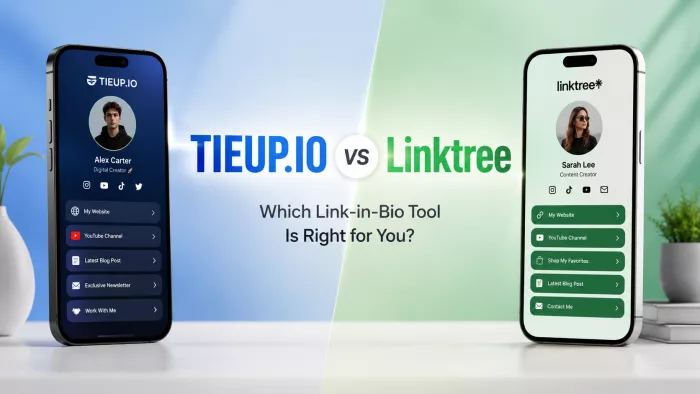
Both TIEUP.IO and Linktree fix the same small, real problem: you get one link in your bio and more than one thing worth sending people to. They just disagree about what that link should grow into.
I set both up, priced out the parts that never make it onto a pricing page, and worked out who each one actually suits. Here's the honest version.
Tale of the tape
Before the round-by-round, here's the quick read on each corner what they are, who they're built for, and where each one tends to sting.
| Metric | TIEUP.IO | Linktree |
| Best described as | A portfolio-first mini-site you build behind one link | The default, tidy list of buttons behind one link |
| Built for | Creators, freelancers, coaches and small businesses who want to show their work, not just list it | Anyone who wants a clean, recognisable link hub live in minutes |
| Home turf | Built in India; strong footing in the creator-portfolio space | Launched in Australia in 2016; the name most people already know |
| Free plan, in a phrase | Start free and explore the premium feature set before committing | Free forever, on a linktr.ee/you URL with Linktree branding |
| Signature strength | Creative freedom arrange links, work, shop and affiliates like a small site | Recognition and reliability it just works, and everyone trusts the format |
| Where it stings | No public pricing page and a smaller name you verify the details yourself | A steep 2025 price rise, and a sales cut most people never notice |
Two bets on what a link should be
Every product has a worldview baked in, and here the two could not be further apart. Naming those upfront makes everything that follows click into place. Most of the differences below aren't random features, they're the same bet playing out again and again.
Linktree's bet is that a link-in-bio page should be effortless and universal. One page, a stack of buttons, published before your coffee cools. It is deliberately not trying to be a website. Its power is that the format is instantly familiar, dependable, and recognised on sight; a linktr.ee page needs no explaining to anyone who lands on it.
TIEUP.IO bet is that the link deserves to be a small site you shape. Instead of a list, you get a canvas: links, a portfolio of your work, a product shelf, affiliate codes and promos, all arranged the way you want them. It is closer to a micro-website than a menu more to set up, but more of you on the other side of the click.
Neither bet is wrong. They just pay off for different people, which is the whole point of this comparison.
Round by round
Rather than march through a feature spreadsheet, let's follow the actual lifecycle the order you'd hit these things if you sat down and built a page today.
Round 1 : The first five minutes
Setup is where Linktree earns its reputation. Sign up, pick a handful of buttons, choose a theme, and you have a shareable link almost immediately. There's nothing to learn because there's barely anything to configure, which is exactly the appeal for someone who just wants a page to exist before their next post goes up.
TIEUP.IO asks a little more of you, on purpose. Because you're building a mini-site rather than a list, the drag-and-drop editor gives you sections to fill: links, a work showcase, products, promos. Still no code, still doable in a few minutes, but you're making more decisions. That's the tax you pay for a page that looks less like everyone else's.
Round to Linktree, narrowly fastest to a live page, if fastest is what you want
Round 2 : Making it yours
This is the clearest split in the whole fight. Linktree's free and lower tiers keep customisation on rails: preset themes, button styles, some colour control. It looks clean, but a Linktree page reads as a Linktree page, and full branding removal only arrives once you're paying for Pro or above. On the free plan your visitors see Linktree's badge, not just yours.

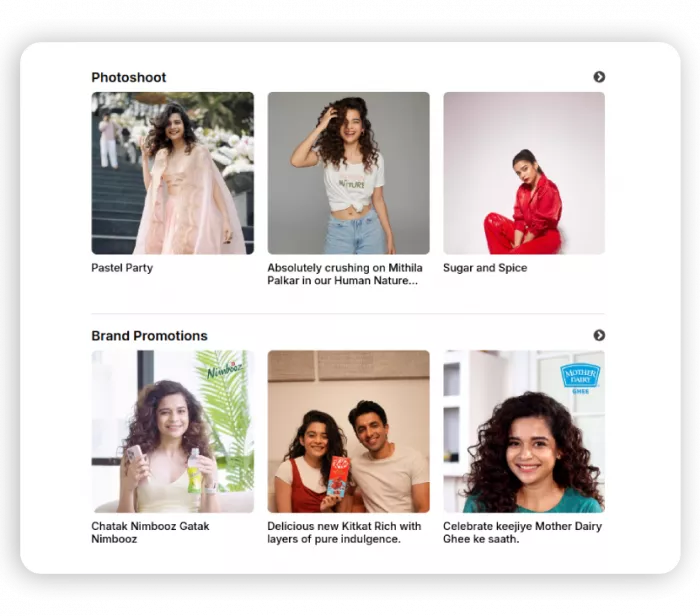
TIEUP.IO leans the opposite way. Customisation and creative freedom are its pitch, not an upsell; the idea is that your page should feel like a corner of your own website rather than a template everyone shares. If the sameness of link-in-bio pages is what's been bothering you, this is the round that matters most.
Round to TIEUP.IO a page shaped around you, not around a template
Round 3 : Filling the page
Both handle the basics well: unlimited links, video, and embeds from the usual platforms. Linktree's long life means almost anything you want to drop in has a supported block, and it behaves predictably.
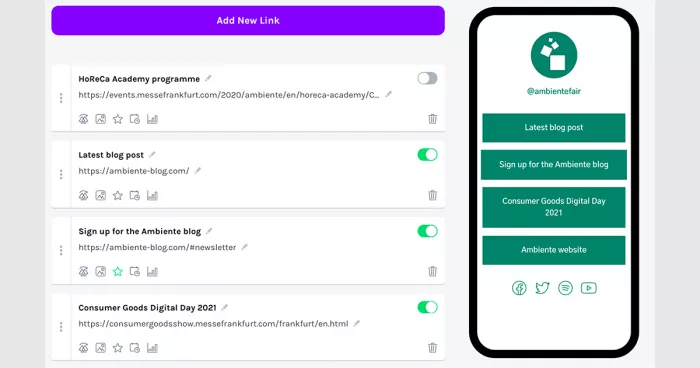
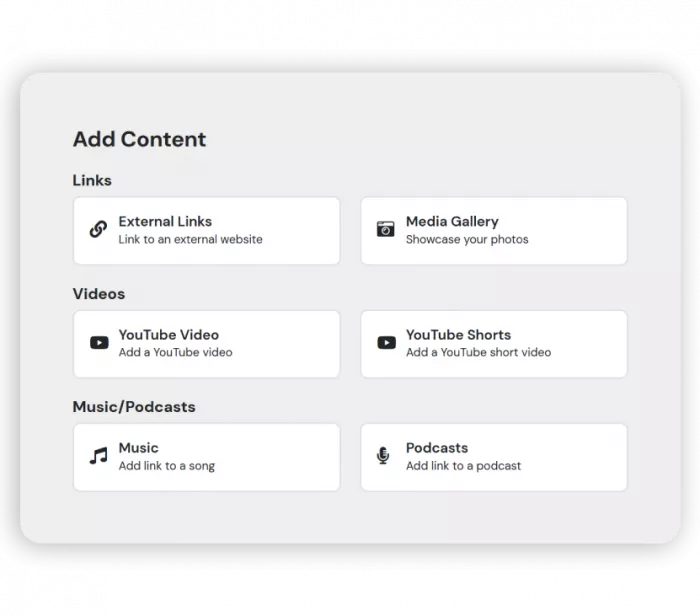
TIEUP.IO widens the definition of “content.” Alongside links and video, it's built to hold a portfolio of your actual work, an e-commerce product shelf, and a place for affiliate links, promo codes and coupons, the kind of things a creator or freelancer wants to display, not just point away to. It treats your best work as a first-class citizen on the page rather than another button in the stack.
More room does not automatically make a better bio page, though. Once links, products and content start competing for attention, the hierarchy matters as much as the feature set. A useful approach to building a link-in-bio landing page that converts is to give visitors one obvious primary action, then let secondary content support it rather than fight with it.
Round to TIEUP.IO more ways to show, not just send
Round 4 : Turning clicks into money
Here's the round nobody markets honestly, so read closely. Linktree can sell digital products and courses directly on your page but it takes a cut of every sale on top of the normal card-processing fee. That cut is the number most people miss:
| Linktree plan | Monthly price | Cut on each digital sale |
| Free | $0 | 12% |
| Starter | $8 | 9% |
| Pro | $15 | 9% |
| Premium | $35 | 0% |
TIEUP.IO approaches money from the promotion side: showcasing products, running affiliate links and promo codes, and positioning your page so brands can find you for collaborations. The catch and I'd rather flag it than paper over it is that TIEUP doesn't publish a public breakdown of any selling or transaction fees the way Linktree does, so if direct in-page selling is central to your plan, confirm the current terms when you sign up rather than assuming.
Round to whoever fits your model Linktree for transparent in-page checkout, TIEUP for promotion and affiliate-style income
Round 5 : Reading the room
Analytics is where the free-versus-paid line bites on Linktree. The free plan shows you top-line numbers, total views and clicks but the genuinely useful stuff, like which individual link is pulling its weight and where your audience sits, lives on paid tiers. You can outgrow the free analytics faster than you'd think.
TIEUP.IO surfaces performance insight as part of the portfolio pitch, but here's the honest caveat again: because it doesn't publish a detailed feature-by-tier table, the depth of its analytics is something to check against your needs before you rely on it for decisions. If data drives how you post, ask the specific questions per-link tracking, geography, referrers before you commit.
Whichever platform you use, raw click totals are only the beginning. Looking at which link-in-bio analytics actually matter can help separate a page that attracts attention from one that consistently moves visitors toward products, enquiries or other high-value destinations.
Round to Linktree, on transparency you know exactly what the data does at each price
Round 6 : Plugging into your stack
Longevity has made Linktree the connector-heavy option. Years in market mean a wide net of integrations with email tools, pixels, payment processors and the rest if you already run a stack, odds are Linktree talks to it out of the box. For a brand or agency, that ecosystem is a real, unglamorous advantage.
TIEUP.IO is the newer, more self-contained platform. It's designed to hold your links, work and offers in one place rather than to be the hub of a sprawling toolchain. That's fine, even preferable if you want fewer moving parts, but if your workflow depends on deep third-party wiring, treat integration breadth as something to confirm rather than assume.
Round to Linktree the established ecosystem is hard to match on day one
Round 7 : Getting found and getting your own name on the door
Two things decide this round: page performance and whether the URL is truly yours. On Linktree, a custom domain of your own name instead of linktr.ee/you is locked behind Pro or higher. Until then you're borrowing Linktree's address, which is fine for a hobby and a weaker signal for anyone selling a service under their own brand.
TIEUP.IO's mini-site framing leans toward a more standalone, own-your-presence feel, and it makes a point of privacy and data handling in its pitch. As with pricing, confirm the specifics of custom-domain support on the plan you're considering but the philosophical direction is “this is your space,” which reads well for professionals who care how the link looks in a client's inbox.
Round to whoever owns your URL soonest check the plan line before you decide
The tradeoff map
Strip away the rounds and you're really choosing between a few honest tensions. Pick the side of each that sounds like you and the winner tends to reveal itself.
● Simplicity or shaping. If you want a page to exist with zero fuss, Linktree wins. If you want a page that looks and works like a slice of your own site, you'll accept TIEUP's slightly longer setup for the payoff.
● A known name or a fresher canvas. Linktree buys you instant familiarity and a track record; TIEUP buys you a page that doesn't look like the ten before it, at the cost of being the less-recognised brand.
● Published terms or verify-as-you-go. Linktree lays its prices and fees out in the open including the parts you might not like. TIEUP starts you free but keeps pricing off a public page, so you trade a transparent table for a try-it-first path.
● A wide ecosystem or a tighter focus. Linktree connects to seemingly everything; TIEUP keeps your links, work and offers together in one tool. More reach versus fewer moving parts.
What it really costs over two years
Sticker price is the least interesting number here. The one that matters is what you pay after the sales cut and on Linktree that cut can quietly outrun the subscription. Take a creator selling about $500 a month in digital products directly on their page, and watch what two years actually looks like:
| Linktree plan | Sub / mo | Sales cut / mo* | Real cost / mo | Over 24 months |
| Free | $0 | $60 | $60 | $1,440 |
| Starter | $8 | $45 | $53 | $1,272 |
| Pro | $15 | $45 | $60 | $1,440 |
| Premium | $35 | $0 | $35 | $840 |
Look what that reveals: at real sales volume, Linktree's most expensive plan is the cheapest to run, because its 0% cut wipes out the fee that's bleeding the lower tiers. Free isn't free once you sell, and Pro can cost the same as Free while charging you $15 for the privilege. That's the buried math worth internalising before you pick a tier.
TIEUP.IO can't be dropped into the same table honestly, because it doesn't publish these numbers and I won't invent them to make a point. What I can say is that the free-to-start path lowers your entry risk to zero, and that if selling is central, the single most important thing you can do is ask for the current fee structure in writing before you route real revenue through any tool. That advice, frankly, applies to Linktree too.
Where each one breaks
Every tool has a wall you eventually hit. Knowing where saves you a migration later.
You'll outgrow Linktree when
You start selling in earnest and the 9–12% cut starts to hurt; you want your own domain and realise it's a paid unlock; you notice your page looks like every other creator's; or the November 2025 price rise (Pro jumped to $15) makes you re-run the maths on whether recognition alone is worth it.
You'll bump into TIEUP.IO's edges when
You want the reassurance of a household name, a public pricing page, or a documented feature-by-tier breakdown before you commit; or your workflow leans hard on deep third-party integrations. It's the younger platform, so more of the answers come from trying it than from reading a spec sheet which suits some people and unsettles others.
Match it to your mission
Skip the abstractions. Find yourself in this list and the choice mostly makes itself.
● You just want to park a few links. A hobbyist sharing three or four destinations from an Instagram bio doesn't need a mini-site. Linktree's free plan is made for exactly this, and there's no shame in the simple answer.
● You're a freelancer, coach or consultant closing clients. Your link is a first impression, and a portfolio that shows your work beats a list that describes it. TIEUP.IO's shape fits this better with the caveat that you confirm custom-domain support so the URL looks the part.
● You sell digital products directly on the page. Do the fee arithmetic first. If you're selling steadily, Linktree Premium's 0% cut is often the cheapest route despite the top sticker; if you'd rather promote and earn through affiliates and collaborations, TIEUP's model is aimed at you just verify its selling terms.
● You're a multi-offer creator shop, affiliates, work, socials, all at once. This is the strongest case for TIEUP.IO, because holding all of that on one shaped page is the entire reason it exists.
● You're a brand or agency wiring this into a bigger stack. Recognition and integration breadth carry the day here, and that's Linktree's home ground.
The call
Forget “it depends.” Answer three questions and you'll know:
● Do you want a list, or a small site? A list points Linktree; a shaped page points TIEUP.IO.
● How central is direct in-page selling? If it's your core, price the fees before anything else that single decision moves more money than the brand name does.
● Do you value a known quantity, or a fresher, more custom presence? Recognition and published terms lean Linktree; creative freedom and an own-your-space feel lean TIEUP.
The honest recommendation
Reach for Linktree if you want the safe, recognised, up-in-minutes hub, you mostly send people outward, and you'd rather have every price and fee printed in front of you accepting that serious selling and a custom domain push you up the paid tiers.
Reach for TIEUP.IO if you want a portfolio-style mini-site that shows your work and stacks your links, shop, affiliates and promos in one place, you like a page that doesn't look like everyone else's, and you're comfortable starting free and checking current plan details as you go.
One's the dependable default. The other's the more expressive canvas. The best pick isn't the more famous tool, it's the one whose bet on what your link should be matches the bet you're making on yourself.


Comments