Best AI Resume Builders in 2026: 7 Tools Compared, Features, Pricing & ATS Support

Snigdha Das
There is a specific kind of dread that comes with opening a blank resume document. You have done the work. You shipped the projects and hit the targets; you survived the reorg. Now you have to compress all of it into one page of tight, keyword-friendly prose that a piece of software will scan in roughly seven seconds before a human ever sees it.
That is the exact gap AI resume builders are trying to fill. And to be fair, most of them fill part of it. They will give you structure and a passable summary, plus bullet points that at least sound like a professional wrote them. What almost none of them will do is know that you cut onboarding time by 40% at your last job, or that the "coordinator" title on your resume actually meant you ran a three-person team.
That distinction, what AI is genuinely good at versus what it can only fake, runs through this entire guide. Below, seven tools, compared on the things that actually determine whether you finish the process with a resume you'd send: output quality, ATS features, free-plan honesty, and real cost.
What an AI resume builder actually does
Strip away the marketing and most AI resume builders perform four jobs:
Generation. You give it a job title, an old resume, or a LinkedIn profile. It produces a first draft: a summary and work experience bullets, sometimes a skills list too. The quality here depends almost entirely on how much input you feed it. Give it a job title alone and you'll get something generic. Give it a full existing resume and a target job ad, and the output gets noticeably sharper.
Rewriting. You've already written something clumsy ("responsible for handling social media") and the tool converts it into "Grew Instagram following 3x through a weekly content calendar." This is where AI is genuinely strong, because it's editing your facts rather than inventing them.
Keyword matching. You paste a job description and the tool identifies terms the posting emphasizes, then tells you which are missing from your resume. This is the ATS layer, and it's the feature most worth paying for.
Formatting and design. Templates, spacing, fonts, section ordering. Not AI in any meaningful sense, but it's a large part of what you're buying, and it matters more than people admit. A technically strong resume in a broken two-column layout can parsebadly and never get read.
A note on ATS, because there's a lot of nonsense online
Applicant Tracking Systems are database software. They store applications so recruiters can sort and search them. Most modern ATS platforms do not "auto-reject" resumes based on a keyword score. That idea has been repeated so often it's become folklore. What actually happens is more mundane and more fixable: a recruiter searches the database for relevant terms, and resumes that don't contain those terms don't surface in the results.
The practical takeaway is the same either way. Use the language of the job posting and keep the file structure clean and parseable. And don't rely on a "94% ATS match" badge as proof of anything. Those scores are the tool's own internal metric, not a reading from the employer's system.
Quick comparison at a glance
| Tool | Best for | Free PDF export | Standout feature | Official pricing |
| Kickresume | Building a resume from scratch | Yes (free templates) | AI-generated first draft; large template library | Free; Premium from $8/month (annual billing) |
| Teal | Managing multiple job applications | Yes | Job tracker; ATS keyword matching | Free; Teal+ from $29 per 30 days |
| Rezi | ATS optimization | Limited (1 resume, 3 downloads) | AI keyword targeting; live ATS scoring | Free; $29/month; $149 lifetime |
| Resume.io | Guided, step-by-step resume building | No (TXT only) | Conversational resume builder | 7-day trial, then recurring subscription (4-week billing) |
| ResumeCoach | Trying a builder before signing up | No (TXT only) | Start without creating an account | Trial, then recurring 28-day subscription |
| Enhancv | Improving an existing resume | Trial only (watermarked) | Premium templates; ATS score | 7-day trial, then from $29/month (discounts on longer plans) |
| Novorésumé | Students and first-time resume writers | Yes (1 single-page resume) | Chat-style AI assistant | Free; Premium from $21.99/month |
The 7 best AI resume builders in 2026
1. Kickresume: best for generating a full resume from scratch
Who it's for: Anyone staring at a blank page who wants a complete draft to react to rather than a blank form to fill in.
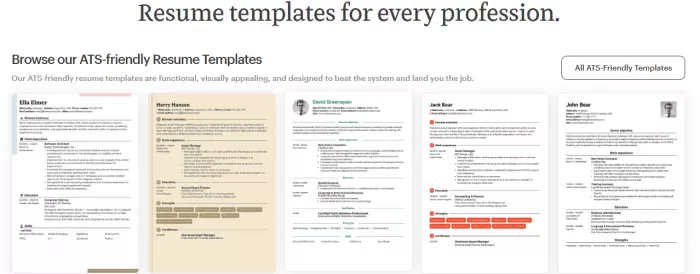
Kickresume is one of the few tools in this category where the AI will genuinely build you a resume before you've written a word. You enter your name and target job title, pick a template, and it populates the core sections (summary, work experience bullets, skills) with content oriented around that role.
That's a meaningful difference. Several competitors describe themselves as AI builders but actually require you to write the content first before their AI will touch it. Kickresume gives you something to edit, and editing is a far easier cognitive task than creating.
The second thing it does well is section-level AI. Rather than one generic "improve my resume" button, each section has its own AI writer with its own inputs. The certifications section asks for the certification name and issuing authority, the experience section asks for a job title. Narrower inputs produce less generic output, and you can feel the difference.
Design is the other differentiator. The template library is large and professionally typeset, and customization runs deep: fonts, spacing, colours, section icons, drag-to-reorder sections. That last one is more strategically useful than it sounds. A career changer wants skills above experience; a recent graduate wants education near the top. Being able to reorder without fighting the template is genuinely valuable.
Pros and Cons:
| Pros | Cons |
| Starts with a usable first draft instead of an empty template, making it ideal for blank-page writers. | Drafts based only on a job title feel generic until you import a resume or LinkedIn profile. |
| Section-specific AI asks different questions for experience, education, and certifications, producing more relevant suggestions. | AI can't invent measurable achievements, so every experience section still needs manual editing. |
| Templates stay clean while allowing enough customization to suit both graduates and experienced professionals. | Some premium templates and customization options are locked behind the paid plan. |
| The free tier is generous enough to build and export before deciding whether to subscribe. | Best results require spending time refining the generated content rather than publishing it unchanged. |
Pricing: Kickresume offers a free plan with unlimited resumes and downloads using its free templates. Premium costs $24/month, $18/month when billed quarterly, or $8/month when billed annually. Students and teachers can also get 6 months of Premium free after verification. For most job seekers, the annual plan offers the best value if you'll be applying for several months.
Verdict: The strongest all-rounder here, and the clearest choice if you're starting from nothing. The free plan is generous enough that there's little reason not to test it first.
2. Teal: best for people running an organized job search
Who it's for: Job seekers applying to fifteen roles at once. The problem there is infrastructure, not the document itself.
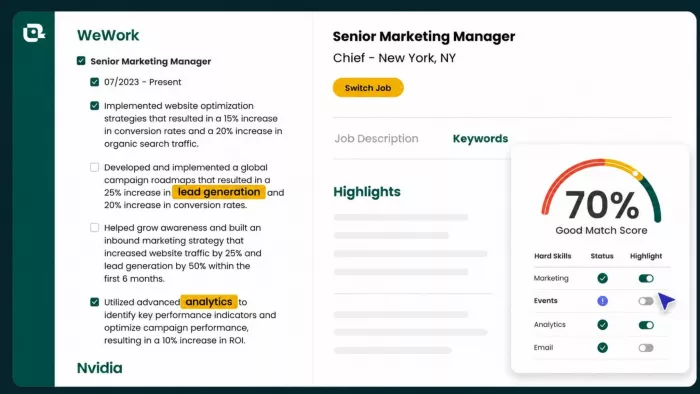
Teal reframes the problem. Most tools treat the resume as the product; Teal treats it as one artifact inside a job search, alongside a job tracker and saved postings, with per-role match scoring. If you're deep in an active search and losing track of what you applied to and which version of your resume you sent, this is the most useful tool on the list.
The keyword matching is its core AI strength. You save a job posting and Teal compares it against your resume, showing you the gaps: which terms the posting emphasizes that your document doesn't contain. It'll also flag structural weaknesses, like bullet points with no measurable outcome.
The trade-offs are real.
The interface carries a lot of information at once and can feel busy, particularly on a first visit. And design is not the priority. Templates are clean and functional but visually similar to each other. If you're in a creative field where the document itself is a work sample, this isn't your tool.
Pros and Cons:
| Pros | Cons |
| Makes managing dozens of applications far easier with resume versions linked to saved jobs. | The dashboard feels crowded and takes time to learn. |
| Keyword analysis explains what the job description emphasizes instead of simply giving a score. | Design choices are limited compared with dedicated resume builders. |
| Free plan is one of the few that doesn't cripple exporting or resume creation. | Most AI writing and optimization features require Teal+. |
| Excellent if you customize every resume instead of sending the same version everywhere. | Billing every 30 days can make the long-term cost easy to underestimate. |
Pricing: Teal has one of the strongest free plans, including unlimited resumes and downloads. Teal+ is available for $13/week, $29 per 30 days, or $79 every 90 days. Since billing is based on 30-day cycles rather than calendar months, remember you'll effectively be billed 13 times per year if you stay subscribed continuously.
Verdict: Best-in-class if your problem is search management. Overkill if you just need one good resume.
3. Rezi: best for ATS and keyword optimization
Who it's for: Applicants targeting competitive, high-volume corporate roles where keyword alignment does real work.
Rezi is the most single-minded tool here, and that focus is a strength. Its AI Keyword Targeting feature takes a job description and identifies the terms worth including. Then it goes further and drafts bullet points that incorporate them naturally, so you're accepting or lightly editing suggestions rather than awkwardly stuffing keywords into sentences you've already written.
That last detail matters more than it sounds. Several competitors will tell you which keywords you're missing and then leave you to bolt them on yourself, which is tedious and usually produces stilted writing.
Rezi closes the loop.
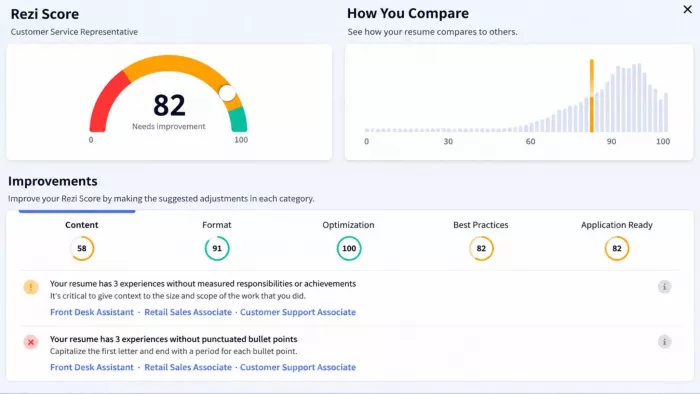
It also runs a live scoring system across content, formatting, optimization, and best practices, with specific suggestions attached to each. Unlike a bare percentage score, these are actionable: it tells you what to fix.
The weaknesses are the free plan and the templates. Free users get one resume and three downloads, with scoring and keyword targeting largely restricted. And the templates are uniformly conservative: clean and ATS-safe, but with little visual range.
Pros and Cons:
| Pros | Cons |
| Rewrites bullets using missing keywords instead of only telling you what to add. | The free plan locks the features that make Rezi worth using. |
| Live optimization gives actionable suggestions rather than a vague ATS percentage. | Templates prioritize ATS compatibility over visual appeal. |
| Lifetime license is excellent value for people who job hunt periodically. | Less useful for creative industries where presentation matters. |
| Produces consistently strong ATS-friendly wording with minimal editing. | Feels more like an optimization tool than a complete resume builder. |
Pricing: Rezi's free plan lets you create one resume with up to three downloads. Rezi Pro costs $29/month, while a $149 lifetime licence removes recurring fees. If you expect to update your resume over several years, the lifetime plan quickly becomes the better long-term value.
Verdict: If ATS optimization is your bottleneck, this is the specialist. Buy the lifetime plan or don't buy at all.
4. Resume.io: best for a guided, hand-held process
Who it's for: People who freeze in open-ended interfaces and want to be asked questions instead.
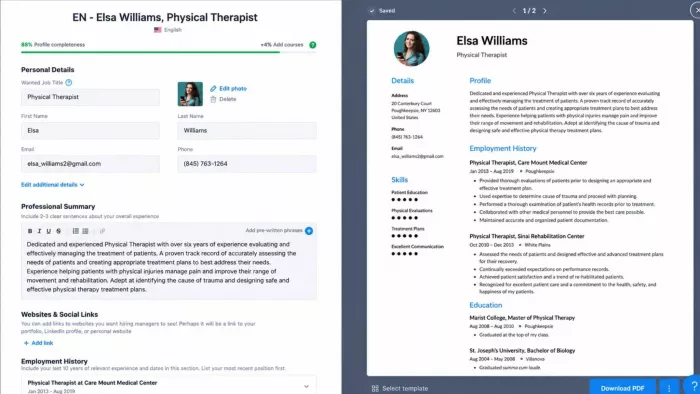
Resume.io's approach is conversational. Its AI assistant asks about your background, then your education and goals, and assembles a resume from your answers. Each completed step triggers the next prompt, which means you're never sitting in front of an empty field wondering what to write. For anyone who finds resume writing paralysing, that guided rhythm is worth a lot.
The template library is stronger than expected: varied in layout and structure, with adjustable colour schemes rather than locked palettes. The interface is clean, with live preview so changes appear as you make them.
The problem is the paywall, and it's a significant one.
Free users can export in TXT format only. PDF and DOCX, the formats every employer actually wants, require payment. You can complete an entire resume and find yourself unable to obtain a usable file. There's also no free trial of the paid tier, only a discounted first week that then auto-renews at a much higher rate on a four-week cycle.
The keyword feature is also half-implemented: the AI identifies terms worth adding but leaves you to insert them manually, which reintroduces exactly the friction the guided flow was meant to remove.
Pros and Cons:
| Pros | Cons |
| Guided workflow removes the pressure of staring at a blank page. | Free users cannot download a usable PDF or DOCX. |
| Live preview makes formatting changes easy to judge. | Keyword suggestions still need to be inserted manually. |
| Templates are modern and easy to customize. | Account creation is required before testing the builder. |
| Good option for users who prefer answering questions instead of writing sections. | Trial pricing automatically converts into a more expensive recurring subscription. |
Pricing: Resume.io starts with a 7-day trial at a low introductory price, after which it automatically renews on a four-week billing cycle unless cancelled. Longer-term six-month and annual plans are also available. Because pricing and promotions vary by region, check the current plan before entering payment details.
Verdict: A pleasant building experience wrapped around a hard paywall. Excellent if you've decided to pay; frustrating if you were hoping to test it properly first.
5. ResumeCoach : best for testing without commitment
Who it's for: People who want to see a finished resume before creating an account.
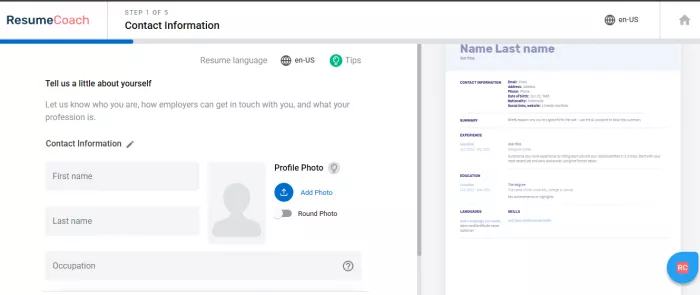
ResumeCoach's best decision is letting you start immediately. No sign-up, no email. Pick from around twenty templates and begin. For anyone tired of handing over an email address to evaluate software, that's a genuine courtesy.
A useful and underrated feature: some templates are labelled "European format," with structural differences from the standard US layout. If you're applying across regions, this saves real guesswork about local conventions.
The AI assistant is capable rather than clever. It generates full sentences and suggests skills; keywords get inserted with a click. It handles the writing competently but doesn't offer job-description matching or role-specific tailoring.
The same paywall problem applies. Building is free; downloading in a usable format is not. Free export is TXT only, and you'll be prompted to sign up and then to pay at the point of download.
Pros and Cons:
| Pros | Cons |
| Lets you start building immediately without creating an account. | Downloading a professional PDF requires payment. |
| Supports both US and European resume formats. | AI writing is fairly basic compared with stronger competitors. |
| Helpful sentence suggestions speed up writing for beginners. | No meaningful job-description matching or ATS optimization. |
| Easy way to preview templates before deciding whether to subscribe. | Introductory pricing renews into a recurring four-week subscription. |
Pricing: ResumeCoach offers a free plan that lets you build a resume and download it as TXT. Premium unlocks PDF downloads, unlimited tailored resumes, advanced AI features, and a 14-day money-back guarantee. After the introductory trial, the subscription automatically renews every 28 days, so it's worth setting a reminder if you only need it short term.
Verdict: Best free preview on this list. Just understand that the finish line is behind a paywall.
6. Enhancv: best for improving a resume you already have
Who it's for: Experienced professionals with existing material who want it sharpened and better designed.
Enhancv is the most design-conscious tool here, and if the visual quality of your resume matters (consulting, design, marketing, senior roles where the document signals polish), it shows.
But the AI has a specific dependency worth understanding before you start. The onboarding asks whether you have an existing resume. Answer no, skip the LinkedIn import, and you'll be handed an empty template. The AI improves content; it does not originate it. You must populate the resume yourself before most AI features become available.
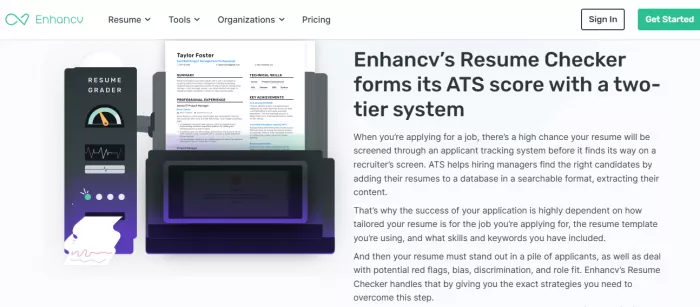
Once you have content in place, the tools are good. The assistant strengthens existing bullet points and generates a summary tailored to a specific job ad. It also produces an ATS score from 0–100 measuring your resume against a job description. The catch: on the free plan you see the number but not the recommendations behind it. A score without guidance is just anxiety with a percentage attached.
Pros and Cons:
| Pros | Cons |
| Produces some of the most polished-looking resumes in this comparison. | AI is designed to improve existing content, not generate it from scratch. |
| Strong at rewriting weak bullet points into more compelling achievement statements. | Seeing an ATS score without seeing the fixes makes the free version less useful. |
| Flexible layouts work well for professionals with longer careers. | Free exports include watermarks and trial restrictions. |
| Ideal when presentation matters as much as content. | Subscription pricing is higher than several competitors. |
Pricing: Enhancv offers a 7-day free trial. Paid plans start at $29/month, with lower effective monthly pricing available on longer billing cycles. The trial is useful for evaluating the editor, but most advanced AI and export features require a paid subscription.
Verdict: Excellent polish tool, poor starting tool. Bring an existing resume or a complete LinkedIn profile, or you'll get nothing from the AI.
7. Novorésumé: best for first-time resume writers
Who it's for: Students and recent graduates who want a clean, unintimidating process.
Novorésumé's strength is restraint. The interface is uncluttered and easy to navigate, which matters enormously when you're writing your first resume and every additional setting is one more thing to worry about.
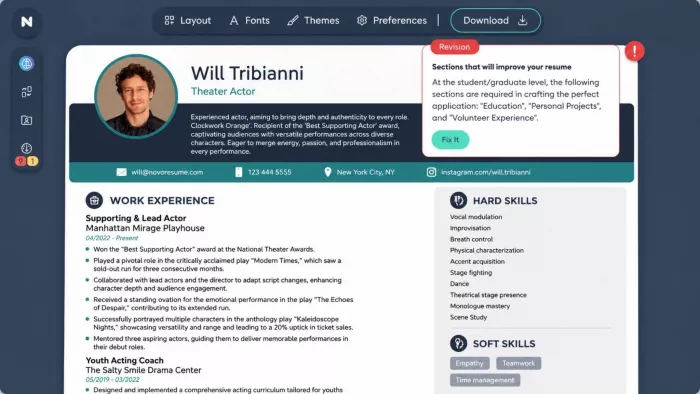
Its AI assistant is the standout. It works as a chat interface rather than a set of buttons. You describe what you did in plain language and it produces bullet point options; you insert the ones you like. This suits inexperienced writers well, because it doesn't assume you already know resume conventions. As with any AI, output quality tracks input quality: a vague prompt produces a vague bullet.
Two friction points to know about. Resume parsing is inconsistent. Multi-column PDFs in particular may not transfer cleanly, with skills and experience bullets dropping out and requiring manual re-entry. And once you've entered your details, there's no obvious way to re-upload or reuse them elsewhere, which makes revisiting your resume months later more painful than it should be.
Pros and Cons:
| Pros | Cons |
| Chat-style AI feels natural for users writing a resume for the first time. | Free users are limited to one single-page resume. |
| Clean interface avoids overwhelming beginners with unnecessary options. | Resume imports struggle with complex multi-column PDFs. |
| Good prompts help users turn projects and internships into resume bullets. | Reusing previously entered information isn't straightforward. |
| Encourages simple, ATS-friendly layouts by default. | Advanced templates and customization require Premium. |
Pricing: Novorésumé's free plan supports one single-page resume. Premium costs $21.99/month, $39.99 per quarter, or $139.99/year. Unlike many competitors, the Premium plans are one-time payments for the selected period rather than automatically renewing subscriptions, making the pricing easier to predict.
Verdict: The friendliest entry point in this roundup. Less suitable if you need to maintain several tailored resume versions.
How to choose the right one for your situation
Rather than crowning a single winner, here's the practical mapping:
You're starting from nothing. Kickresume. It's the only tool here that produces a substantive first draft from a job title alone.
You're applying to a lot of roles. Teal. The job tracker and per-posting keyword matching are built for volume.
You're targeting competitive corporate roles. Rezi. The keyword targeting is the sharpest implementation available, and the lifetime plan removes ongoing cost.
You already have a decent resume and want it to look better. Enhancv. Best design output, provided you bring content with you.
It's your first resume ever. Novorésumé. Lowest friction, most patient interface.
You want to be guided step by step and are willing to pay. Resume.io.
You want to see a finished resume before signing up for anything. ResumeCoach.
A note for readers in India and other non-US markets: most of these tools default to US resume conventions. One page, no photograph, no date of birth, no marital status. If you're applying to Indian firms, particularly in traditional sectors, local expectations may differ, and a two-page CV with additional personal details can be normal. ResumeCoach's EU/US format toggle is helpful here, but in every case, review the output against local norms rather than assuming the default is right for your market.
How to use AI resume builders without sounding like a robot
The tools are only half the equation. Here's how to keep the output from reading like every other AI resume in the pile.
Feed it more than a job title. This is the single change with the biggest payoff. A tool given only "Marketing Manager" produces generic marketing-manager copy. A tool given your existing resume and LinkedIn profile plus the specific job ad produces something recognisably yours. Always import if the option exists.
Add the numbers yourself. AI cannot know that you reduced churn by 12%, managed a ₹40 lakh budget, or trained nine people. These specifics are what separate a credible resume from a plausible one, and they're the exact thing recruiters scan for. Every AI-generated bullet should be reviewed with one question: what number belongs here?
Rewrite the summary in your own voice. AI summaries are consistently the weakest output: smooth, competent, and completely interchangeable. Rewrite yours to state your role and years of experience, plus one specific achievement.
Use keyword suggestions with judgment. If a posting asks for "stakeholder management" and you've done it, use the phrase. If it asks for a tool you've never touched, leave it out. Keyword stuffing is transparent to any human reader, and being caught overstating on a resume is far more costly than missing a term.
Delete the filler. AI tends toward phrases like "spearheaded initiatives" and "results-driven professional." These say nothing. Replace them with what you actually did.
Read it aloud before you send it. The fastest test available. If a sentence doesn't sound like something you'd say in an interview, it doesn't belong on the document you'll be interviewed about.
Mistakes that quietly kill AI-written resumes
Sending the same AI resume everywhere. The main advantage of these tools is that tailoring becomes cheap: regenerating a targeted version takes minutes. Not using that is wasting the tool.
Trusting the ATS score. These are internal metrics invented by the vendor. They're a rough directional signal, not a reading from the employer's actual system. Aim for relevance, not a number.
Choosing design over parseability. Heavy graphics, text inside images, unusual multi-column layouts, and text in headers or footers can all parse badly. If a tool's own import feature struggles with two-column resumes (and several do), assume some employer systems will too.
Letting AI describe experience it doesn't have. If you accept a generated bullet you can't defend in an interview, you've created a problem for your future self. Every line should be something you can talk about for two minutes.
Missing the auto-renewal. Multiple tools here run cheap trials that convert to substantially higher four-weekly billing. Set a calendar reminder the day you subscribe.
Skipping the human read. Have one person you trust read the final version. They will catch things no scoring algorithm will: a claim that reads oddly, a gap that needs explaining. Or a tone that doesn't match the role.
Final thoughts
The most useful way to think about every tool on this list: they're extremely good at the parts of resume writing that are tedious, and largely incapable of the parts that matter most.
Structure, formatting, phrasing, keyword alignment: genuine time savings, and worth using. Knowing which of your accomplishments will land with a hiring manager for this specific role, and how to say it in a way that sounds like a person rather than a template. That remains yours.


Comments