
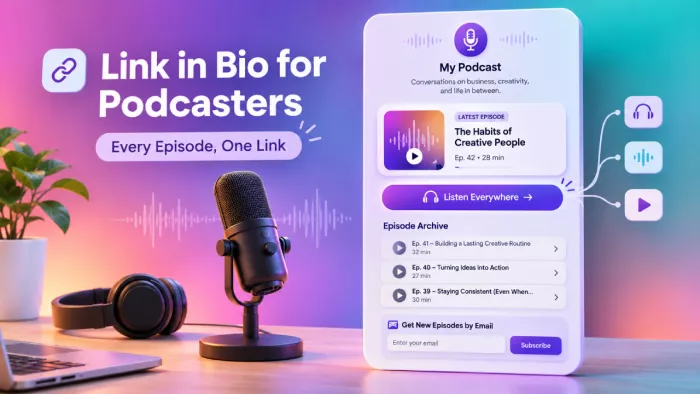
A podcast lives on Spotify, Apple Podcasts, YouTube, Amazon Music, and a dozen smaller apps at the same time, yet every social profile hands out exactly one clickable link. Point that link at Spotify and the Android listener who uses Overcast taps into nothing, while the YouTube crowd never sees the video version at all.
A link in bio for podcasters closes that gap by swapping the single app link for one page that routes any listener to any episode, in whatever app they already open. The pages worth building do more than park the latest episode on top. They keep the back catalogue reachable and turn a one-off tap into a subscriber the show actually owns.
What a Link in Bio Does
A link in bio page is a mobile landing page that sits at one fixed URL and holds every link a podcast needs. The address never changes, so the link in an Instagram or TikTok profile stays put while the content behind it updates on its own schedule.
For a podcast the job is narrow. It gets a listener from a social profile to the right episode in the right app with as few taps as possible, and everything else on the page serves either that path or the one that follows it, which is keeping the listener around after they press play.
The reason it exists at all is the single-link limit. Instagram and TikTok each allow a single profile link, and the other networks are no different, so a show publishing across four platforms cannot cram four destinations into that one slot. The page is where that impossible choice quietly disappears.
The One-Link Problem
Most podcasters handle the single-link limit badly. They pick one app, usually Spotify or Apple Podcasts, and funnel everyone there. That link is dead weight for anyone who listens elsewhere, and on any given show a sizeable chunk of the audience listens elsewhere.
The second habit does more damage. Swapping the bio link every time an episode drops, paired with a caption that reads "new link in bio," teaches the audience that the link is a moving target. Someone who taps a stale link once learns not to bother next time, and that reluctance compounds with every drop.
The damage shows up in specific, countable ways:
• An Apple Podcasts link opens nothing usable on most Android phones, so a whole platform's worth of potential listeners hits a dead end before they ever press play.
• A Spotify-only link ignores the committed fans on Overcast, Pocket Casts, and other independent apps, the exact people most likely to subscribe if handed the door.
• A weekly link swap silently breaks every earlier post that pointed at the previous episode, so months of past promotion quietly turn into dead ends.
• A single destination hides the back catalogue entirely, which means a clip about an older topic has nowhere relevant to send the person it just hooked.
None of these failures are loud. There is no error message and no bounce report, just a slow leak of listeners who tapped once, found friction, and never came back.
Why Every Episode Matters
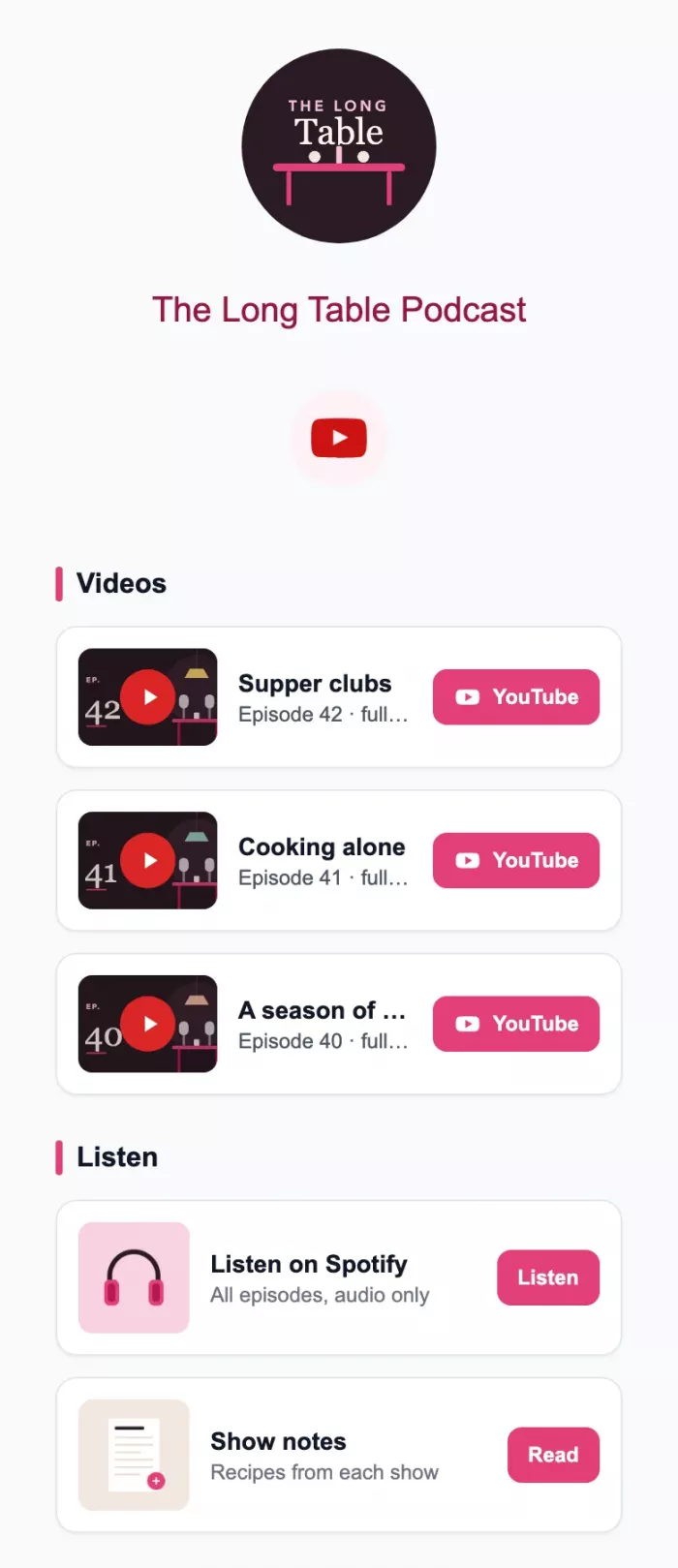
A podcast is not a feed where only the newest post counts. An episode from eight months ago can be the single best entry point for a listener who found the show through a clip about that exact topic, and sending that person to an unrelated new episode wastes the match.
The latest-episode-only setup assumes listeners arrive in step with the publishing calendar. They do not. Someone discovers the show on a Tuesday through a reel featuring a guest from last spring, taps the bio link, and lands on a fresh episode that has nothing to do with why they came.
A page built around every episode treats the back catalogue as what it really is, a library that keeps earning plays long after release. The newest episode still takes the top slot, and the archive sits one tap below, so discovery stops depending on lucky timing.
What to Put on the Page
A podcast bio page has a small set of jobs, and each element on it should map to one of them. The table below lays out the core pieces and what each is there to do.
| Element | What it does |
| Latest episode | Gives a fresh clip somewhere to land and shows the show is active |
| Listen-everywhere link | Routes each listener to their own app from a single button |
| Episode archive | Keeps the back catalogue reachable for topic-led discovery |
| Email signup | Converts a borrowed follower into an owned subscriber |
| Sponsor or support | Holds Patreon, merch, and a sponsor form without crowding the top |
Order matters more than the list itself. The first screen a thumb sees should carry the listen action and nothing that competes with it. Social icons, support links, and secondary buttons belong lower down, where they catch the people who have already decided to stick around.
Linking Every Listening App
The safe default is to link every major app rather than guess where the audience listens. Removing the guess is the whole point, because a listener who spots their own app does not have to think before tapping.
A handful of destinations cover almost everyone:
• Spotify and Apple Podcasts hold the bulk of listeners for most English-language shows, so each earns its own dedicated button rather than sharing one.
• YouTube matters more every year as video podcasts grow, and for some shows it has become the main home rather than a secondary upload.
• Amazon Music and the smaller apps each cover a slice that looks tiny on its own but adds up to real numbers across a full audience.
• A visible RSS option serves the committed listeners on independent apps, who otherwise have no clean route into the show at all.
Listing all of them is not clutter when they sit behind one smart button or a tidy row. It is the difference between meeting a listener where they are and asking them to switch apps for the privilege of hearing the show.
Featuring the Latest Episode
The newest episode earns the top slot because most taps arrive seconds after someone watches a clip or hears a mention. A clearly labelled featured block, carrying the episode number and title, confirms to that person that they have landed in the right place.
The practical move is to keep that block in a fixed position and change only its contents each week. The rest of the page stays still, so it never feels rebuilt, and the single thing that updates is the one thing that should.
Consistency across platforms makes the tap feel automatic. When YouTube is the first button and the clip caption promises the full episode on YouTube, the listener finds exactly what was advertised, and that match is what turns a one-time tap into a habit.
Building an Episode Archive
The archive is the part that separates a real podcast hub from a plain list of links, and it is the piece the show's promise actually rests on, since every episode being reachable is the entire goal.
The challenge is surfacing a back catalogue without burying the listen buttons under fifty entries. A few approaches handle this well:
• An auto-updating episode list pulled straight from the show's RSS feed, which keeps the archive current with no manual editing each week.
• A single button linking to a hosted episode index or the show's own site, where the full catalogue lives behind one clean destination.
• A short set of hand-picked starter episodes for newcomers, chosen to represent the show well rather than to list everything it has ever published.
• A search or topic grouping on tools that support it, so a listener who arrived for one subject can branch into related episodes without hunting.
Which approach fits comes down to the tool, but the principle holds across all of them. A new listener should reach an old episode without leaving the page or scrolling past a wall of links to get there.
Smart Links and Auto-Routing
A smart link is the cleanest answer to the multi-app problem. Rather than a row of platform buttons, a single smart link reads the listener's device and opens the episode in their preferred app on its own. Services built for this, pod.link among the best known, generate one URL per show or per episode that quietly covers Apple Podcasts, Spotify, Overcast, and the rest from a single tap.
The trade-off is control. A smart link hands the routing decision to the service, which is usually what a listener wants anyway, but a show trying to grow one specific platform may want a button it controls directly.
Plenty of pages use both. A smart link covers listen-everywhere for the general audience, and a separate explicit button pushes the one platform the show is actively building, such as YouTube for a video-first podcast.
Capturing Emails
A social following is borrowed, not owned. An algorithm shift or a locked account can thin out reach overnight, and the audience leaves with it. Building an email list gives podcasters a direct way to stay connected with listeners, which is why a signup belongs on the page even though it is not a listen action.
The ask has to be low-friction and specific. A line like "get every new episode in your inbox" works because it names the payoff in plain terms, where a vague "subscribe to our newsletter" asks for effort without saying what the listener gets back.
The signup does not need the very top slot, but it should sit on the first or second screen, in the natural path of someone who already tapped through to listen and liked what they heard enough to want more.
Sponsors and Support
Once the listen path is clean, the page can start carrying the money. Sponsor inquiry forms, membership links, merch, and live-show tickets all have a place, as long as they sit below the listen section instead of elbowing it aside.
A sponsor inquiry link does quiet, useful work. It gives potential advertisers a clear route to reach the show, and on tools with per-link tracking it doubles as hard click data to show those advertisers later.
Membership and Patreon links reward the fans who have already decided the show is worth paying for. That group is a small share of any audience and by far the most valuable one, so giving them an obvious button costs nothing and occasionally pays the hosting bill.
Choosing a Tool
The market splits into general link-in-bio tools and podcast-specific ones. General tools are flexible and familiar, while podcast-first tools ship with the features a show actually needs, such as RSS-fed episode lists and embedded players. The table below sorts the realistic options.
| Tool type | Strengths | Watch for |
| General (tieup.io, Linktree, Beacons) | Fast setup, broad templates, familiar interface | Thin podcast features, manual archive |
| Podcast-first (UniLink, hoo.be, Pod1) | RSS episode feeds, embedded players, smart links | Smaller ecosystems, fewer templates |
| Smart link service (pod.link) | Auto-routing to any app from one URL | A routing link, not a full page |
| Own site or Carrd | Full control and owned traffic, no limits | More setup and upkeep |
The honest answer is that the right tool tracks how far the show wants to go. A new podcast is well served by a free general tool that gets a page live in an afternoon. A show chasing subscribers and sponsors gets far more from a podcast-first page with analytics and an archive that updates itself.
Tracking What Works
A bio page is only worth the upkeep if its performance can be measured, and most tools built for this include per-link tracking. Understanding link-in-bio analytics helps podcasters look beyond total visits to see which listening platforms, episodes, and signup links actually attract clicks, making it easier to decide what deserves more attention.
Per-link data answers questions podcasters usually settle by guessing. A few readings surface again and again once the clicks add up:
• Which listening app the audience genuinely prefers, which often contradicts the one the host assumed and justifies reordering the buttons.
• Whether the archive gets real use or sits untouched, which decides how prominently the back catalogue deserves to appear.
• Whether the email signup pulls its weight or merely occupies space a listen button could be using instead.
• Which social platform sends the most engaged taps, once UTM tags separate one source from another.
Those UTM tags are what extend the picture from the page back to the feed. A tag such as utm_source=instagram on each outbound link reveals which platform is actually driving clicks, so promotion effort can follow the traffic that already exists rather than the platform that simply feels busiest.
Read together over four to six weeks, the numbers stop being trivia and start being instructions. The page that results is shaped by how the audience behaves, not by how the host imagined they would.
The Conclusion
A link in bio for podcasters is not a nice-to-have list of links. It is the connective tissue between a social audience that lives inside a feed and a back catalogue scattered across a dozen listening apps. Shows that treat the page as a funnel, with one clear path to listen and one to subscribe, pull more out of the same promotion than shows that treat it as a directory.
The setup is quick and the upkeep is light once the structure holds. The decision that counts is what the page is for: a single tap to the newest episode, or a door to everything the show has ever made. Built for the second, it keeps sending listeners to episodes long after the clip that brought them stops circulating.


Comments