Top 7 Link in Bio Tools for Photographers (2026): Tested, Priced & Compared

Parveen Verma
Your photographs already did the hard part. Someone stopped scrolling. They pinched to zoom on the light in that third frame. They tapped your profile, read your bio, and hovered over the one clickable link you're allowed.
That link is the narrowest point in your entire client pipeline, and for most photographers, the least considered part of the business. A gallery link that opens a 40-megabyte page. A Linktree with eleven buttons and no hierarchy, or a contact form buried three taps deep. Every one of those is a booking that quietly didn't happen.
This guide covers the seven link in bio tools that actually make sense for photographers in 2026. Not the generic creator list. These are the ones built for image-heavy pages, print sales, inquiry capture, and client galleries.
Key Takeaways
Best overall for photographers who sell: brandID. One free page handles presets, print vouchers, tips, and paid bookings without a separate storefront.
Speed is a revenue metric. A 0.1-second mobile improvement lifted retail conversions 8.4% in Deloitte and Google's study across 37 brands. Photographers push the heaviest pages in the category.
"Free" often isn't. Linktree takes 12% of digital sales on its free plan; Pixieset's free tier takes 15%. On a $400 print order, that's real money.
Your bio link is a bridge, not a destination. Social gets the tap; Google and your website usually close the booking.
Match the tool to your niche. Wedding shooters need inquiry forms, print sellers need low fees, and travel shooters need a fast, beautiful mobile page.
Why Photographers Need a Different Link in Bio Tool
Most link in bio roundups are written for coaches and podcasters. Photographers have three constraints those creators don't.
Your pages are heavy. A link page for a copywriter is text and buttons. Yours is a hero image over a portfolio grid, maybe a reel. That weight has a measurable cost: Google and SOASTA's modeling found the probability of a mobile visitor bouncing rises 32% as load time grows from one second to three, and 123% by ten seconds. A tool that doesn't aggressively compress and lazy-load is actively losing you inquiries.
Your buying cycle is long and multi-channel. Zola's 2026 First Look Report, surveying more than 11,500 engaged couples, found 87% had made a wedding planning decision based on something they saw on social media, with Pinterest still the most widely used platform at 77% and TikTok climbing from 15% to 25% in a single year. But those couples click through to a photographer's website before deciding. Separately, in a survey of 330+ wedding photographers run by educator Maddie Mae, Google Search, not Instagram, came out as the number one source of inquiries.
The honest read: your bio link's job is to move someone from a platform you don't control to something you do (your site, your inquiry form, your email list) in as few taps as possible.
You sell more than services. Prints, albums, presets, mini-session slots, gift vouchers, licensing. A tool that only lists links forces you into a second checkout, and transaction fees compound fast at photography price points.
A link-in-bio page is most useful when it acts as a bridge rather than the final destination. Photographers who rely heavily on Instagram or TikTok still benefit from having a website beyond social media where potential clients can explore a fuller portfolio, understand services, view pricing or packages, and make an inquiry without being distracted by a social feed.
How We Evaluated These Tools
Seven criteria, applied identically to every tool:
Image handling. Compression and responsive sizing, plus whether you can build a gallery block rather than a button stack.
Real cost. Subscription plus transaction fees plus processing. The sticker price is rarely the number that matters.
Inquiry capture. Forms, booking widgets, email collection: what turns a tap into a lead you own.
Monetization depth. Can you sell a preset pack, a print and a session deposit from one page?
Design control. A templated page undercuts a premium rate.
Analytics. Per-link click data, traffic sources, pixel support.
Ownership. Custom domain and data export, plus how exposed you are if the platform changes its rules.
Analytics become more valuable once you look beyond total clicks. Tracking which portfolio, booking, print-store, or contact links people actually use can reveal what visitors are interested in and which platforms are sending the most valuable traffic. A closer look at link-in-bio analytics can also help photographers distinguish casual profile visits from traffic that is genuinely moving toward an inquiry or sale.
Pricing was checked against each vendor's live pricing page in August 2026.
The 7 Best Link in Bio Tools for Photographers: Compared
| Tool | Standout for photographers | Free plan | Sells products? | Real cost | Best for |
| brandID | Full storefront + bookings on a free page | Yes (full features) | Yes: digital, tips, subscriptions, bookings | Free with 5% fee (own gateway); $9/mo drops it to 0% | Selling presets, prints, sessions |
| Milkshake | Swipeable card-based mini-site, built on your phone | Yes | No | $2.99–$8.33/mo | Phone-first visual storytelling |
| Later Link in Bio | Turns your Instagram grid into a clickable portfolio | No | Via external links | From $18.75/mo billed yearly | When your feed is the portfolio |
| Taplink | Inquiry forms, quizzes, booking, payments | Yes (Basic) | Yes | Pro ~$3/mo; Business ~$4.50–$6/mo | Wedding & portrait lead capture |
| Carrd | Total design control on a one-page site | Yes | Yes (Pro Plus) | $9–$49 per year | Fine art & commercial portfolios |
| Linktree | The recognized default, fastest setup | Yes | Yes (with fees) | $0–$35/mo; 12% seller fee on free | Simple, no-commerce hubs |
| Pixieset | Galleries, store, and site in one ecosystem | Yes (3GB, 15% commission) | Yes | Free; paid tiers from ~$10/mo | Client-gallery-driven studios |
1. brandID: Best Overall for Photographers Who Sell
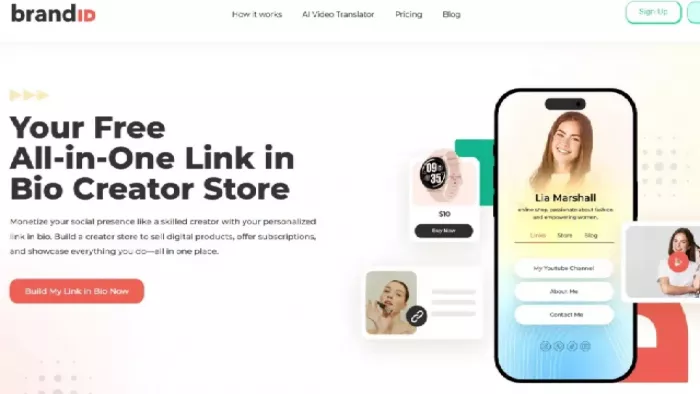
Best for: photographers monetizing beyond the shoot. Presets, LUTs, digital guides, print vouchers, mini-session deposits, tips.
brandID treats the bio link as a storefront rather than a menu. For a photographer, that collapses a stack usually costing $50+/month: link page, checkout, booking tool, and email platform in one URL.
The value is in the combinations. A landscape photographer can sell a $29 preset pack, take print pre-orders and accept tips on one page. A family photographer can run a bookings block for fall mini-sessions with calendar sync while capturing emails for the waitlist, then print a QR code for the venue. Everything reports into one dashboard with per-product data plus Google Analytics and Meta Pixel support.
Key features:
- Sell presets, LUTs, guides, vouchers and other digital products directly from the page.
- Take session deposits or paid bookings without sending people through several different links.
- Add tips, subscriptions or email sign-up forms alongside your photography services.
- Sync bookings with your calendar, so clients can see available dates before contacting you.
- Create discount codes for mini-sessions, seasonal offers or product launches.
- Connect tools such as Google Analytics and Meta Pixel to see where sales and inquiries are coming from.
- Use a custom domain or create QR codes for business cards, exhibitions and printed material.
Pros:
- It can replace several separate tools if you sell products as well as photography services.
- Clients can discover your work, book a session and pay from the same page.
- It works especially well for photographers selling presets, workshops, vouchers or mini-session slots.
- The analytics are more useful than basic click counts because you can see which products or offers attract attention.
Cons:
- There is a lot to set up, especially if you only wanted a simple page with a few links.
- Adding too many products, forms and offers can make the page feel busy.
- It may be unnecessary for photographers who already use a separate booking system and online store.
- It is not a complete replacement for a gallery platform with print-lab fulfilment.
Pricing: Free with full feature access. The free plan takes 5% when you connect your own Stripe or PayPal (10% via brandID's gateway). Creator at $9/month drops that to 0% with your own gateway; Turbo Creator at $15/month lowers the built-in gateway fee to 3%.
2. Milkshake: Best for Phone-First Visual Storytelling
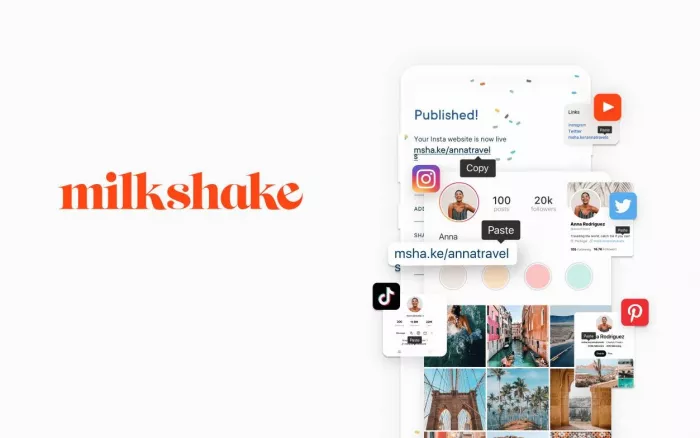
Best for: travel, lifestyle, and editorial photographers who edit and publish from their phone.
Milkshake abandons the button-list format. You build swipeable cards (cover image, about, services, gallery) that read like a horizontal magazine, much closer to how you already think about sequencing images. It's mobile-only, which is both the point and the limitation: you can build a page on the drive home from a shoot, but not from your desktop while culling.
Key features:
- Build the page using swipeable cards instead of a standard list of buttons.
- Create separate cards for your portfolio, services, about section, contact details and social links.
- Design and update the whole page from your phone.
- Use image-focused layouts that work well on smaller screens.
- Add email sign-ups, contact options and selling features depending on the plan.
- Remove Milkshake branding and use a custom domain on selected paid plans.
Pros:
- The card layout gives your photographs more space and feels less like a typical link page.
- It is quick to update when you are travelling or working away from your computer.
- The swipe format suits photographers who like presenting their work as a visual story.
- You do not need much design experience to create something that looks polished.
Cons:
- Managing everything from a phone can become frustrating once the page grows.
- Important links may be missed if they are placed several cards into the sequence.
- It is better suited to a short introduction than a large portfolio.
- Photographers who want detailed SEO controls or advanced layouts may find it limiting.
Pricing: Free with Milkshake branding on an msha.ke URL. Lite $2.99/month removes branding. Pro $6.99/month or $59.99/year adds mailing list integration. Pro Plus runs about $8.33/month annually and unlocks custom domains. Billing runs through the App Store or Google Play.
3. Later Link in Bio: Best When Your Feed Is Your Portfolio
Best for: photographers posting consistently to Instagram who want every image clickable.
Instead of a separate page, Later mirrors your Instagram grid and makes each post tappable. Someone sees the engagement session on your feed, taps it and lands on that blog post, gallery or inquiry form. That's the most natural mapping between what people saw and where they go. You can attach up to five links to a single feed post or Reel, plus one per TikTok post.
Key features:
- Turn your Instagram-style grid into a page where each image can link somewhere different.
- Send visitors from a post directly to the related gallery, blog article, product or booking page.
- Add links to Instagram posts, Reels and selected TikTok content.
- Place featured links, banners and buttons above the grid.
- Collect email addresses and connect supported mailing-list tools.
- Track which posts receive clicks and which content sends people to your website.
- Manage social scheduling and your bio page from the same dashboard.
Pros:
- People can click the exact photograph that caught their attention instead of searching through your website.
- It makes sense for photographers who already use Instagram as their main portfolio.
- Older posts can continue sending visitors to galleries, articles or booking pages.
- The click data can show which type of work attracts actual inquiries, not just likes.
- It saves time if you already use Later for social scheduling.
Cons:
- The page depends heavily on how good and current your social feed looks.
- It may feel expensive when you only need the bio-page feature.
- The design options are more limited than a proper one-page website builder.
- A photo grid is not always the quickest route for someone who simply wants prices or a contact form.
- Photographers who post irregularly may end up with an outdated-looking page.
- Pricing: No free plan. Starter is $18.75/month billed yearly ($25 monthly) and includes Link in Bio, one social set, and 30 scheduled posts per profile. Growth is $37.50/month billed yearly. Link in Bio analytics run up to a year even on Starter.
4. Taplink: Best for Inquiry Capture and Bookings
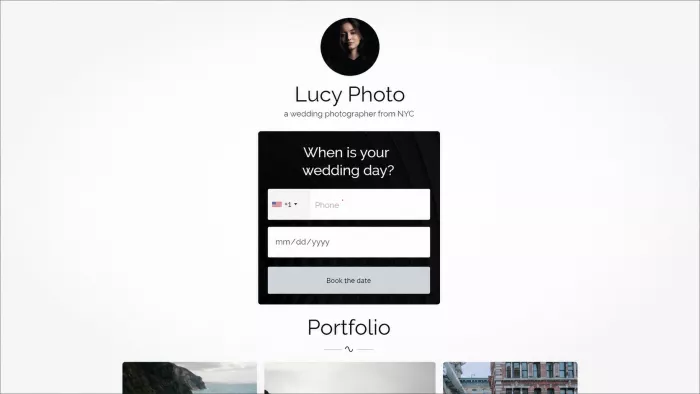
Best for: wedding, portrait, newborn, and event photographers whose main goal is a completed inquiry form.
Taplink is the most conversion-engineered tool here at the price. You build a scrolling mini-site with image sliders, price lists, FAQs, multi-step forms, and booking widgets, which is the exact sequence a couple works through before emailing you.
The multi-step form matters. Instead of one intimidating contact form, ask date, then venue, then budget range, then contact details. Deloitte and Google observed a 21.6% uplift from the first step of a lead-generation form to submission when speed improved by a tenth of a second. Form friction is where inquiries die.
Key features:
- Build a mobile landing page with images, service details, prices, FAQs and contact forms.
- Create step-by-step inquiry forms that ask for details such as date, venue, budget and contact information.
- Add image sliders, videos and package comparisons.
- Accept payments or deposits through supported payment services.
- Add appointment booking for consultations or sessions.
- Connect advertising pixels for retargeting.
- Create different language versions for destination or international clients.
- Use customer-management and automation tools on selected plans.
Pros:
- It is one of the better options for turning profile visitors into genuine inquiries.
- Multi-step forms feel easier to complete than one long contact form.
- Wedding and portrait photographers can ask relevant questions before replying to a lead.
- You can show prices, answer common questions and collect details on the same page.
- It is useful when clients usually take several visits before making a booking decision.
Cons:
- Setting up forms, packages and automations takes time.
- The page can run long if you include every service and every possible question.
- Some of the most useful business features are only available on higher plans.
- The design controls may not be enough for photographers with a specific visual identity.
- It still does not replace a full system for contracts, invoices and client galleries.
Pricing: Free Basic plan with unlimited links. Pro runs roughly $3/month on yearly billing. Business, which unlocks payments, CRM, automations and custom domains, works out to about $4.50–$6/month depending on whether you buy 3, 6, or 12 months. Taplink sells prepaid periods rather than auto-renewing subscriptions; when a period lapses you drop to free and paid blocks switch off.
5. Carrd: Best for Fine Art and Design-Led Portfolios
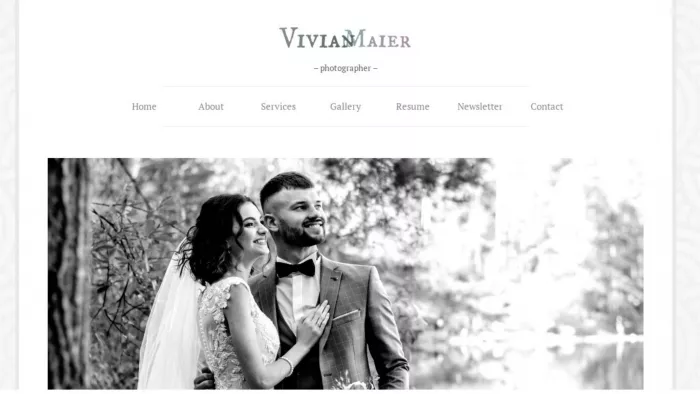
Best for: fine art, architectural, and commercial photographers who want the page to look like an extension of the work.
Carrd isn't strictly a link in bio tool. It's a one-page site builder, which is why it works here. You get near pixel-level control over type, spacing and layout, plus 264+ responsive templates to start from. If your rate depends on looking like a studio rather than a creator, this gets you there.
It also charges 0% commission on sales, which matters at photography price points. A $600 print order on Carrd Pro Plus costs the annual fee and Stripe's cut; the same order on Linktree's free plan costs $72 in seller fees alone.
Key features:
- Create a complete one-page website instead of a simple list of links.
- Control fonts, spacing, image placement, section order and overall layout.
- Add sections for selected work, services, clients, testimonials and contact details.
- Use a custom domain on paid plans.
- Add contact forms, newsletter sign-ups and booking-tool embeds.
- Connect analytics and edit page titles and search-preview information.
Pros:
- It can look like a genuine part of your photography brand rather than a standard creator page.
- The design freedom suits commercial, architectural and fine-art photographers.
- You can keep the page focused on one clear action, such as viewing a portfolio or making an inquiry.
- The yearly pricing is usually lower than many monthly link-page subscriptions.
- It is useful for building separate pages for different audiences or campaigns.
Cons:
- A good result depends on your own design choices.
- It takes longer to build than a ready-made link page.
- Booking, payments and email marketing usually require outside tools.
- It does not include native client galleries, proofing or print fulfilment.
- It is easy to spend too much time adjusting fonts and spacing instead of improving the customer journey.
Pricing: Free plan available. Pro Lite $9/year (3 sites), Pro Standard $19/year (10 sites, custom domains, forms), Pro Plus $49/year (25 sites, code embeds, payments). Those are annual figures; Pro Standard is roughly $1.60/month.
6. Linktree: Best for a Simple, Recognizable Hub
Best for: photographers who need to route traffic and have no plans to sell from the page.
Linktree remains the default for a reason: with a reported 70M+ users, visitors recognize the format instantly. Setup takes four minutes. If your bio link exists purely to send people to your site and your gallery, it does that cleanly.
The problem is commerce. Linktree raised prices in November 2025 and its fee structure is now the harshest here.
Key features:
- Add links to your website, galleries, booking page, social accounts and recent work.
- Highlight important links using different layouts or featured blocks.
- Add images, video and selected embedded content.
- Create a QR code for printed material or in-person events.
- Track page visits and link clicks, depending on the plan.
- Connect common social, email and commerce services.
Choose from ready-made themes without designing the page yourself.
Pros:
- Most visitors already understand how it works.
- You can create a usable page in a few minutes.
- It is a practical choice when you only need to send people to your website, gallery and inquiry form.
- It requires almost no maintenance.
- The large number of integrations makes it easy to connect tools you may already use.
Cons:
- The page can look almost identical to thousands of other profiles.
- A long list of buttons gives visitors little direction.
- Selling through the platform can become expensive once transaction fees are included.
- Some useful analytics and branding options require a paid plan.
- It is better at sending people elsewhere than showing the quality of your photography.
- It may feel too generic for a photographer positioning themselves at the premium end of the market.
Pricing: Free ($0, with Linktree branding and no per-link analytics), Starter $8/month, Pro $15/month, Premium $35/month. Annual billing saves roughly 20%. The seller fee on digital product sales is 12% on Free, 9% on Starter and Pro, and 0% only on Premium, before Stripe's ~2.9% + $0.30.
7. Pixieset: Best for Client-Gallery-Driven Studios
Best for: working photographers already delivering galleries and selling prints who want one ecosystem instead of five tabs.
Pixieset isn't a link in bio tool in the strict sense. It's an all-in-one photographer platform. But a single-page Pixieset site makes an excellent bio link, and it's the only option here where the bio link, client gallery, print store, contract, and invoice live in one account. For a studio shooting 30+ sessions a year, that consolidation beats any design feature on this list.
Key features:
Deliver private client galleries with proofing, favourites and download controls.
Manage contracts, invoices, questionnaires and client details through Studio Manager.
Create mobile gallery apps for clients.
Set gallery passwords, download limits and expiry dates.
Use a custom domain and remove Pixieset branding on paid plans.
Keep the client journey, from booking to delivery, inside one platform.
Pros:
- It is built specifically for working photographers rather than general creators.
- Clients can view, choose, download and order photographs without moving between several platforms.
- Print fulfilment saves time because orders do not have to be handled manually.
- It is particularly useful for wedding, portrait and family photographers delivering many galleries each year.
- Contracts, invoices, questionnaires and galleries can all stay connected to the same client.
- Existing Pixieset users may not need a separate link-in-bio platform at all.
Cons:
- It is far more than most people need for a basic bio page.
- Storage can become an issue as the number and size of galleries grows.
- The commission on the free plan can take a noticeable amount from print sales.
- The website builder offers less freedom than a dedicated design platform.
- Moving a large gallery archive to another service would take considerable work.
- Photographers already using another client-gallery platform may not gain much from switching.
Pricing: Free tier includes 3GB storage, unlimited galleries and a storefront, but takes 15% commission on sales. Basic at around $10/month lifts storage to 10GB, adds a custom domain, removes branding, and makes sales commission-free. Plus (~$20/month) and Pro (~$50/month) scale storage to 100GB and 1TB. A Suite plan bundles all five apps.
Which Tool Fits Your Niche?
Wedding and elopement photographers: Taplink. Your bottleneck is inquiries, not links. Multi-step forms, date checks and price lists for around $50/year is the highest-leverage money in your marketing budget.
Portrait, family, and newborn photographers: brandID. Mini-session slots, gift vouchers and deposits are the shape of this business, and running them from the bio link removes the "let me send you a booking link" round trip that loses people.
Travel and landscape photographers: Milkshake, or Carrd if you sell prints. Your audience is on a phone, in transit, half-interested; a swipeable card site is the format that holds them.
Commercial and editorial photographers: Carrd. Art buyers judge you on visual judgment within seconds, and a stock link list quietly contradicts your rate.
Studio owners delivering client galleries: Pixieset, once volume makes context-switching expensive.
Daily Instagram posters: Later. If your grid is already your portfolio, making it clickable is the shortest path from "I love this image" to "how do I book you."
Five Rules for a Bio Link That Actually Books Shoots
1. One primary action, above the fold. Not eleven equal buttons. Decide whether the page exists to generate inquiries, sell prints or grow your list, then make that visually dominant.
2. Compress before you upload. Export hero images at 1600px wide, 70–80% JPEG quality. Given that a tenth of a second measurably moved conversions across 37 brands, your uncompressed 4000px hero is not a neutral choice.
3. Put a face on the page. Your face, not your logo. Photography is a trust purchase; clients are hiring a person to be present at something that matters.
4. Capture the email, always. Platforms change their rules; your list doesn't.
5. Check per-link click data monthly. If "Portfolio" gets 400 taps and "Inquire" gets six, the problem is your page hierarchy, not your work. Tools that paywall per-link analytics are a false economy.
Common Mistakes Photographers Make
Linking straight to a heavy portfolio site from a mobile bio. Send them to a curated 12-image page instead.
Selling on a free plan without doing the fee math. At 12–15%, a few print orders cost more than the plan that removes the fee.
Conclusion: Pick the One That Fixes Where You Actually Lose People
Here's the part most roundups skip. The right tool isn't the one with the longest feature list. It's the one that fixes the specific place your pipeline leaks. So be honest about which of these you are.
If people find you and then vanish, your problem is friction. You need Taplink or brandID: something with a form or a checkout on the page itself, so the decision and the action happen in the same moment instead of across an email thread that never gets a reply.
If people find you and you look like everyone else, your problem is presentation. Go to Carrd or Milkshake and spend a weekend on it. You are judged on visual judgment, and a stock link list quietly contradicts the rate you're trying to charge.
If you're already selling and losing margin to fees, your problem is arithmetic. Run your last twelve months of product revenue against the fee tables above. If you cleared $6,000, a 12% platform cost you $720, enough to fund every other tool here several times over. brandID's 0% Creator tier, Carrd's zero commission, or Pixieset's commission-free Basic plan all solve it.
If you're drowning in tabs, your problem is overhead, and Pixieset consolidates delivery, sales, contracts, and your public page into one account.
And if you're still building an audience, don't optimize yet. Start free, add one email capture field, and spend the energy you'd have spent comparing tools on making better work and posting it more consistently. The bio link only matters once people are tapping it.
Whichever you choose, set a reminder ninety days out. Open your analytics, look at what visitors actually clicked, and change the page to match.


Comments