Pippit AI: A Comprehensive Look at an Emerging AI Content Creation Platform



The rapid evolution of artificial intelligence has transformed the way digital content is created, marketed, and consumed. Businesses and individual creators alike are increasingly turning to AI-powered tools to keep pace with growing content demands, shorter attention spans, and the constant pressure to remain visually engaging across platforms. Within this expanding ecosystem of creative automation tools, Pippit AI positions itself as a “smart creative agent” designed to simplify video and visual content production, particularly for marketing and e-commerce use cases.
This article offers an in-depth, balanced exploration of Pippit AI, what it is, how it works, who it is designed for, and what users should realistically expect from the platform.
Understanding What Pippit AI Is
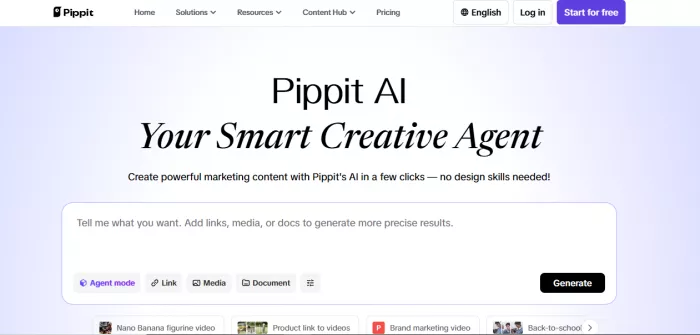
Pippit AI is an online AI-driven creative platform focused on automating the production of short-form videos, product visuals, and marketing assets. Its primary objective is to reduce the time, cost, and technical expertise traditionally required to produce promotional content. Rather than replacing creative decision-making entirely, the platform aims to assist users by generating ready-to-use content based on minimal inputs such as product links, scripts, or brief descriptions.
The platform appears to be especially oriented toward e-commerce sellers, digital marketers, social media managers, and small businesses that need consistent visual output but may lack dedicated design or video production teams. According to its official website, Pippit AI integrates pre-cleared assets, AI avatars, voiceovers, and templates to streamline the creative process from concept to publish-ready output.
Official website reference: https://www.pippit.ai/
How Pippit AI Works in Practice: Step-by-Step Workflow
Step 1: Account Creation and Initial Access
The process begins with creating an account on the Pippit AI platform. Users can sign up using an email address or supported third-party login options. Once logged in, the dashboard introduces the platform’s core purpose quickly generating marketing-ready videos and visual content using AI. The onboarding experience is designed to be simple, ensuring that even first-time users can navigate without prior technical expertise.
Step 2: Selecting the Type of Content to Create
After entering the dashboard, users choose the kind of content they want to produce. This typically includes short promotional videos, product showcase visuals, or social media-friendly marketing clips. Rather than starting from a blank canvas, the platform directs users toward predefined creation paths, which helps reduce confusion and decision fatigue.
Step 3: Providing Input Material
At this stage, users supply the raw input that the AI will work with. This may include a product link, a short description, a marketing script, or basic campaign details. The goal is not to provide exhaustive instructions but to give the AI enough context to understand the product or message being promoted.
Step 4: AI Analysis and Content Assembly
Once the input is submitted, Pippit AI’s system analyzes the provided information. It automatically selects suitable visuals, layouts, animations, text placements, and, if chosen, AI-generated voiceovers or avatars. This is the core automation phase, where the platform transforms simple input into a structured piece of visual content.
Step 5: Template-Based Customization
After the AI generates the initial output, users can refine the content using built-in templates and editing options. This may involve adjusting text, changing visuals, selecting a different template style, or modifying pacing. While customization is intentionally kept lightweight, it allows users to align the output more closely with their brand tone or campaign goal.
Step 6: Preview and Quality Check
Before finalizing the content, users can preview the generated video or visual asset. This step is crucial for checking clarity, accuracy, and overall presentation. Users typically review elements such as text readability, voiceover accuracy, and visual flow to ensure the content meets their expectations.
Step 7: Exporting or Publishing the Content
Once satisfied, users can export the content in supported formats or resolutions. Depending on the plan, this may include watermark-free downloads or platform-specific aspect ratios. Some workflows also allow direct preparation for social media publishing, making the transition from creation to distribution smoother.
Step 8: Reuse, Iterate, or Scale Content Creation
One of the practical advantages of Pippit AI is its ability to scale content production. Users can reuse previous inputs, generate multiple variations, or quickly adapt content for different platforms. This makes it particularly useful for recurring campaigns, product catalogs, or ongoing social media marketing.
Practical Summary
In real-world use, Pippit AI functions as a guided automation tool rather than a traditional editor. It reduces the effort required to go from idea to publishable content, prioritizing speed and simplicity. While it may not replace detailed creative work, it serves as a functional solution for users who need consistent, fast, and accessible content creation.
Core Features of Pippit AI Explained Through Real-World Use
1. AI Video Generation for Rapid Marketing Content
Pippit AI allows users to create short promotional videos by simply providing a product link, brief description, or script. In real-world scenarios, this is especially useful for e-commerce sellers and marketers who need frequent ad creatives for platforms like Instagram, TikTok, or YouTube Shorts. Instead of manually editing footage, users can generate visually complete videos within minutes.
2. Product Link to Video Automation
One of the platform’s most practical features is its ability to convert product URLs into marketing videos. The AI extracts relevant information such as product images, titles, and descriptions, then arranges them into a structured visual narrative. This feature is commonly used by online store owners who want to promote multiple products quickly without designing each video from scratch.
3. Template-Driven Content Creation
Pippit AI offers a range of pre-designed templates that guide the layout, animation style, and pacing of videos. In everyday use, templates help users maintain visual consistency across campaigns while avoiding the complexity of manual design. This is particularly beneficial for small teams that need professional-looking output without a dedicated designer.
4. AI Avatars for Spokesperson-Style Videos
The platform includes AI-generated avatars that can deliver scripted messages on screen. Businesses often use this feature to create explainer videos, product announcements, or brand introductions without filming real presenters. This reduces production costs while enabling multilingual communication for global audiences.
5. AI Voiceovers with Language Flexibility
Pippit AI supports AI-generated voiceovers that can narrate marketing content. In practice, this allows users to produce voice-led videos without hiring voice actors. Marketers targeting international markets may find this particularly helpful, as content can be adapted to different languages with minimal additional effort.
6. Built-In Asset Library with Royalty-Safe Media
The platform provides access to a collection of visuals, backgrounds, and motion elements that are cleared for commercial use. For users, this eliminates the need to source external stock media or worry about copyright issues, making content production both faster and legally safer.
7. Basic Editing and Customization Controls
After the AI generates content, users can make simple adjustments such as editing text, swapping visuals, or selecting alternative templates. In real-world usage, these controls allow for light brand customization without overwhelming users with complex editing tools.
8. Multi-Format Export Options for Social Platforms
Pippit AI supports exporting content in formats suitable for various social media platforms. This enables users to repurpose the same core content for different channels, helping maintain consistent messaging while optimizing presentation for each platform’s requirements.
9. Scalable Content Creation for Ongoing Campaigns
For businesses running repeated or seasonal campaigns, Pippit AI enables quick duplication and variation of content. Users can generate multiple versions of the same video with slight changes, making A/B testing and frequent posting far more manageable.
Practical Takeaway
In real-world use, Pippit AI’s core features are designed to prioritize efficiency over deep customization. The platform works best as a productivity tool for users who need fast, repeatable, and accessible content creation rather than highly bespoke creative work.
User Experience and Interface Design
A. Intent Behind the Interface: Simplicity Over Complexity
From a design perspective, the core philosophy of Pippit AI’s interface prioritizes ease of use and speed rather than offering a deep editing suite. This means the platform is structured around guided workflows that help users go from idea to finished content with minimal decision overhead. In other words, the interface aims to eliminate complexity so that people with little to no design or video editing skills can still create polished assets quickly.
For example:
● The main dashboard is divided into clearly labeled sections for different content types such as video generation, image posts, and templates.
● Users transition logically from providing input (like a product link or script) to reviewing generated content within a few steps.
● Built-in templates and automated assembly reduce the cognitive load on users who aren’t familiar with traditional editing tools.
This approach lowers the learning barrier and helps users achieve results without wrestling with complex toolbars or functions.
B. Logical Workflow and Minimal Learning Curve
A notable aspect of the UX design is the linear workflow it enforces. Rather than overwhelming users with dozens of options at once, the platform guides them through a sequence:
1. Select content type
2. Enter product link or script
3. Let the AI generate output
4. Customize limited elements
5. Preview and export
This sequential experience helps prevent users from feeling “lost” or unsure where to begin, which is a common issue with traditional editing software. According to third-party overviews, most users can “pick up and use the tool” within minutes, with very little learning curve compared to more advanced suites.
C. Template-Centric Design That Scales
A central element of Pippit AI’s interface is its template library. Instead of having users build designs from scratch, the platform offers hundreds of pre-built layouts that are tailored for various industries and social media formats. Users simply select a template that resonates with their goal, and the system populates it automatically with their input.
In practice, this:
● Reduces time spent making layout decisions
● Keeps branding and style more consistent across multiple pieces of content
● Ensures output is optimized for the target platform (e.g., portrait for TikTok, square for Instagram)
These templates are a cornerstone of the interface’s ease-of-use strategy, especially for non-designers.
D. Customization: Easy but Limited
While the AI assembles the initial content automatically, users still have access to some light customization tools. These allow modifications such as editing text, swapping visuals, changing templates, or adjusting basic attributes like voiceover style. The idea is to let users personalize content without needing deep editing skills.
This “guided customization” is part of the UX design, ensuring that users feel in control while still benefitting from automation. For beginners, this resonates well because it avoids overwhelming options; for advanced editors, it may feel limiting but that is a deliberate design choice.
E. Consistency Across Devices and Media
Pippit AI’s interface tends to emphasize consistency across devices meaning what you see on the web dashboard generally mirrors experiences on mobile or tablet screens where supported. This reduces cognitive load and makes it easier for users to switch contexts without relearning the interface.
Additionally, the platform’s export options are designed to maintain visual compatibility with social networks, helping users produce ready-to-publish content without formatting hassles.
F. Criticisms and Real-World Pain Points
While the platform’s interface logic leans heavily into simplicity, several user reviews reveal challenges that impact the overall experience, especially outside of the design itself:
● Customer support and account management frustrate users and many report difficulty resolving issues via the interface or accessing help when problems arise. (Trustpilot)
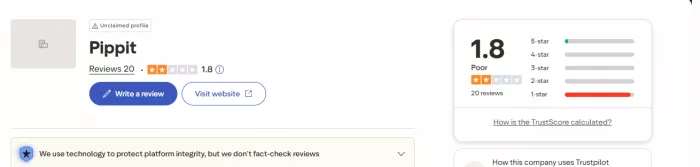
● Users note challenges with unsubscribing from marketing emails, managing subscriptions, or obtaining invoices; these issues relate more to operational design rather than the core creative interface, but still shape overall UX sentiment.
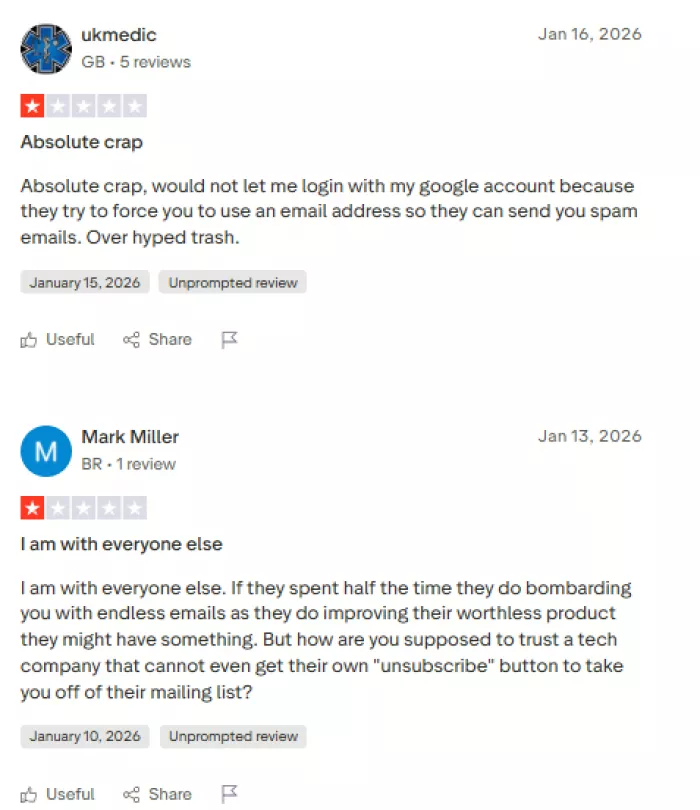
● Some reviewers describe the experience of receiving repetitive communications or “spammy” messages that they cannot easily opt out of an element outside the creative dashboard but tied to the total platform experience.
These criticisms highlight that, while the interface for content creation may be intuitive, the broader user experience around support, billing, and account settings can negatively influence how users perceive the platform overall.
Pricing Structure and Accessibility of Pippit AI
Pippit AI follows a credit-based subscription model where users can access tools and features depending on the plan they choose. The structure is designed to accommodate a wide range of creators from occasional users and beginners to small businesses needing consistent content output while keeping the overall system flexible and scalable.
Free Plan: Trying Without Commitment
At its core, Pippit AI offers a free tier that lets users explore the basic functionality without any financial commitment or credit card information. This is significant because it allows creators to test the creative workflow and output quality before deciding whether to invest money.
Key elements of the free plan:
● Weekly credits: You receive 150 credits per week that refresh every week.
● Content limits: These credits can generate approximately 2 minutes of video or 75 images per week.
● Access to essential tools: You can use core AI-powered features like Link to Video and Avatars to start creating content.
● Cloud storage: Even on a free tier, you get 500 GB of storage to preserve your projects.
This plan is especially useful for students, hobbyists, small teams exploring the platform, or anyone looking to experiment without paying upfront.
However, because credits refresh weekly and do not accumulate, users need to plan their creation schedule if they’re relying on the free tier for ongoing projects.
Starter (Paid) Plan: Full Access With Greater Output
For users who require more substantial creative output for example, for regular social media campaigns, product promotions, or ongoing marketing content Pippit AI provides a Starter plan with a larger credit allocation and full platform features.
Key aspects of the Starter plan:
Pricing Structure
● Annual Billing (most common): Around $24.17 per month when billed yearly (total $289.99/year) this represents a roughly 20 % savings compared to the standard monthly rate.
● Monthly billing option is also available, but usually at a slightly higher equivalent rate.
Credits and Usage
● The Starter plan includes 21,600 credits per year, which roughly equates to 360 minutes of video generation or 10,800 images.
● Credits are typically valid throughout the year (so you don’t have to rush to use them within a shorter span).
This plan is positioned for frequent content creators, small teams, or businesses that need more flexibility and output without the interruptions imposed by credit limits on the free tier.
Credit System vs Traditional Subscription
Instead of paying per feature or per video, Pippit AI uses a credit system, where each piece of content creation consumes credits. This model has both advantages and trade-offs:
● Flexibility: Credits allow users to decide how they spend their usage whether on lots of short videos, a few long ones, or many images.
● Fair Usage: Heavy users consume credits faster, which can encourage planned use and prevent unexpected billing.
● Planning Required: Users must monitor their credit balance, especially on the free tier, since unused credits do not always carry over or replenish only weekly or annually depending on the plan.
Some users appreciate this model because it lets them tailor usage to their needs, while others find it requires more planning to avoid running out of credits mid-project.
Additional Credits and Flexibility
In many cases, if a user even on a paid plan exhausts available credits, they can purchase additional credits separately at set prices. This gives users more flexibility without needing to upgrade their subscription for occasional heavy usage.
Additional credit packs typically offer better per-credit value when purchased in larger bundles, making them more economical for consistent heavy users.
Accessibility and Commercial Rights
A notable advantage of both free and paid Pippit AI plans is that all content generated comes with commercial use rights by default. This makes the tool suitable for professional marketing campaigns, business adverts, and monetized social media content without additional licensing costs.
This approach lowers barriers for entrepreneurs, small business owners, and e-commerce marketers who may otherwise worry about licensing fees or trademark issues when using AI-generated content commercially.
Evaluating Value for Money
Whether the Starter plan represents good value depends on the user’s goals. For regular content makers and marketing teams, the ability to generate hundreds of minutes of video and thousands of images annually can replace expensive editing software subscriptions or reduce the need for professional videographers.
Starting with the free plan allows cautious users to evaluate the tool’s capabilities before committing financially, which many reviewers recommend as a prudent approach.
Strengths of Pippit AI (Categorized)
1. Ease of Use and Accessibility
One of Pippit AI’s strongest advantages is its beginner-friendly design. The platform requires no prior experience in video editing or graphic design, making it accessible to solo creators, small businesses, and marketers without technical backgrounds. The guided workflows reduce confusion and allow users to produce content quickly without steep learning curves.
2. Speed and Automation Efficiency
Pippit AI significantly shortens the time required to create marketing content. Tasks that traditionally take hours such as assembling visuals, adding transitions, and syncing voiceovers can be completed within minutes. This makes the platform especially useful for time-sensitive campaigns, frequent social media posting, and rapid experimentation.
3. Template-Driven Consistency
The availability of pre-designed templates helps users maintain visual consistency across campaigns. This is particularly valuable for brands that need cohesive messaging but lack dedicated design resources. Templates also ensure content is optimized for common social media formats without manual resizing or layout adjustments.
4. Cost-Effectiveness for Small Teams
Compared to hiring designers or subscribing to multiple creative tools, Pippit AI offers a relatively affordable solution for recurring content needs. The inclusion of commercial usage rights across plans further enhances its value for businesses that monetize their content.
5. Scalability for Repetitive Content
For users who create similar content repeatedly such as product ads, promotional clips, or announcements Pippit AI allows quick duplication and variation. This scalability is particularly beneficial for e-commerce catalogs and performance marketing strategies.
Practical Limitations of Pippit AI (Categorized)
1. Limited Creative Flexibility
While templates simplify creation, they also restrict creative freedom. Users seeking highly customized animations, unique transitions, or distinctive brand storytelling may find the editing controls too limited. Advanced creators may feel constrained by the platform’s predefined structures.
2. Output Can Feel Formulaic
Because many users rely on the same templates and AI logic, content can sometimes appear repetitive or generic. Without thoughtful customization, videos may lack a unique brand identity, especially when used extensively across campaigns.
3. Credit-Based Usage Constraints
The credit system requires planning. Users on free or lower-tier plans may run out of credits unexpectedly, particularly during larger projects. Since credits do not always roll over, this model may feel restrictive for users with irregular or unpredictable workloads.
4. Customer Support and Account Management Concerns
Based on public user feedback, some users report challenges related to customer support responsiveness, subscription handling, and billing clarity. While these issues are not directly tied to the creative tools, they can negatively affect the overall user experience.
5. Not Ideal for Advanced Professionals
Pippit AI is not designed to replace professional-grade video editing software. Agencies, experienced designers, or brands with strict creative standards may find the platform insufficient for complex or high-end production requirements.
Balanced Perspective: Where Pippit AI Fits Best
Pippit AI performs best as a productivity-focused creative assistant rather than a full creative studio. Its strengths lie in speed, simplicity, and accessibility, making it well-suited for everyday marketing tasks and content scaling. However, users with advanced creative needs or those who require full control over design elements should view it as a supplementary tool rather than a complete replacement.
Who Is Pippit AI Best Suited For?
1. Small Business Owners and Entrepreneurs
Pippit AI is well suited for small business owners who need professional-looking marketing content without hiring designers or video editors. It enables them to create promotional videos, product showcases, and social media ads quickly while keeping costs manageable.
2. E-Commerce Sellers
Online sellers managing product catalogs can benefit from Pippit AI’s ability to turn product links into marketing videos. This makes it easier to promote multiple items consistently across platforms such as Instagram, Facebook, and TikTok without repeating manual design work.
3. Digital Marketers Managing Frequent Campaigns
Marketers who run recurring campaigns or A/B tests will find Pippit AI useful for generating multiple variations of ads efficiently. The platform supports fast iteration, which is valuable when testing creatives to improve engagement or conversion rates.
4. Content Creators Focused on Short-Form Media
Creators producing short-form content for social platforms can use Pippit AI to maintain posting consistency. The platform helps reduce the time spent on editing while still delivering visually engaging content suitable for fast-paced social feeds.
5. Social Media Managers and Freelancers
Freelancers handling multiple client accounts can leverage Pippit AI to scale content creation without significantly increasing workload. Templates and automation make it easier to deliver regular content while maintaining basic brand consistency.
6. Startups and Early-Stage Teams
Startups with limited resources often need to move fast while keeping expenses under control. Pippit AI provides an accessible way to produce marketing assets for product launches, announcements, and early brand-building efforts without investing in full creative teams.
7. Non-Designers and Beginners
Individuals with little to no background in design or video editing can use Pippit AI confidently. Its guided workflows and automated processes reduce the intimidation factor commonly associated with creative software.
8. Businesses Targeting Multiple Regions or Languages
Organizations that need multilingual content can benefit from AI voiceovers and avatars. This allows them to adapt marketing messages for different audiences without additional production complexity.
Practical Summary
Pippit AI is best suited for users who value speed, simplicity, and scalability over deep creative control. It serves as an effective solution for everyday marketing and promotional needs, especially for users who want results without a steep learning curve.
Final Thoughts: Is Pippit AI Worth Exploring?
Pippit AI represents a growing class of AI-powered creative platforms that aim to democratize content production. Its strength lies in reducing friction turning ideas into usable marketing assets with minimal effort. While it is not without limitations, particularly in creative depth and service transparency, it can still serve as a practical solution for users who need fast, scalable content creation.
For those considering the platform, the most sensible approach is to explore its free offering, assess whether the output aligns with brand expectations, and only then decide whether a paid subscription is justified. In the rapidly evolving AI landscape, tools like Pippit AI highlight both the promise and the trade-offs of automation in creative work.


Comments