

A creative portfolio needs to do more than display finished work. It should explain the thinking behind each project, make your strongest work easy to find, and give potential clients a clear reason to get in touch. AI portfolio builders help with the website structure, design, and content, reducing the work needed to create a professional online presence.
However, not every builder handles creative work equally well. Some prioritize visual storytelling and detailed case studies, while others focus on faster publishing, client inquiries, and simpler website management. Here are seven AI portfolio builders worth considering for different creative needs.
Best AI Portfolio Builders at a Glance
| AI portfolio builder | Best suited for | Starting price |
| Framer | UI/UX and interactive portfolios | Free; $10/month |
| Wix AI | Multidisciplinary creative portfolios | Free; $17/month |
| Squarespace Blueprint AI | Photography and visual portfolios | 14-day trial; $19/month |
| Webflow AI | Detailed case studies and advanced layouts | Free; $15/month |
| Hostinger AI Builder | Affordable freelancer portfolios | $2.99/month |
| 10Web AI Builder | WordPress-based creative portfolios | 3-day trial; $10/month |
| Durable AI | Freelancers offering creative services | Free; $22/month |
Prices are in USD and reflect advertised entry-level annual billing rates, including promotional rates where applicable. Plans, introductory discounts, and renewal prices may vary. Ratings below are editorial assessments of portfolio suitability, not hands-on test results.
1. Framer
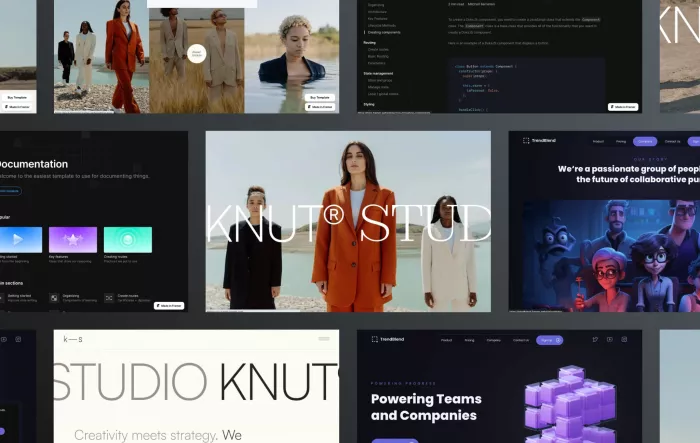
Best for interactive portfolios and design case studies
Framer is particularly appealing to UI/UX designers, motion designers, and creative studios that want their portfolio website to demonstrate their design abilities. Its AI agents can generate page structures, draft content, create responsive layouts, and assist with website improvements. The resulting pages remain editable through Framer's visual design canvas.
Its real strength lies in presenting individual projects. Designers can create detailed case studies using full-width visuals, animated elements, embedded media, and CMS-driven project collections. This makes Framer especially effective for portfolios where process, interaction, and visual presentation matter as much as the final images. The trade-off is the amount of design involvement required, since sophisticated layouts still need careful adjustments across screen sizes.
| Portfolio assessment | Details |
| AI contribution | Page generation, content drafting, CMS assistance, and design improvements |
| Portfolio output | Interactive websites with custom project pages |
| Customization level | High, with detailed layout and animation controls |
| Main limitation | Requires familiarity with visual web design |
| Free plan & pricing | Free plan; Basic from $10/month, billed annually |
Verdict: Framer is one of the strongest options for designers who want their portfolio website itself to be an example of their creative skills.
2. Wix AI Website Builder
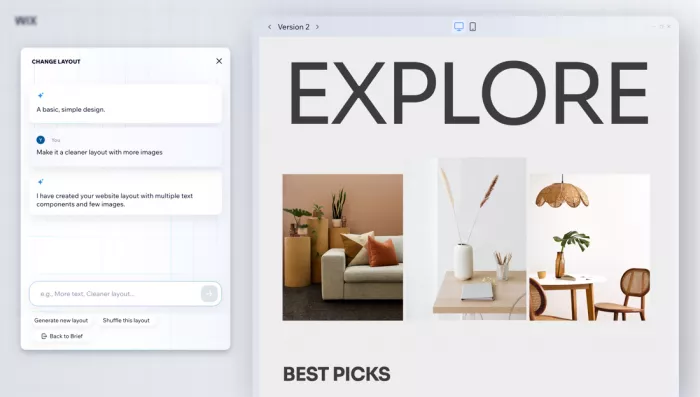
Best for multidisciplinary creative portfolios
Wix is suitable for photographers, illustrators, graphic designers, and creative freelancers who need to organize different types of projects in one place. Its AI website builder, Wix Harmony, generates website structures from prompts, while its dedicated AI Portfolio Creator can organize uploaded images into project groups and suggest titles and descriptions.
This portfolio-specific AI feature is what separates Wix from many general website builders. It reduces the manual work involved in sorting large collections of creative assets. Wix also provides customizable gallery layouts, project collections, and individual project pages, making it practical for professionals working across multiple disciplines. The editor offers considerable flexibility, although managing numerous design settings and applications can become complicated as the website grows.
| Portfolio assessment | Details |
| AI contribution | Website generation, image grouping, and project descriptions |
| Portfolio output | Gallery-based portfolios with categorized project collections |
| Customization level | High, through visual editing and portfolio layouts |
| Main limitation | Numerous editing options can complicate site management |
| Free plan & pricing | Free plan; Light from $17/month, billed annually |
Verdict: Wix is especially useful for creatives managing a large body of work who want AI assistance with both building the website and organizing their projects.
3. Squarespace Blueprint AI
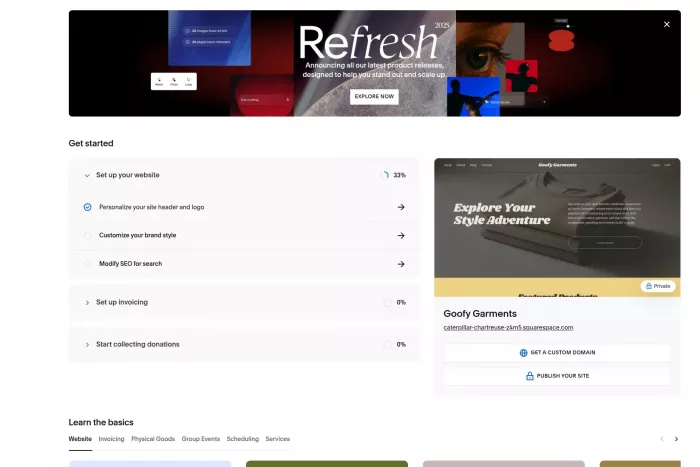
Best for photography and visual storytelling
Squarespace Blueprint AI takes a guided approach to portfolio creation. Rather than requiring a detailed technical prompt, it asks questions about the website's purpose, visual personality, and preferred design direction. The system then generates a multi-page starting website with suitable layouts, images, and text. Its design tools are particularly effective for photographers, artists, and visual storytellers who prefer clean presentation over elaborate interactive effects.
Squarespace also offers dedicated portfolio pages with project thumbnails, gallery sections, and individual project displays. Photographers can arrange work by collection, while artists can combine images with descriptions and background information. Fluid Engine provides drag-and-drop editing, although the overall design environment is more structured than Framer or Webflow. This helps maintain visual consistency but offers less freedom for highly unconventional layouts.
| Portfolio assessment | Details |
| AI contribution | Guided website creation, content drafting, and design direction |
| Portfolio output | Image-focused websites with organized galleries |
| Customization level | Moderate to high, using Fluid Engine |
| Main limitation | Less suitable for complex interactive designs |
| Free plan & pricing | 14-day trial; Basic from $19/month, billed annually |
Verdict: Squarespace is a good fit for professionals whose work should remain the visual focus, particularly photographers, illustrators, and fine artists.
4. Webflow AI
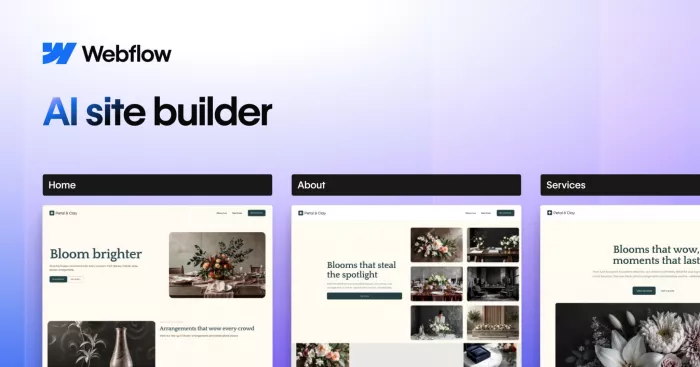
Best for structured case studies and advanced design control
Webflow combines AI-assisted website generation with a detailed visual development environment. Its AI Site Builder can generate a multi-page website from a description, including an initial content structure, theme, and page layouts. Designers can then refine the result using Webflow's layout controls, responsive styling, and components rather than relying entirely on a predesigned template.
Webflow becomes particularly valuable when a portfolio contains many detailed case studies. Its CMS allows users to define consistent fields for project information, such as client, industry, services, images, and results, then present those records through reusable page templates. This works well for product designers, branding agencies, and creative studios with regularly updated projects. However, understanding Webflow's layout system and CMS structure takes more effort than operating a conventional drag-and-drop builder.
| Portfolio assessment | Details |
| AI contribution | Multi-page generation, content assistance, and design components |
| Portfolio output | Structured case-study websites and CMS-driven portfolios |
| Customization level | Very high, including responsive styling and CMS templates |
| Main limitation | Steeper learning curve and separate CMS plan requirements |
| Free plan & pricing | Free plan; Basic $15/month, Premium CMS $25/month, billed annually |
Verdict: Webflow is most suitable for experienced designers and studios that need consistent project documentation alongside detailed control over website appearance.
5. Hostinger AI Website Builder

Best for affordable freelancer portfolios
Hostinger offers a practical starting point for creatives who need a professional website without committing to an expensive design platform. Its AI builder accepts a description of the intended website and generates a starting design with relevant content. Users can then adjust the layout, replace placeholder imagery, and organize their work into portfolio pages without needing coding knowledge.
For freelance writers, graphic designers, and independent creators, Hostinger covers the essentials: project samples, an introduction, service information, and contact details. Hosting and website-building tools are included in the subscription, which keeps the initial setup relatively simple. Its main weakness is that achieving sophisticated project galleries or highly customized visual interactions can require more manual work than on design-focused platforms.
| Portfolio assessment | Details |
| AI contribution | Prompt-based website creation and content assistance |
| Portfolio output | Responsive personal websites and freelancer portfolios |
| Customization level | Moderate, with visual editing and templates |
| Main limitation | Less specialized for advanced portfolio presentation |
| Free plan & pricing | No permanent free hosting plan; from $2.99/month on a 48-month promotional term |
Verdict: Hostinger is a sensible choice for freelancers who prioritize affordability, basic project presentation, and getting a website published without extensive setup.
6. 10Web AI Builder

Best for WordPress-based creative portfolios
10Web takes a different approach by generating WordPress websites through its AI-powered builder. Users describe their professional work and website requirements, and the platform can create an initial structure with pages, content, and visual elements. Its AI Starter plan also includes managed hosting and credits for website generation and editing.
The WordPress foundation makes 10Web relevant to creative professionals who already work with WordPress or prefer its broader publishing ecosystem. A portfolio can be developed beyond a basic gallery into a website containing project archives, articles, professional services, and other specialized functionality. However, the flexibility of WordPress also introduces considerations around plugins, compatibility, and ongoing website management that simpler hosted builders generally handle internally.
| Portfolio assessment | Details |
| AI contribution | WordPress site generation, page design, and content creation |
| Portfolio output | WordPress portfolios with expandable website functionality |
| Customization level | High, depending on the WordPress editing setup |
| Main limitation | WordPress maintenance and extension management add complexity |
| Free plan & pricing | 3-day trial; AI Starter from $10/month, billed annually |
Verdict: 10Web is a strong option for creatives who want an AI-assisted starting point without moving away from the WordPress ecosystem.
7. Durable AI
Best for freelancers offering creative services
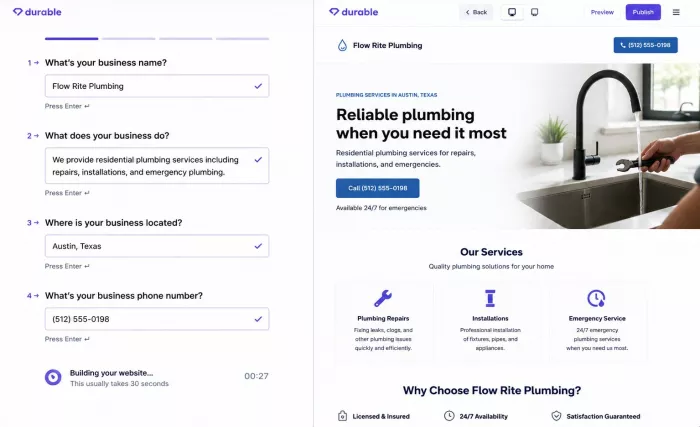
Durable approaches portfolio building from a small-business perspective. After collecting a few details about the business, its AI builder generates a website with relevant sections, messaging, and a responsive design. The platform also includes tools for customer inquiries, bookings, and contact management, making it particularly relevant to freelance photographers, consultants, and creative service providers.
Unlike Framer or Webflow, Durable emphasizes turning website visitors into potential customers rather than offering extensive creative design control. Freelancers can display selected projects, explain their services, and direct visitors toward an inquiry or booking. This works for a compact service portfolio, but professionals who need elaborate galleries, intricate case studies, or unusual visual layouts may find its design system restrictive.
| Portfolio assessment | Details |
| AI contribution | Business-oriented website generation and content drafting |
| Portfolio output | Service portfolios with inquiry and booking options |
| Customization level | Moderate, with section and visual editing |
| Main limitation | Limited emphasis on complex creative showcases |
| Free plan & pricing | Free preview plan; Launch from $22/month, billed annually |
Portfolio verdict: Durable suits freelancers whose portfolio is primarily a way to introduce their services, show selected work, and generate client inquiries.
How to Choose the Right AI Portfolio Builder
An AI-generated website can look polished without being particularly effective as a portfolio. Understanding the difference between an online portfolio and a personal website also helps clarify what the site needs to achieve. The difference comes down to how clearly it presents the work, explains the projects, and supports the professional opportunities the creator wants to attract.
Before choosing a builder, consider these factors:
● Project presentation: Look for individual project pages if your work requires explanations, research, sketches, or before-and-after comparisons. Simple galleries work better for portfolios where the images speak for themselves.
● Content organization: A photographer with hundreds of images needs effective collections and filtering, while a product designer may benefit more from reusable case-study templates with consistent project information.
● AI involvement: Some builders generate an initial website and leave most editing to the user. Others help organize projects, write descriptions, or maintain website content. The most useful AI feature depends on which part of building a portfolio takes the most time.
● Client conversion: Freelancers selling services should consider contact forms, scheduling, and payment support. These can be more valuable than advanced animations if the main purpose is attracting paying clients.
● Long-term costs: Check custom-domain requirements, CMS access, storage, AI credit limits, and renewal rates. A low introductory price does not necessarily mean a lower cost over several years.
What Makes a Strong Creative Portfolio?
The builder matters, but the selection and arrangement of work have a greater influence on how visitors interpret a portfolio. A well-planned creator portfolio should also demonstrate relevant skills and the value of completed projects. A professional website should provide enough information for someone to understand the creator's skills without forcing them to navigate dozens of unrelated projects.
A practical portfolio structure includes a focused homepage, selected projects, an about section, and a clear contact option. For case-study portfolios, each project should also explain the objective, the creator's responsibilities, the process, and the final outcome.
AI-generated descriptions are useful as drafts, but they should be checked carefully. Generic claims about creativity, innovation, or exceptional results add little value when they are not supported by actual work. Specific project details, authentic visuals, and accurate outcomes communicate expertise more effectively.
Final Verdict
The best AI portfolio builder depends on the type of creative work being presented. Framer is the strongest overall choice for design-focused professionals who want interactive presentations and detailed control over their websites. Wix AI stands out for multidisciplinary creatives, particularly because its portfolio-specific AI can help organize uploaded work. Squarespace is especially well suited to photography and visual arts, while Webflow offers greater structural control for extensive case-study portfolios.
For smaller budgets, Hostinger provides an accessible starting point. 10Web is more appropriate for professionals who prefer WordPress, and Durable makes sense when the portfolio needs to function primarily as a client-facing service website.
Ultimately, AI should reduce the effort involved in building and maintaining the website, not replace the creative judgment behind it. A portfolio with five carefully presented projects and clear explanations can communicate considerably more than a visually impressive website filled with loosely organized work.


Comments